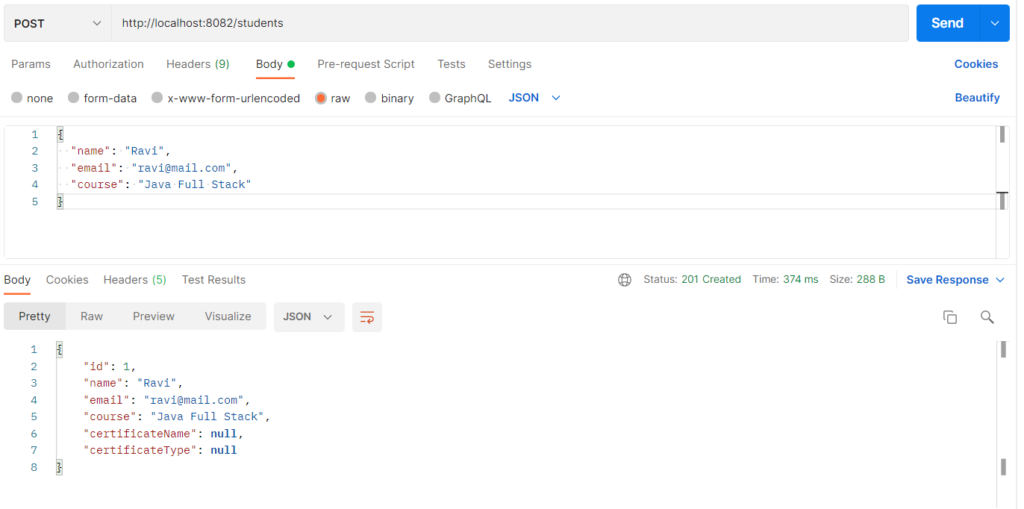
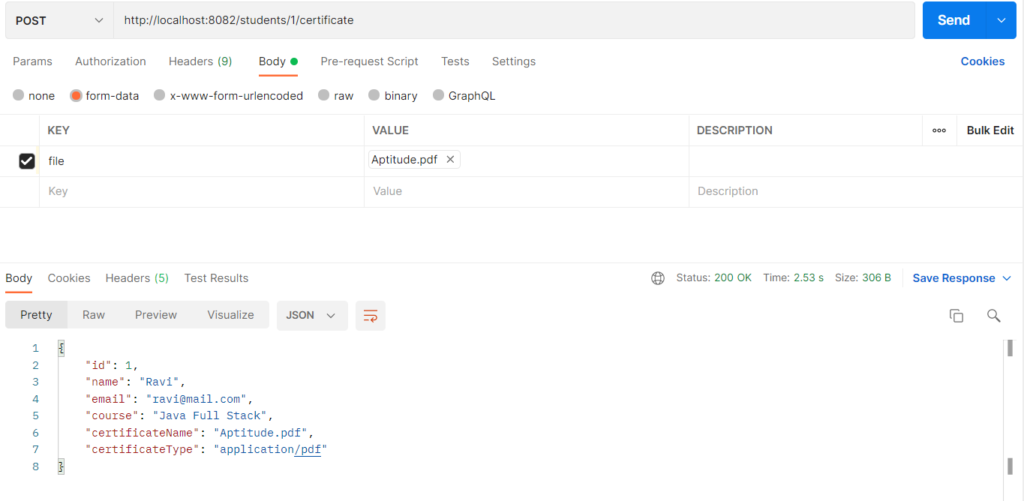
File download through REST means the server sends a stored file (PDF, image, report) back to the client as the HTTP response body. The server sets headers such as Content-Type and Content-Disposition so the browser or client knows what the file is and what to do with it. It is used for certificates, invoices, reports, and resumes, where the user needs the real file instead of JSON data. Spring Boot supports it by returning ResponseEntity<Resource> or ResponseEntity<byte[]> with the right headers.
Features
- Returns files of any type (PDF, image, Excel, ZIP) from a REST endpoint
Content-Typeheader tells the client the file formatContent-Dispositionheader controls the file name and whether it downloads or opensContent-Lengthheader lets the client show download progress- Returns 404 when the student or the file does not exist
- Files can come from the database or from a folder on disk
Hands-on Experiment: Creating a spring boot application to understand how REST APIs return stored files to clients.
The following steps are involved in developing this hands-on experiment.
Step 1: Generate the Project
Step 2: Project Structure
Step 3: pom.xml
Step 4: application.properties
Step 5: Create Entity Class
Step 6: Create Repository Interface
Step 7: Create Service Class
Step 8: Create Controller Class
Step 9: Main Application Class
Step 10: Run the Main Application Class
Step 1: Configure the Project on Spring Initializr
Go to start.spring.io and set:
- Project: Maven
- Language: Java
- Spring Boot version: 3.2.x
- Group: com.example
- Artifact: certificate
- Name: certificate
- Package name: com.example.certificate
- Packaging: Jar
- Java: 17
- Dependencies: Spring Web, Spring Data JPA, MySQL Driver.
Click Generate to download the ZIP, then extract and import it into your IDE as a Maven project.
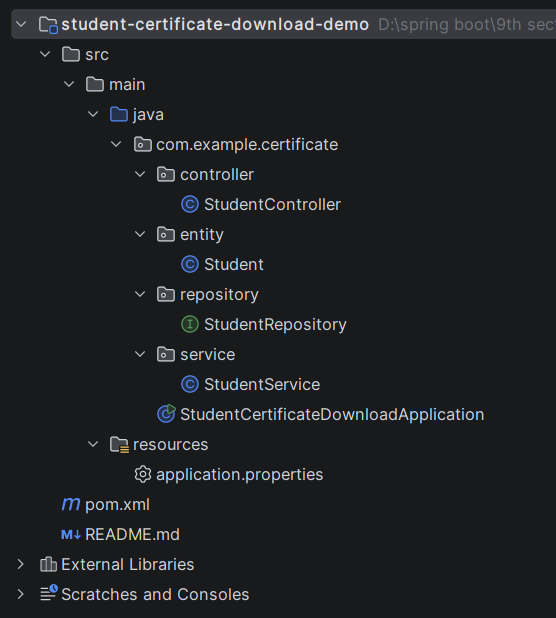
Step 2: Generated Project Structure
Step 3: Explore pom.xml
<?xml version="1.0" encoding="UTF-8"?>
<project xmlns="http://maven.apache.org/POM/4.0.0"
         xmlns:xsi="http://www.w3.org/2001/XMLSchema-instance"
         xsi:schemaLocation="http://maven.apache.org/POM/4.0.0 https://maven.apache.org/xsd/maven-4.0.0.xsd">
    <modelVersion>4.0.0</modelVersion>

    <parent>
        <groupId>org.springframework.boot</groupId>
        <artifactId>spring-boot-starter-parent</artifactId>
        <version>3.2.5</version>
        <relativePath/>
    </parent>

    <groupId>com.example</groupId>
    <artifactId>student-certificate-download-demo</artifactId>
    <version>1.0.0</version>
    <name>student-certificate-download-demo</name>

    <properties>
        <java.version>17</java.version>
    </properties>

    <dependencies>
        <dependency>
            <groupId>org.springframework.boot</groupId>
            <artifactId>spring-boot-starter-web</artifactId>
        </dependency>
        <dependency>
            <groupId>org.springframework.boot</groupId>
            <artifactId>spring-boot-starter-data-jpa</artifactId>
        </dependency>
        <dependency>
            <groupId>com.mysql</groupId>
            <artifactId>mysql-connector-j</artifactId>
            <scope>runtime</scope>
        </dependency>
    </dependencies>

    <build>
        <plugins>
            <plugin>
                <groupId>org.springframework.boot</groupId>
                <artifactId>spring-boot-maven-plugin</artifactId>
            </plugin>
        </plugins>
    </build>
</project>
Step 4: application.properties
spring.application.name=student-certificate-download-demo
server.port=8082
# MySQL (database is created automatically if missing)
spring.datasource.url=jdbc:mysql://localhost:3306/student_certificate_db?createDatabaseIfNotExist=true&useSSL=false&allowPublicKeyRetrieval=true&serverTimezone=UTC
spring.datasource.username=root
spring.datasource.password=password
spring.jpa.hibernate.ddl-auto=update
spring.jpa.show-sql=true
# Multipart settings (used only to store a certificate so it can be downloaded)
spring.servlet.multipart.max-file-size=5MB
spring.servlet.multipart.max-request-size=5MBCode language: PHP (php)Step 5: Create Entity Class
package com.example.certificate.entity;

import com.fasterxml.jackson.annotation.JsonIgnore;
import jakarta.persistence.Column;
import jakarta.persistence.Entity;
import jakarta.persistence.GeneratedValue;
import jakarta.persistence.GenerationType;
import jakarta.persistence.Id;
import jakarta.persistence.Lob;
import jakarta.persistence.Table;

@Entity
@Table(name = "students")
public class Student {

    @Id
    @GeneratedValue(strategy = GenerationType.IDENTITY)
    private Long id;

    private String name;

    private String email;

    private String course;

    // Certificate file details
    private String certificateName;

    private String certificateType;

    @JsonIgnore
    @Lob
    @Column(columnDefinition = "LONGBLOB")
    private byte[] certificateData;

    public Student() {
    }

    public Long getId() { return id; }
    public void setId(Long id) { this.id = id; }

    public String getName() { return name; }
    public void setName(String name) { this.name = name; }

    public String getEmail() { return email; }
    public void setEmail(String email) { this.email = email; }

    public String getCourse() { return course; }
    public void setCourse(String course) { this.course = course; }

    public String getCertificateName() { return certificateName; }
    public void setCertificateName(String certificateName) { this.certificateName = certificateName; }

    public String getCertificateType() { return certificateType; }
    public void setCertificateType(String certificateType) { this.certificateType = certificateType; }

    public byte[] getCertificateData() { return certificateData; }
    public void setCertificateData(byte[] certificateData) { this.certificateData = certificateData; }
}
Step 6: Create below Repository Interface
package com.example.certificate.repository;

import com.example.certificate.entity.Student;
import org.springframework.data.jpa.repository.JpaRepository;
import org.springframework.stereotype.Repository;

@Repository
public interface StudentRepository extends JpaRepository<Student, Long> {
}
Step 7: Create below Service class
package com.example.certificate.service;

import com.example.certificate.entity.Student;
import com.example.certificate.repository.StudentRepository;
import org.springframework.http.HttpStatus;
import org.springframework.stereotype.Service;
import org.springframework.util.StringUtils;
import org.springframework.web.multipart.MultipartFile;
import org.springframework.web.server.ResponseStatusException;

import java.io.IOException;
import java.util.List;

@Service
public class StudentService {

    private final StudentRepository studentRepository;

    public StudentService(StudentRepository studentRepository) {
        this.studentRepository = studentRepository;
    }

    public Student createStudent(Student student) {
        student.setId(null);
        return studentRepository.save(student);
    }

    public List<Student> getAllStudents() {
        return studentRepository.findAll();
    }

    public Student getStudent(Long id) {
        return studentRepository.findById(id)
                .orElseThrow(() -> new ResponseStatusException(
                        HttpStatus.NOT_FOUND, "Student not found with id " + id));
    }

    // Stores the certificate (PDF) so that it can be downloaded later
    public Student saveCertificate(Long id, MultipartFile file) {
        Student student = getStudent(id);
        if (file == null || file.isEmpty()) {
            throw new ResponseStatusException(HttpStatus.BAD_REQUEST, "Certificate file is required");
        }
        if (!"application/pdf".equals(file.getContentType())) {
            throw new ResponseStatusException(HttpStatus.BAD_REQUEST, "Only PDF certificates are allowed");
        }
        try {
            student.setCertificateName(StringUtils.cleanPath(String.valueOf(file.getOriginalFilename())));
            student.setCertificateType(file.getContentType());
            student.setCertificateData(file.getBytes());
        } catch (IOException e) {
            throw new ResponseStatusException(HttpStatus.INTERNAL_SERVER_ERROR, "Could not read the uploaded file");
        }
        return studentRepository.save(student);
    }

    // Returns the student only if a certificate exists, otherwise 404
    public Student getStudentWithCertificate(Long id) {
        Student student = getStudent(id);
        if (student.getCertificateData() == null) {
            throw new ResponseStatusException(HttpStatus.NOT_FOUND,
                    "No certificate found for student " + id);
        }
        return student;
    }
}
Step 8: Create Controller class
package com.example.certificate.controller;

import com.example.certificate.entity.Student;
import com.example.certificate.service.StudentService;
import org.springframework.core.io.ByteArrayResource;
import org.springframework.core.io.Resource;
import org.springframework.http.ContentDisposition;
import org.springframework.http.HttpHeaders;
import org.springframework.http.HttpStatus;
import org.springframework.http.MediaType;
import org.springframework.http.ResponseEntity;
import org.springframework.web.bind.annotation.GetMapping;
import org.springframework.web.bind.annotation.PathVariable;
import org.springframework.web.bind.annotation.PostMapping;
import org.springframework.web.bind.annotation.RequestBody;
import org.springframework.web.bind.annotation.RequestMapping;
import org.springframework.web.bind.annotation.RequestParam;
import org.springframework.web.bind.annotation.RestController;
import org.springframework.web.multipart.MultipartFile;

import java.util.List;

@RestController
@RequestMapping("/students")
public class StudentController {

    private final StudentService studentService;

    public StudentController(StudentService studentService) {
        this.studentService = studentService;
    }

    // 1. Create a student (JSON)
    @PostMapping
    public ResponseEntity<Student> createStudent(@RequestBody Student student) {
        return ResponseEntity.status(HttpStatus.CREATED).body(studentService.createStudent(student));
    }

    // 2. Store a certificate for the student (multipart/form-data)
    @PostMapping(value = "/{id}/certificate", consumes = MediaType.MULTIPART_FORM_DATA_VALUE)
    public Student uploadCertificate(@PathVariable Long id,
                                     @RequestParam("file") MultipartFile file) {
        return studentService.saveCertificate(id, file);
    }

    // 3. Download the certificate (browser saves the file)
    @GetMapping("/{id}/certificate/download")
    public ResponseEntity<Resource> downloadCertificate(@PathVariable Long id) {
        return buildFileResponse(id, ContentDisposition.attachment());
    }

    // 4. View the certificate in the browser (opens in the PDF viewer)
    @GetMapping("/{id}/certificate/view")
    public ResponseEntity<Resource> viewCertificate(@PathVariable Long id) {
        return buildFileResponse(id, ContentDisposition.inline());
    }

    @GetMapping("/{id}")
    public Student getStudent(@PathVariable Long id) {
        return studentService.getStudent(id);
    }

    @GetMapping
    public List<Student> getAllStudents() {
        return studentService.getAllStudents();
    }

    private ResponseEntity<Resource> buildFileResponse(Long id, ContentDisposition.Builder disposition) {
        Student student = studentService.getStudentWithCertificate(id);
        ByteArrayResource resource = new ByteArrayResource(student.getCertificateData());
        return ResponseEntity.ok()
                .contentType(MediaType.parseMediaType(student.getCertificateType()))
                .contentLength(student.getCertificateData().length)
                .header(HttpHeaders.CONTENT_DISPOSITION,
                        disposition.filename(student.getCertificateName()).build().toString())
                .body(resource);
    }
}
Step 9: Main Application
package com.example.certificate;

import org.springframework.boot.SpringApplication;
import org.springframework.boot.autoconfigure.SpringBootApplication;

@SpringBootApplication
public class StudentCertificateDownloadApplication {

    public static void main(String[] args) {
        SpringApplication.run(StudentCertificateDownloadApplication.class, args);
    }
}
Step 10: Run the StudentCertificateDownloadApplication