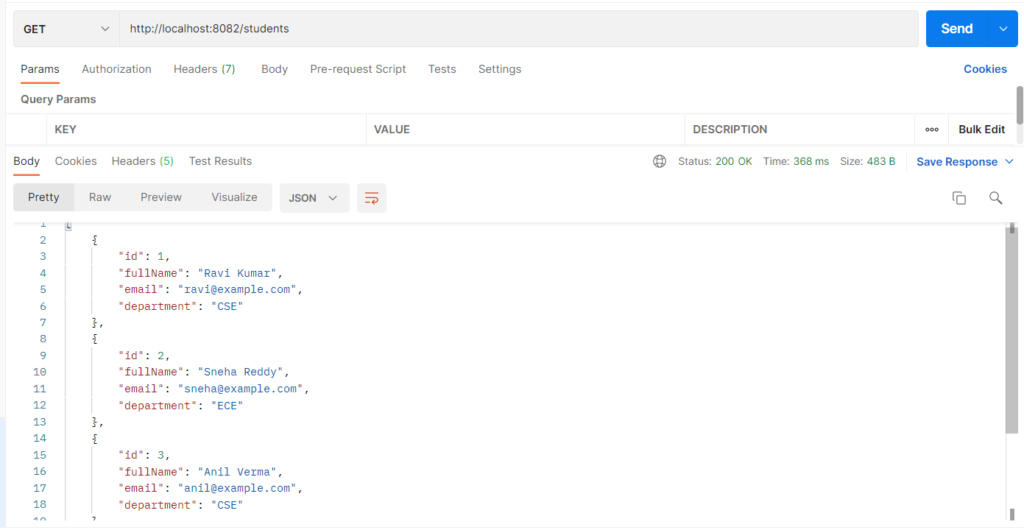
A database query returns rows of columns, but your Java code works with objects like Student. Row mapping is the step that converts each row into an object. In JdbcTemplate, a RowMapper does this: Spring runs the query, calls your mapper once per row, and collects the objects into a List. It is used so that all the code that reads columns (rs.getString("full_name")) lives in one place, and the rest of the application deals only with Java objects. Without it, you would loop over a ResultSet by hand and repeat that code in every query.
Features
- One method call per row: you only describe how to convert a single row.
- Reusable: the same
RowMapperworks for any query that returns the same columns. - Handles the looping and the closing of the
ResultSetfor you. - Column names can differ from property names (
full_nametofullName). - Works for whole objects, single values, and grouped results.
Row Mapping Types
| Type | What it does | When to use it |
|---|---|---|
| 1. RowMapper class | A separate class implementing RowMapper<Student> with a mapRow method |
The same mapping is needed in many queries |
| 2. RowMapper lambda | The same mapRow logic written inline, with no extra class |
A mapping needed in just one place |
| 3. BeanPropertyRowMapper | Maps columns to properties automatically by name, and full_name becomes fullName |
Column and property names match, and you want the least code |
| 4. SingleColumnRowMapper | Maps a one-column result to simple values like String or Long |
Queries such as “all names” or “all ids” |
| 5. ResultSetExtractor | You receive the whole ResultSet and loop through it yourself to build one result |
Combined results, such as a Map grouping students by department |
Hands-on Experiment: Creating a spring boot application using Row Mapping
The following steps are involved in developing this hands-on experiment.
Step 1: Generate the Project
Step 2: Project Structure
Step 3: pom.xml
Step 4: application.yml
Step 5: Create Entity Class
Step 6: Create Repository Interface
Step 7: Create Service Class
Step 8: Create Controller Class
Step 9: Main Application Class
Step 10: Run the Main Application Class
Step 1: Configure the Project on Spring Initializr
Go to start.spring.io and set:
- Project: Maven
- Language: Java
- Spring Boot version: 3.2.x
- Group: com.example
- Artifact: rowmapping
- Name: rowmapping
- Package name: com.example.rowmapping
- Packaging: Jar
- Java: 17
- Dependencies: Spring Web, JDBC API, PostgreSQL Driver
Click Generate to download the ZIP, then extract and import it into your IDE as a Maven project.
Step 2: Generated Project Structure
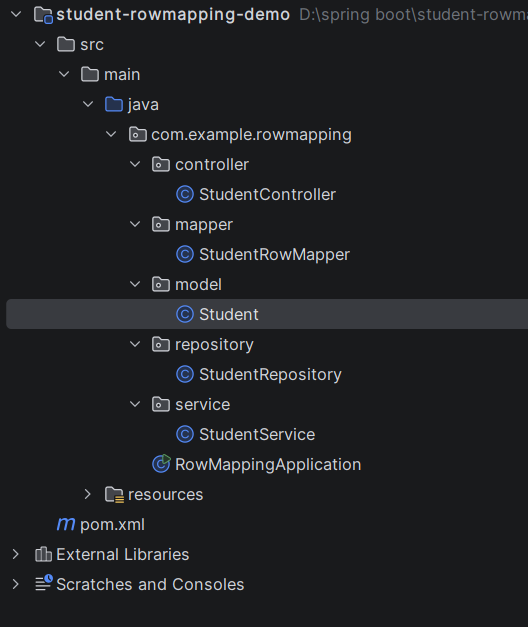
Step 3: Explore pom.xml
<?xml version="1.0" encoding="UTF-8"?>
<project xmlns="http://maven.apache.org/POM/4.0.0"
         xmlns:xsi="http://www.w3.org/2001/XMLSchema-instance"
         xsi:schemaLocation="http://maven.apache.org/POM/4.0.0 https://maven.apache.org/xsd/maven-4.0.0.xsd">
    <modelVersion>4.0.0</modelVersion>

    <parent>
        <groupId>org.springframework.boot</groupId>
        <artifactId>spring-boot-starter-parent</artifactId>
        <version>3.3.5</version>
        <relativePath/>
    </parent>

    <groupId>com.example</groupId>
    <artifactId>student-rowmapping-demo</artifactId>
    <version>1.0.0</version>

    <properties>
        <java.version>17</java.version>
    </properties>

    <dependencies>
        <dependency>
            <groupId>org.springframework.boot</groupId>
            <artifactId>spring-boot-starter-web</artifactId>
        </dependency>
        <dependency>
            <groupId>org.springframework.boot</groupId>
            <artifactId>spring-boot-starter-jdbc</artifactId>
        </dependency>
        <dependency>
            <groupId>org.postgresql</groupId>
            <artifactId>postgresql</artifactId>
            <scope>runtime</scope>
        </dependency>
    </dependencies>

    <build>
        <plugins>
            <plugin>
                <groupId>org.springframework.boot</groupId>
                <artifactId>spring-boot-maven-plugin</artifactId>
            </plugin>
        </plugins>
    </build>
</project>
Step 4: application.yml
spring:
datasource:
url: jdbc:postgresql://localhost:5432/student_jdbc_db
username: postgres
password: password
driver-class-name: org.postgresql.Driver
sql:
init:
mode: always # runs schema.sql and data.sql at startup
server:
port: 8082Step 5: Create Entity Class
package com.example.rowmapping.model;

public class Student {

    private Long id;
    private String fullName;     // column: full_name
    private String email;
    private String department;

    public Long getId() { return id; }
    public void setId(Long id) { this.id = id; }
    public String getFullName() { return fullName; }
    public void setFullName(String fullName) { this.fullName = fullName; }
    public String getEmail() { return email; }
    public void setEmail(String email) { this.email = email; }
    public String getDepartment() { return department; }
    public void setDepartment(String department) { this.department = department; }
}
Row Mapper Class
package com.example.rowmapping.mapper;

import com.example.rowmapping.model.Student;
import org.springframework.jdbc.core.RowMapper;

import java.sql.ResultSet;
import java.sql.SQLException;

// Converts ONE row of the ResultSet into ONE Student object.
// Spring calls mapRow() once for every row and collects the results in a List.
public class StudentRowMapper implements RowMapper<Student> {

    @Override
    public Student mapRow(ResultSet rs, int rowNum) throws SQLException {
        Student student = new Student();
        student.setId(rs.getLong("id"));
        student.setFullName(rs.getString("full_name"));   // column name -> property
        student.setEmail(rs.getString("email"));
        student.setDepartment(rs.getString("department"));
        return student;
    }
}
Step 6: Create below Repository Interface
package com.example.rowmapping.repository;

import com.example.rowmapping.mapper.StudentRowMapper;
import com.example.rowmapping.model.Student;
import org.springframework.jdbc.core.BeanPropertyRowMapper;
import org.springframework.jdbc.core.JdbcTemplate;
import org.springframework.jdbc.core.ResultSetExtractor;
import org.springframework.jdbc.core.RowMapper;
import org.springframework.jdbc.core.SingleColumnRowMapper;
import org.springframework.stereotype.Repository;

import java.util.ArrayList;
import java.util.LinkedHashMap;
import java.util.List;
import java.util.Map;
import java.util.Optional;

@Repository
public class StudentRepository {

    private final JdbcTemplate jdbcTemplate;

    public StudentRepository(JdbcTemplate jdbcTemplate) {
        this.jdbcTemplate = jdbcTemplate;
    }

    // Used only to add data for the experiment
    public int save(Student student) {
        return jdbcTemplate.update(
                "INSERT INTO student_records (full_name, email, department) VALUES (?, ?, ?)",
                student.getFullName(), student.getEmail(), student.getDepartment());
    }

    // ---------- TYPE 1: RowMapper class ----------
    public List<Student> findAll() {
        return jdbcTemplate.query(
                "SELECT id, full_name, email, department FROM student_records ORDER BY id",
                new StudentRowMapper());
    }

    // ---------- TYPE 2: RowMapper as a lambda (inline) ----------
    public Optional<Student> findById(Long id) {
        RowMapper<Student> inlineMapper = (rs, rowNum) -> {
            Student s = new Student();
            s.setId(rs.getLong("id"));
            s.setFullName(rs.getString("full_name"));
            s.setEmail(rs.getString("email"));
            s.setDepartment(rs.getString("department"));
            return s;
        };
        List<Student> result = jdbcTemplate.query(
                "SELECT id, full_name, email, department FROM student_records WHERE id = ?",
                inlineMapper, id);
        return result.stream().findFirst();
    }

    // ---------- TYPE 3: BeanPropertyRowMapper (automatic) ----------
    // Matches columns to properties by name; full_name is matched to fullName automatically.
    public List<Student> findAllAuto() {
        return jdbcTemplate.query(
                "SELECT id, full_name, email, department FROM student_records ORDER BY id",
                new BeanPropertyRowMapper<>(Student.class));
    }

    // ---------- TYPE 4: SingleColumnRowMapper (one column -> simple values) ----------
    public List<String> findAllNames() {
        return jdbcTemplate.query(
                "SELECT full_name FROM student_records ORDER BY id",
                new SingleColumnRowMapper<>(String.class));
    }

    // ---------- TYPE 5: ResultSetExtractor (whole ResultSet -> one object) ----------
    // You loop through the rows yourself and build ONE result: a Map of department -> students.
    public Map<String, List<Student>> groupByDepartment() {
        StudentRowMapper rowMapper = new StudentRowMapper();

        ResultSetExtractor<Map<String, List<Student>>> extractor = rs -> {
            Map<String, List<Student>> grouped = new LinkedHashMap<>();
            int rowNum = 0;
            while (rs.next()) {
                Student student = rowMapper.mapRow(rs, rowNum++);
                grouped.computeIfAbsent(student.getDepartment(), key -> new ArrayList<>()).add(student);
            }
            return grouped;
        };

        return jdbcTemplate.query(
                "SELECT id, full_name, email, department FROM student_records ORDER BY department, id",
                extractor);
    }
}
Step 7: Create below Service class
package com.example.rowmapping.service;

import com.example.rowmapping.model.Student;
import com.example.rowmapping.repository.StudentRepository;
import org.springframework.stereotype.Service;

import java.util.List;
import java.util.Map;
import java.util.Optional;

@Service
public class StudentService {

    private final StudentRepository repository;

    public StudentService(StudentRepository repository) {
        this.repository = repository;
    }

    public void create(Student student) {
        repository.save(student);
    }

    public List<Student> findAll() {
        return repository.findAll();
    }

    public Optional<Student> findById(Long id) {
        return repository.findById(id);
    }

    public List<Student> findAllAuto() {
        return repository.findAllAuto();
    }

    public List<String> findAllNames() {
        return repository.findAllNames();
    }

    public Map<String, List<Student>> groupByDepartment() {
        return repository.groupByDepartment();
    }
}
Step 8: Create Controller class
package com.example.rowmapping.controller;

import com.example.rowmapping.model.Student;
import com.example.rowmapping.service.StudentService;
import org.springframework.http.HttpStatus;
import org.springframework.http.ResponseEntity;
import org.springframework.web.bind.annotation.*;

import java.util.List;
import java.util.Map;

@RestController
@RequestMapping("/students")
public class StudentController {

    private final StudentService service;

    public StudentController(StudentService service) {
        this.service = service;
    }

    // Adds a row so you have more data to map
    @PostMapping
    public ResponseEntity<String> create(@RequestBody Student student) {
        service.create(student);
        return ResponseEntity.status(HttpStatus.CREATED).body("Student added");
    }

    // TYPE 1: RowMapper class   (THE EXPERIMENT)
    @GetMapping
    public List<Student> getAll() {
        return service.findAll();
    }

    // TYPE 2: RowMapper lambda
    @GetMapping("/{id}")
    public ResponseEntity<Student> getById(@PathVariable Long id) {
        return service.findById(id)
                .map(ResponseEntity::ok)
                .orElse(ResponseEntity.notFound().build());
    }

    // TYPE 3: BeanPropertyRowMapper
    @GetMapping("/auto")
    public List<Student> getAllAuto() {
        return service.findAllAuto();
    }

    // TYPE 4: SingleColumnRowMapper
    @GetMapping("/names")
    public List<String> getNames() {
        return service.findAllNames();
    }

    // TYPE 5: ResultSetExtractor
    @GetMapping("/grouped")
    public Map<String, List<Student>> getGrouped() {
        return service.groupByDepartment();
    }
}
Step 9: Main Application
package com.example.rowmapping;

import org.springframework.boot.SpringApplication;
import org.springframework.boot.autoconfigure.SpringBootApplication;

@SpringBootApplication
public class RowMappingApplication {
    public static void main(String[] args) {
        SpringApplication.run(RowMappingApplication.class, args);
    }
}
Step 10: Run the RowMappingApplication