Multiple database support means one Spring Boot application can run on different relational databases (H2, MySQL, PostgreSQL) without changing its Java code. Spring Boot picks the database from configuration: the driver on the classpath, the spring.datasource.* settings, and the active profile. Each database has its own settings file (application-h2.yml, application-mysql.yml, application-postgres.yml), and you switch between them with one line. It is used to develop on a light database (H2), test on the real one, and deploy on a different one (MySQL or PostgreSQL) with the same application.
Features
- The same Student CRUD code runs on all three databases.
- Switching the database is a one-word change (
active: h2,mysql, orpostgres). - H2 needs no installation, so the app runs immediately.
- Each database gets its own table script, because syntax such as auto-increment differs.
- All three drivers sit in
pom.xml, and only the active one is used.
Multiple Database Support Types
- Profile-based switching : One database is active at a time, chosen by a Spring profile. Each profile has its own
application-{profile}.yml - Database-specific scripts : Spring Boot loads
schema-{platform}.sqlfor the active database, so each database gets SQL in its own syntax - Embedded vs server databases : H2 runs inside your application (in memory, no install). MySQL and PostgreSQL are separate servers you install and start.
Hands-on Experiment: Creating a spring boot application with different relational database systems.
The following steps are involved in developing this hands-on experiment.
Step 1: Generate the Project
Step 2: Project Structure
Step 3: pom.xml
Step 4: application.yml
Step 5: Create Entity Class
Step 6: Create Repository Interface
Step 7: Create Service Class
Step 8: Create Controller Class
Step 9: Main Application Class
Step 10: Run the Main Application Class
Step 1: Configure the Project on Spring Initializr
Go to start.spring.io and set:
- Project: Maven
- Language: Java
- Spring Boot version: 3.2.x
- Group: com.example
- Artifact: multidb
- Name: multidb
- Package name: com.example.multidb
- Packaging: Jar
- Java: 17
- Dependencies: Spring Web, JDBC API, PostgreSQL Driver, MySQL Driver, H2 Driver
Click Generate to download the ZIP, then extract and import it into your IDE as a Maven project.
Step 2: Generated Project Structure
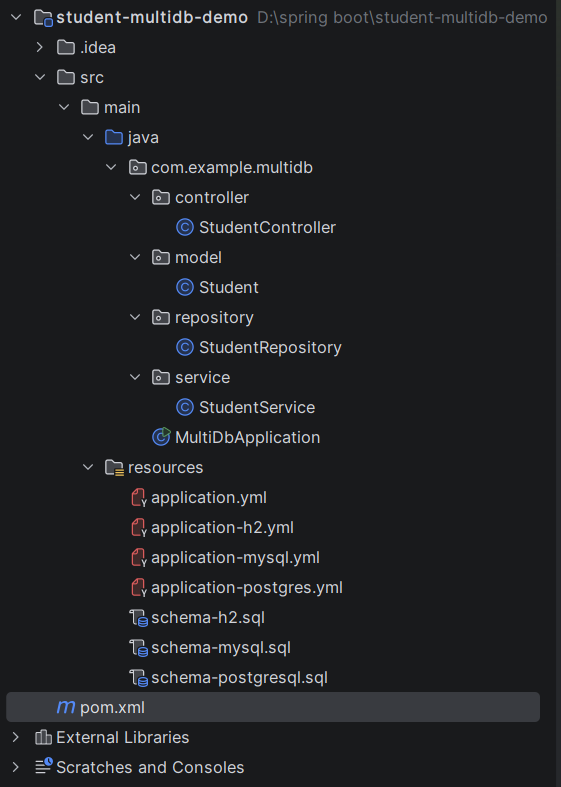
Step 3: Explore pom.xml
<?xml version="1.0" encoding="UTF-8"?>
<project xmlns="http://maven.apache.org/POM/4.0.0"
         xmlns:xsi="http://www.w3.org/2001/XMLSchema-instance"
         xsi:schemaLocation="http://maven.apache.org/POM/4.0.0 https://maven.apache.org/xsd/maven-4.0.0.xsd">
    <modelVersion>4.0.0</modelVersion>

    <parent>
        <groupId>org.springframework.boot</groupId>
        <artifactId>spring-boot-starter-parent</artifactId>
        <version>3.3.5</version>
        <relativePath/>
    </parent>

    <groupId>com.example</groupId>
    <artifactId>student-multidb-demo</artifactId>
    <version>1.0.0</version>

    <properties>
        <java.version>17</java.version>
    </properties>

    <dependencies>
        <dependency>
            <groupId>org.springframework.boot</groupId>
            <artifactId>spring-boot-starter-web</artifactId>
        </dependency>
        <dependency>
            <groupId>org.springframework.boot</groupId>
            <artifactId>spring-boot-starter-jdbc</artifactId>
        </dependency>

        <!-- All three drivers are on the classpath. The active profile decides which one is used. -->
        <dependency>
            <groupId>com.h2database</groupId>
            <artifactId>h2</artifactId>
            <scope>runtime</scope>
        </dependency>
        <dependency>
            <groupId>com.mysql</groupId>
            <artifactId>mysql-connector-j</artifactId>
            <scope>runtime</scope>
        </dependency>
        <dependency>
            <groupId>org.postgresql</groupId>
            <artifactId>postgresql</artifactId>
            <scope>runtime</scope>
        </dependency>
    </dependencies>

    <build>
        <plugins>
            <plugin>
                <groupId>org.springframework.boot</groupId>
                <artifactId>spring-boot-maven-plugin</artifactId>
            </plugin>
        </plugins>
    </build>
</project>
Step 4: application.yml
# Settings shared by every database
spring:
profiles:
active: h2 # <-- CHANGE THIS to mysql or postgres to switch database
sql:
init:
mode: always # run the schema file at startup
server:
port: 8082Code language: PHP (php)application-h2.yml
spring:
  datasource:
    url: jdbc:h2:mem:student_multidb;DB_CLOSE_DELAY=-1
    username: sa
    password:
    driver-class-name: org.h2.Driver
  sql:
    init:
      platform: h2          # loads schema-h2.sql
  h2:
    console:
      enabled: true         # browser console at /h2-console
application-mysql.yml
spring:
  datasource:
    url: jdbc:mysql://localhost:3306/student_multidb?createDatabaseIfNotExist=true&useSSL=false&allowPublicKeyRetrieval=true&serverTimezone=UTC
    username: root
    password: password
    driver-class-name: com.mysql.cj.jdbc.Driver
  sql:
    init:
      platform: mysql       # loads schema-mysql.sql
application-postgres.yml
spring:
  datasource:
    url: jdbc:postgresql://localhost:5432/student_multidb
    username: postgres
    password: password
    driver-class-name: org.postgresql.Driver
  sql:
    init:
      platform: postgresql  # loads schema-postgresql.sql
Step 5: Create Entity Class
package com.example.multidb.model;

public class Student {

    private Long id;
    private String name;
    private String email;
    private String department;

    public Long getId() { return id; }
    public void setId(Long id) { this.id = id; }
    public String getName() { return name; }
    public void setName(String name) { this.name = name; }
    public String getEmail() { return email; }
    public void setEmail(String email) { this.email = email; }
    public String getDepartment() { return department; }
    public void setDepartment(String department) { this.department = department; }
}
Step 6: Create below Repository Interface
package com.example.multidb.repository;

import com.example.multidb.model.Student;
import org.springframework.jdbc.core.BeanPropertyRowMapper;
import org.springframework.jdbc.core.ConnectionCallback;
import org.springframework.jdbc.core.JdbcTemplate;
import org.springframework.jdbc.core.RowMapper;
import org.springframework.stereotype.Repository;

import java.util.List;
import java.util.Optional;

// The SQL here is standard, so the SAME code runs on H2, MySQL and PostgreSQL.
@Repository
public class StudentRepository {

    private final JdbcTemplate jdbcTemplate;
    private final RowMapper<Student> rowMapper = new BeanPropertyRowMapper<>(Student.class);

    public StudentRepository(JdbcTemplate jdbcTemplate) {
        this.jdbcTemplate = jdbcTemplate;
    }

    // CREATE: insert, then read the row back by its unique email (works the same on every database)
    public Student save(Student student) {
        jdbcTemplate.update(
                "INSERT INTO students (name, email, department) VALUES (?, ?, ?)",
                student.getName(), student.getEmail(), student.getDepartment());
        return jdbcTemplate.queryForObject(
                "SELECT id, name, email, department FROM students WHERE email = ?",
                rowMapper, student.getEmail());
    }

    // READ
    public List<Student> findAll() {
        return jdbcTemplate.query(
                "SELECT id, name, email, department FROM students ORDER BY id", rowMapper);
    }

    public Optional<Student> findById(Long id) {
        List<Student> result = jdbcTemplate.query(
                "SELECT id, name, email, department FROM students WHERE id = ?", rowMapper, id);
        return result.stream().findFirst();
    }

    // UPDATE
    public int update(Long id, Student student) {
        return jdbcTemplate.update(
                "UPDATE students SET name = ?, email = ?, department = ? WHERE id = ?",
                student.getName(), student.getEmail(), student.getDepartment(), id);
    }

    // DELETE
    public int deleteById(Long id) {
        return jdbcTemplate.update("DELETE FROM students WHERE id = ?", id);
    }

    // Asks the connected database for its name, so you can see which one is active
    public String databaseName() {
        return jdbcTemplate.execute((ConnectionCallback<String>) connection -> {
            var meta = connection.getMetaData();
            return meta.getDatabaseProductName() + " " + meta.getDatabaseProductVersion();
        });
    }
}
Step 7: Create below Service class
package com.example.multidb.service;

import com.example.multidb.model.Student;
import com.example.multidb.repository.StudentRepository;
import org.springframework.stereotype.Service;

import java.util.List;
import java.util.Optional;

@Service
public class StudentService {

    private final StudentRepository repository;

    public StudentService(StudentRepository repository) {
        this.repository = repository;
    }

    public Student create(Student student) {
        return repository.save(student);
    }

    public List<Student> findAll() {
        return repository.findAll();
    }

    public Optional<Student> findById(Long id) {
        return repository.findById(id);
    }

    public Optional<Student> update(Long id, Student student) {
        if (repository.update(id, student) == 0) {
            return Optional.empty();
        }
        return repository.findById(id);
    }

    public boolean delete(Long id) {
        return repository.deleteById(id) > 0;
    }

    public String databaseName() {
        return repository.databaseName();
    }
}
Step 8: Create Controller class
package com.example.multidb.controller;

import com.example.multidb.model.Student;
import com.example.multidb.service.StudentService;
import org.springframework.dao.DuplicateKeyException;
import org.springframework.http.HttpStatus;
import org.springframework.http.ResponseEntity;
import org.springframework.web.bind.annotation.*;

import java.util.List;
import java.util.Map;

@RestController
@RequestMapping("/students")
public class StudentController {

    private final StudentService service;

    public StudentController(StudentService service) {
        this.service = service;
    }

    @PostMapping
    public ResponseEntity<Object> create(@RequestBody Student student) {
        try {
            return ResponseEntity.status(HttpStatus.CREATED).body(service.create(student));
        } catch (DuplicateKeyException e) {
            return ResponseEntity.status(HttpStatus.CONFLICT).body(Map.of("error", "Email already exists"));
        }
    }

    @GetMapping
    public List<Student> getAll() {
        return service.findAll();
    }

    // Which database is this app connected to right now?
    @GetMapping("/database")
    public String database() {
        return service.databaseName();
    }

    @GetMapping("/{id}")
    public ResponseEntity<Student> getById(@PathVariable Long id) {
        return service.findById(id)
                .map(ResponseEntity::ok)
                .orElse(ResponseEntity.notFound().build());
    }

    @PutMapping("/{id}")
    public ResponseEntity<Student> update(@PathVariable Long id, @RequestBody Student student) {
        return service.update(id, student)
                .map(ResponseEntity::ok)
                .orElse(ResponseEntity.notFound().build());
    }

    @DeleteMapping("/{id}")
    public ResponseEntity<Void> delete(@PathVariable Long id) {
        return service.delete(id) ? ResponseEntity.noContent().build()
                                  : ResponseEntity.notFound().build();
    }
}
Step 9: Main Application
package com.example.multidb;

import org.springframework.boot.SpringApplication;
import org.springframework.boot.autoconfigure.SpringBootApplication;

@SpringBootApplication
public class MultiDbApplication {
    public static void main(String[] args) {
        SpringApplication.run(MultiDbApplication.class, args);
    }
}
Step 10: Run the MultiDbApplication
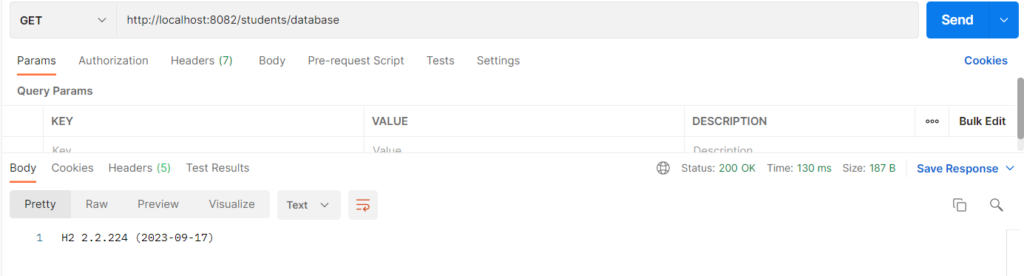
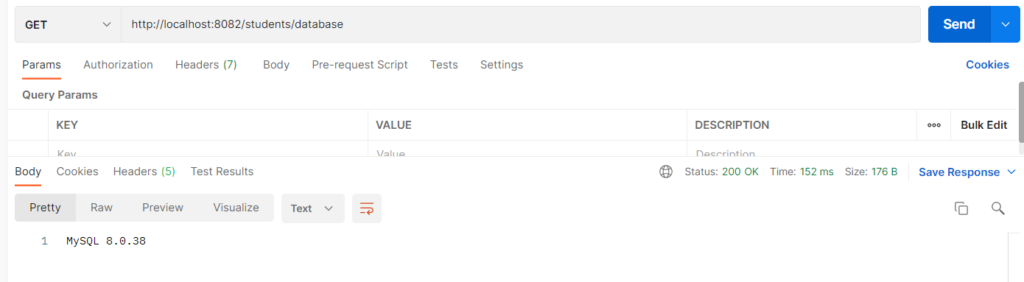
Now, change the
profiles:
  active: h2 to mysql in application.yml
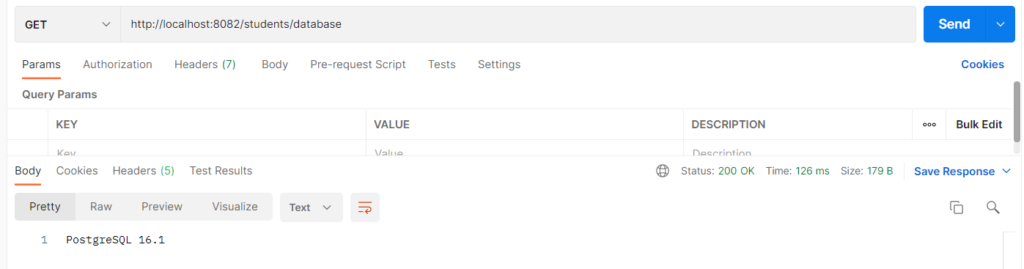
Now, change the
profiles:
  active: mysql to postgres in application.yml