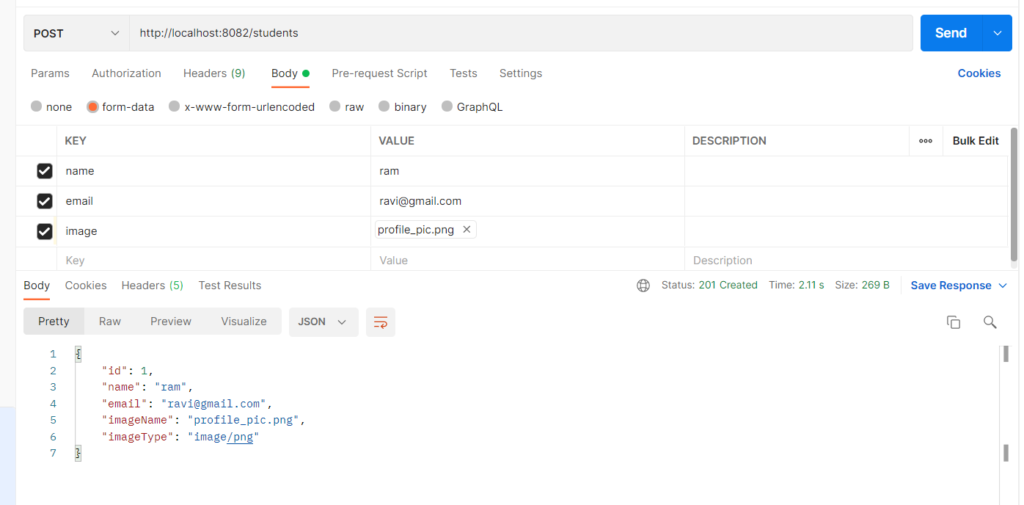
File upload through REST lets a client send files (images, PDFs, documents) to a server along with normal form fields. It uses the multipart/form-data content type, which splits one HTTP request into several parts, each carrying a text field or a binary file. It is used for profile pictures, document submission, resume upload, and similar features where JSON alone cannot carry binary data. Spring Boot handles it with MultipartFile, so you receive the file, its name, type, size, and bytes with almost no extra code.
Features
- Receives files and text fields together in a single request
MultipartFilegives file name, content type, size, and bytes- File size limits set in
application.properties - Validation of file type (images only) and empty files
- Files can be stored in the database (BLOB) or on disk
- Stored files can be returned with the correct content type, so a browser shows the image directly
Hands-on Experiment: Creating a spring boot application to understand how REST APIs receive files using multipart HTTP requests.
The following steps are involved in developing this hands-on experiment.
Step 1: Generate the Project
Step 2: Project Structure
Step 3: pom.xml
Step 4: application.properties
Step 5: Create Entity Class
Step 6: Create Repository Interface
Step 7: Create Service Class
Step 8: Create Controller Class
Step 9: Main Application Class
Step 10: Run the Main Application Class
Step 1: Configure the Project on Spring Initializr
Go to start.spring.io and set:
- Project: Maven
- Language: Java
- Spring Boot version: 3.2.x
- Group: com.example
- Artifact: imageupload
- Name: imageupload
- Package name: com.example.imageupload
- Packaging: Jar
- Java: 17
- Dependencies: Spring Web, Spring Data JPA, MySQL Driver.
Click Generate to download the ZIP, then extract and import it into your IDE as a Maven project.
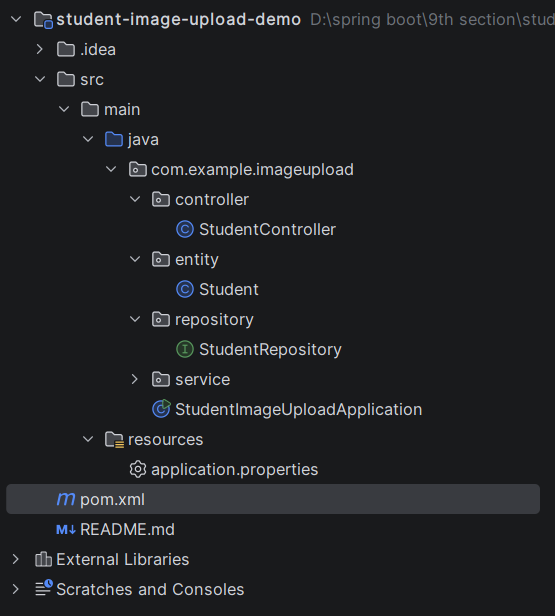
Step 2: Generated Project Structure
Step 3: Explore pom.xml
<?xml version="1.0" encoding="UTF-8"?>
<project xmlns="http://maven.apache.org/POM/4.0.0"
         xmlns:xsi="http://www.w3.org/2001/XMLSchema-instance"
         xsi:schemaLocation="http://maven.apache.org/POM/4.0.0 https://maven.apache.org/xsd/maven-4.0.0.xsd">
    <modelVersion>4.0.0</modelVersion>

    <parent>
        <groupId>org.springframework.boot</groupId>
        <artifactId>spring-boot-starter-parent</artifactId>
        <version>3.2.5</version>
        <relativePath/>
    </parent>

    <groupId>com.example</groupId>
    <artifactId>student-image-upload-demo</artifactId>
    <version>1.0.0</version>
    <name>student-image-upload-demo</name>

    <properties>
        <java.version>17</java.version>
    </properties>

    <dependencies>
        <dependency>
            <groupId>org.springframework.boot</groupId>
            <artifactId>spring-boot-starter-web</artifactId>
        </dependency>
        <dependency>
            <groupId>org.springframework.boot</groupId>
            <artifactId>spring-boot-starter-data-jpa</artifactId>
        </dependency>
        <dependency>
            <groupId>com.mysql</groupId>
            <artifactId>mysql-connector-j</artifactId>
            <scope>runtime</scope>
        </dependency>
    </dependencies>

    <build>
        <plugins>
            <plugin>
                <groupId>org.springframework.boot</groupId>
                <artifactId>spring-boot-maven-plugin</artifactId>
            </plugin>
        </plugins>
    </build>
</project>
Step 4: application.properties
spring.application.name=student-image-upload-demo
server.port=8082
# MySQL (database is created automatically if missing)
spring.datasource.url=jdbc:mysql://localhost:3306/student_upload_db?createDatabaseIfNotExist=true&useSSL=false&allowPublicKeyRetrieval=true&serverTimezone=UTC
spring.datasource.username=root
spring.datasource.password=root
spring.jpa.hibernate.ddl-auto=update
spring.jpa.show-sql=true
# Multipart (file upload) settings
spring.servlet.multipart.enabled=true
spring.servlet.multipart.max-file-size=2MB
spring.servlet.multipart.max-request-size=2MB
Code language: PHP (php)Step 5: Create Entity Class
package com.example.imageupload.entity;

import com.fasterxml.jackson.annotation.JsonIgnore;
import jakarta.persistence.Column;
import jakarta.persistence.Entity;
import jakarta.persistence.GeneratedValue;
import jakarta.persistence.GenerationType;
import jakarta.persistence.Id;
import jakarta.persistence.Lob;
import jakarta.persistence.Table;

@Entity
@Table(name = "students")
public class Student {

    @Id
    @GeneratedValue(strategy = GenerationType.IDENTITY)
    private Long id;

    private String name;

    private String email;

    // Profile image details
    private String imageName;

    private String imageType;

    @JsonIgnore
    @Lob
    @Column(columnDefinition = "LONGBLOB")
    private byte[] imageData;

    public Student() {
    }

    public Long getId() { return id; }
    public void setId(Long id) { this.id = id; }

    public String getName() { return name; }
    public void setName(String name) { this.name = name; }

    public String getEmail() { return email; }
    public void setEmail(String email) { this.email = email; }

    public String getImageName() { return imageName; }
    public void setImageName(String imageName) { this.imageName = imageName; }

    public String getImageType() { return imageType; }
    public void setImageType(String imageType) { this.imageType = imageType; }

    public byte[] getImageData() { return imageData; }
    public void setImageData(byte[] imageData) { this.imageData = imageData; }
}
Step 6: Create below Repository Interface
package com.example.imageupload.repository;

import com.example.imageupload.entity.Student;
import org.springframework.data.jpa.repository.JpaRepository;
import org.springframework.stereotype.Repository;

@Repository
public interface StudentRepository extends JpaRepository<Student, Long> {
}
Step 7: Create below Service class
package com.example.imageupload.service;

import com.example.imageupload.entity.Student;
import com.example.imageupload.repository.StudentRepository;
import org.springframework.http.HttpStatus;
import org.springframework.stereotype.Service;
import org.springframework.util.StringUtils;
import org.springframework.web.multipart.MultipartFile;
import org.springframework.web.server.ResponseStatusException;

import java.io.IOException;
import java.util.List;

@Service
public class StudentService {

    private final StudentRepository studentRepository;

    public StudentService(StudentRepository studentRepository) {
        this.studentRepository = studentRepository;
    }

    public Student createStudent(String name, String email, MultipartFile image) {
        Student student = new Student();
        student.setName(name);
        student.setEmail(email);
        if (image != null && !image.isEmpty()) {
            attachImage(student, image);
        }
        return studentRepository.save(student);
    }

    public Student uploadImage(Long id, MultipartFile image) {
        Student student = getStudent(id);
        attachImage(student, image);
        return studentRepository.save(student);
    }

    public Student getStudent(Long id) {
        return studentRepository.findById(id)
                .orElseThrow(() -> new ResponseStatusException(
                        HttpStatus.NOT_FOUND, "Student not found with id " + id));
    }

    public List<Student> getAllStudents() {
        return studentRepository.findAll();
    }

    public Student getStudentWithImage(Long id) {
        Student student = getStudent(id);
        if (student.getImageData() == null) {
            throw new ResponseStatusException(HttpStatus.NOT_FOUND,
                    "Student " + id + " has no profile image");
        }
        return student;
    }

    public void deleteImage(Long id) {
        Student student = getStudent(id);
        student.setImageName(null);
        student.setImageType(null);
        student.setImageData(null);
        studentRepository.save(student);
    }

    private void attachImage(Student student, MultipartFile image) {
        if (image == null || image.isEmpty()) {
            throw new ResponseStatusException(HttpStatus.BAD_REQUEST, "Image file is required");
        }
        String contentType = image.getContentType();
        if (contentType == null || !contentType.startsWith("image/")) {
            throw new ResponseStatusException(HttpStatus.BAD_REQUEST,
                    "Only image files are allowed (png, jpg, gif...)");
        }
        try {
            student.setImageName(StringUtils.cleanPath(String.valueOf(image.getOriginalFilename())));
            student.setImageType(contentType);
            student.setImageData(image.getBytes());
        } catch (IOException e) {
            throw new ResponseStatusException(HttpStatus.INTERNAL_SERVER_ERROR,
                    "Could not read the uploaded file");
        }
    }
}
Step 8: Create Controller class
package com.example.imageupload.controller;

import com.example.imageupload.entity.Student;
import com.example.imageupload.service.StudentService;
import org.springframework.http.HttpHeaders;
import org.springframework.http.HttpStatus;
import org.springframework.http.MediaType;
import org.springframework.http.ResponseEntity;
import org.springframework.web.bind.annotation.DeleteMapping;
import org.springframework.web.bind.annotation.GetMapping;
import org.springframework.web.bind.annotation.PathVariable;
import org.springframework.web.bind.annotation.PostMapping;
import org.springframework.web.bind.annotation.RequestMapping;
import org.springframework.web.bind.annotation.RequestParam;
import org.springframework.web.bind.annotation.RestController;
import org.springframework.web.multipart.MultipartFile;

import java.util.List;

@RestController
@RequestMapping("/students")
public class StudentController {

    private final StudentService studentService;

    public StudentController(StudentService studentService) {
        this.studentService = studentService;
    }

    // Create student with optional profile image (multipart/form-data)
    @PostMapping(consumes = MediaType.MULTIPART_FORM_DATA_VALUE)
    public ResponseEntity<Student> createStudent(
            @RequestParam("name") String name,
            @RequestParam("email") String email,
            @RequestParam(value = "image", required = false) MultipartFile image) {
        Student saved = studentService.createStudent(name, email, image);
        return ResponseEntity.status(HttpStatus.CREATED).body(saved);
    }

    // Upload or replace the profile image of an existing student
    @PostMapping(value = "/{id}/image", consumes = MediaType.MULTIPART_FORM_DATA_VALUE)
    public Student uploadImage(@PathVariable Long id,
                               @RequestParam("image") MultipartFile image) {
        return studentService.uploadImage(id, image);
    }

    // View the profile image (browser displays it directly)
    @GetMapping("/{id}/image")
    public ResponseEntity<byte[]> getImage(@PathVariable Long id) {
        Student student = studentService.getStudentWithImage(id);
        return ResponseEntity.ok()
                .contentType(MediaType.parseMediaType(student.getImageType()))
                .header(HttpHeaders.CONTENT_DISPOSITION,
                        "inline; filename=\"" + student.getImageName() + "\"")
                .body(student.getImageData());
    }

    @GetMapping("/{id}")
    public Student getStudent(@PathVariable Long id) {
        return studentService.getStudent(id);
    }

    @GetMapping
    public List<Student> getAllStudents() {
        return studentService.getAllStudents();
    }

    @DeleteMapping("/{id}/image")
    public ResponseEntity<String> deleteImage(@PathVariable Long id) {
        studentService.deleteImage(id);
        return ResponseEntity.ok("Profile image removed for student " + id);
    }
}
Step 9: Main Application
package com.example.imageupload;

import org.springframework.boot.SpringApplication;
import org.springframework.boot.autoconfigure.SpringBootApplication;

@SpringBootApplication
public class StudentImageUploadApplication {

    public static void main(String[] args) {
        SpringApplication.run(StudentImageUploadApplication.class, args);
    }
}
Step 10: Run the StudentImageUploadApplication