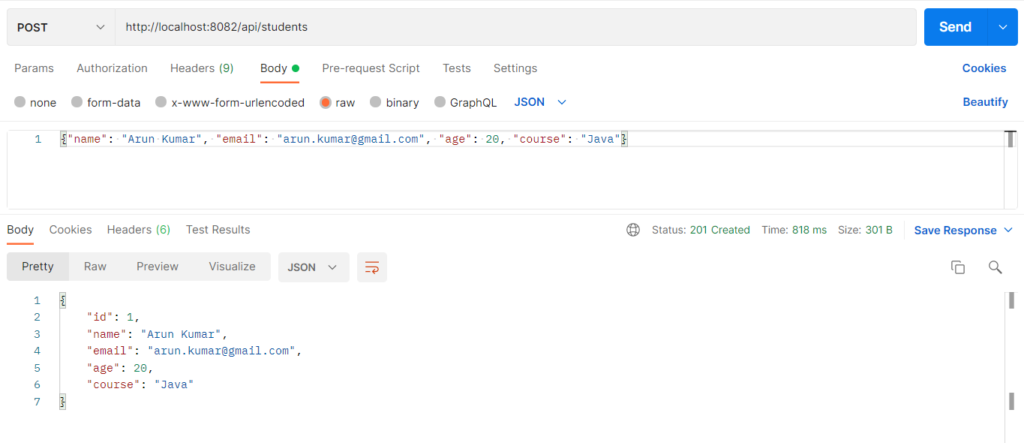
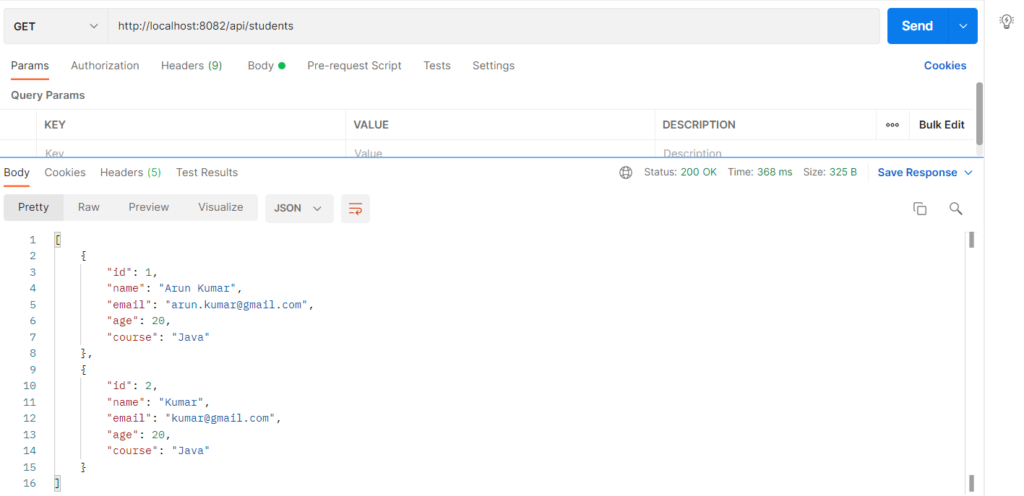
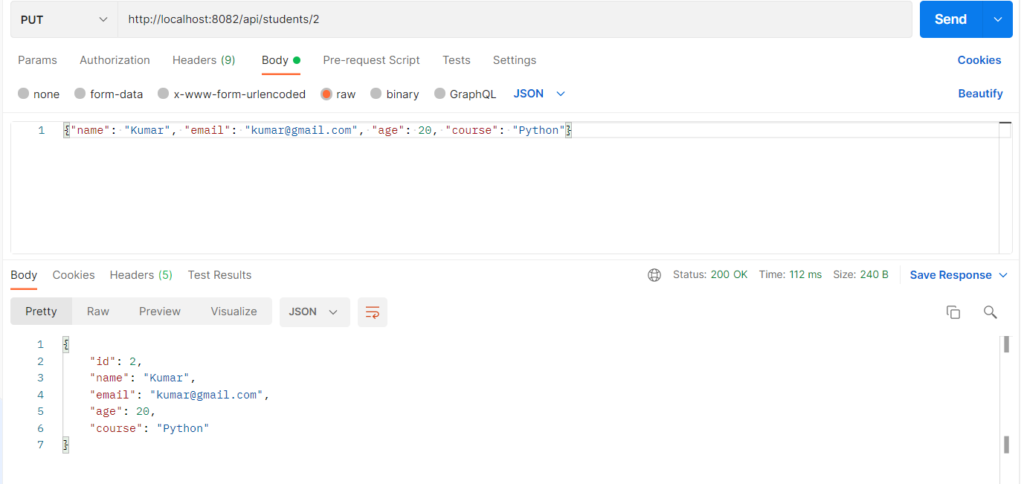
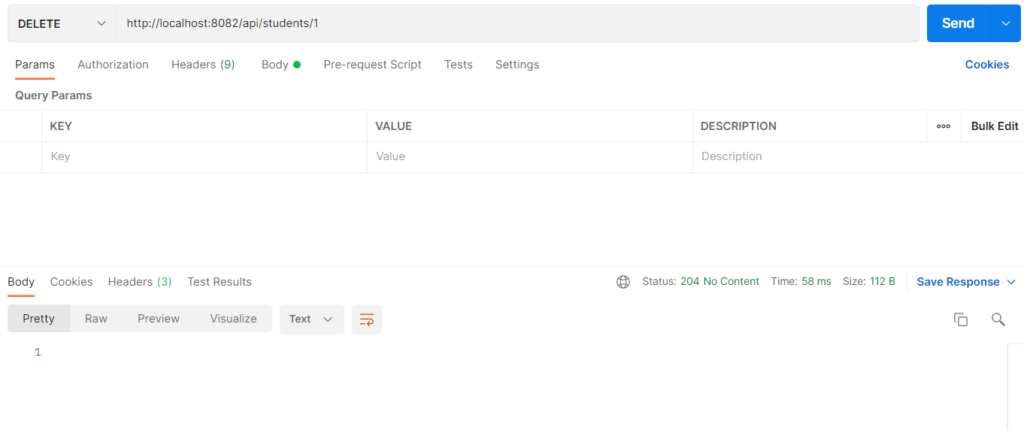
REST is a style of building web APIs where everything is a resource (a student, an order) with its own URL, and the client works on it using standard HTTP methods.It is used because it is simple, works with any client (browser, mobile app, Postman), and follows rules everyone already knows.A request names the resource in the URL (/api/students/1), the method says the action (GET, POST, PUT, DELETE), and the response carries a status code and usually JSON.CRUD maps directly onto it: Create is POST, Read is GET, Update is PUT and Delete is DELETE.
Features
- Resources are named with plural nouns (
/api/students), with no verbs in the URL. - The HTTP method defines the action, not the URL.
- Each request is stateless: the server keeps no session between calls.
- Data is exchanged as JSON.
- Status codes tell the client what happened (200, 201, 204, 400, 404).
- A
Locationheader tells the client where the new resource lives after a create.
REST Fundamentals: Methods and Status Codes
HTTP Methods (CRUD)
| Method | Action | URL | Success status |
|---|---|---|---|
| POST | Create a student | /api/students |
201 Created |
| GET | Read all students | /api/students |
200 OK |
| GET | Read one student | /api/students/{id} |
200 OK |
| PUT | Update (replace) a student | /api/students/{id} |
200 OK |
| DELETE | Delete a student | /api/students/{id} |
204 No Content |
Status Codes
| Code | Meaning | When it appears here |
|---|---|---|
| 200 OK | Request worked | Read and update |
| 201 Created | New resource made | After POST (plus a Location header) |
| 204 No Content | Worked, nothing to return | After DELETE |
| 400 Bad Request | Client sent bad data | Blank name, invalid email |
| 404 Not Found | Resource doesn’t exist | Unknown student id |
| 405 Method Not Allowed | Method not supported on that URL | DELETE /api/students |
Hands-on Experiment: Creating a spring boot application to understand REST resources, HTTP methods, status codes, and request-response
The following steps are involved in developing this hands-on experiment.
Step 1: Generate the Project
Step 2: Project Structure
Step 3: pom.xml
Step 4: application.properties
Step 5: Create Entity Class
Step 6: Create Repository Interface
Step 7: Create Service Class
Step 8: Create Controller Class
Step 9: Main Application Class
Step 10: Run the Main Application Class
Step 1: Configure the Project on Spring Initializr
Go to start.spring.io and set:
- Project: Maven
- Language: Java
- Spring Boot version: 3.2.x
- Group: com.example
- Artifact: restcrud
- Name: restcrud
- Package name: com.example.restcrud
- Packaging: Jar
- Java: 17
- Dependencies: Spring Web, Spring Data JPA, MySQL Driver, Validation I/O.
Click Generate to download the ZIP, then extract and import it into your IDE as a Maven project.
Step 2: Generated Project Structure
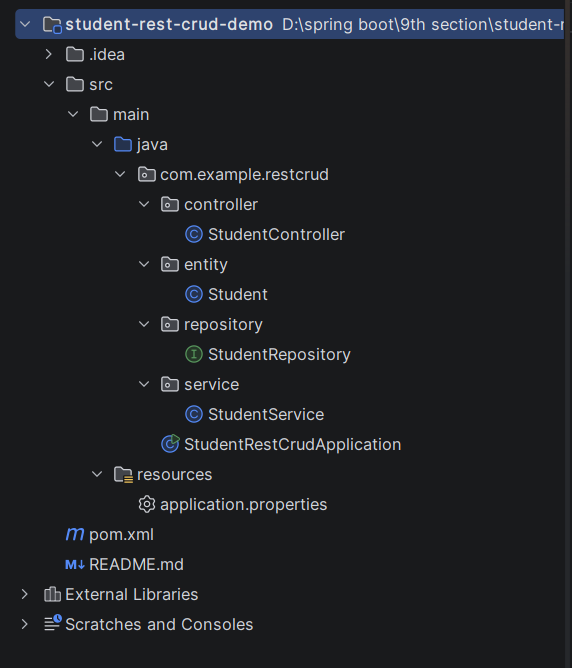
Step 3: Explore pom.xml
<?xml version="1.0" encoding="UTF-8"?>
<project xmlns="http://maven.apache.org/POM/4.0.0"
         xmlns:xsi="http://www.w3.org/2001/XMLSchema-instance"
         xsi:schemaLocation="http://maven.apache.org/POM/4.0.0 https://maven.apache.org/xsd/maven-4.0.0.xsd">
    <modelVersion>4.0.0</modelVersion>

    <parent>
        <groupId>org.springframework.boot</groupId>
        <artifactId>spring-boot-starter-parent</artifactId>
        <version>3.2.5</version>
        <relativePath/>
    </parent>

    <groupId>com.example</groupId>
    <artifactId>student-rest-crud-demo</artifactId>
    <version>1.0.0</version>
    <name>student-rest-crud-demo</name>

    <properties>
        <java.version>17</java.version>
    </properties>

    <dependencies>
        <dependency>
            <groupId>org.springframework.boot</groupId>
            <artifactId>spring-boot-starter-web</artifactId>
        </dependency>
        <dependency>
            <groupId>org.springframework.boot</groupId>
            <artifactId>spring-boot-starter-validation</artifactId>
        </dependency>
        <dependency>
            <groupId>org.springframework.boot</groupId>
            <artifactId>spring-boot-starter-data-jpa</artifactId>
        </dependency>
        <dependency>
            <groupId>com.mysql</groupId>
            <artifactId>mysql-connector-j</artifactId>
            <scope>runtime</scope>
        </dependency>
    </dependencies>

    <build>
        <plugins>
            <plugin>
                <groupId>org.springframework.boot</groupId>
                <artifactId>spring-boot-maven-plugin</artifactId>
            </plugin>
        </plugins>
    </build>
</project>
Step 4: application.properties
spring.application.name=student-rest-crud-demo
server.port=8082
spring.datasource.url=jdbc:mysql://localhost:3306/student_rest_db?createDatabaseIfNotExist=true&useSSL=false&serverTimezone=UTC&allowPublicKeyRetrieval=true
spring.datasource.username=root
spring.datasource.password=password
spring.datasource.driver-class-name=com.mysql.cj.jdbc.Driver
spring.jpa.hibernate.ddl-auto=update
spring.jpa.show-sql=true
spring.jpa.database-platform=org.hibernate.dialect.MySQLDialect
# Show the reason text in error responses (for example "Student not found with id 99")
server.error.include-message=alwaysStep 5: Create Entity Class
package com.example.restcrud.entity;

import jakarta.persistence.Entity;
import jakarta.persistence.GeneratedValue;
import jakarta.persistence.GenerationType;
import jakarta.persistence.Id;
import jakarta.persistence.Table;
import jakarta.validation.constraints.Email;
import jakarta.validation.constraints.Min;
import jakarta.validation.constraints.NotBlank;
import jakarta.validation.constraints.NotNull;

// The Student resource
@Entity
@Table(name = "students")
public class Student {

    @Id
    @GeneratedValue(strategy = GenerationType.IDENTITY)
    private Long id;

    @NotBlank(message = "Name is required")
    private String name;

    @NotBlank(message = "Email is required")
    @Email(message = "Enter a valid email address")
    private String email;

    @NotNull(message = "Age is required")
    @Min(value = 1, message = "Age must be at least 1")
    private Integer age;

    @NotBlank(message = "Course is required")
    private String course;

    public Student() {
    }

    public Long getId() { return id; }
    public void setId(Long id) { this.id = id; }

    public String getName() { return name; }
    public void setName(String name) { this.name = name; }

    public String getEmail() { return email; }
    public void setEmail(String email) { this.email = email; }

    public Integer getAge() { return age; }
    public void setAge(Integer age) { this.age = age; }

    public String getCourse() { return course; }
    public void setCourse(String course) { this.course = course; }
}
Step 6: Create below Repository Interface
package com.example.restcrud.repository;

import com.example.restcrud.entity.Student;
import org.springframework.data.jpa.repository.JpaRepository;
import org.springframework.stereotype.Repository;

@Repository
public interface StudentRepository extends JpaRepository<Student, Long> {
}
Step 7: Create below Service class
package com.example.restcrud.service;

import com.example.restcrud.entity.Student;
import com.example.restcrud.repository.StudentRepository;
import org.springframework.http.HttpStatus;
import org.springframework.stereotype.Service;
import org.springframework.web.server.ResponseStatusException;

import java.util.List;

@Service
public class StudentService {

    private final StudentRepository studentRepository;

    public StudentService(StudentRepository studentRepository) {
        this.studentRepository = studentRepository;
    }

    // CREATE
    public Student create(Student student) {
        student.setId(null);   // the server decides the id, never the client
        return studentRepository.save(student);
    }

    // READ (all)
    public List<Student> getAll() {
        return studentRepository.findAll();
    }

    // READ (one) -> 404 if missing
    public Student getById(Long id) {
        return studentRepository.findById(id)
                .orElseThrow(() -> new ResponseStatusException(
                        HttpStatus.NOT_FOUND, "Student not found with id " + id));
    }

    // UPDATE (replaces all fields) -> 404 if missing
    public Student update(Long id, Student updated) {
        Student existing = getById(id);
        existing.setName(updated.getName());
        existing.setEmail(updated.getEmail());
        existing.setAge(updated.getAge());
        existing.setCourse(updated.getCourse());
        return studentRepository.save(existing);
    }

    // DELETE -> 404 if missing
    public void delete(Long id) {
        studentRepository.delete(getById(id));
    }
}
Step 8: Create Controller class
package com.example.restcrud.controller;

import com.example.restcrud.entity.Student;
import com.example.restcrud.service.StudentService;
import jakarta.validation.Valid;
import org.springframework.http.ResponseEntity;
import org.springframework.web.bind.annotation.DeleteMapping;
import org.springframework.web.bind.annotation.GetMapping;
import org.springframework.web.bind.annotation.PathVariable;
import org.springframework.web.bind.annotation.PostMapping;
import org.springframework.web.bind.annotation.PutMapping;
import org.springframework.web.bind.annotation.RequestBody;
import org.springframework.web.bind.annotation.RequestMapping;
import org.springframework.web.bind.annotation.RestController;
import org.springframework.web.servlet.support.ServletUriComponentsBuilder;

import java.net.URI;
import java.util.List;

// Resource: "students"  ->  URL: /api/students  (plural noun, no verbs in the URL)
@RestController
@RequestMapping("/api/students")
public class StudentController {

    private final StudentService studentService;

    public StudentController(StudentService studentService) {
        this.studentService = studentService;
    }

    // POST /api/students  -> 201 Created + Location header
    @PostMapping
    public ResponseEntity<Student> create(@Valid @RequestBody Student student) {
        Student saved = studentService.create(student);
        URI location = ServletUriComponentsBuilder.fromCurrentRequest()
                .path("/{id}").buildAndExpand(saved.getId()).toUri();
        return ResponseEntity.created(location).body(saved);
    }

    // GET /api/students  -> 200 OK
    @GetMapping
    public ResponseEntity<List<Student>> getAll() {
        return ResponseEntity.ok(studentService.getAll());
    }

    // GET /api/students/1  -> 200 OK  (or 404 Not Found)
    @GetMapping("/{id}")
    public ResponseEntity<Student> getById(@PathVariable Long id) {
        return ResponseEntity.ok(studentService.getById(id));
    }

    // PUT /api/students/1  -> 200 OK  (or 404 Not Found)
    @PutMapping("/{id}")
    public ResponseEntity<Student> update(@PathVariable Long id, @Valid @RequestBody Student student) {
        return ResponseEntity.ok(studentService.update(id, student));
    }

    // DELETE /api/students/1  -> 204 No Content  (or 404 Not Found)
    @DeleteMapping("/{id}")
    public ResponseEntity<Void> delete(@PathVariable Long id) {
        studentService.delete(id);
        return ResponseEntity.noContent().build();
    }
}
Step 9: Main Application
package com.example.restcrud;

import org.springframework.boot.SpringApplication;
import org.springframework.boot.autoconfigure.SpringBootApplication;

@SpringBootApplication
public class StudentRestCrudApplication {

    public static void main(String[] args) {
        SpringApplication.run(StudentRestCrudApplication.class, args);
    }
}
Step 10: Run the StudentRestCurdApplication