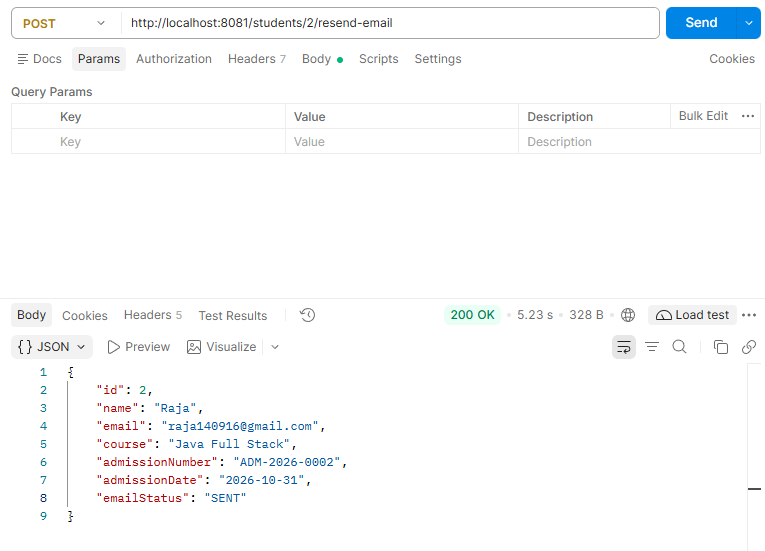
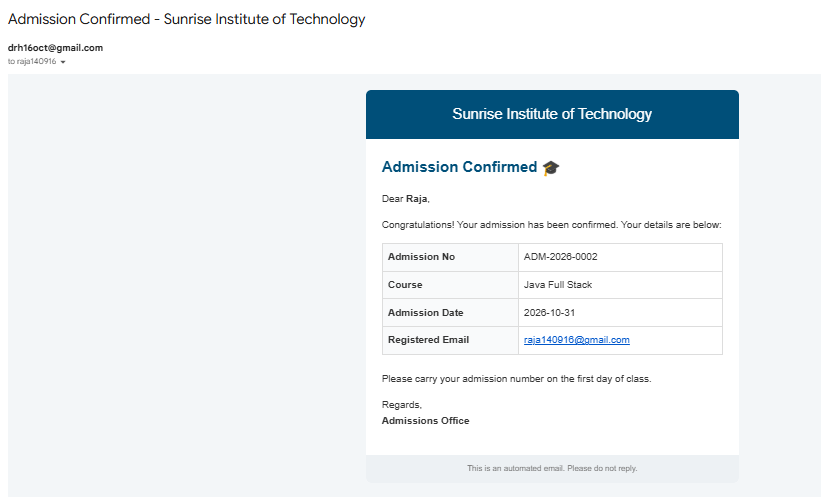
An HTML email is a message whose body uses HTML tags and inline CSS, so it can show headings, tables, colors, and branding instead of plain text. In Spring Boot you build it with MimeMessage and MimeMessageHelper from the same JavaMailSender used in 12.1. Passing true as the HTML flag tells the mail client to render the body as formatted content. It is used for admission letters, invoices, welcome emails, and notifications that need a professional look.
Features
- Rich formatting with headings, tables, colors, and buttons
- Plain-text fallback sent along with the HTML (multipart/alternative)
- UTF-8 support for symbols and emojis
- Same
spring.mail.*SMTP configuration as 12.1, with no extra setup - Can be extended with attachments and inline images through
MimeMessageHelper - Dynamic content such as name, course, and admission number inserted from the entity
Hands-on Experiment: Creating a spring boot application to understand how formatted HTML content can be included in application-generated emails.
The following steps are involved in developing this hands-on experiment.
Step 1: Generate the Project
Step 2: Project Structure
Step 3: pom.xml
Step 4: application.properties
Step 5: Create Entity Class
Step 6: Create Repository Interface
Step 7: Create Service Class
Step 8: Create Controller Class
Step 9: Main Application Class
Step 10: Run the Main Application Class
Step 1: Configure the Project on Spring Initializr
Go to start.spring.io and set:
- Project: Maven
- Language: Java
- Spring Boot version: 3.2.x
- Group: com.example
- Artifact: htmlemail
- Name: htmlemail
- Package name: com.example.htmlemail
- Packaging: Jar
- Java: 17
- Dependencies: Spring Web, Spring Data JPA, MySQL Driver, Java Mail Sender.
Click Generate to download the ZIP, then extract and import it into your IDE as a Maven project.
Step 2: Generated Project Structure
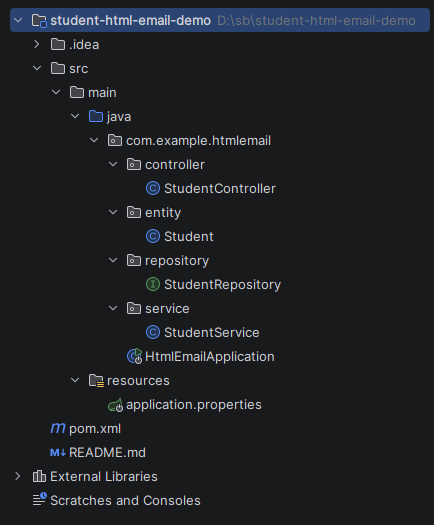
Step 3: Explore pom.xml
<?xml version="1.0" encoding="UTF-8"?>
<project xmlns="http://maven.apache.org/POM/4.0.0"
         xmlns:xsi="http://www.w3.org/2001/XMLSchema-instance"
         xsi:schemaLocation="http://maven.apache.org/POM/4.0.0 https://maven.apache.org/xsd/maven-4.0.0.xsd">
    <modelVersion>4.0.0</modelVersion>

    <parent>
        <groupId>org.springframework.boot</groupId>
        <artifactId>spring-boot-starter-parent</artifactId>
        <version>3.2.5</version>
        <relativePath/>
    </parent>

    <groupId>com.example</groupId>
    <artifactId>student-html-email-demo</artifactId>
    <version>1.0.0</version>
    <name>student-html-email-demo</name>
    <description>HTML Email - Student admission confirmation</description>

    <properties>
        <java.version>17</java.version>
    </properties>

    <dependencies>
        <dependency>
            <groupId>org.springframework.boot</groupId>
            <artifactId>spring-boot-starter-web</artifactId>
        </dependency>
        <dependency>
            <groupId>org.springframework.boot</groupId>
            <artifactId>spring-boot-starter-data-jpa</artifactId>
        </dependency>
        <dependency>
            <groupId>org.springframework.boot</groupId>
            <artifactId>spring-boot-starter-mail</artifactId>
        </dependency>
        <dependency>
            <groupId>com.mysql</groupId>
            <artifactId>mysql-connector-j</artifactId>
            <scope>runtime</scope>
        </dependency>
    </dependencies>

    <build>
        <plugins>
            <plugin>
                <groupId>org.springframework.boot</groupId>
                <artifactId>spring-boot-maven-plugin</artifactId>
            </plugin>
        </plugins>
    </build>
</project>
Step 4: application.properties
spring.application.name=student-html-email-demo
# ---------- MySQL ----------
# Create the database first: CREATE DATABASE student_html_email_db;
spring.datasource.url=jdbc:mysql://localhost:3306/student_html_email_db
spring.datasource.username=root
spring.datasource.password=root
spring.jpa.hibernate.ddl-auto=update
spring.jpa.show-sql=true
server.port=8081
# ---------- SMTP (Gmail example) ----------
spring.mail.host=smtp.gmail.com
spring.mail.port=587
spring.mail.username=your-email@gmail.com
# Use a 16-character Gmail App Password (NOT your normal password)
spring.mail.password=your-app-password
spring.mail.properties.mail.smtp.auth=true
spring.mail.properties.mail.smtp.starttls.enable=true
spring.mail.properties.mail.smtp.connectiontimeout=5000
spring.mail.properties.mail.smtp.timeout=5000
spring.mail.properties.mail.smtp.writetimeout=5000
# ---------- Custom ----------
app.mail.from=your-email@gmail.com
app.college.name=Sunrise Institute of Technology
Code language: PHP (php)Step 5: Create Entity Class
package com.example.htmlemail.entity;

import jakarta.persistence.*;
import java.time.LocalDate;

@Entity
@Table(name = "students")
public class Student {

    @Id
    @GeneratedValue(strategy = GenerationType.IDENTITY)
    private Long id;

    @Column(nullable = false)
    private String name;

    @Column(nullable = false, unique = true)
    private String email;

    private String course;

    private String admissionNumber;

    private LocalDate admissionDate;

    // SENT or FAILED
    private String emailStatus;

    public Student() {
    }

    public Long getId() { return id; }
    public void setId(Long id) { this.id = id; }

    public String getName() { return name; }
    public void setName(String name) { this.name = name; }

    public String getEmail() { return email; }
    public void setEmail(String email) { this.email = email; }

    public String getCourse() { return course; }
    public void setCourse(String course) { this.course = course; }

    public String getAdmissionNumber() { return admissionNumber; }
    public void setAdmissionNumber(String admissionNumber) { this.admissionNumber = admissionNumber; }

    public LocalDate getAdmissionDate() { return admissionDate; }
    public void setAdmissionDate(LocalDate admissionDate) { this.admissionDate = admissionDate; }

    public String getEmailStatus() { return emailStatus; }
    public void setEmailStatus(String emailStatus) { this.emailStatus = emailStatus; }
}
Step 6: Create below Repository Interface
package com.example.htmlemail.repository;

import com.example.htmlemail.entity.Student;
import org.springframework.data.jpa.repository.JpaRepository;
import org.springframework.stereotype.Repository;

@Repository
public interface StudentRepository extends JpaRepository<Student, Long> {

    boolean existsByEmail(String email);
}
Step 7: Create below Service class
package com.example.htmlemail.service;
import com.example.htmlemail.entity.Student;
import com.example.htmlemail.repository.StudentRepository;
import jakarta.mail.internet.MimeMessage;
import org.springframework.beans.factory.annotation.Value;
import org.springframework.mail.javamail.JavaMailSender;
import org.springframework.mail.javamail.MimeMessageHelper;
import org.springframework.stereotype.Service;
import java.time.LocalDate;
import java.util.List;
@Service
public class StudentService {
private final StudentRepository studentRepository;
private final JavaMailSender mailSender;
@Value("${app.mail.from}")
private String fromAddress;
@Value("${app.college.name}")
private String collegeName;
public StudentService(StudentRepository studentRepository, JavaMailSender mailSender) {
this.studentRepository = studentRepository;
this.mailSender = mailSender;
}
public Student admit(Student student) {
if (studentRepository.existsByEmail(student.getEmail())) {
throw new IllegalArgumentException("Email already registered: " + student.getEmail());
}
student.setAdmissionDate(LocalDate.now());
student.setEmailStatus("PENDING");
Student saved = studentRepository.save(student);
// Admission number needs the generated id
saved.setAdmissionNumber("ADM-" + LocalDate.now().getYear() + "-" + String.format("%04d", saved.getId()));
// Admission succeeds even if the mail server is down
try {
sendAdmissionEmail(saved);
saved.setEmailStatus("SENT");
} catch (Exception ex) {
System.err.println("Mail failed: " + ex.getMessage());
saved.setEmailStatus("FAILED");
}
return studentRepository.save(saved);
}
public Student resendAdmissionEmail(Long id) {
Student student = studentRepository.findById(id)
.orElseThrow(() -> new IllegalArgumentException("Student not found: " + id));
try {
sendAdmissionEmail(student);
student.setEmailStatus("SENT");
} catch (Exception ex) {
System.err.println("Mail failed: " + ex.getMessage());
student.setEmailStatus("FAILED");
}
return studentRepository.save(student);
}
public List<Student> getAll() {
return studentRepository.findAll();
}
// MimeMessage + MimeMessageHelper(true) tells the mail client the body is HTML
private void sendAdmissionEmail(Student student) throws Exception {
MimeMessage mimeMessage = mailSender.createMimeMessage();
MimeMessageHelper helper = new MimeMessageHelper(mimeMessage, true, "UTF-8");
helper.setFrom(fromAddress);
helper.setTo(student.getEmail());
helper.setSubject("Admission Confirmed - " + collegeName);
helper.setText(buildPlainText(student), buildHtml(student)); // plain-text fallback + HTML
mailSender.send(mimeMessage);
}
private String buildPlainText(Student s) {
return "Hello " + s.getName() + ",\n"
+ "Your admission to " + collegeName + " is confirmed.\n"
+ "Course: " + s.getCourse() + "\n"
+ "Admission No: " + s.getAdmissionNumber() + "\n"
+ "Admission Date: " + s.getAdmissionDate();
}
private String buildHtml(Student s) {
return "<html><body style='margin:0;padding:0;background:#f4f6f8;font-family:Arial,sans-serif;'>"
+ "<table width='100%' cellpadding='0' cellspacing='0'><tr><td align='center' style='padding:24px;'>"
+ "<table width='560' cellpadding='0' cellspacing='0' style='background:#ffffff;border-radius:8px;overflow:hidden;'>"
+ "<tr><td style='background:#1f4e79;color:#ffffff;padding:20px;text-align:center;font-size:22px;'>"
+ collegeName + "</td></tr>"
+ "<tr><td style='padding:24px;color:#333333;font-size:15px;line-height:1.6;'>"
+ "<h2 style='margin-top:0;color:#1f4e79;'>Admission Confirmed 🎓</h2>"
+ "<p>Dear <b>" + s.getName() + "</b>,</p>"
+ "<p>Congratulations! Your admission has been confirmed. Your details are below:</p>"
+ "<table width='100%' cellpadding='8' cellspacing='0' style='border-collapse:collapse;'>"
+ row("Admission No", s.getAdmissionNumber())
+ row("Course", s.getCourse())
+ row("Admission Date", String.valueOf(s.getAdmissionDate()))
+ row("Registered Email", s.getEmail())
+ "</table>"
+ "<p style='margin-top:24px;'>Please carry your admission number on the first day of class.</p>"
+ "<p>Regards,<br><b>Admissions Office</b></p>"
+ "</td></tr>"
+ "<tr><td style='background:#eef1f4;color:#777777;font-size:12px;text-align:center;padding:12px;'>"
+ "This is an automated email. Please do not reply.</td></tr>"
+ "</table></td></tr></table></body></html>";
}
private String row(String label, String value) {
return "<tr><td style='border:1px solid #dddddd;background:#f9fafb;width:40%;'><b>" + label + "</b></td>"
+ "<td style='border:1px solid #dddddd;'>" + value + "</td></tr>";
}
}
Step 8: Create Controller class
package com.example.htmlemail.controller;

import com.example.htmlemail.entity.Student;
import com.example.htmlemail.service.StudentService;
import org.springframework.http.HttpStatus;
import org.springframework.http.ResponseEntity;
import org.springframework.web.bind.annotation.*;

import java.util.List;
import java.util.Map;

@RestController
@RequestMapping("/students")
public class StudentController {

    private final StudentService studentService;

    public StudentController(StudentService studentService) {
        this.studentService = studentService;
    }

    @PostMapping("/admit")
    public ResponseEntity<?> admit(@RequestBody Student student) {
        try {
            return ResponseEntity.status(HttpStatus.CREATED).body(studentService.admit(student));
        } catch (IllegalArgumentException ex) {
            return ResponseEntity.badRequest().body(Map.of("error", ex.getMessage()));
        }
    }

    @PostMapping("/{id}/resend-email")
    public ResponseEntity<?> resend(@PathVariable Long id) {
        try {
            return ResponseEntity.ok(studentService.resendAdmissionEmail(id));
        } catch (IllegalArgumentException ex) {
            return ResponseEntity.status(HttpStatus.NOT_FOUND).body(Map.of("error", ex.getMessage()));
        }
    }

    @GetMapping
    public List<Student> getAll() {
        return studentService.getAll();
    }
}
Step 9: Main Application
package com.example.htmlemail;

import org.springframework.boot.SpringApplication;
import org.springframework.boot.autoconfigure.SpringBootApplication;

@SpringBootApplication
public class HtmlEmailApplication {

    public static void main(String[] args) {
        SpringApplication.run(HtmlEmailApplication.class, args);
    }
}
Step 10: Run the HtmlEmailApplication