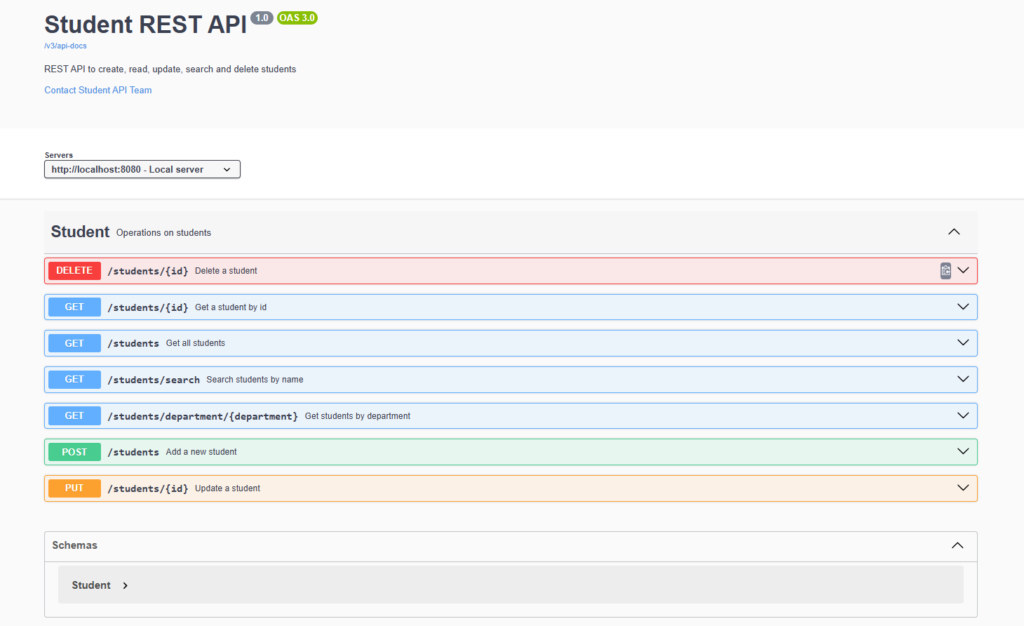
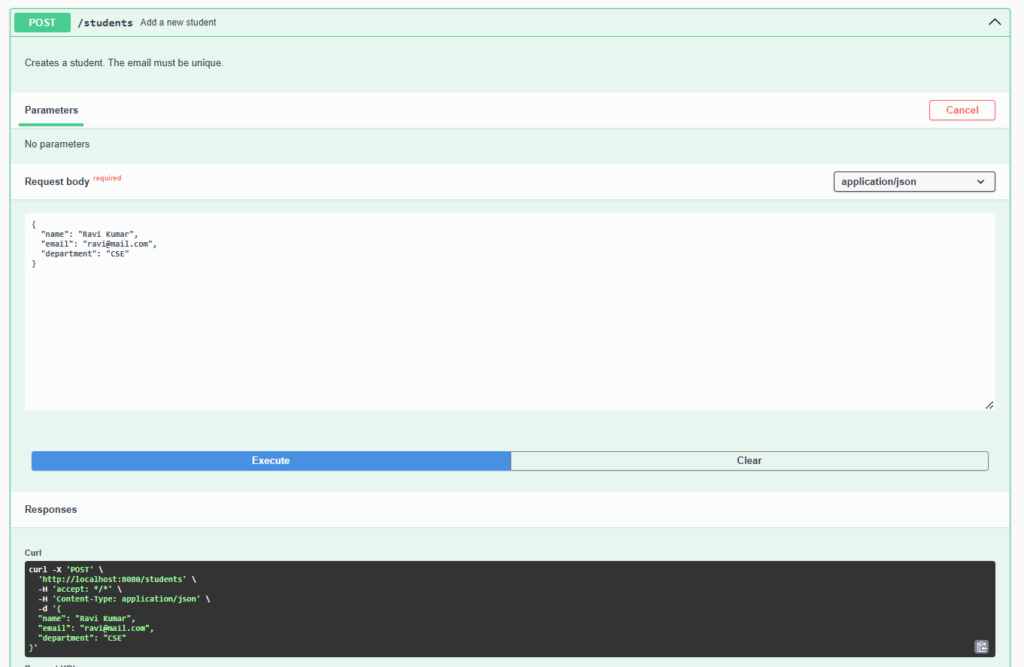
- OpenAPI is a standard, language-neutral format that formally describes a REST API: its URLs, methods, request bodies, responses and status codes.
- It is used so that developers, testers and client teams can understand and try an API without reading the source code.
- In Spring Boot, the springdoc library scans your controllers and generates the OpenAPI document automatically.
- It also serves Swagger UI, a web page where you can read the documentation and call the endpoints directly.
Features
- Generates the OpenAPI document automatically from your controllers.
- Provides interactive Swagger UI to test endpoints from the browser.
- Describes request bodies, response codes and data models.
- Documents with annotations, with no separate document to maintain.
- Exposes the raw document as JSON and YAML for tools and code generators.
- Stays in sync with the code, because it is generated from it.
Hands-on Experiment: Creating a spring boot application to understand how REST API endpoints can be formally described using the OpenAPI specification.
The following steps are involved in developing this hands-on experiment.
Step 1: Generate the Project
Step 2: Project Structure
Step 3: pom.xml
Step 4: application.properties
Step 5: Create Entity Class
Step 6: Create Repository Interface
Step 7: Create Service Class
Step 8: Create Controller Class
Step 9: Main Application Class
Step 10: Run the Main Application Class
Step 1: Configure the Project on Spring Initializr
Go to start.spring.io and set:
- Project: Maven
- Language: Java
- Spring Boot version: 3.2.x
- Group: com.example
- Artifact: openapidemo
- Name: openapidemo
- Package name: com.example.openapidemo
- Packaging: Jar
- Java: 17
- Dependencies: Spring Web, Spring Data JPA, MySQL Driver, SpringDoc OpenAPI.
Click Generate to download the ZIP, then extract and import it into your IDE as a Maven project.
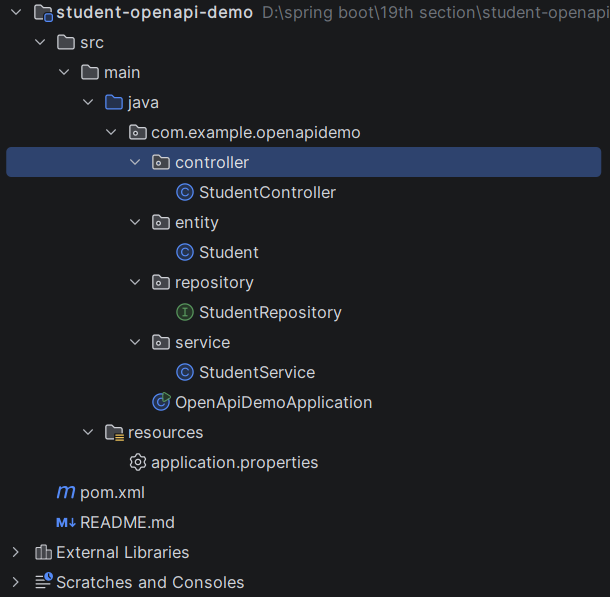
Step 2: Generated Project Structure
Step 3: Explore pom.xml
<?xml version="1.0" encoding="UTF-8"?>
<project xmlns="http://maven.apache.org/POM/4.0.0"
         xmlns:xsi="http://www.w3.org/2001/XMLSchema-instance"
         xsi:schemaLocation="http://maven.apache.org/POM/4.0.0 https://maven.apache.org/xsd/maven-4.0.0.xsd">
    <modelVersion>4.0.0</modelVersion>

    <parent>
        <groupId>org.springframework.boot</groupId>
        <artifactId>spring-boot-starter-parent</artifactId>
        <version>3.2.5</version>
        <relativePath/>
    </parent>

    <groupId>com.example</groupId>
    <artifactId>student-openapi-demo</artifactId>
    <version>1.0.0</version>
    <name>student-openapi-demo</name>
    <description>OpenAPI documentation for the Student REST API</description>

    <properties>
        <java.version>17</java.version>
    </properties>

    <dependencies>
        <dependency>
            <groupId>org.springframework.boot</groupId>
            <artifactId>spring-boot-starter-web</artifactId>
        </dependency>
        <dependency>
            <groupId>org.springframework.boot</groupId>
            <artifactId>spring-boot-starter-data-jpa</artifactId>
        </dependency>
        <dependency>
            <groupId>com.mysql</groupId>
            <artifactId>mysql-connector-j</artifactId>
            <scope>runtime</scope>
        </dependency>
        <!-- Generates the OpenAPI document and serves Swagger UI -->
        <dependency>
            <groupId>org.springdoc</groupId>
            <artifactId>springdoc-openapi-starter-webmvc-ui</artifactId>
            <version>2.5.0</version>
        </dependency>
    </dependencies>

    <build>
        <plugins>
            <plugin>
                <groupId>org.springframework.boot</groupId>
                <artifactId>spring-boot-maven-plugin</artifactId>
            </plugin>
        </plugins>
    </build>
</project>
Step 4: application.properties
spring.application.name=student-openapi-demo
server.port=8082
# MySQL (database is created automatically if it does not exist) - change username/password as needed
spring.datasource.url=jdbc:mysql://localhost:3306/studentdb?createDatabaseIfNotExist=true&useSSL=false&serverTimezone=UTC&allowPublicKeyRetrieval=true
spring.datasource.username=root
spring.datasource.password=password
spring.jpa.hibernate.ddl-auto=update
spring.jpa.show-sql=true
# OpenAPI / Swagger UI paths (these are the defaults, shown here for clarity)
springdoc.api-docs.path=/v3/api-docs
springdoc.swagger-ui.path=/swagger-ui.html
springdoc.swagger-ui.operations-sorter=methodCode language: PHP (php)Step 5: Create Entity Class
package com.example.openapidemo.entity;

import io.swagger.v3.oas.annotations.media.Schema;
import jakarta.persistence.Column;
import jakarta.persistence.Entity;
import jakarta.persistence.GeneratedValue;
import jakarta.persistence.GenerationType;
import jakarta.persistence.Id;
import jakarta.persistence.Table;

@Schema(description = "Student details")
@Entity
@Table(name = "students")
public class Student {

    @Schema(description = "Auto-generated student id", example = "1", accessMode = Schema.AccessMode.READ_ONLY)
    @Id
    @GeneratedValue(strategy = GenerationType.IDENTITY)
    private Long id;

    @Schema(description = "Full name of the student", example = "Ravi Kumar")
    private String name;

    @Schema(description = "Unique email address", example = "ravi@mail.com")
    @Column(unique = true)
    private String email;

    @Schema(description = "Department of the student", example = "CSE")
    private String department;

    public Student() {
    }

    public Student(String name, String email, String department) {
        this.name = name;
        this.email = email;
        this.department = department;
    }

    public Long getId() { return id; }
    public void setId(Long id) { this.id = id; }

    public String getName() { return name; }
    public void setName(String name) { this.name = name; }

    public String getEmail() { return email; }
    public void setEmail(String email) { this.email = email; }

    public String getDepartment() { return department; }
    public void setDepartment(String department) { this.department = department; }
}
Step 6: Create below Repository Interface
package com.example.openapidemo.repository;

import com.example.openapidemo.entity.Student;
import org.springframework.data.jpa.repository.JpaRepository;
import org.springframework.stereotype.Repository;

import java.util.List;

@Repository
public interface StudentRepository extends JpaRepository<Student, Long> {

    boolean existsByEmail(String email);

    List<Student> findByDepartment(String department);

    List<Student> findByNameContainingIgnoreCase(String keyword);
}
Step 7: Create below Service class
package com.example.openapidemo.service;

import com.example.openapidemo.entity.Student;
import com.example.openapidemo.repository.StudentRepository;
import org.springframework.http.HttpStatus;
import org.springframework.stereotype.Service;
import org.springframework.web.server.ResponseStatusException;

import java.util.List;

@Service
public class StudentService {

    private final StudentRepository studentRepository;

    public StudentService(StudentRepository studentRepository) {
        this.studentRepository = studentRepository;
    }

    public Student addStudent(Student student) {
        if (studentRepository.existsByEmail(student.getEmail())) {
            throw new ResponseStatusException(HttpStatus.CONFLICT,
                    "Email already registered: " + student.getEmail());
        }
        return studentRepository.save(student);
    }

    public List<Student> getAllStudents() {
        return studentRepository.findAll();
    }

    public Student getStudentById(Long id) {
        return studentRepository.findById(id)
                .orElseThrow(() -> new ResponseStatusException(HttpStatus.NOT_FOUND,
                        "Student not found with id: " + id));
    }

    public List<Student> getByDepartment(String department) {
        return studentRepository.findByDepartment(department);
    }

    public List<Student> searchByName(String keyword) {
        return studentRepository.findByNameContainingIgnoreCase(keyword);
    }

    public Student updateStudent(Long id, Student updated) {
        Student existing = getStudentById(id);
        existing.setName(updated.getName());
        existing.setDepartment(updated.getDepartment());
        return studentRepository.save(existing);
    }

    public void deleteStudent(Long id) {
        if (!studentRepository.existsById(id)) {
            throw new ResponseStatusException(HttpStatus.NOT_FOUND,
                    "Student not found with id: " + id);
        }
        studentRepository.deleteById(id);
    }
}
Step 8: Create Controller class
package com.example.openapidemo.controller;

import com.example.openapidemo.entity.Student;
import com.example.openapidemo.service.StudentService;
import io.swagger.v3.oas.annotations.Operation;
import io.swagger.v3.oas.annotations.Parameter;
import io.swagger.v3.oas.annotations.responses.ApiResponse;
import io.swagger.v3.oas.annotations.responses.ApiResponses;
import io.swagger.v3.oas.annotations.tags.Tag;
import org.springframework.http.HttpStatus;
import org.springframework.web.bind.annotation.*;

import java.util.List;

@Tag(name = "Student", description = "Operations on students")
@RestController
@RequestMapping("/students")
public class StudentController {

    private final StudentService studentService;

    public StudentController(StudentService studentService) {
        this.studentService = studentService;
    }

    @Operation(summary = "Add a new student", description = "Creates a student. The email must be unique.")
    @ApiResponses({
            @ApiResponse(responseCode = "201", description = "Student created"),
            @ApiResponse(responseCode = "409", description = "Email already registered", content = @io.swagger.v3.oas.annotations.media.Content)
    })
    @PostMapping
    @ResponseStatus(HttpStatus.CREATED)
    public Student addStudent(@RequestBody Student student) {
        return studentService.addStudent(student);
    }

    @Operation(summary = "Get all students")
    @ApiResponse(responseCode = "200", description = "List of all students")
    @GetMapping
    public List<Student> getAllStudents() {
        return studentService.getAllStudents();
    }

    @Operation(summary = "Get a student by id")
    @ApiResponses({
            @ApiResponse(responseCode = "200", description = "Student found"),
            @ApiResponse(responseCode = "404", description = "Student not found", content = @io.swagger.v3.oas.annotations.media.Content)
    })
    @GetMapping("/{id}")
    public Student getStudentById(
            @Parameter(description = "Id of the student", example = "1") @PathVariable Long id) {
        return studentService.getStudentById(id);
    }

    @Operation(summary = "Get students by department")
    @ApiResponse(responseCode = "200", description = "Students of the department")
    @GetMapping("/department/{department}")
    public List<Student> getByDepartment(
            @Parameter(description = "Department name", example = "CSE") @PathVariable String department) {
        return studentService.getByDepartment(department);
    }

    @Operation(summary = "Search students by name", description = "Case-insensitive search on part of the name")
    @ApiResponse(responseCode = "200", description = "Matching students")
    @GetMapping("/search")
    public List<Student> search(
            @Parameter(description = "Part of the student name", example = "ravi") @RequestParam String name) {
        return studentService.searchByName(name);
    }

    @Operation(summary = "Update a student", description = "Updates name and department of an existing student")
    @ApiResponses({
            @ApiResponse(responseCode = "200", description = "Student updated"),
            @ApiResponse(responseCode = "404", description = "Student not found", content = @io.swagger.v3.oas.annotations.media.Content)
    })
    @PutMapping("/{id}")
    public Student updateStudent(
            @Parameter(description = "Id of the student", example = "1") @PathVariable Long id,
            @RequestBody Student student) {
        return studentService.updateStudent(id, student);
    }

    @Operation(summary = "Delete a student")
    @ApiResponses({
            @ApiResponse(responseCode = "200", description = "Student deleted"),
            @ApiResponse(responseCode = "404", description = "Student not found", content = @io.swagger.v3.oas.annotations.media.Content)
    })
    @DeleteMapping("/{id}")
    public String deleteStudent(
            @Parameter(description = "Id of the student", example = "1") @PathVariable Long id) {
        studentService.deleteStudent(id);
        return "Student deleted with id: " + id;
    }
}
Step 9: Main Application
package com.example.openapidemo;

import io.swagger.v3.oas.annotations.OpenAPIDefinition;
import io.swagger.v3.oas.annotations.info.Contact;
import io.swagger.v3.oas.annotations.info.Info;
import io.swagger.v3.oas.annotations.servers.Server;
import org.springframework.boot.SpringApplication;
import org.springframework.boot.autoconfigure.SpringBootApplication;

// General information shown at the top of the OpenAPI document and Swagger UI
@OpenAPIDefinition(
        info = @Info(
                title = "Student REST API",
                version = "1.0",
                description = "REST API to create, read, update, search and delete students",
                contact = @Contact(name = "Student API Team", email = "support@example.com")
        ),
        servers = @Server(url = "http://localhost:8080", description = "Local server")
)
@SpringBootApplication
public class OpenApiDemoApplication {

    public static void main(String[] args) {
        SpringApplication.run(OpenApiDemoApplication.class, args);
    }
}
Step 10: Run the OpenApiDemoApplication