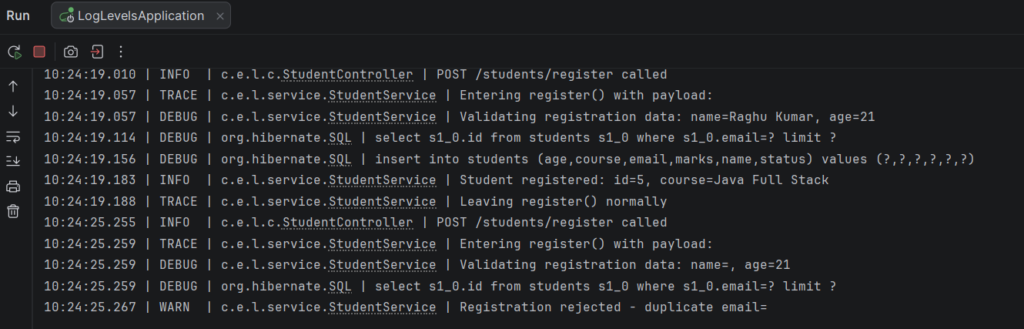
Log levels classify each log message by its importance, so you can tell a routine event from a serious failure. Spring Boot (Logback) supports TRACE, DEBUG, INFO, WARN, and ERROR, from least to most severe. Choosing the right level keeps production logs clean (only INFO and above) while still allowing detailed DEBUG output when troubleshooting. Levels can be set globally or per package in application.properties, with no code change.
Features
- Five severity levels, ordered TRACE < DEBUG < INFO < WARN < ERROR
- A configured level shows itself and everything more severe
- Different levels for different packages (for example service at TRACE, controller at INFO)
- Root level for the whole application, with overrides for Hibernate, Spring, or your own code
- Level can be changed by editing a property and restarting
- Same
log.xxx("...{}", value)syntax for every level
Log Level Types
| Level | Meaning | Student processing example |
|---|---|---|
| TRACE | Finest detail, method entry and exit | Entering register() with payload: ravi@example.com |
| DEBUG | Developer detail for troubleshooting | Evaluating marks=82 for student id=1 |
| INFO | Normal business event that succeeded | Student registered: id=1, course=Java Full Stack |
| WARN | Bad input or unusual situation; the app continues | Registration rejected - invalid age 12 |
| ERROR | Operation failed and needs attention | Data problem: marks are missing for student id=1 |
Hands-on Experiment: Creating a spring boot application to understand how DEBUG, INFO, WARN, and ERROR levels represent different application events.
The following steps are involved in developing this hands-on experiment.
Step 1: Generate the Project
Step 2: Project Structure
Step 3: pom.xml
Step 4: application.properties
Step 5: Create Entity Class
Step 6: Create Repository Interface
Step 7: Create Service Class
Step 8: Create Controller Class
Step 9: Main Application Class
Step 10: Run the Main Application Class
Step 1: Configure the Project on Spring Initializr
Go to start.spring.io and set:
- Project: Maven
- Language: Java
- Spring Boot version: 3.2.x
- Group: com.example
- Artifact: loglevels
- Name: loglevels
- Package name: com.example.loglevels
- Packaging: Jar
- Java: 17
- Dependencies: Spring Web, Spring Data JPA, MySQL Driver, Validation I/O.
Click Generate to download the ZIP, then extract and import it into your IDE as a Maven project.
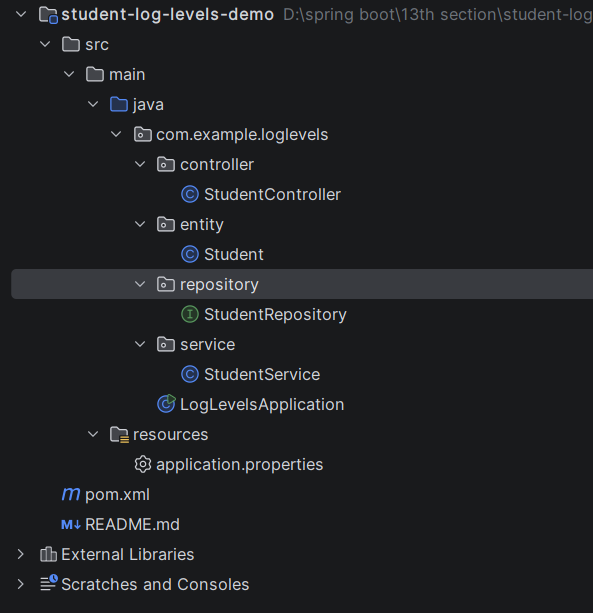
Step 2: Generated Project Structure
Step 3: Explore pom.xml
<?xml version="1.0" encoding="UTF-8"?>
<project xmlns="http://maven.apache.org/POM/4.0.0"
         xmlns:xsi="http://www.w3.org/2001/XMLSchema-instance"
         xsi:schemaLocation="http://maven.apache.org/POM/4.0.0 https://maven.apache.org/xsd/maven-4.0.0.xsd">
    <modelVersion>4.0.0</modelVersion>

    <parent>
        <groupId>org.springframework.boot</groupId>
        <artifactId>spring-boot-starter-parent</artifactId>
        <version>3.2.5</version>
        <relativePath/>
    </parent>

    <groupId>com.example</groupId>
    <artifactId>student-log-levels-demo</artifactId>
    <version>1.0.0</version>
    <name>student-log-levels-demo</name>
    <description>Log Levels - appropriate levels during Student processing</description>

    <properties>
        <java.version>17</java.version>
    </properties>

    <dependencies>
        <dependency>
            <groupId>org.springframework.boot</groupId>
            <artifactId>spring-boot-starter-web</artifactId>
        </dependency>
        <dependency>
            <groupId>org.springframework.boot</groupId>
            <artifactId>spring-boot-starter-data-jpa</artifactId>
        </dependency>
        <dependency>
            <groupId>com.mysql</groupId>
            <artifactId>mysql-connector-j</artifactId>
            <scope>runtime</scope>
        </dependency>
    </dependencies>

    <build>
        <plugins>
            <plugin>
                <groupId>org.springframework.boot</groupId>
                <artifactId>spring-boot-maven-plugin</artifactId>
            </plugin>
        </plugins>
    </build>
</project>
Step 4: application.properties
spring.application.name=student-log-levels-demo
# ---------- MySQL ----------
# Create the database first: CREATE DATABASE student_log_levels_db;
spring.datasource.url=jdbc:mysql://localhost:3306/sys
spring.datasource.username=root
spring.datasource.password=password
spring.jpa.hibernate.ddl-auto=update
# ---------- Log levels ----------
# TRACE < DEBUG < INFO < WARN < ERROR (a level shows itself and everything to its right)
logging.level.root=INFO
# Service layer: show everything, including TRACE
logging.level.com.example.loglevels.service=TRACE
# Controller layer: only INFO and above (hides DEBUG/TRACE from controller)
logging.level.com.example.loglevels.controller=INFO
# Hibernate SQL at DEBUG
logging.level.org.hibernate.SQL=DEBUG
logging.pattern.console=%d{HH:mm:ss.SSS} | %-5level | %logger{30} | %msg%n
logging.file.name=logs/student-levels.logCode language: PHP (php)Step 5: Create Entity Class
package com.example.loglevels.entity;

import jakarta.persistence.*;

@Entity
@Table(name = "students")
public class Student {

    @Id
    @GeneratedValue(strategy = GenerationType.IDENTITY)
    private Long id;

    @Column(nullable = false)
    private String name;

    @Column(nullable = false, unique = true)
    private String email;

    private String course;

    private Integer age;

    // Can be null until exam results are entered
    private Integer marks;

    // REGISTERED, PASSED, DISTINCTION, FAILED
    private String status;

    public Student() {
    }

    public Long getId() { return id; }
    public void setId(Long id) { this.id = id; }

    public String getName() { return name; }
    public void setName(String name) { this.name = name; }

    public String getEmail() { return email; }
    public void setEmail(String email) { this.email = email; }

    public String getCourse() { return course; }
    public void setCourse(String course) { this.course = course; }

    public Integer getAge() { return age; }
    public void setAge(Integer age) { this.age = age; }

    public Integer getMarks() { return marks; }
    public void setMarks(Integer marks) { this.marks = marks; }

    public String getStatus() { return status; }
    public void setStatus(String status) { this.status = status; }
}
Step 6: Create below Repository Interface
package com.example.loglevels.repository;

import com.example.loglevels.entity.Student;
import org.springframework.data.jpa.repository.JpaRepository;
import org.springframework.stereotype.Repository;

@Repository
public interface StudentRepository extends JpaRepository<Student, Long> {

    boolean existsByEmail(String email);
}
Step 7: Create below Service class
package com.example.loglevels.service;

import com.example.loglevels.entity.Student;
import com.example.loglevels.repository.StudentRepository;
import org.slf4j.Logger;
import org.slf4j.LoggerFactory;
import org.springframework.stereotype.Service;

import java.util.List;

@Service
public class StudentService {

    private static final Logger log = LoggerFactory.getLogger(StudentService.class);

    private final StudentRepository studentRepository;

    public StudentService(StudentRepository studentRepository) {
        this.studentRepository = studentRepository;
    }

    // ------------------------------------------------------------------
    // Register a student - shows TRACE, DEBUG, INFO, WARN, ERROR
    // ------------------------------------------------------------------
    public Student register(Student student) {
        log.trace("Entering register() with payload: {}", student.getEmail());          // TRACE: method flow

        log.debug("Validating registration data: name={}, age={}", student.getName(), student.getAge()); // DEBUG: developer detail

        if (student.getAge() == null || student.getAge() < 16) {
            log.warn("Registration rejected - invalid age {} for email={}", student.getAge(), student.getEmail()); // WARN: bad input, app continues
            throw new IllegalArgumentException("Student must be at least 16 years old");
        }

        if (studentRepository.existsByEmail(student.getEmail())) {
            log.warn("Registration rejected - duplicate email={}", student.getEmail());  // WARN
            throw new IllegalArgumentException("Email already registered: " + student.getEmail());
        }

        try {
            student.setStatus("REGISTERED");
            Student saved = studentRepository.save(student);
            log.info("Student registered: id={}, course={}", saved.getId(), saved.getCourse()); // INFO: business event
            log.trace("Leaving register() normally");
            return saved;
        } catch (Exception ex) {
            log.error("Database failure while registering email={}", student.getEmail(), ex); // ERROR: operation failed, stack trace
            throw ex;
        }
    }

    // ------------------------------------------------------------------
    // Process results - pass / fail / distinction / bad data
    // ------------------------------------------------------------------
    public Student processResult(Long id) {
        log.debug("Processing result for student id={}", id);

        Student student = studentRepository.findById(id).orElseThrow(() -> {
            log.warn("Result processing skipped - student not found: id={}", id);
            return new IllegalArgumentException("Student not found: " + id);
        });

        Integer marks = student.getMarks();
        if (marks == null) {
            // Data that should exist is missing - a real problem the team must look at
            log.error("Data problem: marks are missing for student id={} ({})", id, student.getEmail());
            throw new IllegalStateException("Marks not available for student " + id);
        }

        log.debug("Evaluating marks={} for student id={}", marks, id);

        if (marks >= 75) {
            student.setStatus("DISTINCTION");
            log.info("Student id={} passed with DISTINCTION (marks={})", id, marks);
        } else if (marks >= 40) {
            student.setStatus("PASSED");
            log.info("Student id={} PASSED (marks={})", id, marks);
        } else {
            student.setStatus("FAILED");
            log.warn("Student id={} FAILED (marks={}) - needs follow-up", id, marks);
        }
        return studentRepository.save(student);
    }

    public Student updateMarks(Long id, Integer marks) {
        log.debug("Updating marks for student id={} to {}", id, marks);
        Student student = studentRepository.findById(id)
                .orElseThrow(() -> {
                    log.warn("Marks update skipped - student not found: id={}", id);
                    return new IllegalArgumentException("Student not found: " + id);
                });
        student.setMarks(marks);
        Student saved = studentRepository.save(student);
        log.info("Marks updated for student id={}", id);
        return saved;
    }

    public List<Student> getAll() {
        log.debug("Fetching all students");
        return studentRepository.findAll();
    }

    // Prints one message at every level so the effect of the configured level is visible
    public void logAllLevels() {
        log.trace("TRACE message - most detailed, method flow");
        log.debug("DEBUG message - developer troubleshooting detail");
        log.info("INFO message - normal business event");
        log.warn("WARN message - unexpected but recoverable");
        log.error("ERROR message - operation failed");
    }
}
Step 8: Create Controller class
package com.example.loglevels.controller;

import com.example.loglevels.entity.Student;
import com.example.loglevels.service.StudentService;
import org.slf4j.Logger;
import org.slf4j.LoggerFactory;
import org.springframework.http.HttpStatus;
import org.springframework.http.ResponseEntity;
import org.springframework.web.bind.annotation.*;

import java.util.List;
import java.util.Map;

@RestController
@RequestMapping("/students")
public class StudentController {

    private static final Logger log = LoggerFactory.getLogger(StudentController.class);

    private final StudentService studentService;

    public StudentController(StudentService studentService) {
        this.studentService = studentService;
    }

    @PostMapping("/register")
    public ResponseEntity<?> register(@RequestBody Student student) {
        log.info("POST /students/register called");
        log.debug("Controller DEBUG (hidden, controller level is INFO)");
        try {
            return ResponseEntity.status(HttpStatus.CREATED).body(studentService.register(student));
        } catch (IllegalArgumentException ex) {
            return ResponseEntity.badRequest().body(Map.of("error", ex.getMessage()));
        } catch (Exception ex) {
            return ResponseEntity.status(HttpStatus.INTERNAL_SERVER_ERROR).body(Map.of("error", "Registration failed"));
        }
    }

    @PutMapping("/{id}/marks")
    public ResponseEntity<?> updateMarks(@PathVariable Long id, @RequestBody Map<String, Integer> request) {
        log.info("PUT /students/{}/marks called", id);
        try {
            return ResponseEntity.ok(studentService.updateMarks(id, request.get("marks")));
        } catch (IllegalArgumentException ex) {
            return ResponseEntity.status(HttpStatus.NOT_FOUND).body(Map.of("error", ex.getMessage()));
        }
    }

    @PostMapping("/{id}/process-result")
    public ResponseEntity<?> processResult(@PathVariable Long id) {
        log.info("POST /students/{}/process-result called", id);
        try {
            return ResponseEntity.ok(studentService.processResult(id));
        } catch (IllegalArgumentException ex) {
            return ResponseEntity.status(HttpStatus.NOT_FOUND).body(Map.of("error", ex.getMessage()));
        } catch (IllegalStateException ex) {
            return ResponseEntity.status(HttpStatus.UNPROCESSABLE_ENTITY).body(Map.of("error", ex.getMessage()));
        }
    }

    @GetMapping
    public List<Student> getAll() {
        log.info("GET /students called");
        return studentService.getAll();
    }

    @GetMapping("/log-demo")
    public Map<String, String> logDemo() {
        log.info("GET /students/log-demo called");
        studentService.logAllLevels();
        return Map.of("message", "Check the console: service shows all 5 levels, controller shows INFO and above");
    }
}
Step 9: Main Application
package com.example.loglevels;

import org.springframework.boot.SpringApplication;
import org.springframework.boot.autoconfigure.SpringBootApplication;

@SpringBootApplication
public class LogLevelsApplication {

    public static void main(String[] args) {
        SpringApplication.run(LogLevelsApplication.class, args);
    }
}
Step 10: Run the LogLevelsApplication