- Health monitoring means checking, through a URL, whether an application and the systems it depends on are working.
- It is used so that monitoring tools, load balancers and Kubernetes can detect a failing application automatically and react, for example by restarting it or stopping traffic to it.
- Spring Boot Actuator provides
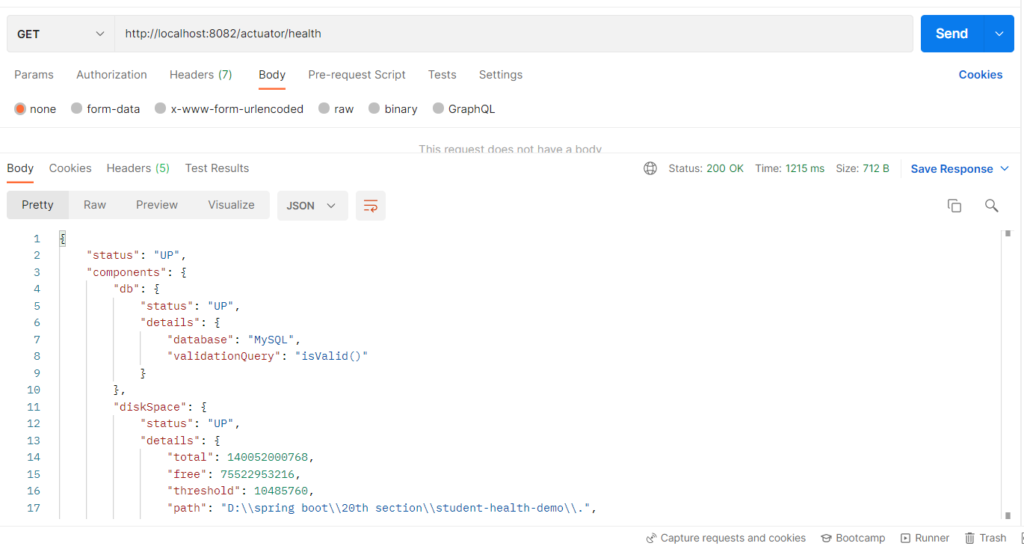
/actuator/health, which combines the status of the database, disk space and any custom checks into one result. - If any critical component is
DOWN, the endpoint returns HTTP 503, so tools don’t need to read the JSON.
Features
- Reports an overall status plus the status of each component.
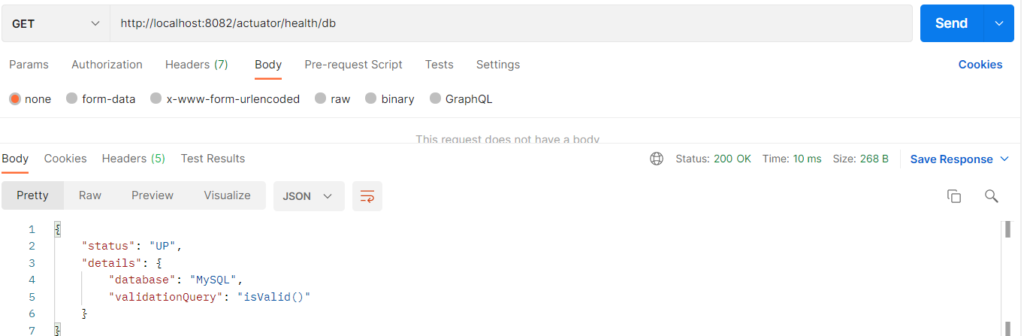
- Checks the MySQL connection automatically through the
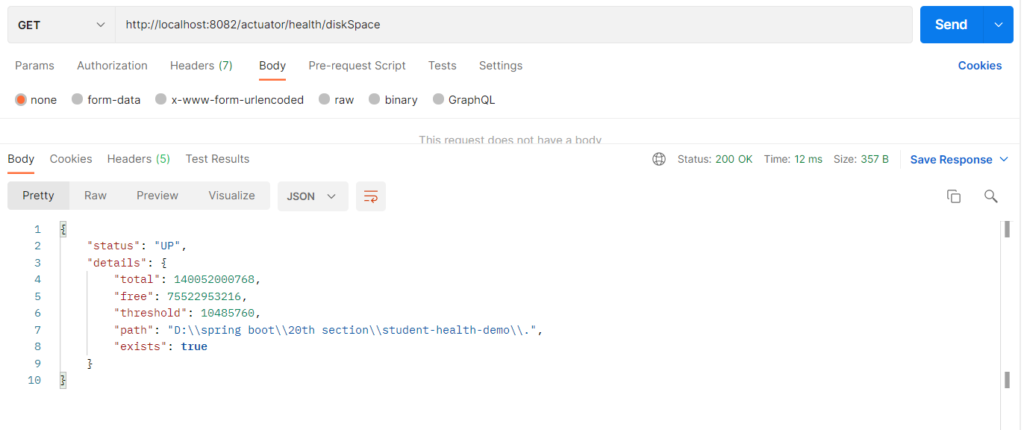
dbindicator. - Checks free disk space through the
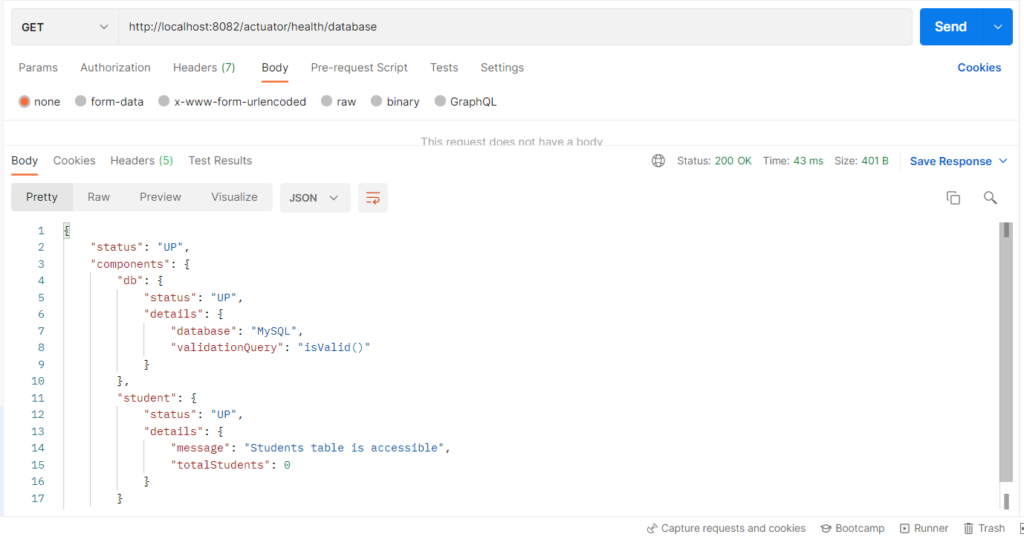
diskSpaceindicator. - Supports custom health checks, such as reading the students table.
- Provides separate liveness and readiness probes for Kubernetes.
- Supports health groups that check only selected components.
Health Indicators
| Indicator | Checks | Where it comes from |
|---|---|---|
db |
Whether the application can connect to MySQL. | Built in. |
diskSpace |
Whether enough disk space is free. | Built in. |
ping |
A simple “application responds” check. | Built in. |
student |
Whether the students table can be read, and how many rows it has. | Custom (StudentHealthIndicator). |
livenessState |
Whether the application itself is alive. | Built in, when probes are enabled. |
readinessState |
Whether the application is ready to accept traffic. | Built in, when probes are enabled. |
Health status values
UPmeans the component is working (HTTP 200).DOWNmeans the component is failing (HTTP 503).OUT_OF_SERVICEmeans the component was taken out of service on purpose (HTTP 503).UNKNOWNmeans the state cannot be determined (HTTP 200).
Health endpoints
/actuator/healthis the overall status with all components./actuator/health/{name}is one component, such asdb./actuator/health/livenessand/actuator/health/readinessare the Kubernetes probes./actuator/health/databaseis a custom group made ofdbandstudent.
Hands-on Experiment: Creating a spring boot application to understand how application and dependency health can be checked through monitoring endpoints.
The following steps are involved in developing this hands-on experiment.
Step 1: Generate the Project
Step 2: Project Structure
Step 3: pom.xml
Step 4: application.properties
Step 5: Create Entity Class
Step 6: Create Repository Interface
Step 7: Create Service Class
Step 8: Create Controller Class
Step 9: Main Application Class
Step 10: Run the Main Application Class
Step 1: Configure the Project on Spring Initializr
Go to start.spring.io and set:
- Project: Maven
- Language: Java
- Spring Boot version: 3.2.x
- Group: com.example
- Artifact: healthdemo
- Name: healthdemo
- Package name: com.example.healthdemo
- Packaging: Jar
- Java: 17
- Dependencies: Spring Web, Spring Data JPA, MySQL Driver, Actuator.
Click Generate to download the ZIP, then extract and import it into your IDE as a Maven project.
Step 2: Generated Project Structure
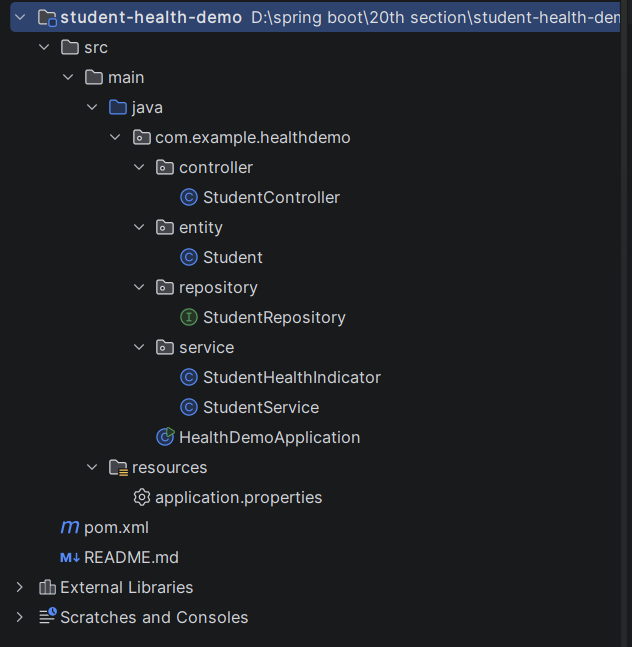
Step 3: Explore pom.xml
<?xml version="1.0" encoding="UTF-8"?>
<project xmlns="http://maven.apache.org/POM/4.0.0"
         xmlns:xsi="http://www.w3.org/2001/XMLSchema-instance"
         xsi:schemaLocation="http://maven.apache.org/POM/4.0.0 https://maven.apache.org/xsd/maven-4.0.0.xsd">
    <modelVersion>4.0.0</modelVersion>

    <parent>
        <groupId>org.springframework.boot</groupId>
        <artifactId>spring-boot-starter-parent</artifactId>
        <version>3.2.5</version>
        <relativePath/>
    </parent>

    <groupId>com.example</groupId>
    <artifactId>student-health-demo</artifactId>
    <version>1.0.0</version>
    <name>student-health-demo</name>
    <description>Health monitoring of the Student application and its MySQL connection</description>

    <properties>
        <java.version>17</java.version>
    </properties>

    <dependencies>
        <dependency>
            <groupId>org.springframework.boot</groupId>
            <artifactId>spring-boot-starter-web</artifactId>
        </dependency>
        <dependency>
            <groupId>org.springframework.boot</groupId>
            <artifactId>spring-boot-starter-data-jpa</artifactId>
        </dependency>
        <!-- Provides /actuator/health and the health indicators -->
        <dependency>
            <groupId>org.springframework.boot</groupId>
            <artifactId>spring-boot-starter-actuator</artifactId>
        </dependency>
        <dependency>
            <groupId>com.mysql</groupId>
            <artifactId>mysql-connector-j</artifactId>
            <scope>runtime</scope>
        </dependency>
    </dependencies>

    <build>
        <plugins>
            <plugin>
                <groupId>org.springframework.boot</groupId>
                <artifactId>spring-boot-maven-plugin</artifactId>
            </plugin>
        </plugins>
    </build>
</project>
Step 4: application.properties
spring.application.name=student-health-demo
server.port=8082
# MySQL (database is created automatically if it does not exist) - change username/password as needed
spring.datasource.url=jdbc:mysql://localhost:3306/studentdb?createDatabaseIfNotExist=true&useSSL=false&serverTimezone=UTC&allowPublicKeyRetrieval=true
spring.datasource.username=root
spring.datasource.password=password
spring.jpa.hibernate.ddl-auto=update
spring.jpa.show-sql=true
# ---------- Health monitoring settings ----------
# Expose only the health and info endpoints
management.endpoints.web.exposure.include=health,info
# Show every component (db, diskSpace, ping, student) with its details
management.endpoint.health.show-components=always
management.endpoint.health.show-details=always
# Enable the liveness and readiness probes (/actuator/health/liveness and /actuator/health/readiness)
management.endpoint.health.probes.enabled=true
# Built-in indicators (enabled by default, shown here for clarity)
management.health.db.enabled=true
management.health.diskspace.enabled=true
# A custom health group: /actuator/health/database checks only the db and student indicators
management.endpoint.health.group.database.include=db,student
management.endpoint.health.group.database.show-details=alwaysCode language: PHP (php)Step 5: Create Entity Class
package com.example.healthdemo.entity;

import jakarta.persistence.Column;
import jakarta.persistence.Entity;
import jakarta.persistence.GeneratedValue;
import jakarta.persistence.GenerationType;
import jakarta.persistence.Id;
import jakarta.persistence.Table;

@Entity
@Table(name = "students")
public class Student {

    @Id
    @GeneratedValue(strategy = GenerationType.IDENTITY)
    private Long id;

    private String name;

    @Column(unique = true)
    private String email;

    private String department;

    public Student() {
    }

    public Student(String name, String email, String department) {
        this.name = name;
        this.email = email;
        this.department = department;
    }

    public Long getId() { return id; }
    public void setId(Long id) { this.id = id; }

    public String getName() { return name; }
    public void setName(String name) { this.name = name; }

    public String getEmail() { return email; }
    public void setEmail(String email) { this.email = email; }

    public String getDepartment() { return department; }
    public void setDepartment(String department) { this.department = department; }
}
Step 6: Create below Repository Interface
package com.example.healthdemo.repository;

import com.example.healthdemo.entity.Student;
import org.springframework.data.jpa.repository.JpaRepository;
import org.springframework.stereotype.Repository;

@Repository
public interface StudentRepository extends JpaRepository<Student, Long> {

    boolean existsByEmail(String email);
}
Step 7: Create below Service class
package com.example.healthdemo.service;

import com.example.healthdemo.repository.StudentRepository;
import org.springframework.boot.actuate.health.Health;
import org.springframework.boot.actuate.health.HealthIndicator;
import org.springframework.stereotype.Component;

// Custom health check: can the application actually read the students table?
@Component
public class StudentHealthIndicator implements HealthIndicator {

    private final StudentRepository studentRepository;

    public StudentHealthIndicator(StudentRepository studentRepository) {
        this.studentRepository = studentRepository;
    }

    @Override
    public Health health() {
        try {
            long totalStudents = studentRepository.count();
            return Health.up()
                    .withDetail("message", "Students table is accessible")
                    .withDetail("totalStudents", totalStudents)
                    .build();
        } catch (Exception ex) {
            return Health.down()
                    .withDetail("message", "Cannot read the students table")
                    .withDetail("error", ex.getMessage())
                    .build();
        }
    }
}
package com.example.healthdemo.service;

import com.example.healthdemo.entity.Student;
import com.example.healthdemo.repository.StudentRepository;
import org.springframework.http.HttpStatus;
import org.springframework.stereotype.Service;
import org.springframework.web.server.ResponseStatusException;

import java.util.List;

@Service
public class StudentService {

    private final StudentRepository studentRepository;

    public StudentService(StudentRepository studentRepository) {
        this.studentRepository = studentRepository;
    }

    public Student addStudent(Student student) {
        if (studentRepository.existsByEmail(student.getEmail())) {
            throw new ResponseStatusException(HttpStatus.CONFLICT,
                    "Email already registered: " + student.getEmail());
        }
        return studentRepository.save(student);
    }

    public List<Student> getAllStudents() {
        return studentRepository.findAll();
    }

    public Student getStudentById(Long id) {
        return studentRepository.findById(id)
                .orElseThrow(() -> new ResponseStatusException(HttpStatus.NOT_FOUND,
                        "Student not found with id: " + id));
    }

    public void deleteStudent(Long id) {
        if (!studentRepository.existsById(id)) {
            throw new ResponseStatusException(HttpStatus.NOT_FOUND,
                    "Student not found with id: " + id);
        }
        studentRepository.deleteById(id);
    }
}
Step 8: Create Controller class
package com.example.healthdemo.controller;

import com.example.healthdemo.entity.Student;
import com.example.healthdemo.service.StudentService;
import org.springframework.http.HttpStatus;
import org.springframework.web.bind.annotation.*;

import java.util.List;

@RestController
@RequestMapping("/students")
public class StudentController {

    private final StudentService studentService;

    public StudentController(StudentService studentService) {
        this.studentService = studentService;
    }

    @PostMapping
    @ResponseStatus(HttpStatus.CREATED)
    public Student addStudent(@RequestBody Student student) {
        return studentService.addStudent(student);
    }

    @GetMapping
    public List<Student> getAllStudents() {
        return studentService.getAllStudents();
    }

    @GetMapping("/{id}")
    public Student getStudentById(@PathVariable Long id) {
        return studentService.getStudentById(id);
    }

    @DeleteMapping("/{id}")
    public String deleteStudent(@PathVariable Long id) {
        studentService.deleteStudent(id);
        return "Student deleted with id: " + id;
    }
}
Step 9: Main Application
package com.example.healthdemo;

import org.springframework.boot.SpringApplication;
import org.springframework.boot.autoconfigure.SpringBootApplication;

@SpringBootApplication
public class HealthDemoApplication {

    public static void main(String[] args) {
        SpringApplication.run(HealthDemoApplication.class, args);
    }
}
Step 10: Run the HealthDemoApplication