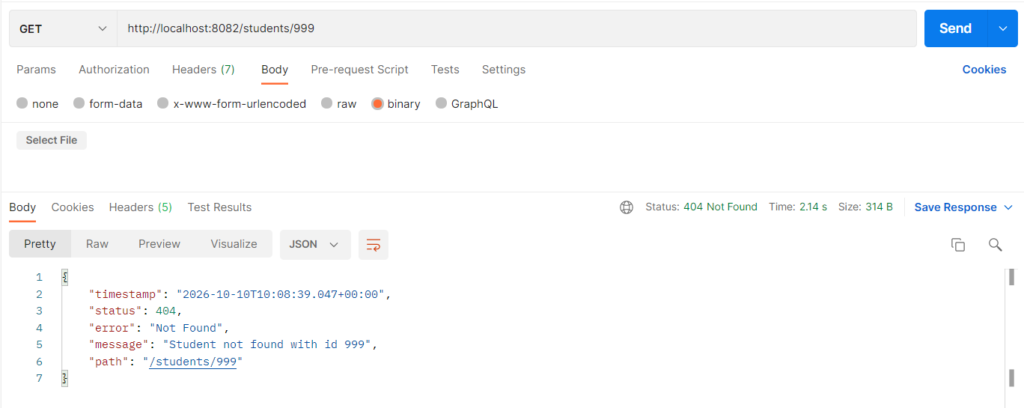
A custom exception is your own exception class that describes one specific failure in your application, such as a student who does not exist. It extends RuntimeException (or Exception) and carries a clear name and message, so the problem is obvious in code, logs, and API responses. It is used instead of generic exceptions, because StudentNotFoundException explains the failure better than RuntimeException or a null check. In Spring Boot, adding @ResponseStatus to the class also turns the exception into the right HTTP status code automatically.
Features
- Gives a meaningful name and message to an application-specific failure
- Keeps business error logic out of the controller
- Can be thrown from the service layer and handled in one place
@ResponseStatusmaps the exception to an HTTP status (404 here) without extra code- Can carry extra data such as the missing id
- Makes code and logs easier to read and debug
Custom Exception Types
- Unchecked custom exception: extends
RuntimeException. It needs nothrowsortry-catch, and is the normal choice in Spring Boot.StudentNotFoundExceptionin this example is of this kind. - Checked custom exception: extends
Exception. The compiler forces callers to handle it or declarethrows, so it is used less often in Spring applications. - Exception with HTTP status: an exception annotated with
@ResponseStatus, so Spring returns that status code automatically. - Exception with extra fields: carries data such as an error code or the id that failed.
- Exception hierarchy: a base exception (for example
ApplicationException) with child exceptions such asStudentNotFoundExceptionandDuplicateStudentException.
Hands-on Experiment: Creating a spring boot application to understand how application-specific failures can be represented using meaningful exception classes.
The following steps are involved in developing this hands-on experiment.
Step 1: Generate the Project
Step 2: Project Structure
Step 3: pom.xml
Step 4: application.properties
Step 5: Create Entity Class
Step 6: Create Repository Interface
Step 7: Create Service Class
Step 8: Create Controller Class
Step 9: Main Application Class
Step 10: Run the Main Application Class
Step 1: Configure the Project on Spring Initializr
Go to start.spring.io and set:
- Project: Maven
- Language: Java
- Spring Boot version: 3.2.x
- Group: com.example
- Artifact: customexception
- Name: customexception
- Package name: com.example.customexception
- Packaging: Jar
- Java: 17
- Dependencies: Spring Web, Spring Data JPA, MySQL Driver.
Click Generate to download the ZIP, then extract and import it into your IDE as a Maven project.
Step 2: Generated Project Structure
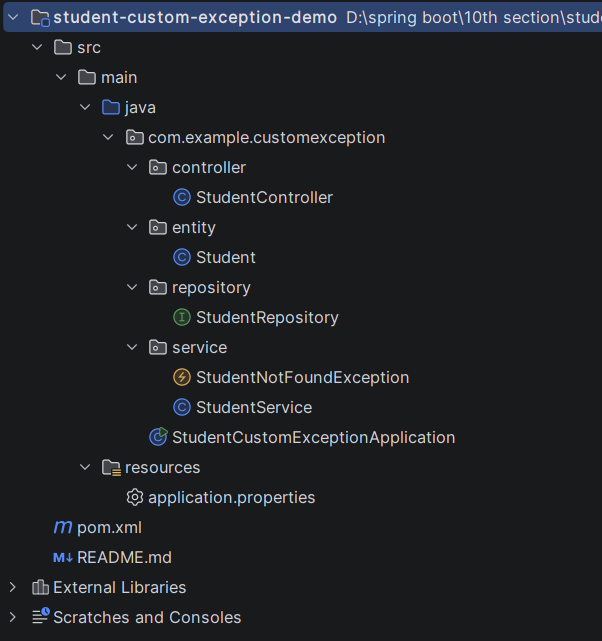
Step 3: Explore pom.xml
<?xml version="1.0" encoding="UTF-8"?>
<project xmlns="http://maven.apache.org/POM/4.0.0"
         xmlns:xsi="http://www.w3.org/2001/XMLSchema-instance"
         xsi:schemaLocation="http://maven.apache.org/POM/4.0.0 https://maven.apache.org/xsd/maven-4.0.0.xsd">
    <modelVersion>4.0.0</modelVersion>

    <parent>
        <groupId>org.springframework.boot</groupId>
        <artifactId>spring-boot-starter-parent</artifactId>
        <version>3.2.5</version>
        <relativePath/>
    </parent>

    <groupId>com.example</groupId>
    <artifactId>student-custom-exception-demo</artifactId>
    <version>1.0.0</version>
    <name>student-custom-exception-demo</name>

    <properties>
        <java.version>17</java.version>
    </properties>

    <dependencies>
        <dependency>
            <groupId>org.springframework.boot</groupId>
            <artifactId>spring-boot-starter-web</artifactId>
        </dependency>
        <dependency>
            <groupId>org.springframework.boot</groupId>
            <artifactId>spring-boot-starter-data-jpa</artifactId>
        </dependency>
        <dependency>
            <groupId>com.mysql</groupId>
            <artifactId>mysql-connector-j</artifactId>
            <scope>runtime</scope>
        </dependency>
    </dependencies>

    <build>
        <plugins>
            <plugin>
                <groupId>org.springframework.boot</groupId>
                <artifactId>spring-boot-maven-plugin</artifactId>
            </plugin>
        </plugins>
    </build>
</project>
Step 4: application.properties
spring.application.name=student-custom-exception-demo
server.port=8082
# MySQL (database is created automatically if missing)
spring.datasource.url=jdbc:mysql://localhost:3306/student_exception_db?createDatabaseIfNotExist=true&useSSL=false&allowPublicKeyRetrieval=true&serverTimezone=UTC
spring.datasource.username=root
spring.datasource.password=password
spring.jpa.hibernate.ddl-auto=update
spring.jpa.show-sql=true
# Show the custom exception message in the JSON error response
server.error.include-message=alwaysCode language: PHP (php)Step 5: Create Entity Class
package com.example.customexception.entity;

import jakarta.persistence.Entity;
import jakarta.persistence.GeneratedValue;
import jakarta.persistence.GenerationType;
import jakarta.persistence.Id;
import jakarta.persistence.Table;

@Entity
@Table(name = "students")
public class Student {

    @Id
    @GeneratedValue(strategy = GenerationType.IDENTITY)
    private Long id;

    private String name;
    private String email;
    private String course;

    public Student() {
    }

    public Long getId() { return id; }
    public void setId(Long id) { this.id = id; }

    public String getName() { return name; }
    public void setName(String name) { this.name = name; }

    public String getEmail() { return email; }
    public void setEmail(String email) { this.email = email; }

    public String getCourse() { return course; }
    public void setCourse(String course) { this.course = course; }
}
Step 6: Create below Repository Interface
package com.example.customexception.repository;

import com.example.customexception.entity.Student;
import org.springframework.data.jpa.repository.JpaRepository;
import org.springframework.stereotype.Repository;

@Repository
public interface StudentRepository extends JpaRepository<Student, Long> {
}
Step 7: Create below Service class
package com.example.customexception.service;

import com.example.customexception.entity.Student;
import com.example.customexception.repository.StudentRepository;
import org.springframework.stereotype.Service;

import java.util.List;

@Service
public class StudentService {

    private final StudentRepository studentRepository;

    public StudentService(StudentRepository studentRepository) {
        this.studentRepository = studentRepository;
    }

    public Student createStudent(Student student) {
        student.setId(null);
        return studentRepository.save(student);
    }

    public List<Student> getAllStudents() {
        return studentRepository.findAll();
    }

    public Student getStudentById(Long id) {
        return studentRepository.findById(id)
                .orElseThrow(() -> new StudentNotFoundException(id));
    }

    public Student updateStudent(Long id, Student updated) {
        Student existing = getStudentById(id);
        existing.setName(updated.getName());
        existing.setEmail(updated.getEmail());
        existing.setCourse(updated.getCourse());
        return studentRepository.save(existing);
    }

    public void deleteStudent(Long id) {
        Student existing = getStudentById(id);
        studentRepository.delete(existing);
    }
}
package com.example.customexception.service;

import org.springframework.http.HttpStatus;
import org.springframework.web.bind.annotation.ResponseStatus;

// Custom (unchecked) exception: Spring returns HTTP 404 whenever it is thrown
@ResponseStatus(HttpStatus.NOT_FOUND)
public class StudentNotFoundException extends RuntimeException {

    public StudentNotFoundException(Long id) {
        super("Student not found with id " + id);
    }
}
Step 8: Create Controller class
package com.example.customexception.controller;

import com.example.customexception.entity.Student;
import com.example.customexception.service.StudentService;
import org.springframework.http.HttpStatus;
import org.springframework.http.ResponseEntity;
import org.springframework.web.bind.annotation.DeleteMapping;
import org.springframework.web.bind.annotation.GetMapping;
import org.springframework.web.bind.annotation.PathVariable;
import org.springframework.web.bind.annotation.PostMapping;
import org.springframework.web.bind.annotation.PutMapping;
import org.springframework.web.bind.annotation.RequestBody;
import org.springframework.web.bind.annotation.RequestMapping;
import org.springframework.web.bind.annotation.RestController;

import java.util.List;

@RestController
@RequestMapping("/students")
public class StudentController {

    private final StudentService studentService;

    public StudentController(StudentService studentService) {
        this.studentService = studentService;
    }

    @PostMapping
    public ResponseEntity<Student> createStudent(@RequestBody Student student) {
        return ResponseEntity.status(HttpStatus.CREATED).body(studentService.createStudent(student));
    }

    @GetMapping
    public List<Student> getAllStudents() {
        return studentService.getAllStudents();
    }

    @GetMapping("/{id}")
    public Student getStudentById(@PathVariable Long id) {
        return studentService.getStudentById(id);
    }

    @PutMapping("/{id}")
    public Student updateStudent(@PathVariable Long id, @RequestBody Student student) {
        return studentService.updateStudent(id, student);
    }

    @DeleteMapping("/{id}")
    public ResponseEntity<String> deleteStudent(@PathVariable Long id) {
        studentService.deleteStudent(id);
        return ResponseEntity.ok("Student deleted with id " + id);
    }
}
Step 9: Main Application
package com.example.customexception;

import org.springframework.boot.SpringApplication;
import org.springframework.boot.autoconfigure.SpringBootApplication;

@SpringBootApplication
public class StudentCustomExceptionApplication {

    public static void main(String[] args) {
        SpringApplication.run(StudentCustomExceptionApplication.class, args);
    }
}
Step 10: Run the StudentCustomExceptionApplication