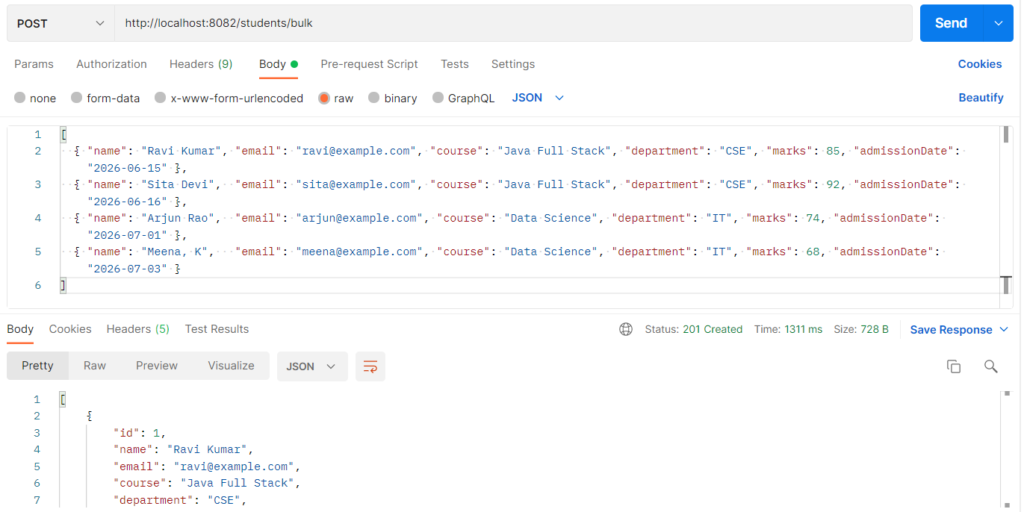
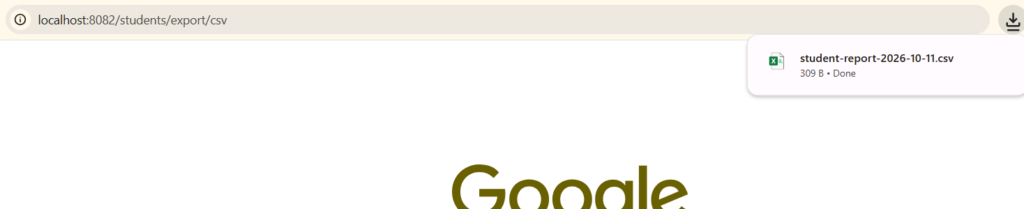
Export means converting database records into a downloadable file, so users can open, share, or analyze data outside the application. CSV is a plain-text format (comma-separated values) that any tool can open, while Excel (.xlsx) supports styling, formulas, and formatted dates. In Spring Boot, the service builds the file in memory as a byte[] and the controller returns it with a Content-Disposition: attachment header. It is used for student lists, fee reports, attendance sheets, and any data that managers want in a spreadsheet.
Features
- Download from a normal REST URL, and the browser saves the file automatically
- CSV needs no library, because plain Java is enough
- Excel is created with Apache POI (
poi-ooxml) - Styled Excel header (bold, white text, blue background)
- Real numbers and real dates in Excel, so sorting and calculations work
- Excel formulas (
COUNTA,AVERAGE) for summary rows - Frozen header row, filter buttons, and auto-sized columns
- Proper CSV escaping, so a value like
Meena, Kdoes not break the columns - UTF-8 BOM in the CSV so Excel shows special characters correctly
- Optional filter by course:
?course=Data Science
CSV and Excel Export Types
| Type | Class / Approach | Output | When to use |
|---|---|---|---|
| CSV export | StringBuilder or PrintWriter |
.csv plain text |
Simple data, imports into other systems, small files |
| Excel (.xlsx) | XSSFWorkbook (Apache POI) |
.xlsx with styles and formulas |
Business reports; used in this example |
| Excel (.xls, legacy) | HSSFWorkbook |
.xls, limited to 65,536 rows |
Only for very old Excel versions |
| Streaming Excel | SXSSFWorkbook |
.xlsx, keeps only a few rows in memory |
Very large exports (100,000+ rows) |
Hands-on Experiment: Creating a spring boot application to understand how to download the .csv and excel files
The following steps are involved in developing this hands-on experiment.
Step 1: Generate the Project
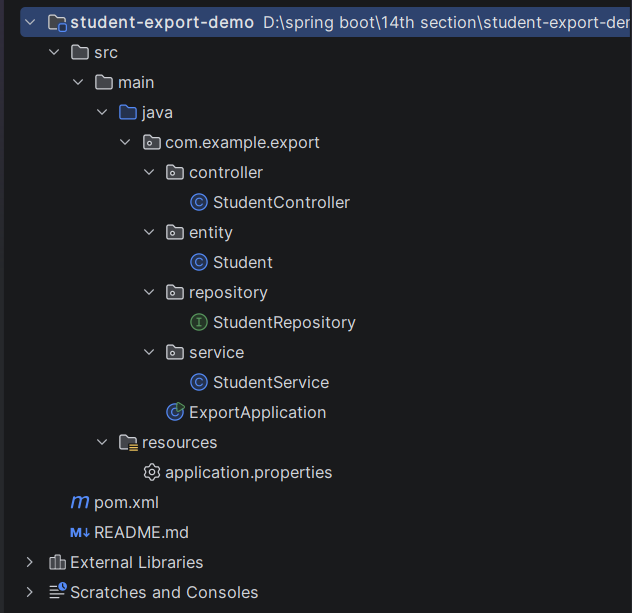
Step 2: Project Structure
Step 3: pom.xml
Step 4: application.properties
Step 5: Create Entity Class
Step 6: Create Repository Interface
Step 7: Create Service Class
Step 8: Create Controller Class
Step 9: Main Application Class
Step 10: Run the Main Application Class
Step 1: Configure the Project on Spring Initializr
Go to start.spring.io and set:
- Project: Maven
- Language: Java
- Spring Boot version: 3.2.x
- Group: com.example
- Artifact: export
- Name: export
- Package name: com.example.export
- Packaging: Jar
- Java: 17
- Dependencies: Spring Web, Spring Data JPA, MySQL Driver.
Click Generate to download the ZIP, then extract and import it into your IDE as a Maven project.
Step 2: Generated Project Structure
Step 3: Explore pom.xml
<?xml version="1.0" encoding="UTF-8"?>
<project xmlns="http://maven.apache.org/POM/4.0.0"
         xmlns:xsi="http://www.w3.org/2001/XMLSchema-instance"
         xsi:schemaLocation="http://maven.apache.org/POM/4.0.0 https://maven.apache.org/xsd/maven-4.0.0.xsd">
    <modelVersion>4.0.0</modelVersion>

    <parent>
        <groupId>org.springframework.boot</groupId>
        <artifactId>spring-boot-starter-parent</artifactId>
        <version>3.2.5</version>
        <relativePath/>
    </parent>

    <groupId>com.example</groupId>
    <artifactId>student-export-demo</artifactId>
    <version>1.0.0</version>
    <name>student-export-demo</name>
    <description>CSV Export and Excel Export - Student reports</description>

    <properties>
        <java.version>17</java.version>
    </properties>

    <dependencies>
        <dependency>
            <groupId>org.springframework.boot</groupId>
            <artifactId>spring-boot-starter-web</artifactId>
        </dependency>
        <dependency>
            <groupId>org.springframework.boot</groupId>
            <artifactId>spring-boot-starter-data-jpa</artifactId>
        </dependency>
        <!-- Apache POI: creates .xlsx files (CSV needs no library) -->
        <dependency>
            <groupId>org.apache.poi</groupId>
            <artifactId>poi-ooxml</artifactId>
            <version>5.2.5</version>
        </dependency>
        <dependency>
            <groupId>com.mysql</groupId>
            <artifactId>mysql-connector-j</artifactId>
            <scope>runtime</scope>
        </dependency>
    </dependencies>

    <build>
        <plugins>
            <plugin>
                <groupId>org.springframework.boot</groupId>
                <artifactId>spring-boot-maven-plugin</artifactId>
            </plugin>
        </plugins>
    </build>
</project>
Step 4: application.properties
spring.application.name=student-export-demo
# ---------- MySQL ----------
# Create the database first: CREATE DATABASE student_export_db;
spring.datasource.url=jdbc:mysql://localhost:3306/student_export_db
spring.datasource.username=root
spring.datasource.password=password
spring.jpa.hibernate.ddl-auto=update
spring.jpa.show-sql=true
server.port=8082Code language: PHP (php)Step 5: Create Entity Class
package com.example.export.entity;

import jakarta.persistence.*;
import java.time.LocalDate;

@Entity
@Table(name = "students")
public class Student {

    @Id
    @GeneratedValue(strategy = GenerationType.IDENTITY)
    private Long id;

    @Column(nullable = false)
    private String name;

    @Column(nullable = false, unique = true)
    private String email;

    private String course;

    private String department;

    private Integer marks;

    private LocalDate admissionDate;

    public Student() {
    }

    public Long getId() { return id; }
    public void setId(Long id) { this.id = id; }

    public String getName() { return name; }
    public void setName(String name) { this.name = name; }

    public String getEmail() { return email; }
    public void setEmail(String email) { this.email = email; }

    public String getCourse() { return course; }
    public void setCourse(String course) { this.course = course; }

    public String getDepartment() { return department; }
    public void setDepartment(String department) { this.department = department; }

    public Integer getMarks() { return marks; }
    public void setMarks(Integer marks) { this.marks = marks; }

    public LocalDate getAdmissionDate() { return admissionDate; }
    public void setAdmissionDate(LocalDate admissionDate) { this.admissionDate = admissionDate; }
}
Step 6: Create below Repository Interface
package com.example.export.repository;

import com.example.export.entity.Student;
import org.springframework.data.jpa.repository.JpaRepository;
import org.springframework.stereotype.Repository;

import java.util.List;

@Repository
public interface StudentRepository extends JpaRepository<Student, Long> {

    boolean existsByEmail(String email);

    List<Student> findByCourseIgnoreCase(String course);
}
Step 7: Create below Service class
package com.example.export.service;

import com.example.export.entity.Student;
import com.example.export.repository.StudentRepository;
import org.apache.poi.ss.usermodel.*;
import org.apache.poi.ss.util.CellRangeAddress;
import org.apache.poi.xssf.usermodel.XSSFWorkbook;
import org.springframework.stereotype.Service;

import java.io.ByteArrayOutputStream;
import java.io.IOException;
import java.nio.charset.StandardCharsets;
import java.time.LocalDate;
import java.util.ArrayList;
import java.util.List;

@Service
public class StudentService {

    private static final String[] HEADERS =
            {"ID", "Name", "Email", "Course", "Department", "Marks", "Admission Date"};

    private final StudentRepository studentRepository;

    public StudentService(StudentRepository studentRepository) {
        this.studentRepository = studentRepository;
    }

    // ---------------- Student operations ----------------

    public Student add(Student student) {
        if (studentRepository.existsByEmail(student.getEmail())) {
            throw new IllegalArgumentException("Email already registered: " + student.getEmail());
        }
        return studentRepository.save(student);
    }

    // Adds many students at once - handy for creating sample data; duplicates are skipped
    public List<Student> addAll(List<Student> students) {
        List<Student> saved = new ArrayList<>();
        for (Student s : students) {
            if (!studentRepository.existsByEmail(s.getEmail())) {
                saved.add(studentRepository.save(s));
            }
        }
        return saved;
    }

    public List<Student> getAll() {
        return studentRepository.findAll();
    }

    // Used by both exports: all students, or only one course when a filter is given
    private List<Student> findForExport(String course) {
        if (course == null || course.isBlank()) {
            return studentRepository.findAll();
        }
        return studentRepository.findByCourseIgnoreCase(course);
    }

    // ---------------- CSV export ----------------

    public byte[] exportCsv(String course) {
        List<Student> students = findForExport(course);

        StringBuilder csv = new StringBuilder();
        csv.append('\uFEFF');                                  // UTF-8 BOM so Excel shows special characters correctly
        csv.append(String.join(",", HEADERS)).append("\r\n");

        for (Student s : students) {
            csv.append(s.getId()).append(',')
               .append(csvValue(s.getName())).append(',')
               .append(csvValue(s.getEmail())).append(',')
               .append(csvValue(s.getCourse())).append(',')
               .append(csvValue(s.getDepartment())).append(',')
               .append(s.getMarks() == null ? "" : s.getMarks()).append(',')
               .append(s.getAdmissionDate() == null ? "" : s.getAdmissionDate())
               .append("\r\n");
        }
        return csv.toString().getBytes(StandardCharsets.UTF_8);
    }

    // CSV rule (RFC 4180): wrap in quotes if the value has a comma, quote or line break; double any quote inside
    private String csvValue(String value) {
        if (value == null) {
            return "";
        }
        if (value.contains(",") || value.contains("\"") || value.contains("\n") || value.contains("\r")) {
            return "\"" + value.replace("\"", "\"\"") + "\"";
        }
        return value;
    }

    // ---------------- Excel export ----------------

    public byte[] exportExcel(String course) throws IOException {
        List<Student> students = findForExport(course);

        try (Workbook workbook = new XSSFWorkbook();
             ByteArrayOutputStream out = new ByteArrayOutputStream()) {

            Sheet sheet = workbook.createSheet("Students");

            // ----- styles -----
            Font headerFont = workbook.createFont();
            headerFont.setBold(true);
            headerFont.setColor(IndexedColors.WHITE.getIndex());

            CellStyle headerStyle = workbook.createCellStyle();
            headerStyle.setFont(headerFont);
            headerStyle.setFillForegroundColor(IndexedColors.DARK_BLUE.getIndex());
            headerStyle.setFillPattern(FillPatternType.SOLID_FOREGROUND);
            headerStyle.setAlignment(HorizontalAlignment.CENTER);
            headerStyle.setBorderBottom(BorderStyle.THIN);

            CreationHelper helper = workbook.getCreationHelper();
            CellStyle dateStyle = workbook.createCellStyle();
            dateStyle.setDataFormat(helper.createDataFormat().getFormat("dd-mmm-yyyy"));

            Font boldFont = workbook.createFont();
            boldFont.setBold(true);
            CellStyle summaryStyle = workbook.createCellStyle();
            summaryStyle.setFont(boldFont);

            CellStyle averageStyle = workbook.createCellStyle();
            averageStyle.setFont(boldFont);
            averageStyle.setDataFormat(helper.createDataFormat().getFormat("0.00"));

            // ----- header row -----
            Row header = sheet.createRow(0);
            for (int i = 0; i < HEADERS.length; i++) {
                Cell cell = header.createCell(i);
                cell.setCellValue(HEADERS[i]);
                cell.setCellStyle(headerStyle);
            }

            // ----- data rows -----
            int rowNum = 1;
            for (Student s : students) {
                Row row = sheet.createRow(rowNum++);
                row.createCell(0).setCellValue(s.getId());
                row.createCell(1).setCellValue(nullSafe(s.getName()));
                row.createCell(2).setCellValue(nullSafe(s.getEmail()));
                row.createCell(3).setCellValue(nullSafe(s.getCourse()));
                row.createCell(4).setCellValue(nullSafe(s.getDepartment()));
                if (s.getMarks() != null) {
                    row.createCell(5).setCellValue(s.getMarks());      // real number, so Excel can calculate
                }
                if (s.getAdmissionDate() != null) {
                    Cell dateCell = row.createCell(6);
                    dateCell.setCellValue(s.getAdmissionDate());       // real date, formatted by the style
                    dateCell.setCellStyle(dateStyle);
                }
            }

            // ----- summary rows (Excel formulas) -----
            if (!students.isEmpty()) {
                int last = rowNum;                                     // last data row number in Excel terms (1-based)
                Row total = sheet.createRow(rowNum++);
                Cell label = total.createCell(4);
                label.setCellValue("Total students");
                label.setCellStyle(summaryStyle);
                Cell count = total.createCell(5);
                count.setCellFormula("COUNTA(B2:B" + last + ")");
                count.setCellStyle(summaryStyle);

                Row avg = sheet.createRow(rowNum);
                Cell avgLabel = avg.createCell(4);
                avgLabel.setCellValue("Average marks");
                avgLabel.setCellStyle(summaryStyle);
                Cell avgValue = avg.createCell(5);
                avgValue.setCellFormula("AVERAGE(F2:F" + last + ")");
                avgValue.setCellStyle(averageStyle);
            }

            // ----- usability -----
            sheet.createFreezePane(0, 1);                              // header stays visible while scrolling
            sheet.setAutoFilter(new CellRangeAddress(0, 0, 0, HEADERS.length - 1));
            for (int i = 0; i < HEADERS.length; i++) {
                sheet.autoSizeColumn(i);
            }

            workbook.write(out);
            return out.toByteArray();
        }
    }

    private String nullSafe(String value) {
        return value == null ? "" : value;
    }

    public String reportFileName(String extension, String course) {
        String suffix = (course == null || course.isBlank()) ? "" : "-" + course.replaceAll("\\s+", "_");
        return "student-report" + suffix + "-" + LocalDate.now() + "." + extension;
    }
}
Step 8: Create Controller class
package com.example.export.controller;

import com.example.export.entity.Student;
import com.example.export.service.StudentService;
import org.springframework.http.HttpHeaders;
import org.springframework.http.HttpStatus;
import org.springframework.http.MediaType;
import org.springframework.http.ResponseEntity;
import org.springframework.web.bind.annotation.*;

import java.util.List;
import java.util.Map;

@RestController
@RequestMapping("/students")
public class StudentController {

    private final StudentService studentService;

    public StudentController(StudentService studentService) {
        this.studentService = studentService;
    }

    @PostMapping
    public ResponseEntity<?> add(@RequestBody Student student) {
        try {
            return ResponseEntity.status(HttpStatus.CREATED).body(studentService.add(student));
        } catch (IllegalArgumentException ex) {
            return ResponseEntity.badRequest().body(Map.of("error", ex.getMessage()));
        }
    }

    @PostMapping("/bulk")
    public ResponseEntity<List<Student>> addAll(@RequestBody List<Student> students) {
        return ResponseEntity.status(HttpStatus.CREATED).body(studentService.addAll(students));
    }

    @GetMapping
    public List<Student> getAll() {
        return studentService.getAll();
    }

    // CSV download  (optional filter: ?course=Java Full Stack)
    @GetMapping("/export/csv")
    public ResponseEntity<byte[]> exportCsv(@RequestParam(required = false) String course) {
        byte[] data = studentService.exportCsv(course);
        return ResponseEntity.ok()
                .header(HttpHeaders.CONTENT_DISPOSITION,
                        "attachment; filename=\"" + studentService.reportFileName("csv", course) + "\"")
                .contentType(MediaType.parseMediaType("text/csv; charset=UTF-8"))
                .contentLength(data.length)
                .body(data);
    }

    // Excel download  (optional filter: ?course=Java Full Stack)
    @GetMapping("/export/excel")
    public ResponseEntity<?> exportExcel(@RequestParam(required = false) String course) {
        try {
            byte[] data = studentService.exportExcel(course);
            return ResponseEntity.ok()
                    .header(HttpHeaders.CONTENT_DISPOSITION,
                            "attachment; filename=\"" + studentService.reportFileName("xlsx", course) + "\"")
                    .contentType(MediaType.parseMediaType(
                            "application/vnd.openxmlformats-officedocument.spreadsheetml.sheet"))
                    .contentLength(data.length)
                    .body(data);
        } catch (Exception ex) {
            return ResponseEntity.status(HttpStatus.INTERNAL_SERVER_ERROR)
                    .body(Map.of("error", "Excel export failed: " + ex.getMessage()));
        }
    }
}
Step 9: Main Application
package com.example.export;

import org.springframework.boot.SpringApplication;
import org.springframework.boot.autoconfigure.SpringBootApplication;

@SpringBootApplication
public class ExportApplication {

    public static void main(String[] args) {
        SpringApplication.run(ExportApplication.class, args);
    }
}
Step 10: Run the ExportApplication