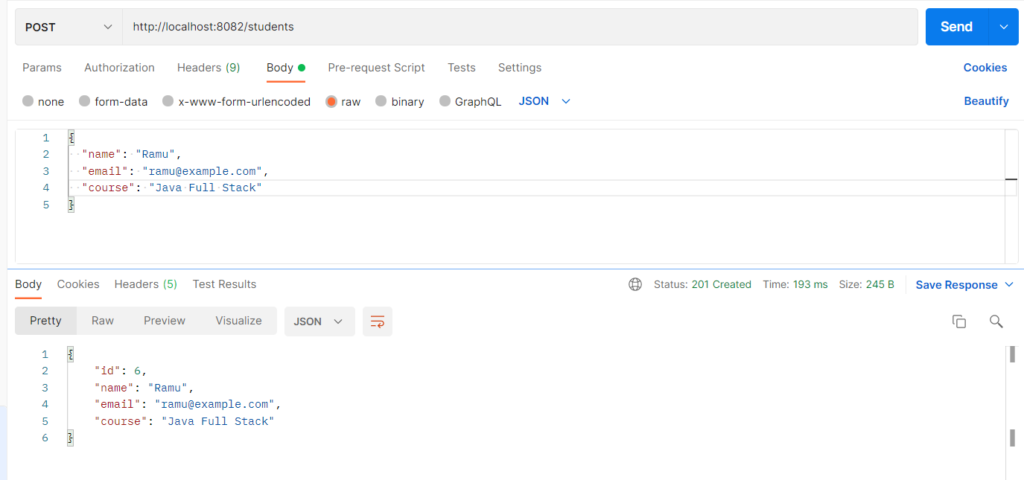
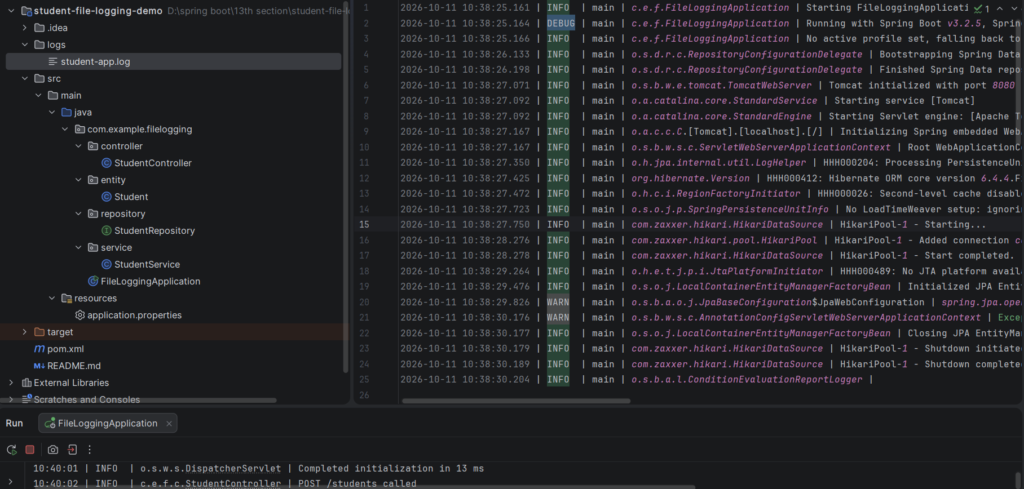
File logging writes application log messages to a file on disk instead of only showing them in the console. Console output disappears when the app restarts or the terminal closes, but a log file persists and can be searched later. In Spring Boot you enable it with logging.file.name or logging.file.path in application.properties. A rolling policy splits the log into dated or size-limited files and deletes old ones, so the disk never fills up.
Features
- One property (
logging.file.name) starts writing logs to a file - Logs survive application restarts, since new lines are appended
- Separate pattern for the file and the console (
logging.pattern.file,logging.pattern.console) - Automatic rolling by size and date
- Compressed archives (
.gz) to save disk space - Automatic cleanup with
max-history(days) andtotal-size-cap(total size) - Works with all log levels and per-package levels from 13.2
Hands-on Experiment: Creating a spring boot application to understand how application logs can be written to persistent log files.
The following steps are involved in developing this hands-on experiment.
Step 1: Generate the Project
Step 2: Project Structure
Step 3: pom.xml
Step 4: application.properties
Step 5: Create Entity Class
Step 6: Create Repository Interface
Step 7: Create Service Class
Step 8: Create Controller Class
Step 9: Main Application Class
Step 10: Run the Main Application Class
Step 1: Configure the Project on Spring Initializr
Go to start.spring.io and set:
- Project: Maven
- Language: Java
- Spring Boot version: 3.2.x
- Group: com.example
- Artifact: filelogging
- Name: filelogging
- Package name: com.example.filelogging
- Packaging: Jar
- Java: 17
- Dependencies: Spring Web, Spring Data JPA, MySQL Driver.
Click Generate to download the ZIP, then extract and import it into your IDE as a Maven project.
Step 2: Generated Project Structure
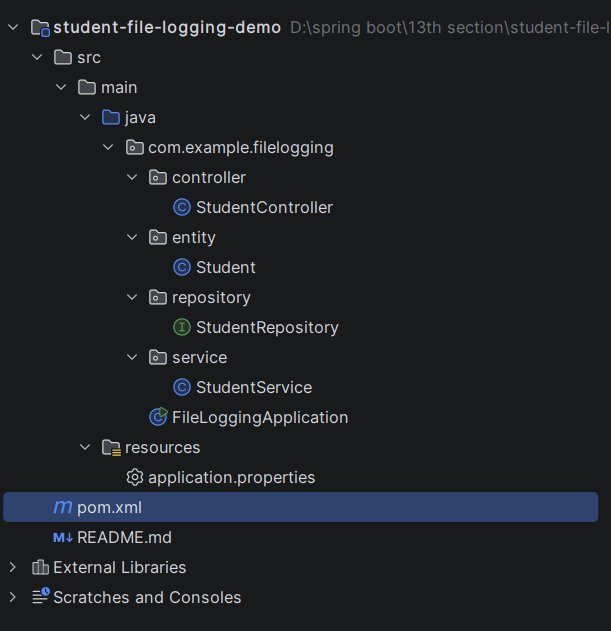
Step 3: Explore pom.xml
<?xml version="1.0" encoding="UTF-8"?>
<project xmlns="http://maven.apache.org/POM/4.0.0"
         xmlns:xsi="http://www.w3.org/2001/XMLSchema-instance"
         xsi:schemaLocation="http://maven.apache.org/POM/4.0.0 https://maven.apache.org/xsd/maven-4.0.0.xsd">
    <modelVersion>4.0.0</modelVersion>

    <parent>
        <groupId>org.springframework.boot</groupId>
        <artifactId>spring-boot-starter-parent</artifactId>
        <version>3.2.5</version>
        <relativePath/>
    </parent>

    <groupId>com.example</groupId>
    <artifactId>student-file-logging-demo</artifactId>
    <version>1.0.0</version>
    <name>student-file-logging-demo</name>
    <description>File Logging - Student application logs written to rolling files</description>

    <properties>
        <java.version>17</java.version>
    </properties>

    <dependencies>
        <dependency>
            <groupId>org.springframework.boot</groupId>
            <artifactId>spring-boot-starter-web</artifactId>
        </dependency>
        <dependency>
            <groupId>org.springframework.boot</groupId>
            <artifactId>spring-boot-starter-data-jpa</artifactId>
        </dependency>
        <dependency>
            <groupId>com.mysql</groupId>
            <artifactId>mysql-connector-j</artifactId>
            <scope>runtime</scope>
        </dependency>
    </dependencies>

    <build>
        <plugins>
            <plugin>
                <groupId>org.springframework.boot</groupId>
                <artifactId>spring-boot-maven-plugin</artifactId>
            </plugin>
        </plugins>
    </build>
</project>
Step 4: application.properties
spring.application.name=student-file-logging-demo
# ---------- MySQL ----------
# Create the database first: CREATE DATABASE student_file_logging_db;
spring.datasource.url=jdbc:mysql://localhost:3306/student_db1
spring.datasource.username=root
spring.datasource.password=password
spring.jpa.hibernate.ddl-auto=update
# ---------- Log levels ----------
logging.level.root=INFO
logging.level.com.example.filelogging=DEBUG
# ---------- File logging ----------
# Log file (relative to the folder where the app is started). Folder "logs" is created automatically.
logging.file.name=logs/student-app.log
# Format used inside the file: date | level | thread | class | message
logging.pattern.file=%d{yyyy-MM-dd HH:mm:ss.SSS} | %-5level | %thread | %logger{36} | %msg%n
logging.charset.file=UTF-8
# Console keeps a shorter format
logging.pattern.console=%d{HH:mm:ss} | %-5level | %logger{30} | %msg%n
# ---------- Rolling policy (so the file does not grow forever) ----------
# Start a new file when the current one reaches this size (10KB only for the demo; use 10MB+ in production)
logging.logback.rollingpolicy.max-file-size=10KB
# Old files go to the archive folder; %d = date, %i = number of the file within the day; .gz = compressed
logging.logback.rollingpolicy.file-name-pattern=logs/archive/student-app.%d{yyyy-MM-dd}.%i.log.gz
# Keep archives for 7 days
logging.logback.rollingpolicy.max-history=7
# Delete oldest archives when all logs together exceed this size
logging.logback.rollingpolicy.total-size-cap=100MB
# Do not clean old archives when the app starts
logging.logback.rollingpolicy.clean-history-on-start=falseCode language: PHP (php)Step 5: Create Entity Class
package com.example.filelogging.entity;

import jakarta.persistence.*;

@Entity
@Table(name = "students")
public class Student {

    @Id
    @GeneratedValue(strategy = GenerationType.IDENTITY)
    private Long id;

    @Column(nullable = false)
    private String name;

    @Column(nullable = false, unique = true)
    private String email;

    private String course;

    public Student() {
    }

    public Long getId() { return id; }
    public void setId(Long id) { this.id = id; }

    public String getName() { return name; }
    public void setName(String name) { this.name = name; }

    public String getEmail() { return email; }
    public void setEmail(String email) { this.email = email; }

    public String getCourse() { return course; }
    public void setCourse(String course) { this.course = course; }
}
Step 6: Create below Repository Interface
package com.example.filelogging.repository;

import com.example.filelogging.entity.Student;
import org.springframework.data.jpa.repository.JpaRepository;
import org.springframework.stereotype.Repository;

@Repository
public interface StudentRepository extends JpaRepository<Student, Long> {

    boolean existsByEmail(String email);
}
Step 7: Create below Service class
package com.example.filelogging.service;

import com.example.filelogging.entity.Student;
import com.example.filelogging.repository.StudentRepository;
import org.slf4j.Logger;
import org.slf4j.LoggerFactory;
import org.springframework.beans.factory.annotation.Value;
import org.springframework.stereotype.Service;

import java.io.IOException;
import java.nio.charset.StandardCharsets;
import java.nio.file.Files;
import java.nio.file.Path;
import java.nio.file.Paths;
import java.util.ArrayList;
import java.util.List;
import java.util.stream.Stream;

@Service
public class StudentService {

    private static final Logger log = LoggerFactory.getLogger(StudentService.class);

    private final StudentRepository studentRepository;

    // Same property Spring Boot uses to create the log file
    @Value("${logging.file.name}")
    private String logFileName;

    public StudentService(StudentRepository studentRepository) {
        this.studentRepository = studentRepository;
    }

    public Student create(Student student) {
        log.info("Creating student with email={}", student.getEmail());
        if (studentRepository.existsByEmail(student.getEmail())) {
            log.warn("Create rejected - email already exists: {}", student.getEmail());
            throw new IllegalArgumentException("Email already registered: " + student.getEmail());
        }
        try {
            Student saved = studentRepository.save(student);
            log.info("Student created successfully with id={}", saved.getId());
            return saved;
        } catch (Exception ex) {
            log.error("Failed to create student with email={}", student.getEmail(), ex);
            throw ex;
        }
    }

    public List<Student> getAll() {
        log.info("Fetching all students");
        List<Student> students = studentRepository.findAll();
        log.debug("Total students found: {}", students.size());
        return students;
    }

    public Student getById(Long id) {
        log.info("Fetching student with id={}", id);
        return studentRepository.findById(id).orElseThrow(() -> {
            log.warn("Student not found with id={}", id);
            return new IllegalArgumentException("Student not found: " + id);
        });
    }

    public Student update(Long id, Student updated) {
        log.info("Updating student with id={}", id);
        Student existing = getById(id);
        existing.setName(updated.getName());
        existing.setEmail(updated.getEmail());
        existing.setCourse(updated.getCourse());
        Student saved = studentRepository.save(existing);
        log.info("Student updated successfully with id={}", saved.getId());
        return saved;
    }

    public void delete(Long id) {
        log.info("Deleting student with id={}", id);
        if (!studentRepository.existsById(id)) {
            log.warn("Delete failed - student not found with id={}", id);
            throw new IllegalArgumentException("Student not found: " + id);
        }
        studentRepository.deleteById(id);
        log.info("Student deleted successfully with id={}", id);
    }

    // Writes many lines quickly so the 10KB limit is crossed and the file rolls over
    public int generateLogs(int count) {
        log.info("Generating {} sample log lines", count);
        for (int i = 1; i <= count; i++) {
            log.info("Sample log line {} - Student processing batch in progress", i);
        }
        log.warn("Sample WARN line written after {} lines", count);
        return count;
    }

    // Reads the last N lines of the current log file (demo only - do not expose logs like this in production)
    public List<String> tailLog(int lines) throws IOException {
        Path path = Paths.get(logFileName);
        if (!Files.exists(path)) {
            log.warn("Log file not found at {}", path.toAbsolutePath());
            throw new IllegalArgumentException("Log file not found: " + path.toAbsolutePath());
        }
        List<String> all = Files.readAllLines(path, StandardCharsets.UTF_8);
        int from = Math.max(0, all.size() - lines);
        return new ArrayList<>(all.subList(from, all.size()));
    }

    // Lists the current file and the rolled-over archive files with their sizes
    public List<String> listLogFiles() throws IOException {
        List<String> result = new ArrayList<>();
        Path current = Paths.get(logFileName);
        if (Files.exists(current)) {
            result.add(current + "  (" + Files.size(current) + " bytes)");
        }
        Path archive = current.toAbsolutePath().getParent().resolve("archive");
        if (Files.exists(archive)) {
            try (Stream<Path> files = Files.list(archive)) {
                for (Path p : (Iterable<Path>) files.sorted()::iterator) {
                    result.add("archive/" + p.getFileName() + "  (" + Files.size(p) + " bytes)");
                }
            }
        }
        return result;
    }
}
Step 8: Create Controller class
package com.example.filelogging.controller;

import com.example.filelogging.entity.Student;
import com.example.filelogging.service.StudentService;
import org.slf4j.Logger;
import org.slf4j.LoggerFactory;
import org.springframework.http.HttpStatus;
import org.springframework.http.ResponseEntity;
import org.springframework.web.bind.annotation.*;

import java.util.List;
import java.util.Map;

@RestController
@RequestMapping("/students")
public class StudentController {

    private static final Logger log = LoggerFactory.getLogger(StudentController.class);

    private final StudentService studentService;

    public StudentController(StudentService studentService) {
        this.studentService = studentService;
    }

    @PostMapping
    public ResponseEntity<?> create(@RequestBody Student student) {
        log.info("POST /students called");
        try {
            return ResponseEntity.status(HttpStatus.CREATED).body(studentService.create(student));
        } catch (IllegalArgumentException ex) {
            return ResponseEntity.badRequest().body(Map.of("error", ex.getMessage()));
        }
    }

    @GetMapping
    public List<Student> getAll() {
        log.info("GET /students called");
        return studentService.getAll();
    }

    @GetMapping("/{id}")
    public ResponseEntity<?> getById(@PathVariable Long id) {
        log.info("GET /students/{} called", id);
        try {
            return ResponseEntity.ok(studentService.getById(id));
        } catch (IllegalArgumentException ex) {
            return ResponseEntity.status(HttpStatus.NOT_FOUND).body(Map.of("error", ex.getMessage()));
        }
    }

    @PutMapping("/{id}")
    public ResponseEntity<?> update(@PathVariable Long id, @RequestBody Student student) {
        log.info("PUT /students/{} called", id);
        try {
            return ResponseEntity.ok(studentService.update(id, student));
        } catch (IllegalArgumentException ex) {
            return ResponseEntity.status(HttpStatus.NOT_FOUND).body(Map.of("error", ex.getMessage()));
        }
    }

    @DeleteMapping("/{id}")
    public ResponseEntity<?> delete(@PathVariable Long id) {
        log.info("DELETE /students/{} called", id);
        try {
            studentService.delete(id);
            return ResponseEntity.ok(Map.of("message", "Student deleted: " + id));
        } catch (IllegalArgumentException ex) {
            return ResponseEntity.status(HttpStatus.NOT_FOUND).body(Map.of("error", ex.getMessage()));
        }
    }

    // ---------- File logging helpers (for the experiment) ----------

    @PostMapping("/logs/generate")
    public Map<String, Object> generate(@RequestBody Map<String, Integer> request) {
        int count = request.getOrDefault("count", 100);
        log.info("POST /students/logs/generate called with count={}", count);
        return Map.of("generated", studentService.generateLogs(count));
    }

    @GetMapping("/logs/tail")
    public ResponseEntity<?> tail(@RequestParam(defaultValue = "20") int lines) {
        try {
            return ResponseEntity.ok(studentService.tailLog(lines));
        } catch (IllegalArgumentException ex) {
            return ResponseEntity.status(HttpStatus.NOT_FOUND).body(Map.of("error", ex.getMessage()));
        } catch (Exception ex) {
            log.error("Could not read log file", ex);
            return ResponseEntity.status(HttpStatus.INTERNAL_SERVER_ERROR).body(Map.of("error", "Could not read log file"));
        }
    }

    @GetMapping("/logs/files")
    public ResponseEntity<?> files() {
        try {
            return ResponseEntity.ok(studentService.listLogFiles());
        } catch (Exception ex) {
            log.error("Could not list log files", ex);
            return ResponseEntity.status(HttpStatus.INTERNAL_SERVER_ERROR).body(Map.of("error", "Could not list log files"));
        }
    }
}
Step 9: Main Application
package com.example.filelogging;

import org.springframework.boot.SpringApplication;
import org.springframework.boot.autoconfigure.SpringBootApplication;

@SpringBootApplication
public class FileLoggingApplication {

    public static void main(String[] args) {
        SpringApplication.run(FileLoggingApplication.class, args);
    }
}
Step 10: Run the FileLoggingApplication