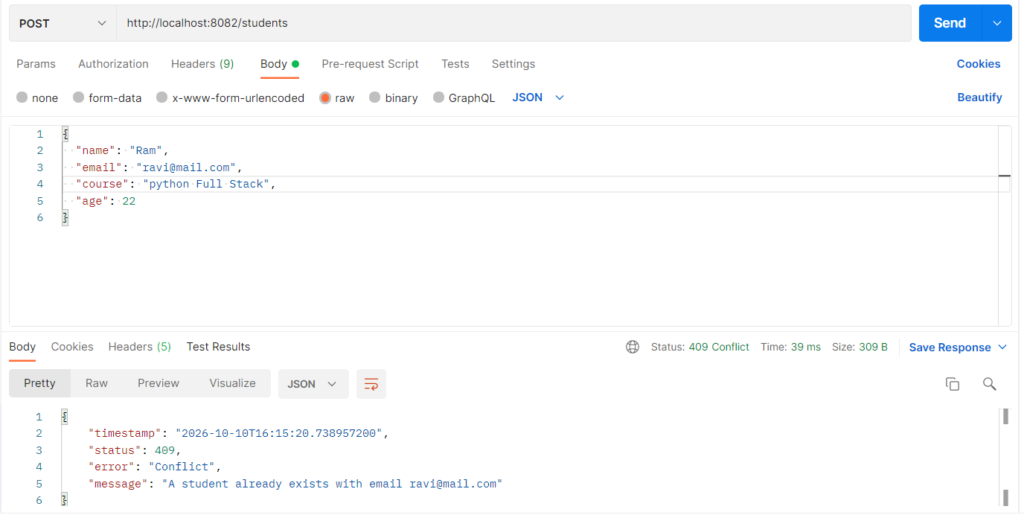
Controller-level handling means a controller catches and handles exceptions itself, using @ExceptionHandler methods written inside the controller class. When a service throws an exception, Spring looks in that same controller for a matching handler and uses it to build the response. It is used to turn failures such as a missing student or invalid data into clear HTTP status codes and JSON messages, instead of a generic 500 error page. The handlers apply only to the controller that contains them, so each controller can treat errors in its own way.
Features
@ExceptionHandlermethods placed inside the controller- One handler per exception type, each with its own status code
- Custom JSON error body (timestamp, status, error, message)
- Controller methods stay clean, with no
try-catchblocks - Works with custom exceptions thrown from the service layer
- Limited to one controller, so other controllers are not affected
Controller-level Handling Types
- Single exception handler:
@ExceptionHandler(StudentNotFoundException.class)handles one exception type. This example uses one for each of its three exceptions. - Multiple exceptions in one handler:
@ExceptionHandler({A.class, B.class})lets one method handle several exceptions that need the same response. - Handler returning ResponseEntity: the method builds the status and a custom body, which is the style used here.
- Handler with @ResponseStatus: the method is annotated with a fixed status, and its return value is the body.
- Manual try-catch in the endpoint: the controller method catches the exception itself. It works but repeats code in every endpoint, so
@ExceptionHandleris preferred.
Hands-on Experiment: Creating a spring boot application to understand how individual controllers can handle specific application exceptions.
The following steps are involved in developing this hands-on experiment.
Step 1: Generate the Project
Step 2: Project Structure
Step 3: pom.xml
Step 4: application.properties
Step 5: Create Entity Class
Step 6: Create Repository Interface
Step 7: Create Service Class
Step 8: Create Controller Class
Step 9: Main Application Class
Step 10: Run the Main Application Class
Step 1: Configure the Project on Spring Initializr
Go to start.spring.io and set:
- Project: Maven
- Language: Java
- Spring Boot version: 3.2.x
- Group: com.example
- Artifact: controllerhandling
- Name: controllerhandling
- Package name: com.example.controllerhandling
- Packaging: Jar
- Java: 17
- Dependencies: Spring Web, Spring Data JPA, MySQL Driver.
Click Generate to download the ZIP, then extract and import it into your IDE as a Maven project.
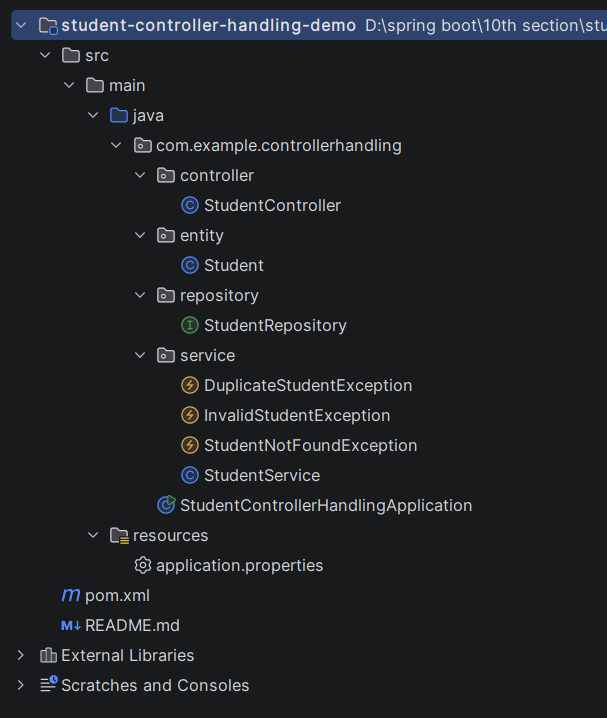
Step 2: Generated Project Structure
Step 3: Explore pom.xml
<?xml version="1.0" encoding="UTF-8"?>
<project xmlns="http://maven.apache.org/POM/4.0.0"
         xmlns:xsi="http://www.w3.org/2001/XMLSchema-instance"
         xsi:schemaLocation="http://maven.apache.org/POM/4.0.0 https://maven.apache.org/xsd/maven-4.0.0.xsd">
    <modelVersion>4.0.0</modelVersion>

    <parent>
        <groupId>org.springframework.boot</groupId>
        <artifactId>spring-boot-starter-parent</artifactId>
        <version>3.2.5</version>
        <relativePath/>
    </parent>

    <groupId>com.example</groupId>
    <artifactId>student-controller-handling-demo</artifactId>
    <version>1.0.0</version>
    <name>student-controller-handling-demo</name>

    <properties>
        <java.version>17</java.version>
    </properties>

    <dependencies>
        <dependency>
            <groupId>org.springframework.boot</groupId>
            <artifactId>spring-boot-starter-web</artifactId>
        </dependency>
        <dependency>
            <groupId>org.springframework.boot</groupId>
            <artifactId>spring-boot-starter-data-jpa</artifactId>
        </dependency>
        <dependency>
            <groupId>com.mysql</groupId>
            <artifactId>mysql-connector-j</artifactId>
            <scope>runtime</scope>
        </dependency>
    </dependencies>

    <build>
        <plugins>
            <plugin>
                <groupId>org.springframework.boot</groupId>
                <artifactId>spring-boot-maven-plugin</artifactId>
            </plugin>
        </plugins>
    </build>
</project>
Step 4: application.properties
spring.application.name=student-controller-handling-demo
server.port=8082
# MySQL (database is created automatically if missing)
spring.datasource.url=jdbc:mysql://localhost:3306/student_handling_db?createDatabaseIfNotExist=true&useSSL=false&allowPublicKeyRetrieval=true&serverTimezone=UTC
spring.datasource.username=root
spring.datasource.password=root
spring.jpa.hibernate.ddl-auto=update
spring.jpa.show-sql=trueCode language: PHP (php)Step 5: Create Entity Class
package com.example.controllerhandling.entity;

import jakarta.persistence.Entity;
import jakarta.persistence.GeneratedValue;
import jakarta.persistence.GenerationType;
import jakarta.persistence.Id;
import jakarta.persistence.Table;

@Entity
@Table(name = "students")
public class Student {

    @Id
    @GeneratedValue(strategy = GenerationType.IDENTITY)
    private Long id;

    private String name;
    private String email;
    private String course;
    private Integer age;

    public Student() {
    }

    public Long getId() { return id; }
    public void setId(Long id) { this.id = id; }

    public String getName() { return name; }
    public void setName(String name) { this.name = name; }

    public String getEmail() { return email; }
    public void setEmail(String email) { this.email = email; }

    public String getCourse() { return course; }
    public void setCourse(String course) { this.course = course; }

    public Integer getAge() { return age; }
    public void setAge(Integer age) { this.age = age; }
}
Step 6: Create below Repository Interface
package com.example.controllerhandling.repository;

import com.example.controllerhandling.entity.Student;
import org.springframework.data.jpa.repository.JpaRepository;
import org.springframework.stereotype.Repository;

import java.util.Optional;

@Repository
public interface StudentRepository extends JpaRepository<Student, Long> {

    Optional<Student> findByEmail(String email);
}
Step 7: Create below Service class
package com.example.controllerhandling.service;

import com.example.controllerhandling.entity.Student;
import com.example.controllerhandling.repository.StudentRepository;
import org.springframework.stereotype.Service;

import java.util.List;

@Service
public class StudentService {

    private final StudentRepository studentRepository;

    public StudentService(StudentRepository studentRepository) {
        this.studentRepository = studentRepository;
    }

    public Student createStudent(Student student) {
        validate(student);
        studentRepository.findByEmail(student.getEmail()).ifPresent(existing -> {
            throw new DuplicateStudentException(student.getEmail());
        });
        student.setId(null);
        return studentRepository.save(student);
    }

    public List<Student> getAllStudents() {
        return studentRepository.findAll();
    }

    public Student getStudentById(Long id) {
        return studentRepository.findById(id)
                .orElseThrow(() -> new StudentNotFoundException(id));
    }

    public Student updateStudent(Long id, Student updated) {
        Student existing = getStudentById(id);
        validate(updated);
        studentRepository.findByEmail(updated.getEmail()).ifPresent(other -> {
            if (!other.getId().equals(id)) {
                throw new DuplicateStudentException(updated.getEmail());
            }
        });
        existing.setName(updated.getName());
        existing.setEmail(updated.getEmail());
        existing.setCourse(updated.getCourse());
        existing.setAge(updated.getAge());
        return studentRepository.save(existing);
    }

    public void deleteStudent(Long id) {
        studentRepository.delete(getStudentById(id));
    }

    private void validate(Student student) {
        if (student.getName() == null || student.getName().isBlank()) {
            throw new InvalidStudentException("Student name is required");
        }
        if (student.getEmail() == null || !student.getEmail().contains("@")) {
            throw new InvalidStudentException("A valid email is required");
        }
        if (student.getAge() == null || student.getAge() < 15 || student.getAge() > 60) {
            throw new InvalidStudentException("Age must be between 15 and 60");
        }
    }
}
package com.example.controllerhandling.service;

// Thrown when another student already uses the same email
public class DuplicateStudentException extends RuntimeException {

    public DuplicateStudentException(String email) {
        super("A student already exists with email " + email);
    }
}
package com.example.controllerhandling.service;

// Thrown when student data breaks a rule (blank name, bad email, wrong age)
public class InvalidStudentException extends RuntimeException {

    public InvalidStudentException(String message) {
        super(message);
    }
}
package com.example.controllerhandling.service;

// Thrown when a student id does not exist
public class StudentNotFoundException extends RuntimeException {

    public StudentNotFoundException(Long id) {
        super("Student not found with id " + id);
    }
}
Step 8: Create Controller class
package com.example.controllerhandling.controller;

import com.example.controllerhandling.entity.Student;
import com.example.controllerhandling.service.DuplicateStudentException;
import com.example.controllerhandling.service.InvalidStudentException;
import com.example.controllerhandling.service.StudentNotFoundException;
import com.example.controllerhandling.service.StudentService;
import org.springframework.http.HttpStatus;
import org.springframework.http.ResponseEntity;
import org.springframework.web.bind.annotation.DeleteMapping;
import org.springframework.web.bind.annotation.ExceptionHandler;
import org.springframework.web.bind.annotation.GetMapping;
import org.springframework.web.bind.annotation.PathVariable;
import org.springframework.web.bind.annotation.PostMapping;
import org.springframework.web.bind.annotation.PutMapping;
import org.springframework.web.bind.annotation.RequestBody;
import org.springframework.web.bind.annotation.RequestMapping;
import org.springframework.web.bind.annotation.RestController;

import java.time.LocalDateTime;
import java.util.LinkedHashMap;
import java.util.List;
import java.util.Map;

@RestController
@RequestMapping("/students")
public class StudentController {

    private final StudentService studentService;

    public StudentController(StudentService studentService) {
        this.studentService = studentService;
    }

    // ---------- Endpoints ----------

    @PostMapping
    public ResponseEntity<Student> createStudent(@RequestBody Student student) {
        return ResponseEntity.status(HttpStatus.CREATED).body(studentService.createStudent(student));
    }

    @GetMapping
    public List<Student> getAllStudents() {
        return studentService.getAllStudents();
    }

    @GetMapping("/{id}")
    public Student getStudentById(@PathVariable Long id) {
        return studentService.getStudentById(id);
    }

    @PutMapping("/{id}")
    public Student updateStudent(@PathVariable Long id, @RequestBody Student student) {
        return studentService.updateStudent(id, student);
    }

    @DeleteMapping("/{id}")
    public ResponseEntity<String> deleteStudent(@PathVariable Long id) {
        studentService.deleteStudent(id);
        return ResponseEntity.ok("Student deleted with id " + id);
    }

    // ---------- Controller-level exception handlers ----------
    // These methods work only for exceptions thrown from THIS controller.

    @ExceptionHandler(StudentNotFoundException.class)
    public ResponseEntity<Map<String, Object>> handleNotFound(StudentNotFoundException ex) {
        return buildError(HttpStatus.NOT_FOUND, ex.getMessage());
    }

    @ExceptionHandler(InvalidStudentException.class)
    public ResponseEntity<Map<String, Object>> handleInvalid(InvalidStudentException ex) {
        return buildError(HttpStatus.BAD_REQUEST, ex.getMessage());
    }

    @ExceptionHandler(DuplicateStudentException.class)
    public ResponseEntity<Map<String, Object>> handleDuplicate(DuplicateStudentException ex) {
        return buildError(HttpStatus.CONFLICT, ex.getMessage());
    }

    private ResponseEntity<Map<String, Object>> buildError(HttpStatus status, String message) {
        Map<String, Object> body = new LinkedHashMap<>();
        body.put("timestamp", LocalDateTime.now().toString());
        body.put("status", status.value());
        body.put("error", status.getReasonPhrase());
        body.put("message", message);
        return ResponseEntity.status(status).body(body);
    }
}
Step 9: Main Application
package com.example.controllerhandling;

import org.springframework.boot.SpringApplication;
import org.springframework.boot.autoconfigure.SpringBootApplication;

@SpringBootApplication
public class StudentControllerHandlingApplication {

    public static void main(String[] args) {
        SpringApplication.run(StudentControllerHandlingApplication.class, args);
    }
}
Step 10: Run the StudentControllerHandlerApplication