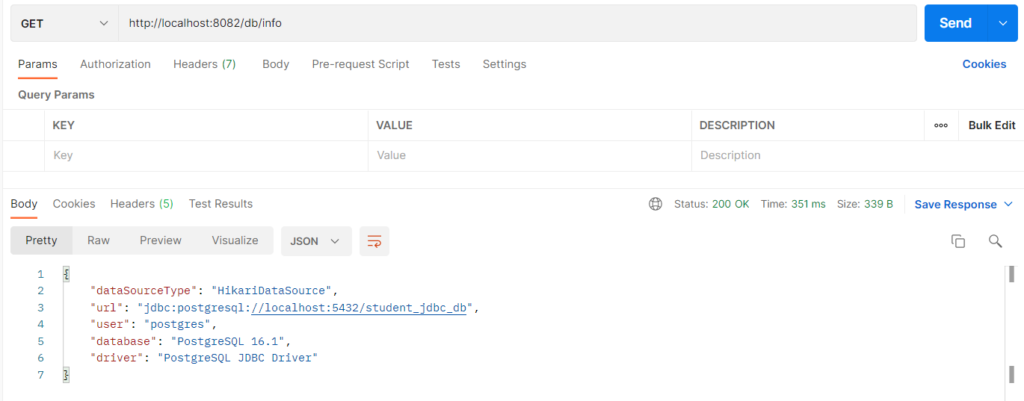
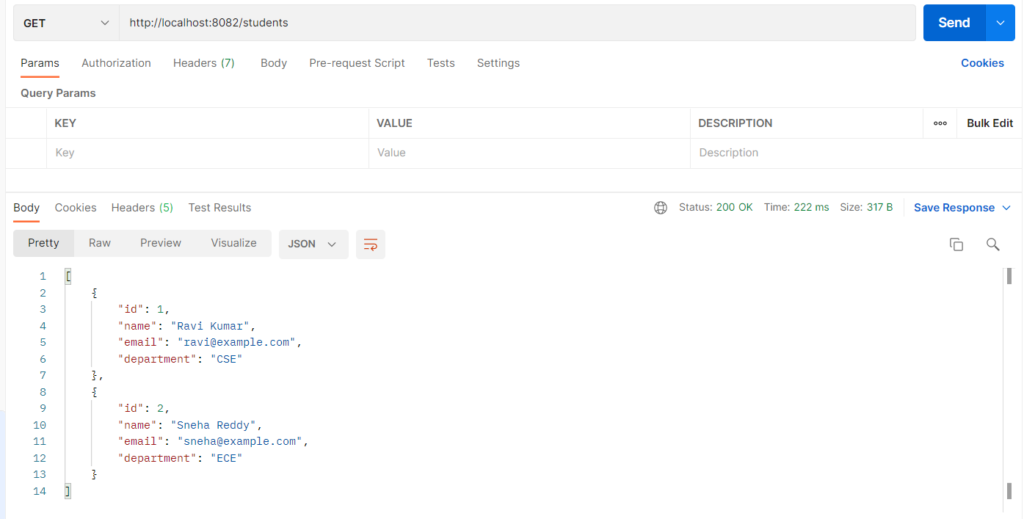
Spring Boot connects to a relational database by reading spring.datasource.* settings and building a DataSource, which is a pool of ready connections (HikariCP by default). JdbcTemplate sits on top of that DataSource and runs plain SQL for you, handling connections, statements, result sets, and cleanup. The four basic operations are INSERT (create), SELECT (read), UPDATE (change), and DELETE (remove), each run with ? placeholders so values are passed safely and SQL injection is avoided. It is used when you want full control of the SQL, a lightweight setup with no ORM, or a clear view of how database access works underneath JPA.
Types
- Plain JDBC:
DriverManagerorDataSourcewithConnection,PreparedStatement, andResultSet. It works, but needs a lot of boilerplate. JdbcTemplate: the main Spring helper, used here (update,query,queryForObject).NamedParameterJdbcTemplate: uses named parameters such as:nameinstead of?.SimpleJdbcInsert: builds INSERT statements from a table name and a map.DataSourcekinds: HikariCP pool (Boot default),DriverManagerDataSource(no pooling, for tests), or a JNDI server DataSource.- Result mapping:
RowMapper(one row to one object),BeanPropertyRowMapper,ResultSetExtractor.
Hands-on Experiment: Understand how Spring Boot connects applications to relational databases through JDBC and DataSource configuration
The following steps are involved in developing this hands-on experiment.
Step 1: Generate the Project
Step 2: Project Structure
Step 3: pom.xml
Step 4: application.yml
Step 5: Create Entity Class
Step 6: Create Repository Interface
Step 7: Create Service Class
Step 8: Create Controller Class
Step 9: Main Application Class
Step 10: Run the Main Application Class
Step 1: Configure the Project on Spring Initializr
Go to start.spring.io and set:
- Project: Maven
- Language: Java
- Spring Boot version: 3.2.x
- Group: com.example
- Artifact: jdbc
- Name: jdbc
- Package name: com.example.jdbc
- Packaging: Jar
- Java: 17
- Dependencies: Spring Web, JDBC API, PostgreSQL Driver
Click Generate to download the ZIP, then extract and import it into your IDE as a Maven project.
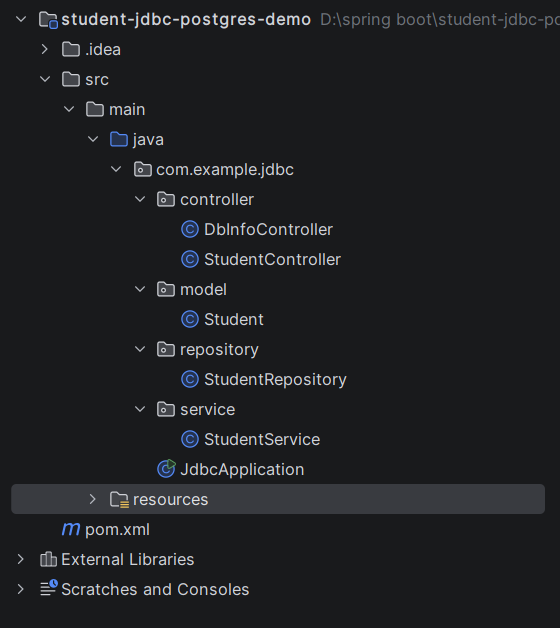
Step 2: Generated Project Structure
Step 3: Explore pom.xml
<?xml version="1.0" encoding="UTF-8"?>
<project xmlns="http://maven.apache.org/POM/4.0.0"
         xmlns:xsi="http://www.w3.org/2001/XMLSchema-instance"
         xsi:schemaLocation="http://maven.apache.org/POM/4.0.0 https://maven.apache.org/xsd/maven-4.0.0.xsd">
    <modelVersion>4.0.0</modelVersion>

    <parent>
        <groupId>org.springframework.boot</groupId>
        <artifactId>spring-boot-starter-parent</artifactId>
        <version>3.3.5</version>
        <relativePath/>
    </parent>

    <groupId>com.example</groupId>
    <artifactId>student-jdbc-postgres-demo</artifactId>
    <version>1.0.0</version>

    <properties>
        <java.version>17</java.version>
    </properties>

    <dependencies>
        <dependency>
            <groupId>org.springframework.boot</groupId>
            <artifactId>spring-boot-starter-web</artifactId>
        </dependency>
        <!-- JDBC + HikariCP connection pool + JdbcTemplate (no JPA / Hibernate here) -->
        <dependency>
            <groupId>org.springframework.boot</groupId>
            <artifactId>spring-boot-starter-jdbc</artifactId>
        </dependency>
        <dependency>
            <groupId>org.postgresql</groupId>
            <artifactId>postgresql</artifactId>
            <scope>runtime</scope>
        </dependency>
    </dependencies>

    <build>
        <plugins>
            <plugin>
                <groupId>org.springframework.boot</groupId>
                <artifactId>spring-boot-maven-plugin</artifactId>
            </plugin>
        </plugins>
    </build>
</project>
Step 4: application.yml
spring:
datasource:
# Spring Boot builds a DataSource (HikariCP pool) from these values
url: jdbc:postgresql://localhost:5432/student_jdbc_db
username: postgres
password: password
driver-class-name: org.postgresql.Driver
hikari:
maximum-pool-size: 5
sql:
init:
mode: always # runs schema.sql then data.sql at startup
server:
port: 8082
logging:
level:
org.springframework.jdbc.core.JdbcTemplate: DEBUG # prints every SQL statementStep 5: Create Entity class
package com.example.jdbc.model;

// Plain Java class (no JPA annotations). Each field matches a column in the students table.
public class Student {

    private Long id;
    private String name;
    private String email;
    private String department;

    public Long getId() { return id; }
    public void setId(Long id) { this.id = id; }
    public String getName() { return name; }
    public void setName(String name) { this.name = name; }
    public String getEmail() { return email; }
    public void setEmail(String email) { this.email = email; }
    public String getDepartment() { return department; }
    public void setDepartment(String department) { this.department = department; }
}
Step 6: Create Repository Interface
package com.example.jdbc.repository;

import com.example.jdbc.model.Student;
import org.springframework.jdbc.core.JdbcTemplate;
import org.springframework.jdbc.core.RowMapper;
import org.springframework.jdbc.support.GeneratedKeyHolder;
import org.springframework.jdbc.support.KeyHolder;
import org.springframework.stereotype.Repository;

import java.sql.PreparedStatement;
import java.util.List;
import java.util.Optional;

@Repository
public class StudentRepository {

    // JdbcTemplate is built by Spring Boot on top of the DataSource and injected here
    private final JdbcTemplate jdbcTemplate;

    public StudentRepository(JdbcTemplate jdbcTemplate) {
        this.jdbcTemplate = jdbcTemplate;
    }

    // RowMapper: converts ONE row of a ResultSet into ONE Student object
    private static final RowMapper<Student> ROW_MAPPER = (rs, rowNum) -> {
        Student s = new Student();
        s.setId(rs.getLong("id"));
        s.setName(rs.getString("name"));
        s.setEmail(rs.getString("email"));
        s.setDepartment(rs.getString("department"));
        return s;
    };

    // ---------- INSERT ----------
    public Student save(Student student) {
        KeyHolder keyHolder = new GeneratedKeyHolder();
        jdbcTemplate.update(connection -> {
            PreparedStatement ps = connection.prepareStatement(
                    "INSERT INTO students (name, email, department) VALUES (?, ?, ?)",
                    new String[]{"id"});   // PostgreSQL: name the key column so only "id" is returned
            ps.setString(1, student.getName());
            ps.setString(2, student.getEmail());
            ps.setString(3, student.getDepartment());
            return ps;
        }, keyHolder);
        student.setId(keyHolder.getKey().longValue());   // auto-generated id (BIGSERIAL)
        return student;
    }

    // ---------- SELECT ----------
    public List<Student> findAll() {
        return jdbcTemplate.query(
                "SELECT id, name, email, department FROM students ORDER BY id", ROW_MAPPER);
    }

    public Optional<Student> findById(Long id) {
        List<Student> result = jdbcTemplate.query(
                "SELECT id, name, email, department FROM students WHERE id = ?", ROW_MAPPER, id);
        return result.stream().findFirst();
    }

    public List<Student> findByDepartment(String department) {
        return jdbcTemplate.query(
                "SELECT id, name, email, department FROM students WHERE department = ? ORDER BY id",
                ROW_MAPPER, department);
    }

    public long count() {
        Long total = jdbcTemplate.queryForObject("SELECT COUNT(*) FROM students", Long.class);
        return total == null ? 0 : total;
    }

    // ---------- UPDATE ----------  (returns the number of rows changed)
    public int update(Long id, Student student) {
        return jdbcTemplate.update(
                "UPDATE students SET name = ?, email = ?, department = ? WHERE id = ?",
                student.getName(), student.getEmail(), student.getDepartment(), id);
    }

    // ---------- DELETE ----------  (returns the number of rows removed)
    public int deleteById(Long id) {
        return jdbcTemplate.update("DELETE FROM students WHERE id = ?", id);
    }
}
Step 7: Create Service class
package com.example.jdbc.service;

import com.example.jdbc.model.Student;
import com.example.jdbc.repository.StudentRepository;
import org.springframework.stereotype.Service;

import java.util.List;
import java.util.NoSuchElementException;

@Service
public class StudentService {

    private final StudentRepository repository;

    public StudentService(StudentRepository repository) {
        this.repository = repository;
    }

    public Student create(Student student) {
        return repository.save(student);
    }

    public List<Student> findAll(String department) {
        return (department == null || department.isBlank())
                ? repository.findAll()
                : repository.findByDepartment(department);
    }

    public Student findById(Long id) {
        return repository.findById(id)
                .orElseThrow(() -> new NoSuchElementException("Student not found with id " + id));
    }

    public Student update(Long id, Student student) {
        if (repository.update(id, student) == 0) {          // 0 rows changed -> id does not exist
            throw new NoSuchElementException("Student not found with id " + id);
        }
        return findById(id);
    }

    public void delete(Long id) {
        if (repository.deleteById(id) == 0) {                // 0 rows removed -> id does not exist
            throw new NoSuchElementException("Student not found with id " + id);
        }
    }

    public long count() {
        return repository.count();
    }
}
Step 8: Create Controller classes
package com.example.jdbc.controller;

import com.example.jdbc.model.Student;
import com.example.jdbc.service.StudentService;
import org.springframework.http.HttpStatus;
import org.springframework.http.ResponseEntity;
import org.springframework.web.bind.annotation.*;

import java.util.List;

@RestController
@RequestMapping("/students")
public class StudentController {

    private final StudentService service;

    public StudentController(StudentService service) {
        this.service = service;
    }

    // INSERT
    @PostMapping
    public ResponseEntity<Student> create(@RequestBody Student student) {
        return ResponseEntity.status(HttpStatus.CREATED).body(service.create(student));
    }

    // SELECT all  (optional ?department=CSE)
    @GetMapping
    public List<Student> getAll(@RequestParam(required = false) String department) {
        return service.findAll(department);
    }

    // SELECT count
    @GetMapping("/count")
    public long count() {
        return service.count();
    }

    // SELECT by id
    @GetMapping("/{id}")
    public Student getById(@PathVariable Long id) {
        return service.findById(id);
    }

    // UPDATE
    @PutMapping("/{id}")
    public Student update(@PathVariable Long id, @RequestBody Student student) {
        return service.update(id, student);
    }

    // DELETE
    @DeleteMapping("/{id}")
    public ResponseEntity<Void> delete(@PathVariable Long id) {
        service.delete(id);
        return ResponseEntity.noContent().build();
    }
}
package com.example.jdbc.controller;

import org.springframework.web.bind.annotation.GetMapping;
import org.springframework.web.bind.annotation.RequestMapping;
import org.springframework.web.bind.annotation.RestController;

import javax.sql.DataSource;
import java.sql.Connection;
import java.sql.DatabaseMetaData;
import java.sql.SQLException;
import java.util.LinkedHashMap;
import java.util.Map;

// Proves the DataSource is connected: asks the database about itself
@RestController
@RequestMapping("/db")
public class DbInfoController {

    private final DataSource dataSource;   // the connection pool Spring Boot created

    public DbInfoController(DataSource dataSource) {
        this.dataSource = dataSource;
    }

    @GetMapping("/info")
    public Map<String, String> info() throws SQLException {
        try (Connection connection = dataSource.getConnection()) {   // borrowed from the pool
            DatabaseMetaData meta = connection.getMetaData();
            Map<String, String> result = new LinkedHashMap<>();
            result.put("dataSourceType", dataSource.getClass().getSimpleName());
            result.put("url", meta.getURL());
            result.put("user", meta.getUserName());
            result.put("database", meta.getDatabaseProductName() + " " + meta.getDatabaseProductVersion());
            result.put("driver", meta.getDriverName());
            return result;
        }
    }
}
Step 9: Main Application
package com.example.jdbc;

import org.springframework.boot.SpringApplication;
import org.springframework.boot.autoconfigure.SpringBootApplication;

@SpringBootApplication
public class JdbcApplication {
    public static void main(String[] args) {
        SpringApplication.run(JdbcApplication.class, args);
    }
}
Step 10: Run the JdbcApplication