Distributed caching stores frequently read data in a shared in-memory store (Redis) so that many application instances can use the same cache.It is used to avoid repeated slow database queries, which cuts response time and reduces load on MySQL.Spring Boot connects to Redis through Spring Cache annotations (@Cacheable, @CachePut, @CacheEvict), so caching needs almost no extra code.In this demo, a Product Catalog reads from MySQL only on the first request, and later requests are served from Redis.
Features
- Shared cache across multiple application instances
- Very fast in-memory reads (sub-millisecond)
- Time-to-live (TTL) expiry for automatic cache refresh
- Annotation-based caching with no manual Redis code
- Key prefixing, so cache entries are easy to find in Redis
- Cache stays in sync on create, update and delete
Redis Caching Types
The caching annotations each handle a different kind of cache operation:
| Kind | What it does | Used in this demo |
|---|---|---|
@Cacheable |
Checks the cache first. On a miss it runs the method and stores the result. | getProductById, getProductsByCategory |
@CachePut |
Always runs the method and updates the cache with the result. | createProduct, updateProduct |
@CacheEvict |
Removes one entry, or all entries, from the cache. | deleteProduct, clearAllCaches |
@Caching |
Combines several cache operations on one method. | create, update, delete |
@EnableCaching |
Switches on annotation-driven caching for the application. | Main class |
Hands-on Experiment: Building a High-Performance Product Catalog with Redis Distributed Caching
Aim: To build a Spring Boot product catalog service that uses Redis as a distributed cache in front of MySQL, and to see how @Cacheable, @CachePut and @CacheEvict keep the cache fast and consistent.
Step-by-Step Application Development
Step 1: Generate the Project via Spring Initializr
Open https://start.spring.io and select:
- Project: Maven
- Language: Java
- Spring Boot: 3.3.x
- Group:
com.example - Artifact:
product-catalog-redis - Packaging: Jar
- Java: 17
- Dependencies: Spring Web, Spring Data JPA, Spring Data Redis (Access+Driver), Spring Cache Abstraction, MySQL Driver
Click Generate, extract the zip and open it in your IDE.
Step 2: Project Structure
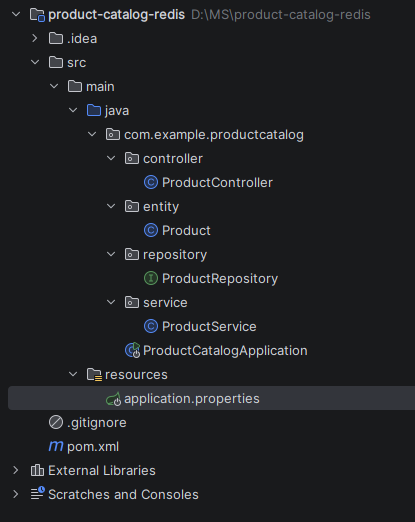
Step 3: Create Files according to the project structure
package com.example.productcatalog.entity;

import jakarta.persistence.Entity;
import jakarta.persistence.GeneratedValue;
import jakarta.persistence.GenerationType;
import jakarta.persistence.Id;
import jakarta.persistence.Table;

import java.io.Serializable;

// Serializable is required because Redis stores the object in serialized form
@Entity
@Table(name = "products")
public class Product implements Serializable {

    private static final long serialVersionUID = 1L;

    @Id
    @GeneratedValue(strategy = GenerationType.IDENTITY)
    private Long id;

    private String name;
    private String category;
    private Double price;
    private Integer stock;
    private String description;

    public Product() {
    }

    public Product(String name, String category, Double price, Integer stock, String description) {
        this.name = name;
        this.category = category;
        this.price = price;
        this.stock = stock;
        this.description = description;
    }

    public Long getId() { return id; }
    public void setId(Long id) { this.id = id; }

    public String getName() { return name; }
    public void setName(String name) { this.name = name; }

    public String getCategory() { return category; }
    public void setCategory(String category) { this.category = category; }

    public Double getPrice() { return price; }
    public void setPrice(Double price) { this.price = price; }

    public Integer getStock() { return stock; }
    public void setStock(Integer stock) { this.stock = stock; }

    public String getDescription() { return description; }
    public void setDescription(String description) { this.description = description; }
}
package com.example.productcatalog.repository;

import com.example.productcatalog.entity.Product;
import org.springframework.data.jpa.repository.JpaRepository;
import org.springframework.stereotype.Repository;

import java.util.List;

@Repository
public interface ProductRepository extends JpaRepository<Product, Long> {

    List<Product> findByCategory(String category);
}
package com.example.productcatalog.service;

import com.example.productcatalog.entity.Product;
import com.example.productcatalog.repository.ProductRepository;
import org.slf4j.Logger;
import org.slf4j.LoggerFactory;
import org.springframework.cache.annotation.CacheEvict;
import org.springframework.cache.annotation.CachePut;
import org.springframework.cache.annotation.Cacheable;
import org.springframework.cache.annotation.Caching;
import org.springframework.http.HttpStatus;
import org.springframework.stereotype.Service;
import org.springframework.web.server.ResponseStatusException;

import java.util.List;

@Service
public class ProductService {

    private static final Logger log = LoggerFactory.getLogger(ProductService.class);

    private final ProductRepository productRepository;

    public ProductService(ProductRepository productRepository) {
        this.productRepository = productRepository;
    }

    // CREATE: save to MySQL and put the new product into the Redis cache
    @Caching(
        put = @CachePut(value = "product", key = "#result.id"),
        evict = @CacheEvict(value = "productsByCategory", allEntries = true)
    )
    public Product createProduct(Product product) {
        log.info("Saving new product to MySQL: {}", product.getName());
        return productRepository.save(product);
    }

    // READ: the method body runs ONLY on a cache miss
    @Cacheable(value = "product", key = "#id")
    public Product getProductById(Long id) {
        log.info("CACHE MISS -> fetching product {} from MySQL", id);
        simulateSlowQuery();
        return productRepository.findById(id)
                .orElseThrow(() -> new ResponseStatusException(HttpStatus.NOT_FOUND, "Product not found: " + id));
    }

    @Cacheable(value = "productsByCategory", key = "#category")
    public List<Product> getProductsByCategory(String category) {
        log.info("CACHE MISS -> fetching category '{}' from MySQL", category);
        simulateSlowQuery();
        return productRepository.findByCategory(category);
    }

    // UPDATE: refresh the cached copy so readers never see stale data
    @Caching(
        put = @CachePut(value = "product", key = "#id"),
        evict = @CacheEvict(value = "productsByCategory", allEntries = true)
    )
    public Product updateProduct(Long id, Product updated) {
        log.info("Updating product {} in MySQL and refreshing Redis", id);
        Product existing = productRepository.findById(id)
                .orElseThrow(() -> new ResponseStatusException(HttpStatus.NOT_FOUND, "Product not found: " + id));
        existing.setName(updated.getName());
        existing.setCategory(updated.getCategory());
        existing.setPrice(updated.getPrice());
        existing.setStock(updated.getStock());
        existing.setDescription(updated.getDescription());
        return productRepository.save(existing);
    }

    // DELETE: remove from MySQL and evict from Redis
    @Caching(evict = {
        @CacheEvict(value = "product", key = "#id"),
        @CacheEvict(value = "productsByCategory", allEntries = true)
    })
    public void deleteProduct(Long id) {
        log.info("Deleting product {} from MySQL and evicting from Redis", id);
        productRepository.deleteById(id);
    }

    // Clears every entry of the "product" cache
    @CacheEvict(value = {"product", "productsByCategory"}, allEntries = true)
    public void clearAllCaches() {
        log.info("All product caches cleared");
    }

    // Makes the database call visibly slow so the cache benefit can be seen in Postman
    private void simulateSlowQuery() {
        try {
            Thread.sleep(2000);
        } catch (InterruptedException e) {
            Thread.currentThread().interrupt();
        }
    }
}
package com.example.productcatalog.controller;

import com.example.productcatalog.entity.Product;
import com.example.productcatalog.service.ProductService;
import org.springframework.http.HttpStatus;
import org.springframework.http.ResponseEntity;
import org.springframework.web.bind.annotation.*;

import java.util.List;

@RestController
@RequestMapping("/api/products")
public class ProductController {

    private final ProductService productService;

    public ProductController(ProductService productService) {
        this.productService = productService;
    }

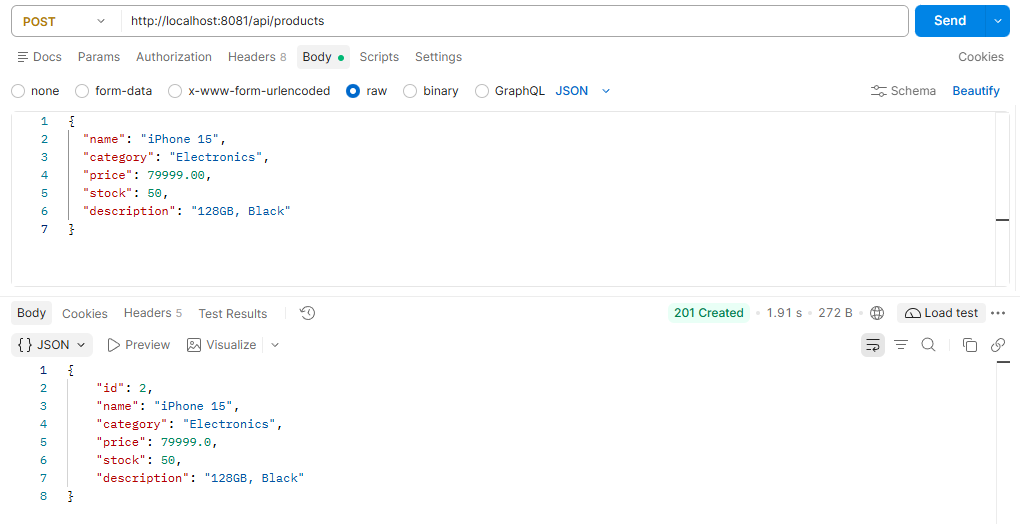
    @PostMapping
    public ResponseEntity<Product> create(@RequestBody Product product) {
        return ResponseEntity.status(HttpStatus.CREATED).body(productService.createProduct(product));
    }

    @GetMapping("/{id}")
    public Product getById(@PathVariable Long id) {
        return productService.getProductById(id);
    }

    @GetMapping("/category/{category}")
    public List<Product> getByCategory(@PathVariable String category) {
        return productService.getProductsByCategory(category);
    }

    @PutMapping("/{id}")
    public Product update(@PathVariable Long id, @RequestBody Product product) {
        return productService.updateProduct(id, product);
    }

    @DeleteMapping("/{id}")
    public ResponseEntity<String> delete(@PathVariable Long id) {
        productService.deleteProduct(id);
        return ResponseEntity.ok("Product " + id + " deleted");
    }

    @DeleteMapping("/cache")
    public ResponseEntity<String> clearCache() {
        productService.clearAllCaches();
        return ResponseEntity.ok("All caches cleared");
    }
}
package com.example.productcatalog;

import org.springframework.boot.SpringApplication;
import org.springframework.boot.autoconfigure.SpringBootApplication;
import org.springframework.cache.annotation.EnableCaching;

@SpringBootApplication
@EnableCaching
public class ProductCatalogApplication {

    public static void main(String[] args) {
        SpringApplication.run(ProductCatalogApplication.class, args);
    }
}
spring.application.name=product-catalog-redis
server.port=8081
# ---------- MySQL ----------
spring.datasource.url=jdbc:mysql://localhost:3306/product_catalog_db?createDatabaseIfNotExist=true&useSSL=false&serverTimezone=UTC
spring.datasource.username=root
spring.datasource.password=password
spring.jpa.hibernate.ddl-auto=update
spring.jpa.show-sql=true
# ---------- Redis (distributed cache) ----------
spring.data.redis.host=localhost
spring.data.redis.port=6379
spring.cache.type=redis
spring.cache.redis.time-to-live=600000
spring.cache.redis.key-prefix=catalog::
spring.cache.redis.use-key-prefix=true
spring.cache.redis.cache-null-values=falseCode language: PHP (php)Start Redis
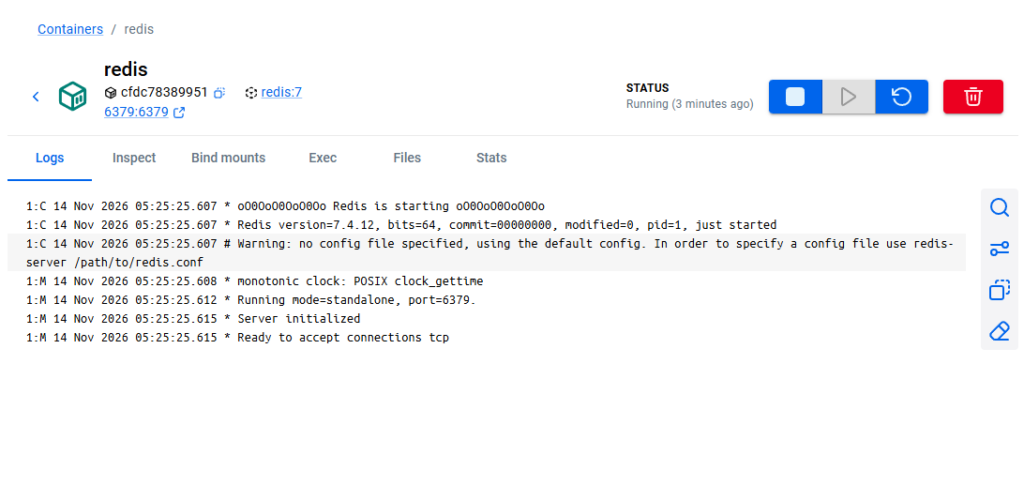
docker run -d --name redis -p 6379:6379 redis:7Code language: CSS (css)Step 4: Run the Application