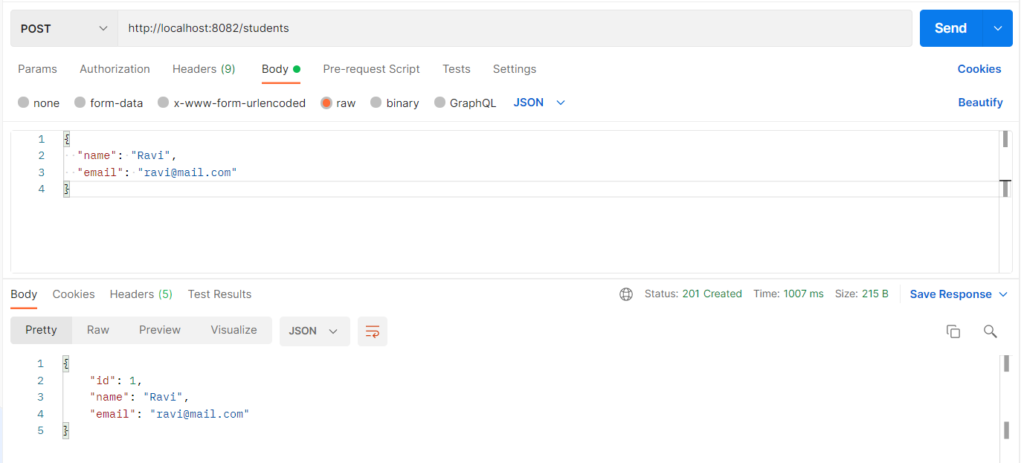
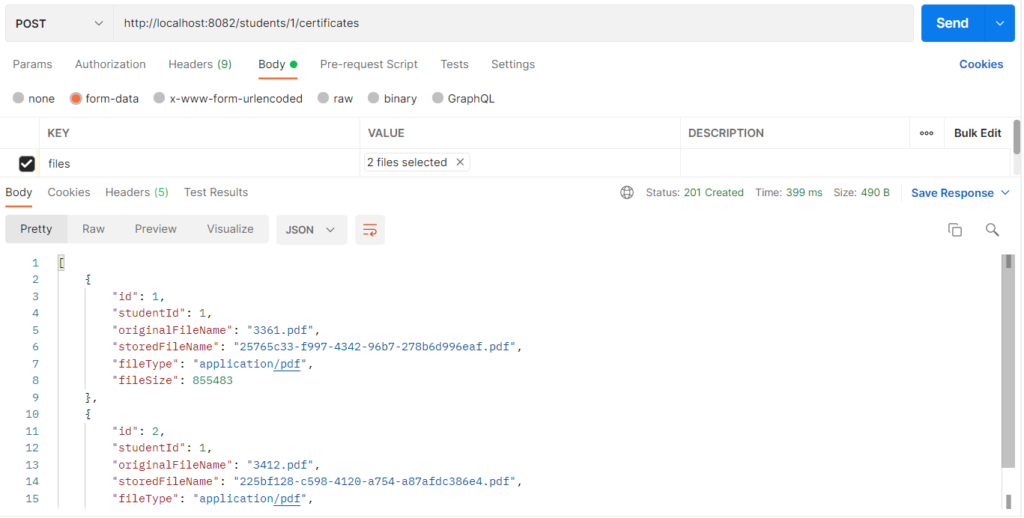
Multiple file upload means a client sends several files in one multipart/form-data request, and Spring Boot receives them together as a List<MultipartFile> (or an array). Each file is a separate part of the request, so the server can check, store, and record every file one by one. It is used when a record needs more than one attachment, such as a student’s degree, marks memo, and course certificates, so the user does not have to upload them in separate requests. In this example the files are saved in a certificates folder, and one row per file is saved in MySQL.
Features
- One request carries several files, received as
List<MultipartFile> - Limits for each file (3MB), for the whole request (10MB), and for the number of files (5)
- Every file is validated first (not empty, PDF/PNG/JPEG only), so either all files are stored or none
- Unique stored names (UUID), so files with the same name never overwrite each other
- If storing fails halfway, the files already written in that request are removed
- Each file is listed, downloaded, and deleted separately through its own id
- The
certificatesfolder is created automatically at startup
Multiple File Upload Types
- Same key repeated (
List<MultipartFile>): every file uses the same form key, herefiles. This example uses it, and it is the most common form. - Array (
MultipartFile[]): works exactly like the list, with the same Postman setup, only the Java type is an array. - Different keys for different files: each file has its own key and its own
@RequestParam, for exampledegreeandmarksMemo. It is used when every file has a fixed meaning. - Files with form data or JSON:
@RequestPartreceives the files together with a JSON part, for example a student object plus its certificates. - All-or-nothing vs partial success: all-or-nothing rejects the whole request when one file is invalid, which is what this example does. Partial success stores the valid files and reports the failed ones.
Hands-on Experiment: Creating a spring boot application to understand how several files can be uploaded through one request.
The following steps are involved in developing this hands-on experiment.
Step 1: Generate the Project
Step 2: Project Structure
Step 3: pom.xml
Step 4: application.properties
Step 5: Create Entity Class
Step 6: Create Repository Interface
Step 7: Create Service Class
Step 8: Create Controller Class
Step 9: Main Application Class
Step 10: Run the Main Application Class
Step 1: Configure the Project on Spring Initializr
Go to start.spring.io and set:
- Project: Maven
- Language: Java
- Spring Boot version: 3.2.x
- Group: com.example
- Artifact: multiplefileupload
- Name: multiplefileupload
- Package name: com.example.multiplefileupload
- Packaging: Jar
- Java: 17
- Dependencies: Spring Web, Spring Data JPA, MySQL Driver.
Click Generate to download the ZIP, then extract and import it into your IDE as a Maven project.
Step 2: Generated Project Structure
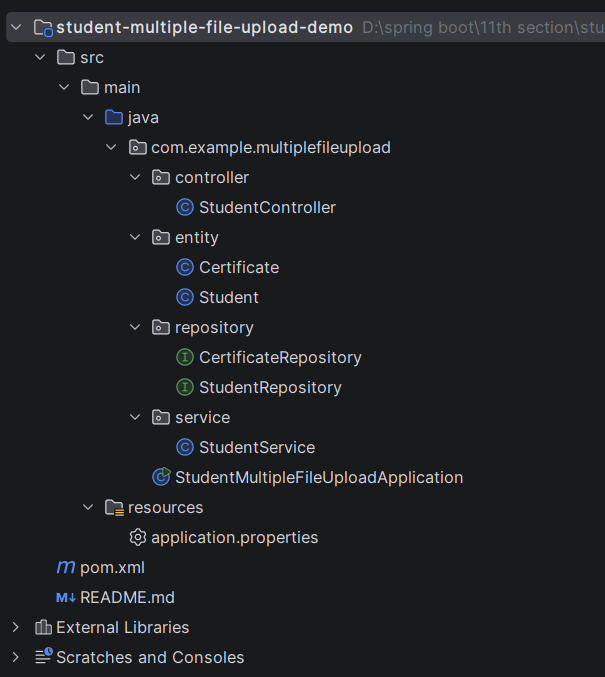
Step 3: Explore pom.xml
<?xml version="1.0" encoding="UTF-8"?>
<project xmlns="http://maven.apache.org/POM/4.0.0"
         xmlns:xsi="http://www.w3.org/2001/XMLSchema-instance"
         xsi:schemaLocation="http://maven.apache.org/POM/4.0.0 https://maven.apache.org/xsd/maven-4.0.0.xsd">
    <modelVersion>4.0.0</modelVersion>

    <parent>
        <groupId>org.springframework.boot</groupId>
        <artifactId>spring-boot-starter-parent</artifactId>
        <version>3.2.5</version>
        <relativePath/>
    </parent>

    <groupId>com.example</groupId>
    <artifactId>student-multiple-file-upload-demo</artifactId>
    <version>1.0.0</version>
    <name>student-multiple-file-upload-demo</name>

    <properties>
        <java.version>17</java.version>
    </properties>

    <dependencies>
        <dependency>
            <groupId>org.springframework.boot</groupId>
            <artifactId>spring-boot-starter-web</artifactId>
        </dependency>
        <dependency>
            <groupId>org.springframework.boot</groupId>
            <artifactId>spring-boot-starter-data-jpa</artifactId>
        </dependency>
        <dependency>
            <groupId>com.mysql</groupId>
            <artifactId>mysql-connector-j</artifactId>
            <scope>runtime</scope>
        </dependency>
    </dependencies>

    <build>
        <plugins>
            <plugin>
                <groupId>org.springframework.boot</groupId>
                <artifactId>spring-boot-maven-plugin</artifactId>
            </plugin>
        </plugins>
    </build>
</project>
Step 4: application.properties
spring.application.name=student-multiple-file-upload-demo
server.port=8082
# MySQL (database is created automatically if missing)
spring.datasource.url=jdbc:mysql://localhost:3306/student_certificate_upload_db?createDatabaseIfNotExist=true&useSSL=false&allowPublicKeyRetrieval=true&serverTimezone=UTC
spring.datasource.username=root
spring.datasource.password=password
spring.jpa.hibernate.ddl-auto=update
spring.jpa.show-sql=true
# Folder where certificates are stored (created automatically, relative to the project folder)
file.upload-dir=certificates
# Maximum number of files allowed in ONE request
file.max-files=5
# Multipart limits: per file, and for the whole request (all files together)
spring.servlet.multipart.enabled=true
spring.servlet.multipart.max-file-size=3MB
spring.servlet.multipart.max-request-size=10MBCode language: PHP (php)Step 5: Create Entity Class
package com.example.multiplefileupload.entity;

import jakarta.persistence.Entity;
import jakarta.persistence.GeneratedValue;
import jakarta.persistence.GenerationType;
import jakarta.persistence.Id;
import jakarta.persistence.Table;

@Entity
@Table(name = "students")
public class Student {

    @Id
    @GeneratedValue(strategy = GenerationType.IDENTITY)
    private Long id;

    private String name;
    private String email;

    public Student() {
    }

    public Long getId() { return id; }
    public void setId(Long id) { this.id = id; }

    public String getName() { return name; }
    public void setName(String name) { this.name = name; }

    public String getEmail() { return email; }
    public void setEmail(String email) { this.email = email; }
}
package com.example.multiplefileupload.entity;

import jakarta.persistence.Entity;
import jakarta.persistence.GeneratedValue;
import jakarta.persistence.GenerationType;
import jakarta.persistence.Id;
import jakarta.persistence.Table;

// One row per uploaded file. The file itself is in the certificates folder.
@Entity
@Table(name = "certificates")
public class Certificate {

    @Id
    @GeneratedValue(strategy = GenerationType.IDENTITY)
    private Long id;

    private Long studentId;

    private String originalFileName;

    private String storedFileName;

    private String fileType;

    private Long fileSize;

    public Certificate() {
    }

    public Long getId() { return id; }
    public void setId(Long id) { this.id = id; }

    public Long getStudentId() { return studentId; }
    public void setStudentId(Long studentId) { this.studentId = studentId; }

    public String getOriginalFileName() { return originalFileName; }
    public void setOriginalFileName(String originalFileName) { this.originalFileName = originalFileName; }

    public String getStoredFileName() { return storedFileName; }
    public void setStoredFileName(String storedFileName) { this.storedFileName = storedFileName; }

    public String getFileType() { return fileType; }
    public void setFileType(String fileType) { this.fileType = fileType; }

    public Long getFileSize() { return fileSize; }
    public void setFileSize(Long fileSize) { this.fileSize = fileSize; }
}
Step 6: Create below Repository Interface
package com.example.multiplefileupload.repository;

import com.example.multiplefileupload.entity.Student;
import org.springframework.data.jpa.repository.JpaRepository;
import org.springframework.stereotype.Repository;

@Repository
public interface StudentRepository extends JpaRepository<Student, Long> {
}
package com.example.multiplefileupload.repository;

import com.example.multiplefileupload.entity.Certificate;
import org.springframework.data.jpa.repository.JpaRepository;
import org.springframework.stereotype.Repository;

import java.util.List;

@Repository
public interface CertificateRepository extends JpaRepository<Certificate, Long> {

    List<Certificate> findByStudentId(Long studentId);
}
Step 7: Create below Service class
package com.example.multiplefileupload.service;

import com.example.multiplefileupload.entity.Certificate;
import com.example.multiplefileupload.entity.Student;
import com.example.multiplefileupload.repository.CertificateRepository;
import com.example.multiplefileupload.repository.StudentRepository;
import jakarta.annotation.PostConstruct;
import org.springframework.beans.factory.annotation.Value;
import org.springframework.core.io.FileSystemResource;
import org.springframework.core.io.Resource;
import org.springframework.http.HttpStatus;
import org.springframework.stereotype.Service;
import org.springframework.util.StringUtils;
import org.springframework.web.multipart.MultipartFile;
import org.springframework.web.server.ResponseStatusException;

import java.io.IOException;
import java.io.InputStream;
import java.nio.file.Files;
import java.nio.file.Path;
import java.nio.file.Paths;
import java.nio.file.StandardCopyOption;
import java.util.ArrayList;
import java.util.List;
import java.util.UUID;

@Service
public class StudentService {

    private final StudentRepository studentRepository;
    private final CertificateRepository certificateRepository;

    @Value("${file.upload-dir}")
    private String uploadDir;

    @Value("${file.max-files}")
    private int maxFiles;

    private Path root;

    public StudentService(StudentRepository studentRepository,
                          CertificateRepository certificateRepository) {
        this.studentRepository = studentRepository;
        this.certificateRepository = certificateRepository;
    }

    @PostConstruct
    public void init() {
        try {
            root = Paths.get(uploadDir).toAbsolutePath().normalize();
            Files.createDirectories(root);
        } catch (IOException e) {
            throw new IllegalStateException("Could not create upload folder " + uploadDir, e);
        }
    }

    // ---------- Student ----------

    public Student createStudent(Student student) {
        student.setId(null);
        return studentRepository.save(student);
    }

    public List<Student> getAllStudents() {
        return studentRepository.findAll();
    }

    public Student getStudent(Long id) {
        return studentRepository.findById(id)
                .orElseThrow(() -> new ResponseStatusException(
                        HttpStatus.NOT_FOUND, "Student not found with id " + id));
    }

    // ---------- Multiple certificates in ONE request ----------

    public List<Certificate> uploadCertificates(Long studentId, List<MultipartFile> files) {
        getStudent(studentId);

        if (files == null || files.isEmpty()) {
            throw new ResponseStatusException(HttpStatus.BAD_REQUEST, "Please select at least one file");
        }
        if (files.size() > maxFiles) {
            throw new ResponseStatusException(HttpStatus.BAD_REQUEST,
                    "You can upload a maximum of " + maxFiles + " files at a time");
        }

        // Step 1: validate EVERY file first, so either all are stored or none
        for (MultipartFile file : files) {
            if (file.isEmpty()) {
                throw new ResponseStatusException(HttpStatus.BAD_REQUEST,
                        "File '" + file.getOriginalFilename() + "' is empty");
            }
            extensionFor(file);
        }

        // Step 2: store the files one by one
        List<Certificate> certificates = new ArrayList<>();
        List<Path> savedPaths = new ArrayList<>();
        try {
            for (MultipartFile file : files) {
                String storedName = UUID.randomUUID() + extensionFor(file);
                Path target = root.resolve(storedName).normalize();

                try (InputStream inputStream = file.getInputStream()) {
                    Files.copy(inputStream, target, StandardCopyOption.REPLACE_EXISTING);
                }
                savedPaths.add(target);

                Certificate certificate = new Certificate();
                certificate.setStudentId(studentId);
                certificate.setOriginalFileName(StringUtils.cleanPath(String.valueOf(file.getOriginalFilename())));
                certificate.setStoredFileName(storedName);
                certificate.setFileType(file.getContentType());
                certificate.setFileSize(file.getSize());
                certificates.add(certificate);
            }
        } catch (IOException e) {
            // Something failed: remove the files already written in this request
            for (Path path : savedPaths) {
                try {
                    Files.deleteIfExists(path);
                } catch (IOException ignored) {
                    // nothing more to do
                }
            }
            throw new ResponseStatusException(HttpStatus.INTERNAL_SERVER_ERROR, "Could not store the files");
        }

        // Step 3: save all file details in MySQL
        return certificateRepository.saveAll(certificates);
    }

    public List<Certificate> getCertificates(Long studentId) {
        getStudent(studentId);
        return certificateRepository.findByStudentId(studentId);
    }

    public Certificate getCertificate(Long studentId, Long certificateId) {
        Certificate certificate = certificateRepository.findById(certificateId)
                .orElseThrow(() -> new ResponseStatusException(
                        HttpStatus.NOT_FOUND, "Certificate not found with id " + certificateId));
        if (!certificate.getStudentId().equals(studentId)) {
            throw new ResponseStatusException(HttpStatus.NOT_FOUND,
                    "Certificate " + certificateId + " does not belong to student " + studentId);
        }
        return certificate;
    }

    public Resource loadFile(Certificate certificate) {
        Path file = root.resolve(certificate.getStoredFileName()).normalize();
        if (!Files.exists(file)) {
            throw new ResponseStatusException(HttpStatus.NOT_FOUND, "File is missing on the server");
        }
        return new FileSystemResource(file);
    }

    public void deleteCertificate(Long studentId, Long certificateId) {
        Certificate certificate = getCertificate(studentId, certificateId);
        try {
            Files.deleteIfExists(root.resolve(certificate.getStoredFileName()).normalize());
        } catch (IOException ignored) {
            // the database record is more important than a leftover file
        }
        certificateRepository.delete(certificate);
    }

    private String extensionFor(MultipartFile file) {
        String contentType = file.getContentType();
        if ("application/pdf".equals(contentType)) return ".pdf";
        if ("image/png".equals(contentType)) return ".png";
        if ("image/jpeg".equals(contentType)) return ".jpg";
        throw new ResponseStatusException(HttpStatus.BAD_REQUEST,
                "File '" + file.getOriginalFilename() + "' is not allowed. Only PDF, PNG and JPEG files are accepted");
    }
}
Step 8: Create Controller class
package com.example.multiplefileupload.controller;

import com.example.multiplefileupload.entity.Certificate;
import com.example.multiplefileupload.entity.Student;
import com.example.multiplefileupload.service.StudentService;
import org.springframework.core.io.Resource;
import org.springframework.http.ContentDisposition;
import org.springframework.http.HttpHeaders;
import org.springframework.http.HttpStatus;
import org.springframework.http.MediaType;
import org.springframework.http.ResponseEntity;
import org.springframework.web.bind.annotation.DeleteMapping;
import org.springframework.web.bind.annotation.GetMapping;
import org.springframework.web.bind.annotation.PathVariable;
import org.springframework.web.bind.annotation.PostMapping;
import org.springframework.web.bind.annotation.RequestBody;
import org.springframework.web.bind.annotation.RequestMapping;
import org.springframework.web.bind.annotation.RequestParam;
import org.springframework.web.bind.annotation.RestController;
import org.springframework.web.multipart.MultipartFile;

import java.util.List;

@RestController
@RequestMapping("/students")
public class StudentController {

    private final StudentService studentService;

    public StudentController(StudentService studentService) {
        this.studentService = studentService;
    }

    // 1. Create a student (JSON)
    @PostMapping
    public ResponseEntity<Student> createStudent(@RequestBody Student student) {
        return ResponseEntity.status(HttpStatus.CREATED).body(studentService.createStudent(student));
    }

    // 2. Upload SEVERAL certificates in one request (form-data, same key "files" repeated)
    @PostMapping(value = "/{studentId}/certificates", consumes = MediaType.MULTIPART_FORM_DATA_VALUE)
    public ResponseEntity<List<Certificate>> uploadCertificates(
            @PathVariable Long studentId,
            @RequestParam("files") List<MultipartFile> files) {
        List<Certificate> saved = studentService.uploadCertificates(studentId, files);
        return ResponseEntity.status(HttpStatus.CREATED).body(saved);
    }

    // 3. List the certificates of a student
    @GetMapping("/{studentId}/certificates")
    public List<Certificate> getCertificates(@PathVariable Long studentId) {
        return studentService.getCertificates(studentId);
    }

    // 4. Download one certificate
    @GetMapping("/{studentId}/certificates/{certificateId}")
    public ResponseEntity<Resource> downloadCertificate(@PathVariable Long studentId,
                                                        @PathVariable Long certificateId) {
        Certificate certificate = studentService.getCertificate(studentId, certificateId);
        Resource file = studentService.loadFile(certificate);
        return ResponseEntity.ok()
                .contentType(MediaType.parseMediaType(certificate.getFileType()))
                .header(HttpHeaders.CONTENT_DISPOSITION,
                        ContentDisposition.attachment().filename(certificate.getOriginalFileName()).build().toString())
                .body(file);
    }

    // 5. Delete one certificate (file + database row)
    @DeleteMapping("/{studentId}/certificates/{certificateId}")
    public ResponseEntity<String> deleteCertificate(@PathVariable Long studentId,
                                                    @PathVariable Long certificateId) {
        studentService.deleteCertificate(studentId, certificateId);
        return ResponseEntity.ok("Certificate " + certificateId + " deleted");
    }

    @GetMapping("/{id}")
    public Student getStudent(@PathVariable Long id) {
        return studentService.getStudent(id);
    }

    @GetMapping
    public List<Student> getAllStudents() {
        return studentService.getAllStudents();
    }
}
Step 9: Main Application
package com.example.multiplefileupload;

import org.springframework.boot.SpringApplication;
import org.springframework.boot.autoconfigure.SpringBootApplication;

@SpringBootApplication
public class StudentMultipleFileUploadApplication {

    public static void main(String[] args) {
        SpringApplication.run(StudentMultipleFileUploadApplication.class, args);
    }
}
Step 10: Run the StudentMultiFileUploadApplication