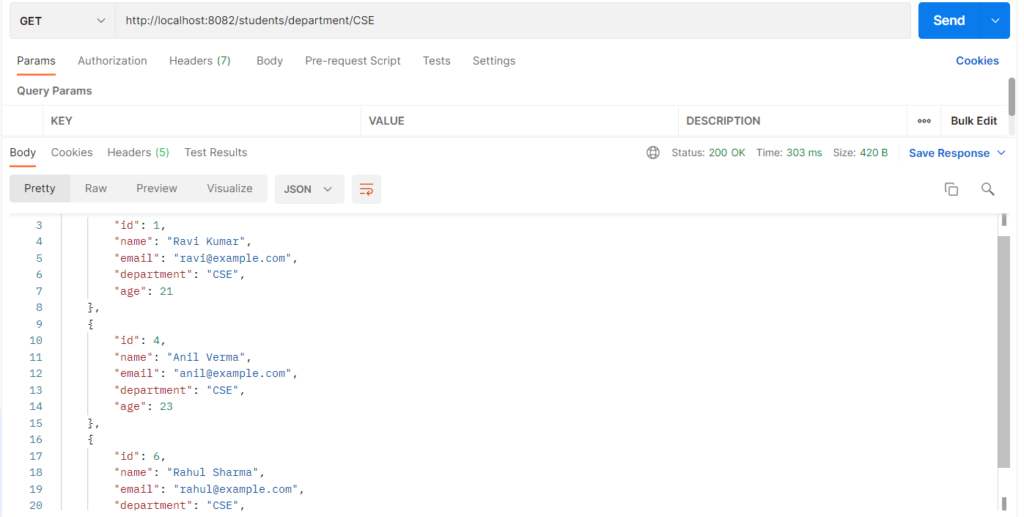
A derived query method is a method you declare in a Spring Data repository interface, where Spring reads the method name and generates the SQL query for you. You write only the method signature, such as List<Student> findByDepartment(String department);, with no SQL and no method body. Spring splits the name into parts: the action (findBy), the property (Department), and the keyword (Containing, GreaterThan, And…), then builds the query from them. It is used for simple searches and filters, so common queries take one line instead of a written query.
Features
- No SQL and no implementation code to write.
- The names are checked at startup. A wrong property name stops the app with a clear error instead of failing later.
- Many keywords can be combined in one name (
And,Or,OrderBy,Top3). - Return types can be a List, an Optional, a boolean, or a number.
- The generated SQL can be seen in the console with
show-sql: true.
Hands-on Experiment: Creating a spring boot application with Derived Query Methods
The following steps are involved in developing this hands-on experiment.
Step 1: Generate the Project
Step 2: Project Structure
Step 3: pom.xml
Step 4: application.yml
Step 5: Create Entity Class
Step 6: Create Repository Interface
Step 7: Create Controller Class
Step 8: Main Application Class
Step 9: Run the Main Application Class
Step 1: Configure the Project on Spring Initializr
Go to start.spring.io and set:
- Project: Maven
- Language: Java
- Spring Boot version: 3.2.x
- Group: com.example
- Artifact: derived
- Name: derived
- Package name: com.example.derived
- Packaging: Jar
- Java: 17
- Dependencies: Spring Web, Spring Data JPA, MySQL Driver
Click Generate to download the ZIP, then extract and import it into your IDE as a Maven project.
Step 2: Generated Project Structure
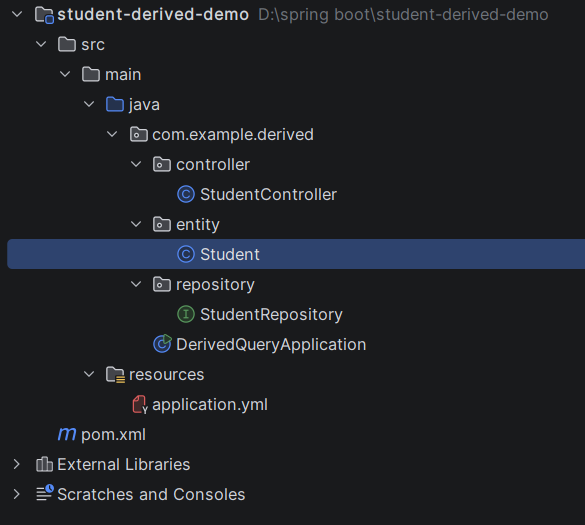
Step 3: Explore pom.xml
<?xml version="1.0" encoding="UTF-8"?>
<project xmlns="http://maven.apache.org/POM/4.0.0"
         xmlns:xsi="http://www.w3.org/2001/XMLSchema-instance"
         xsi:schemaLocation="http://maven.apache.org/POM/4.0.0 https://maven.apache.org/xsd/maven-4.0.0.xsd">
    <modelVersion>4.0.0</modelVersion>

    <parent>
        <groupId>org.springframework.boot</groupId>
        <artifactId>spring-boot-starter-parent</artifactId>
        <version>3.3.5</version>
        <relativePath/>
    </parent>

    <groupId>com.example</groupId>
    <artifactId>student-derived-demo</artifactId>
    <version>1.0.0</version>

    <properties>
        <java.version>17</java.version>
    </properties>

    <dependencies>
        <dependency>
            <groupId>org.springframework.boot</groupId>
            <artifactId>spring-boot-starter-web</artifactId>
        </dependency>
        <dependency>
            <groupId>org.springframework.boot</groupId>
            <artifactId>spring-boot-starter-data-jpa</artifactId>
        </dependency>
        <dependency>
            <groupId>com.mysql</groupId>
            <artifactId>mysql-connector-j</artifactId>
            <scope>runtime</scope>
        </dependency>
    </dependencies>

    <build>
        <plugins>
            <plugin>
                <groupId>org.springframework.boot</groupId>
                <artifactId>spring-boot-maven-plugin</artifactId>
            </plugin>
        </plugins>
    </build>
</project>
Step 4: application.yml
spring:
datasource:
url: jdbc:mysql://localhost:3306/student_derived_db?createDatabaseIfNotExist=true&useSSL=false&allowPublicKeyRetrieval=true&serverTimezone=UTC
username: root
password: password
driver-class-name: com.mysql.cj.jdbc.Driver
jpa:
hibernate:
ddl-auto: update
show-sql: true # prints the SQL that Spring Data generated from the method names
server:
port: 8082Step 5: Create Entity Class
package com.example.derived.entity;

import jakarta.persistence.*;

@Entity
@Table(name = "students")
public class Student {

    @Id
    @GeneratedValue(strategy = GenerationType.IDENTITY)
    private Long id;

    private String name;

    @Column(unique = true)
    private String email;

    private String department;
    private int age;

    public Student() {}

    public Student(String name, String email, String department, int age) {
        this.name = name;
        this.email = email;
        this.department = department;
        this.age = age;
    }

    public Long getId() { return id; }
    public void setId(Long id) { this.id = id; }
    public String getName() { return name; }
    public void setName(String name) { this.name = name; }
    public String getEmail() { return email; }
    public void setEmail(String email) { this.email = email; }
    public String getDepartment() { return department; }
    public void setDepartment(String department) { this.department = department; }
    public int getAge() { return age; }
    public void setAge(int age) { this.age = age; }
}
Step 6: Create below Repository Interface
package com.example.derived.repository;

import com.example.derived.entity.Student;
import org.springframework.data.jpa.repository.JpaRepository;

import java.util.List;
import java.util.Optional;

// No SQL and no method bodies: Spring Data reads each method NAME and builds the query.
// Pattern:  findBy + PropertyName + Keyword
public interface StudentRepository extends JpaRepository<Student, Long> {

    // 1. Equality         -> WHERE department = ?
    List<Student> findByDepartment(String department);

    Optional<Student> findByEmail(String email);

    // 2. Text matching    -> WHERE name LIKE %?%   and   WHERE name LIKE ?%
    List<Student> findByNameContaining(String name);

    List<Student> findByNameStartingWith(String prefix);

    // 3. Comparison       -> WHERE age > ?   and   WHERE age BETWEEN ? AND ?
    List<Student> findByAgeGreaterThan(int age);

    List<Student> findByAgeBetween(int min, int max);

    // 4. Combining        -> WHERE department = ? AND age > ?
    List<Student> findByDepartmentAndAgeGreaterThan(String department, int age);

    // 5. Sorting/limiting -> ORDER BY name ASC   and   ORDER BY age DESC LIMIT 3
    List<Student> findByDepartmentOrderByNameAsc(String department);

    List<Student> findTop3ByOrderByAgeDesc();

    // 6. Exists / count   -> returns true/false and a number
    boolean existsByEmail(String email);

    long countByDepartment(String department);
}
Step 7: Create Controller class
package com.example.derived.controller;

import com.example.derived.entity.Student;
import com.example.derived.repository.StudentRepository;
import org.springframework.http.HttpStatus;
import org.springframework.http.ResponseEntity;
import org.springframework.web.bind.annotation.*;

import java.util.List;
import java.util.Map;

@RestController
@RequestMapping("/students")
public class StudentController {

    private final StudentRepository repository;

    public StudentController(StudentRepository repository) {
        this.repository = repository;
    }

    @PostMapping
    public ResponseEntity<Object> create(@RequestBody Student student) {
        if (repository.existsByEmail(student.getEmail())) {                 // existsBy
            return ResponseEntity.status(HttpStatus.CONFLICT).body(Map.of("error", "Email already exists"));
        }
        student.setId(null);
        return ResponseEntity.status(HttpStatus.CREATED).body(repository.save(student));
    }

    @GetMapping
    public List<Student> getAll() {
        return repository.findAll();
    }

    // THE EXPERIMENT
    @GetMapping("/department/{department}")
    public List<Student> byDepartment(@PathVariable String department) {
        return repository.findByDepartment(department);                      // findByDepartment
    }

    // THE EXPERIMENT:  /students/search?name=ravi
    @GetMapping("/search")
    public List<Student> search(@RequestParam String name) {
        return repository.findByNameContaining(name);                        // findByNameContaining
    }

    @GetMapping("/email")
    public ResponseEntity<Student> byEmail(@RequestParam String email) {
        return repository.findByEmail(email)                                 // findByEmail
                .map(ResponseEntity::ok)
                .orElse(ResponseEntity.notFound().build());
    }

    @GetMapping("/starts-with")
    public List<Student> startsWith(@RequestParam String prefix) {
        return repository.findByNameStartingWith(prefix);                    // StartingWith
    }

    @GetMapping("/older-than/{age}")
    public List<Student> olderThan(@PathVariable int age) {
        return repository.findByAgeGreaterThan(age);                         // GreaterThan
    }

    @GetMapping("/age-between")
    public List<Student> ageBetween(@RequestParam int min, @RequestParam int max) {
        return repository.findByAgeBetween(min, max);                        // Between
    }

    @GetMapping("/department/{department}/older-than/{age}")
    public List<Student> departmentAndAge(@PathVariable String department, @PathVariable int age) {
        return repository.findByDepartmentAndAgeGreaterThan(department, age); // And
    }

    @GetMapping("/department/{department}/sorted")
    public List<Student> departmentSorted(@PathVariable String department) {
        return repository.findByDepartmentOrderByNameAsc(department);        // OrderBy
    }

    @GetMapping("/oldest")
    public List<Student> oldestThree() {
        return repository.findTop3ByOrderByAgeDesc();                        // Top3
    }

    @GetMapping("/count/{department}")
    public long count(@PathVariable String department) {
        return repository.countByDepartment(department);                     // countBy
    }
}
Step 8: Main Application
package com.example.derived;

import com.example.derived.entity.Student;
import com.example.derived.repository.StudentRepository;
import org.springframework.boot.CommandLineRunner;
import org.springframework.boot.SpringApplication;
import org.springframework.boot.autoconfigure.SpringBootApplication;
import org.springframework.context.annotation.Bean;

import java.util.List;

@SpringBootApplication
public class DerivedQueryApplication {

    public static void main(String[] args) {
        SpringApplication.run(DerivedQueryApplication.class, args);
    }

    // Adds sample students once (only when the table is empty) so the searches have data
    @Bean
    CommandLineRunner seedData(StudentRepository repository) {
        return args -> {
            if (repository.count() == 0) {
                repository.saveAll(List.of(
                        new Student("Ravi Kumar",   "ravi@example.com",  "CSE", 21),
                        new Student("Ravi Teja",    "teja@example.com",  "ECE", 22),
                        new Student("Sneha Reddy",  "sneha@example.com", "ECE", 20),
                        new Student("Anil Verma",   "anil@example.com",  "CSE", 23),
                        new Student("Priya Nair",   "priya@example.com", "IT",  19),
                        new Student("Rahul Sharma", "rahul@example.com", "CSE", 24)));
            }
        };
    }
}
Step 9: Run the DerivedQueryApplication