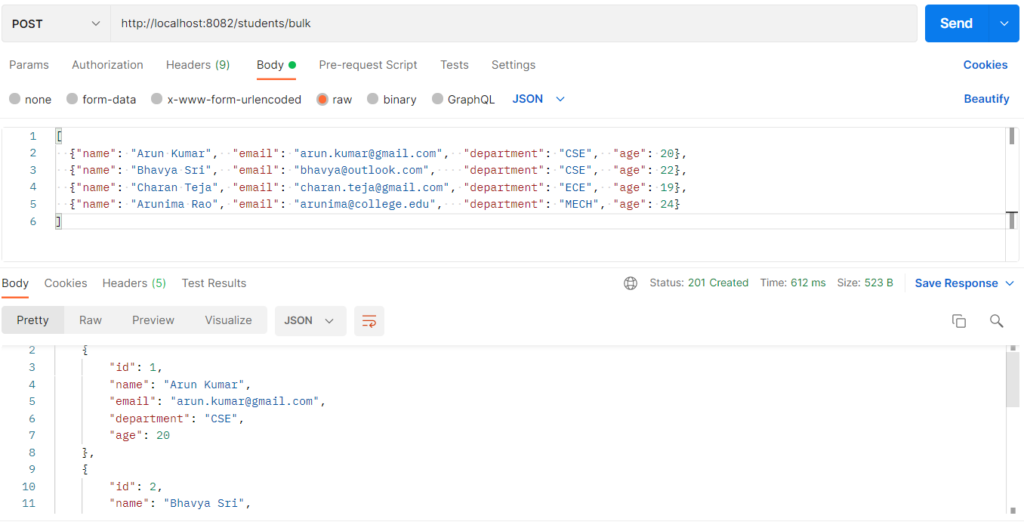
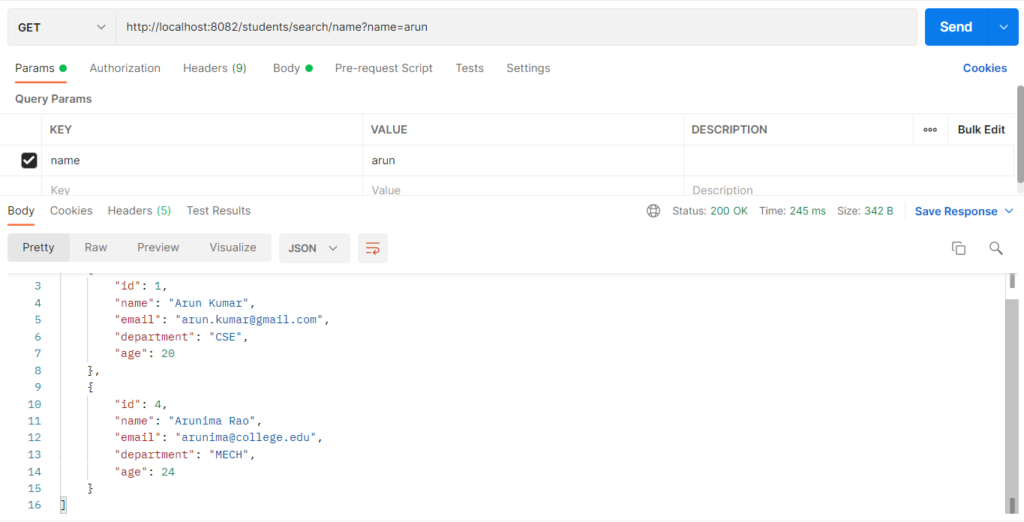
Search finds records by matching keywords against fields such as name, email or department, instead of returning the whole table.It is used so users can quickly find the data they need, even with partial words or different upper/lower case.Spring Data supports it through derived query methods (findByNameContainingIgnoreCase) and custom @Query JPQL for more complex searches.The keyword arrives as a URL parameter, and the repository turns it into a SQL LIKE or = condition.
Features
- Partial matching (
arunfinds “Arun Kumar” and “Arunima Rao”). - Case-insensitive, so
CSE,cseandCseall work. - Search on one field, on several fields at once, or with combined filters.
- Optional filters: any parameter you leave out is ignored.
- Works with derived query methods and
@Query.
Search Types
| Type | How it works | Example in this project |
|---|---|---|
| Partial match (Containing) | LIKE %value% on one field. |
findByNameContainingIgnoreCase(name) |
| Exact match | The whole value must be equal. | findByDepartmentIgnoreCase(department) |
| Keyword search (OR) | One keyword is checked against name, email and department. A match in any of them counts. | searchByKeyword(keyword) with @Query |
| Combined filter search (AND) | Name, email and department are all applied together, and every value supplied must match. | searchByFilters(name, email, department) with @Query |
Hands-on Experiment: Creating a spring boot application by Searching the data
The following steps are involved in developing this hands-on experiment.
Step 1: Generate the Project
Step 2: Project Structure
Step 3: pom.xml
Step 4: application.properties
Step 5: Create Entity Class
Step 6: Create Repository Interface
Step 7: Create Service Class
Step 8: Create Controller Class
Step 9: Main Application Class
Step 10: Run the Main Application Class
Step 1: Configure the Project on Spring Initializr
Go to start.spring.io and set:
- Project: Maven
- Language: Java
- Spring Boot version: 3.2.x
- Group: com.example
- Artifact: search
- Name: search
- Package name: com.example.search
- Packaging: Jar
- Java: 17
- Dependencies: Spring Web, Spring Data JPA, MySQL Driver
Click Generate to download the ZIP, then extract and import it into your IDE as a Maven project.
Step 2: Generated Project Structure
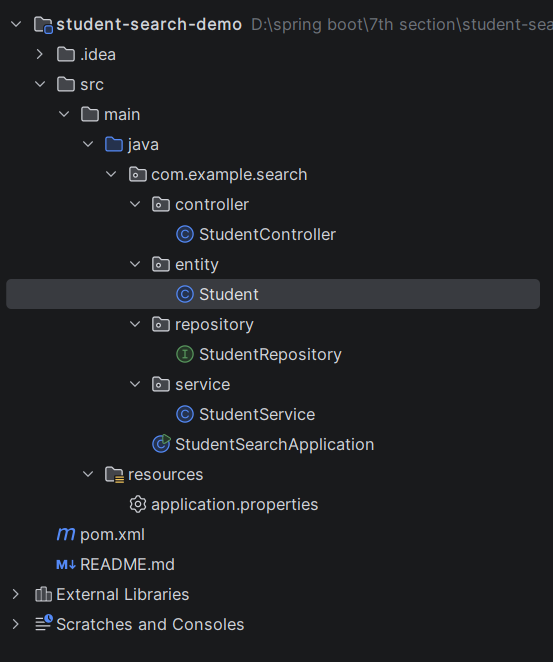
Step 3: Explore pom.xml
<?xml version="1.0" encoding="UTF-8"?>
<project xmlns="http://maven.apache.org/POM/4.0.0"
         xmlns:xsi="http://www.w3.org/2001/XMLSchema-instance"
         xsi:schemaLocation="http://maven.apache.org/POM/4.0.0 https://maven.apache.org/xsd/maven-4.0.0.xsd">
    <modelVersion>4.0.0</modelVersion>

    <parent>
        <groupId>org.springframework.boot</groupId>
        <artifactId>spring-boot-starter-parent</artifactId>
        <version>3.2.5</version>
        <relativePath/>
    </parent>

    <groupId>com.example</groupId>
    <artifactId>student-search-demo</artifactId>
    <version>1.0.0</version>
    <name>student-search-demo</name>

    <properties>
        <java.version>17</java.version>
    </properties>

    <dependencies>
        <dependency>
            <groupId>org.springframework.boot</groupId>
            <artifactId>spring-boot-starter-web</artifactId>
        </dependency>
        <dependency>
            <groupId>org.springframework.boot</groupId>
            <artifactId>spring-boot-starter-data-jpa</artifactId>
        </dependency>
        <dependency>
            <groupId>com.mysql</groupId>
            <artifactId>mysql-connector-j</artifactId>
            <scope>runtime</scope>
        </dependency>
    </dependencies>

    <build>
        <plugins>
            <plugin>
                <groupId>org.springframework.boot</groupId>
                <artifactId>spring-boot-maven-plugin</artifactId>
            </plugin>
        </plugins>
    </build>
</project>
Step 4: application.properties
spring.application.name=student-search-demo
server.port=8082
spring.datasource.url=jdbc:mysql://localhost:3306/student_search_db?createDatabaseIfNotExist=true&useSSL=false&serverTimezone=UTC&allowPublicKeyRetrieval=true
spring.datasource.username=root
spring.datasource.password=password
spring.datasource.driver-class-name=com.mysql.cj.jdbc.Driver
spring.jpa.hibernate.ddl-auto=update
spring.jpa.show-sql=true
spring.jpa.database-platform=org.hibernate.dialect.MySQLDialectCode language: JavaScript (javascript)Step 5: Create Entity Class
package com.example.search.entity;

import jakarta.persistence.Column;
import jakarta.persistence.Entity;
import jakarta.persistence.GeneratedValue;
import jakarta.persistence.GenerationType;
import jakarta.persistence.Id;
import jakarta.persistence.Table;

@Entity
@Table(name = "students")
public class Student {

    @Id
    @GeneratedValue(strategy = GenerationType.IDENTITY)
    private Long id;

    @Column(nullable = false)
    private String name;

    private String email;

    private String department;

    private Integer age;

    public Student() {
    }

    public Student(String name, String email, String department, Integer age) {
        this.name = name;
        this.email = email;
        this.department = department;
        this.age = age;
    }

    public Long getId() { return id; }
    public void setId(Long id) { this.id = id; }

    public String getName() { return name; }
    public void setName(String name) { this.name = name; }

    public String getEmail() { return email; }
    public void setEmail(String email) { this.email = email; }

    public String getDepartment() { return department; }
    public void setDepartment(String department) { this.department = department; }

    public Integer getAge() { return age; }
    public void setAge(Integer age) { this.age = age; }
}
Step 6: Create below Repository Interface
package com.example.search.repository;

import com.example.search.entity.Student;
import org.springframework.data.jpa.repository.JpaRepository;
import org.springframework.data.jpa.repository.Query;
import org.springframework.data.repository.query.Param;
import org.springframework.stereotype.Repository;

import java.util.List;

@Repository
public interface StudentRepository extends JpaRepository<Student, Long> {

    // Partial match, ignoring upper/lower case (name LIKE %value%)
    List<Student> findByNameContainingIgnoreCase(String name);

    List<Student> findByEmailContainingIgnoreCase(String email);

    // Exact match, ignoring upper/lower case
    List<Student> findByDepartmentIgnoreCase(String department);

    // One keyword searched across name OR email OR department
    @Query("SELECT s FROM Student s WHERE "
            + "LOWER(s.name) LIKE LOWER(CONCAT('%', :keyword, '%')) OR "
            + "LOWER(s.email) LIKE LOWER(CONCAT('%', :keyword, '%')) OR "
            + "LOWER(s.department) LIKE LOWER(CONCAT('%', :keyword, '%'))")
    List<Student> searchByKeyword(@Param("keyword") String keyword);

    // Combined filter: every value that is supplied must match (empty value = ignored)
    @Query("SELECT s FROM Student s WHERE "
            + "LOWER(s.name) LIKE LOWER(CONCAT('%', :name, '%')) AND "
            + "LOWER(s.email) LIKE LOWER(CONCAT('%', :email, '%')) AND "
            + "(:department = '' OR LOWER(s.department) = LOWER(:department))")
    List<Student> searchByFilters(@Param("name") String name,
                                  @Param("email") String email,
                                  @Param("department") String department);
}
Step 7: Create below Service class
package com.example.search.service;

import com.example.search.entity.Student;
import com.example.search.repository.StudentRepository;
import org.springframework.stereotype.Service;

import java.util.List;

@Service
public class StudentService {

    private final StudentRepository studentRepository;

    public StudentService(StudentRepository studentRepository) {
        this.studentRepository = studentRepository;
    }

    public Student save(Student student) {
        return studentRepository.save(student);
    }

    public List<Student> saveAll(List<Student> students) {
        return studentRepository.saveAll(students);
    }

    public List<Student> getAll() {
        return studentRepository.findAll();
    }

    public List<Student> searchByName(String name) {
        return studentRepository.findByNameContainingIgnoreCase(name.trim());
    }

    public List<Student> searchByEmail(String email) {
        return studentRepository.findByEmailContainingIgnoreCase(email.trim());
    }

    public List<Student> searchByDepartment(String department) {
        return studentRepository.findByDepartmentIgnoreCase(department.trim());
    }

    public List<Student> searchByKeyword(String keyword) {
        return studentRepository.searchByKeyword(keyword.trim());
    }

    // Missing filters become empty text, which the query treats as "match anything"
    public List<Student> searchByFilters(String name, String email, String department) {
        return studentRepository.searchByFilters(clean(name), clean(email), clean(department));
    }

    private String clean(String value) {
        return value == null ? "" : value.trim();
    }
}
Step 8: Create Controller class
package com.example.search.controller;

import com.example.search.entity.Student;
import com.example.search.service.StudentService;
import org.springframework.http.HttpStatus;
import org.springframework.http.ResponseEntity;
import org.springframework.web.bind.annotation.GetMapping;
import org.springframework.web.bind.annotation.PostMapping;
import org.springframework.web.bind.annotation.RequestBody;
import org.springframework.web.bind.annotation.RequestMapping;
import org.springframework.web.bind.annotation.RequestParam;
import org.springframework.web.bind.annotation.RestController;

import java.util.List;

@RestController
@RequestMapping("/students")
public class StudentController {

    private final StudentService studentService;

    public StudentController(StudentService studentService) {
        this.studentService = studentService;
    }

    // POST /students
    @PostMapping
    public ResponseEntity<Student> create(@RequestBody Student student) {
        return ResponseEntity.status(HttpStatus.CREATED).body(studentService.save(student));
    }

    // POST /students/bulk
    @PostMapping("/bulk")
    public ResponseEntity<List<Student>> createBulk(@RequestBody List<Student> students) {
        return ResponseEntity.status(HttpStatus.CREATED).body(studentService.saveAll(students));
    }

    // GET /students
    @GetMapping
    public List<Student> getAll() {
        return studentService.getAll();
    }

    // GET /students/search/name?name=an
    @GetMapping("/search/name")
    public List<Student> searchByName(@RequestParam String name) {
        return studentService.searchByName(name);
    }

    // GET /students/search/email?email=gmail
    @GetMapping("/search/email")
    public List<Student> searchByEmail(@RequestParam String email) {
        return studentService.searchByEmail(email);
    }

    // GET /students/search/department?department=CSE
    @GetMapping("/search/department")
    public List<Student> searchByDepartment(@RequestParam String department) {
        return studentService.searchByDepartment(department);
    }

    // GET /students/search/keyword?keyword=cse
    @GetMapping("/search/keyword")
    public List<Student> searchByKeyword(@RequestParam String keyword) {
        return studentService.searchByKeyword(keyword);
    }

    // GET /students/search?name=an&email=mail&department=CSE   (all three optional)
    @GetMapping("/search")
    public List<Student> search(@RequestParam(required = false) String name,
                                @RequestParam(required = false) String email,
                                @RequestParam(required = false) String department) {
        return studentService.searchByFilters(name, email, department);
    }
}
Step 9: Main Application
package com.example.search;

import org.springframework.boot.SpringApplication;
import org.springframework.boot.autoconfigure.SpringBootApplication;

@SpringBootApplication
public class StudentSearchApplication {

    public static void main(String[] args) {
        SpringApplication.run(StudentSearchApplication.class, args);
    }
}
Step 10: Run the StudentSearchApplication