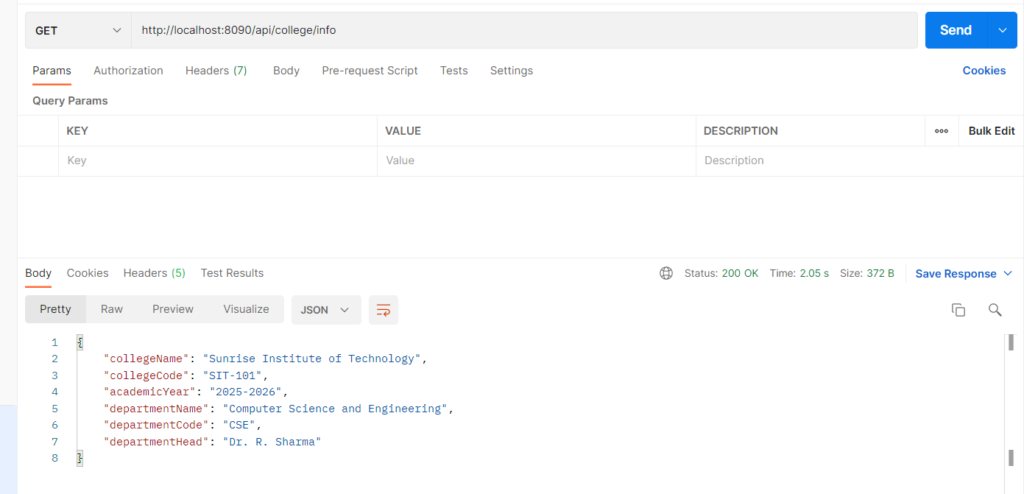
Custom configuration means defining your own application-specific values (like college name or academic year) in application.properties instead of hard-coding them in Java. Spring Boot reads these values at startup and makes them available inside your classes. You can bind them to a Java class with @ConfigurationProperties, or read single values with @Value. Changing a value only needs an edit to the properties file, with no recompiling. The same code can use different values per environment (dev, test, prod).
Why it is used
- Avoids hard-coded values scattered across the code
- Keeps all settings in one place, so they are easy to maintain
- Gives type-safe, grouped access to related values
- Lets you change settings per environment without touching the code
Types of custom configuration:
- @Value(“${college.name}”): Injects one property into a field. Good for a few simple values.
- @ConfigurationProperties(prefix=”college”): Binds a group of properties, including nested ones, to a class. Best for related values.
Environmentobject: Reads any property in code withenv.getProperty("key").- @PropertySource: Loads values from your own separate
.propertiesfile.
Hands-on Experiment: Creating Spring boot application using custom configuration
The following steps are involved in developing this hands-on experiment.
Step 1: Generate the Project
Step 2: Project Structure
Step 3: pom.xml
Step 4: application.properties
Step 5: Create Configuration Class
Step 6: Create Entity Class
Step 7: Create Repository Interface
Step 8: Create Service Class
Step 9: Create Controller Class
Step 10: Main Application Class
Step 11: Run the Main Application Class
Step 1: Configure the Project on Spring Initializr
Go to start.spring.io and set:
- Project: Maven
- Language: Java
- Spring Boot version: 3.2.x
- Group: com.example
- Artifact: collegeconfig
- Name: collegeconfig
- Package name: com.example.collegeconfig
- Packaging: Jar
- Java: 17
- Dependencies: Spring Web, Spring Data JPA, MySQL Driver
Click Generate to download the ZIP, then extract and import it into your IDE as a Maven project.
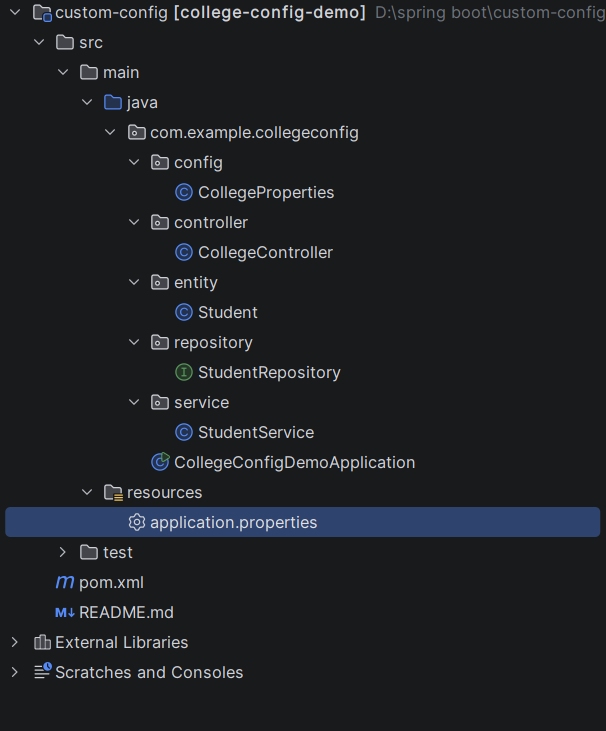
Step 2: Generated Project Structure
Step 3: Explore pom.xml
<?xml version="1.0" encoding="UTF-8"?>
<project xmlns="http://maven.apache.org/POM/4.0.0"
         xmlns:xsi="http://www.w3.org/2001/XMLSchema-instance"
         xsi:schemaLocation="http://maven.apache.org/POM/4.0.0 https://maven.apache.org/xsd/maven-4.0.0.xsd">
    <modelVersion>4.0.0</modelVersion>

    <parent>
        <groupId>org.springframework.boot</groupId>
        <artifactId>spring-boot-starter-parent</artifactId>
        <version>3.2.5</version>
        <relativePath/>
    </parent>

    <groupId>com.example</groupId>
    <artifactId>college-config-demo</artifactId>
    <version>0.0.1-SNAPSHOT</version>
    <name>college-config-demo</name>
    <description>Custom Configuration demo with Spring Boot and MySQL</description>

    <properties>
        <java.version>17</java.version>
    </properties>

    <dependencies>
        <dependency>
            <groupId>org.springframework.boot</groupId>
            <artifactId>spring-boot-starter-web</artifactId>
        </dependency>
        <dependency>
            <groupId>org.springframework.boot</groupId>
            <artifactId>spring-boot-starter-data-jpa</artifactId>
        </dependency>
        <dependency>
            <groupId>com.mysql</groupId>
            <artifactId>mysql-connector-j</artifactId>
            <scope>runtime</scope>
        </dependency>
        <dependency>
            <groupId>org.springframework.boot</groupId>
            <artifactId>spring-boot-configuration-processor</artifactId>
            <optional>true</optional>
        </dependency>
        <dependency>
            <groupId>org.springframework.boot</groupId>
            <artifactId>spring-boot-starter-test</artifactId>
            <scope>test</scope>
        </dependency>
    </dependencies>

    <build>
        <plugins>
            <plugin>
                <groupId>org.springframework.boot</groupId>
                <artifactId>spring-boot-maven-plugin</artifactId>
            </plugin>
        </plugins>
    </build>
</project>
Step 4: application.properties
spring.application.name=college-config-demo
server.port=8090
# ---------- MySQL ----------
spring.datasource.url=jdbc:mysql://localhost:3306/college_config_db?createDatabaseIfNotExist=true&useSSL=false&serverTimezone=UTC&allowPublicKeyRetrieval=true
spring.datasource.username=root
spring.datasource.password=password
spring.jpa.hibernate.ddl-auto=update
spring.jpa.show-sql=true
# ---------- Custom configuration (prefix = college) ----------
college.name=Sunrise Institute of Technology
college.code=SIT-101
college.academic-year=2025-2026
college.department.name=Computer Science and Engineering
college.department.code=CSE
college.department.head=Dr. R. SharmaCode language: PHP (php)Step 5: Configuration file
package com.example.collegeconfig.config;

import org.springframework.boot.context.properties.ConfigurationProperties;
import org.springframework.stereotype.Component;

@Component
@ConfigurationProperties(prefix = "college")
public class CollegeProperties {

    private String name;
    private String code;
    private String academicYear;      // college.academic-year
    private Department department = new Department();

    public static class Department {
        private String name;
        private String code;
        private String head;

        public String getName() { return name; }
        public void setName(String name) { this.name = name; }
        public String getCode() { return code; }
        public void setCode(String code) { this.code = code; }
        public String getHead() { return head; }
        public void setHead(String head) { this.head = head; }
    }

    public String getName() { return name; }
    public void setName(String name) { this.name = name; }
    public String getCode() { return code; }
    public void setCode(String code) { this.code = code; }
    public String getAcademicYear() { return academicYear; }
    public void setAcademicYear(String academicYear) { this.academicYear = academicYear; }
    public Department getDepartment() { return department; }
    public void setDepartment(Department department) { this.department = department; }
}
Step 6: Create Entity Class
package com.example.collegeconfig.entity;

import jakarta.persistence.*;

@Entity
@Table(name = "students")
public class Student {

    @Id
    @GeneratedValue(strategy = GenerationType.IDENTITY)
    private Long id;

    @Column(nullable = false)
    private String name;

    @Column(nullable = false, unique = true)
    private String email;

    private String department;
    private String academicYear;

    public Student() {}

    public Long getId() { return id; }
    public void setId(Long id) { this.id = id; }
    public String getName() { return name; }
    public void setName(String name) { this.name = name; }
    public String getEmail() { return email; }
    public void setEmail(String email) { this.email = email; }
    public String getDepartment() { return department; }
    public void setDepartment(String department) { this.department = department; }
    public String getAcademicYear() { return academicYear; }
    public void setAcademicYear(String academicYear) { this.academicYear = academicYear; }
}
Step 7: Create Repository Interface
package com.example.collegeconfig.repository;

import com.example.collegeconfig.entity.Student;
import org.springframework.data.jpa.repository.JpaRepository;
import org.springframework.stereotype.Repository;

@Repository
public interface StudentRepository extends JpaRepository<Student, Long> {
}
Step 8: Create Service class
package com.example.collegeconfig.service;

import com.example.collegeconfig.config.CollegeProperties;
import com.example.collegeconfig.entity.Student;
import com.example.collegeconfig.repository.StudentRepository;
import org.springframework.stereotype.Service;

import java.util.LinkedHashMap;
import java.util.List;
import java.util.Map;

@Service
public class StudentService {

    private final StudentRepository repository;
    private final CollegeProperties college;

    public StudentService(StudentRepository repository, CollegeProperties college) {
        this.repository = repository;
        this.college = college;
    }

    // Returns the custom configuration values as a simple map
    public Map<String, Object> getCollegeInfo() {
        Map<String, Object> info = new LinkedHashMap<>();
        info.put("collegeName", college.getName());
        info.put("collegeCode", college.getCode());
        info.put("academicYear", college.getAcademicYear());
        info.put("departmentName", college.getDepartment().getName());
        info.put("departmentCode", college.getDepartment().getCode());
        info.put("departmentHead", college.getDepartment().getHead());
        return info;
    }

    // Department and academic year come from configuration, not from the client
    public Student addStudent(Student student) {
        student.setDepartment(college.getDepartment().getName());
        student.setAcademicYear(college.getAcademicYear());
        return repository.save(student);
    }

    public List<Student> getAllStudents() {
        return repository.findAll();
    }
}
Step 9: Create Controller class
package com.example.collegeconfig.controller;

import com.example.collegeconfig.entity.Student;
import com.example.collegeconfig.service.StudentService;
import org.springframework.http.HttpStatus;
import org.springframework.http.ResponseEntity;
import org.springframework.web.bind.annotation.*;

import java.util.List;
import java.util.Map;

@RestController
@RequestMapping("/api")
public class CollegeController {

    private final StudentService service;

    public CollegeController(StudentService service) {
        this.service = service;
    }

    @GetMapping("/college/info")
    public Map<String, Object> getCollegeInfo() {
        return service.getCollegeInfo();
    }

    @PostMapping("/students")
    public ResponseEntity<Student> addStudent(@RequestBody Student student) {
        return ResponseEntity.status(HttpStatus.CREATED).body(service.addStudent(student));
    }

    @GetMapping("/students")
    public List<Student> getAllStudents() {
        return service.getAllStudents();
    }
}
Step 10: Main Application
package com.example.collegeconfig;

import org.springframework.boot.SpringApplication;
import org.springframework.boot.autoconfigure.SpringBootApplication;

@SpringBootApplication
public class CollegeConfigDemoApplication {

    public static void main(String[] args) {
        SpringApplication.run(CollegeConfigDemoApplication.class, args);
    }
}
Step 11: Run the StudentApplication