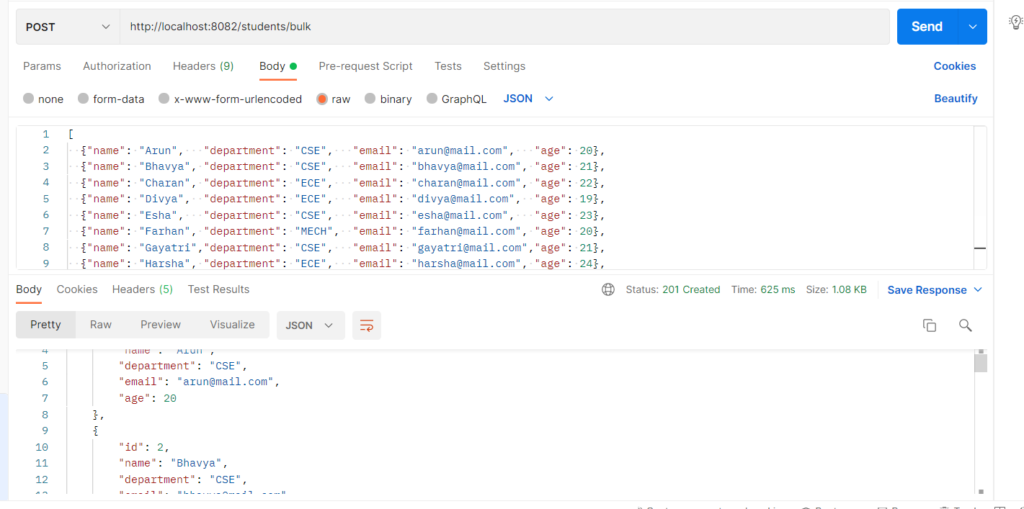
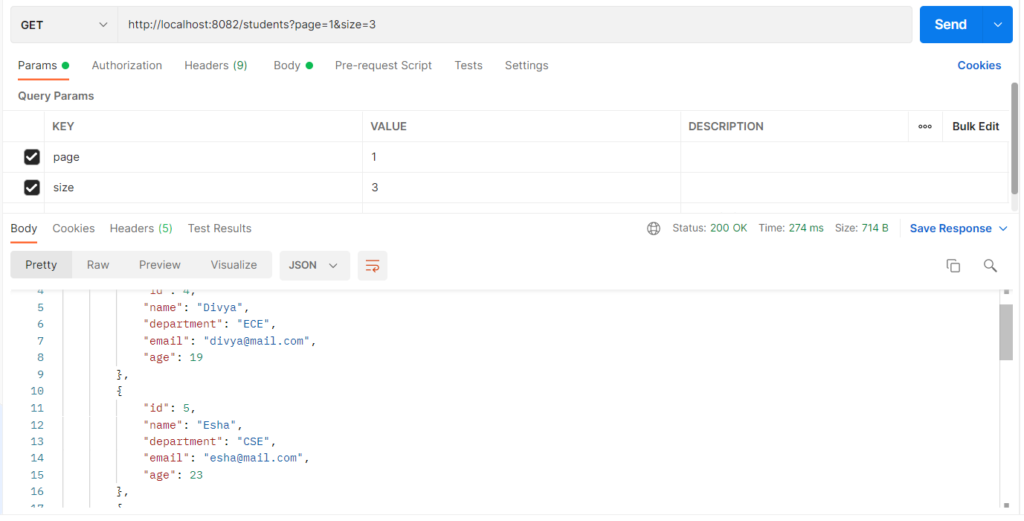
Pagination splits a large database result into small pages, so the API returns only a few records at a time instead of the whole table. It is used to cut response time, memory usage and network load, and to make lists easier to browse. Spring Data provides it through the Pageable interface, with PageRequest as the usual implementation. The client sends page, size and sort as URL parameters. The repository returns a Page or Slice, which holds the records plus the paging details.
Features
- Page number and page size come straight from the URL (
?page=0&size=5). - Sorting is built in (
sort=name,asc). Pagereturns total records and total pages.Sliceonly tells you whether a next page exists.- It works with derived query methods, so
findByDepartment(dept, pageable)is paginated automatically. - Defaults and a maximum page size can be set in
application.properties. - Page numbers start at 0.
Pagination Types
| Type | What it returns | When to use it |
|---|---|---|
| Page | Records + totalElements + totalPages. Runs an extra COUNT query. |
Numbered pages (1, 2, 3 …) in a UI |
| Slice | Records + whether a next slice exists. No COUNT query, so it is faster. | “Load more” or infinite scroll |
| List with Pageable | Only the records, with no paging details. | When you don’t need totals at all |
Hands-on Experiment: Creating a spring boot application with Pagination
The following steps are involved in developing this hands-on experiment.
Step 1: Generate the Project
Step 2: Project Structure
Step 3: pom.xml
Step 4: application.properties
Step 5: Create Entity Class
Step 6: Create Repository Interface
Step 7: Create Service Class
Step 8: Create Controller Class
Step 9: Main Application Class
Step 10: Run the Main Application Class
Step 1: Configure the Project on Spring Initializr
Go to start.spring.io and set:
- Project: Maven
- Language: Java
- Spring Boot version: 3.2.x
- Group: com.example
- Artifact: pagination
- Name: pagination
- Package name: com.example.pagination
- Packaging: Jar
- Java: 17
- Dependencies: Spring Web, Spring Data JPA, MySQL Driver
Click Generate to download the ZIP, then extract and import it into your IDE as a Maven project.
Step 2: Generated Project Structure
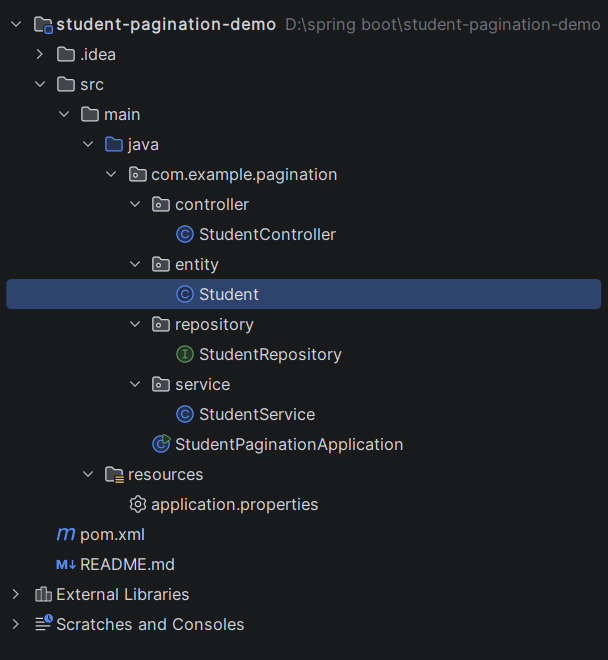
Step 3: Explore pom.xml
<?xml version="1.0" encoding="UTF-8"?>
<project xmlns="http://maven.apache.org/POM/4.0.0"
         xmlns:xsi="http://www.w3.org/2001/XMLSchema-instance"
         xsi:schemaLocation="http://maven.apache.org/POM/4.0.0 https://maven.apache.org/xsd/maven-4.0.0.xsd">
    <modelVersion>4.0.0</modelVersion>

    <parent>
        <groupId>org.springframework.boot</groupId>
        <artifactId>spring-boot-starter-parent</artifactId>
        <version>3.2.5</version>
        <relativePath/>
    </parent>

    <groupId>com.example</groupId>
    <artifactId>student-pagination-demo</artifactId>
    <version>1.0.0</version>
    <name>student-pagination-demo</name>

    <properties>
        <java.version>17</java.version>
    </properties>

    <dependencies>
        <dependency>
            <groupId>org.springframework.boot</groupId>
            <artifactId>spring-boot-starter-web</artifactId>
        </dependency>
        <dependency>
            <groupId>org.springframework.boot</groupId>
            <artifactId>spring-boot-starter-data-jpa</artifactId>
        </dependency>
        <dependency>
            <groupId>com.mysql</groupId>
            <artifactId>mysql-connector-j</artifactId>
            <scope>runtime</scope>
        </dependency>
    </dependencies>

    <build>
        <plugins>
            <plugin>
                <groupId>org.springframework.boot</groupId>
                <artifactId>spring-boot-maven-plugin</artifactId>
            </plugin>
        </plugins>
    </build>
</project>
Step 4: application.properties
spring.application.name=student-pagination-demo
server.port=8082
spring.datasource.url=jdbc:mysql://localhost:3306/student_db?createDatabaseIfNotExist=true&useSSL=false&serverTimezone=UTC&allowPublicKeyRetrieval=true
spring.datasource.username=root
spring.datasource.password=password
spring.datasource.driver-class-name=com.mysql.cj.jdbc.Driver
spring.jpa.hibernate.ddl-auto=update
spring.jpa.show-sql=true
spring.jpa.database-platform=org.hibernate.dialect.MySQLDialect
# Pagination defaults and limits
spring.data.web.pageable.default-page-size=5
spring.data.web.pageable.max-page-size=50Code language: PHP (php)Step 5: Create Entity Class
package com.example.pagination.entity;

import jakarta.persistence.Column;
import jakarta.persistence.Entity;
import jakarta.persistence.GeneratedValue;
import jakarta.persistence.GenerationType;
import jakarta.persistence.Id;
import jakarta.persistence.Table;

@Entity
@Table(name = "students")
public class Student {

    @Id
    @GeneratedValue(strategy = GenerationType.IDENTITY)
    private Long id;

    @Column(nullable = false)
    private String name;

    @Column(nullable = false)
    private String department;

    private String email;

    private Integer age;

    public Student() {
    }

    public Student(String name, String department, String email, Integer age) {
        this.name = name;
        this.department = department;
        this.email = email;
        this.age = age;
    }

    public Long getId() { return id; }
    public void setId(Long id) { this.id = id; }

    public String getName() { return name; }
    public void setName(String name) { this.name = name; }

    public String getDepartment() { return department; }
    public void setDepartment(String department) { this.department = department; }

    public String getEmail() { return email; }
    public void setEmail(String email) { this.email = email; }

    public Integer getAge() { return age; }
    public void setAge(Integer age) { this.age = age; }
}
Step 6: Create below Repository Interface
package com.example.pagination.repository;

import com.example.pagination.entity.Student;
import org.springframework.data.domain.Page;
import org.springframework.data.domain.Pageable;
import org.springframework.data.domain.Slice;
import org.springframework.data.jpa.repository.JpaRepository;
import org.springframework.stereotype.Repository;

@Repository
public interface StudentRepository extends JpaRepository<Student, Long> {

    // Page: includes total elements and total pages (runs an extra COUNT query)
    Page<Student> findByDepartment(String department, Pageable pageable);

    Page<Student> findByNameContainingIgnoreCase(String name, Pageable pageable);

    // Slice: only knows if a next slice exists (no COUNT query, faster)
    Slice<Student> findByAgeGreaterThan(Integer age, Pageable pageable);
}
Step 7: Create below Service class
package com.example.pagination.service;

import com.example.pagination.entity.Student;
import com.example.pagination.repository.StudentRepository;
import org.springframework.data.domain.Page;
import org.springframework.data.domain.Pageable;
import org.springframework.data.domain.Slice;
import org.springframework.stereotype.Service;

import java.util.List;

@Service
public class StudentService {

    private final StudentRepository studentRepository;

    public StudentService(StudentRepository studentRepository) {
        this.studentRepository = studentRepository;
    }

    public Student save(Student student) {
        return studentRepository.save(student);
    }

    public List<Student> saveAll(List<Student> students) {
        return studentRepository.saveAll(students);
    }

    public Page<Student> getAllStudents(Pageable pageable) {
        return studentRepository.findAll(pageable);
    }

    public Page<Student> getByDepartment(String department, Pageable pageable) {
        return studentRepository.findByDepartment(department, pageable);
    }

    public Page<Student> searchByName(String name, Pageable pageable) {
        return studentRepository.findByNameContainingIgnoreCase(name, pageable);
    }

    public Slice<Student> getOlderThan(Integer age, Pageable pageable) {
        return studentRepository.findByAgeGreaterThan(age, pageable);
    }
}
Step 8: Create Controller class
package com.example.pagination.controller;

import com.example.pagination.entity.Student;
import com.example.pagination.service.StudentService;
import org.springframework.data.domain.Page;
import org.springframework.data.domain.Pageable;
import org.springframework.data.domain.Slice;
import org.springframework.data.domain.Sort;
import org.springframework.data.web.PageableDefault;
import org.springframework.http.HttpStatus;
import org.springframework.http.ResponseEntity;
import org.springframework.web.bind.annotation.GetMapping;
import org.springframework.web.bind.annotation.PathVariable;
import org.springframework.web.bind.annotation.PostMapping;
import org.springframework.web.bind.annotation.RequestBody;
import org.springframework.web.bind.annotation.RequestMapping;
import org.springframework.web.bind.annotation.RequestParam;
import org.springframework.web.bind.annotation.RestController;

import java.util.List;

@RestController
@RequestMapping("/students")
public class StudentController {

    private final StudentService studentService;

    public StudentController(StudentService studentService) {
        this.studentService = studentService;
    }

    // POST /students
    @PostMapping
    public ResponseEntity<Student> create(@RequestBody Student student) {
        return ResponseEntity.status(HttpStatus.CREATED).body(studentService.save(student));
    }

    // POST /students/bulk
    @PostMapping("/bulk")
    public ResponseEntity<List<Student>> createBulk(@RequestBody List<Student> students) {
        return ResponseEntity.status(HttpStatus.CREATED).body(studentService.saveAll(students));
    }

    // GET /students?page=0&size=5&sort=name,asc
    @GetMapping
    public Page<Student> getAll(@PageableDefault(size = 5, sort = "id", direction = Sort.Direction.ASC) Pageable pageable) {
        return studentService.getAllStudents(pageable);
    }

    // GET /students/department/CSE?page=0&size=3
    @GetMapping("/department/{department}")
    public Page<Student> getByDepartment(@PathVariable String department,
                                         @PageableDefault(size = 5, sort = "name") Pageable pageable) {
        return studentService.getByDepartment(department, pageable);
    }

    // GET /students/search?name=an&page=0&size=3
    @GetMapping("/search")
    public Page<Student> search(@RequestParam String name,
                                @PageableDefault(size = 5, sort = "name") Pageable pageable) {
        return studentService.searchByName(name, pageable);
    }

    // GET /students/slice?age=20&page=0&size=3
    @GetMapping("/slice")
    public Slice<Student> getOlderThan(@RequestParam Integer age,
                                       @PageableDefault(size = 5, sort = "age") Pageable pageable) {
        return studentService.getOlderThan(age, pageable);
    }
}
Step 9: Main Application
package com.example.pagination;

import org.springframework.boot.SpringApplication;
import org.springframework.boot.autoconfigure.SpringBootApplication;

@SpringBootApplication
public class StudentPaginationApplication {

    public static void main(String[] args) {
        SpringApplication.run(StudentPaginationApplication.class, args);
    }
}
Step 10: Run the StudentPaginationApplication