
MongoDB with Java using Dependencies allows a Java application to connect and interact with MongoDB using the MongoDB Java Driver. Instead of manually downloading JAR files and configuring the classpath, Maven manages the required dependencies automatically through the pom.xml file. The application can connect to MongoDB, create/access databases and collections, insert documents, and retrieve data using Java.
Architecture
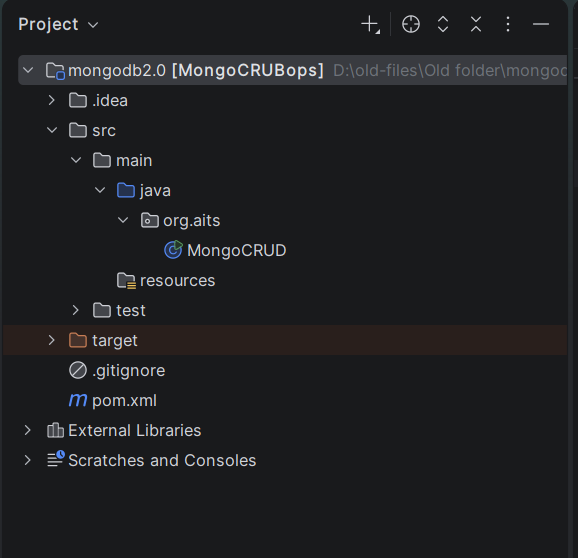
Prerequisites
Install the following:
Java
Check Java:
java -version
Maven
Check Maven:
mvn -version
MongoDB
Make sure MongoDB Server is running.
The application will connect to:
mongodb://localhost:27017
Create the Maven Project
In IntelliJ IDEA:
File -> New -> Project -> Maven
Enter:
GroupId : com.aits
ArtifactId: MongoCRUBops
Project name:
MongoCRUBops
Create below files
The pom.xml contains the MongoDB Java Driver dependency.
<?xml version="1.0" encoding="UTF-8"?>
<project xmlns="http://maven.apache.org/POM/4.0.0"
         xmlns:xsi="http://www.w3.org/2001/XMLSchema-instance"
         xsi:schemaLocation="http://maven.apache.org/POM/4.0.0 http://maven.apache.org/xsd/maven-4.0.0.xsd">
    <modelVersion>4.0.0</modelVersion>

    <groupId>org.aits</groupId>
    <artifactId>MongoCRUDops</artifactId>
    <version>1.0-SNAPSHOT</version>

    <properties>
        <maven.compiler.source>17</maven.compiler.source>
        <maven.compiler.target>17</maven.compiler.target>
        <project.build.sourceEncoding>UTF-8</project.build.sourceEncoding>
    </properties>
   <dependencies>
       <!-- https://mvnrepository.com/artifact/org.mongodb/mongo-java-driver -->
       <dependency>
           <groupId>org.mongodb</groupId>
           <artifactId>mongo-java-driver</artifactId>
           <version>3.12.14</version>
       </dependency>

   </dependencies>


</project>
package org.aits;
import com.mongodb.MongoClient;
import com.mongodb.client.MongoCollection;
import com.mongodb.client.MongoDatabase;
import com.mongodb.client.model.Updates;
import com.mongodb.client.result.DeleteResult;
import org.bson.Document;
import org.bson.conversions.Bson;
import java.util.HashMap;
import java.util.Map;
import java.util.Scanner;
import static com.mongodb.client.model.Filters.eq;
public class MongoCRUD {
public static void main(String[] args) {
MongoClient mongo = new MongoClient("localhost", 27017);
// Accessing the database
MongoDatabase database = mongo.getDatabase("annamacharya");
// Creating a collection
System.out.println("Collection created successfully");
// Retrieving a collection
MongoCollection<Document> collection = database.getCollection("students");
Map<String, Object> map = new HashMap<String, Object>();
Scanner input = new Scanner(System.in);
char t;
char ch;
do {
input.reset();
System.out.println("Enter Choice for MONGO CRUD Operations");
System.out.println("1-Insert \t 2-updation \t 3-delete \t 4-select");
ch = input.next().charAt(0);
switch (ch) {
case '1':
System.out.println("Enter roll number :");
String roll = input.next();
System.out.println("Enter name :");
String name = input.next();
map.put("roll", roll);
map.put("name", name);
Document doc = new Document(map);
collection.insertOne(doc);
System.out.println("inserted successfully");
break;
case '2':
System.out.println("enter roll to update:");
String roll1 = input.next();
System.out.println("enter new name:");
String name1 = input.next();
collection.updateOne(eq("roll", roll1), Updates.set("name", name1));
System.out.println("updated successfully");
break;
case '3':
System.out.println("Enter Roll Number to delete record...");
String rnum = input.next();
Bson filter = eq("roll", rnum);
DeleteResult result = collection.deleteOne(filter);
System.out.println("deleted successfully");
break;
case '4':
System.out.println("enter roll to get specified record:");
String r = input.next();
Document student2 = collection.find(eq("roll", r)).first();
System.out.println("Student 2: " + student2.toJson());
System.out.println("All documents are displayed");
break;
}
System.out.println("Do want to continue press y");
t = input.next().charAt(0);
input.reset();
} while (t == 'y');
}
}Right click on the MongoCRUD and Run the MongoCRUD
"C:\Program Files\Java\jdk-17\bin\java.exe" "-javaagent:C:\Program Files\JetBrains\IntelliJ IDEA 2023.3.2\lib\idea_rt.jar=59412:C:\Program Files\JetBrains\IntelliJ IDEA 2023.3.2\bin" -Dfile.encoding=UTF-8 -classpath "D:\AJP(IICSE)\JDBCPractice\mongodb\target\classes;C:\Users\AITS_CCF\.m2\repository\org\mongodb\mongo-java-driver\3.12.14\mongo-java-driver-3.12.14.jar" MongoCRUD
Feb 09, 2024 10:01:02 AM com.mongodb.diagnostics.logging.JULLogger log
INFO: Cluster created with settings {hosts=[localhost:27017], mode=SINGLE, requiredClusterType=UNKNOWN, serverSelectionTimeout='30000 ms', maxWaitQueueSize=500}
Collection created successfully
Enter Choice for MONGO CRUD Operations
1-Insert 2-updation 3-delete 4-select
Feb 09, 2024 10:01:02 AM com.mongodb.diagnostics.logging.JULLogger log
INFO: Opened connection [connectionId{localValue:1, serverValue:108}] to localhost:27017
Feb 09, 2024 10:01:02 AM com.mongodb.diagnostics.logging.JULLogger log
INFO: Monitor thread successfully connected to server with description ServerDescription{address=localhost:27017, type=STANDALONE, state=CONNECTED, ok=true, version=ServerVersion{versionList=[7, 0, 5]}, minWireVersion=0, maxWireVersion=21, maxDocumentSize=16777216, logicalSessionTimeoutMinutes=30, roundTripTimeNanos=4995500}
1
Enter roll number :
531
Enter name :
Mahesh
Feb 09, 2024 10:01:09 AM com.mongodb.diagnostics.logging.JULLogger log
INFO: Opened connection [connectionId{localValue:2, serverValue:109}] to localhost:27017
inserted successfully
Do want to continue press y
y
Enter Choice for MONGO CRUD Operations
1-Insert 2-updation 3-delete 4-select
2
enter roll to update:
531
enter new name:
DurgaMahesh
updated successfully
Do want to continue press y
y
Enter Choice for MONGO CRUD Operations
1-Insert 2-updation 3-delete 4-select
4
enter roll to get specified record:
531
Student 2: {"_id": {"$oid": "65c5a5a408966e04771a502b"}, "roll": "531", "name": "DurgaMahesh"}
All documents are displayed
Do want to continue press y
y
Enter Choice for MONGO CRUD Operations
1-Insert 2-updation 3-delete 4-select
1
Enter roll number :
506
Enter name :
Durun
inserted successfully
Do want to continue press y
y
Enter Choice for MONGO CRUD Operations
1-Insert 2-updation 3-delete 4-select
4
enter roll to get specified record:
506
Student 2: {"_id": {"$oid": "65c5aad37391466e32d24f94"}, "roll": "506", "name": "Durun"}
All documents are displayed
Do want to continue press y
y
Enter Choice for MONGO CRUD Operations
1-Insert 2-updation 3-delete 4-select
3
Enter Roll Number to delete record...
506
deleted successfully
Do want to continue press y
n
Process finished with exit code 0Code language: JavaScript (javascript)