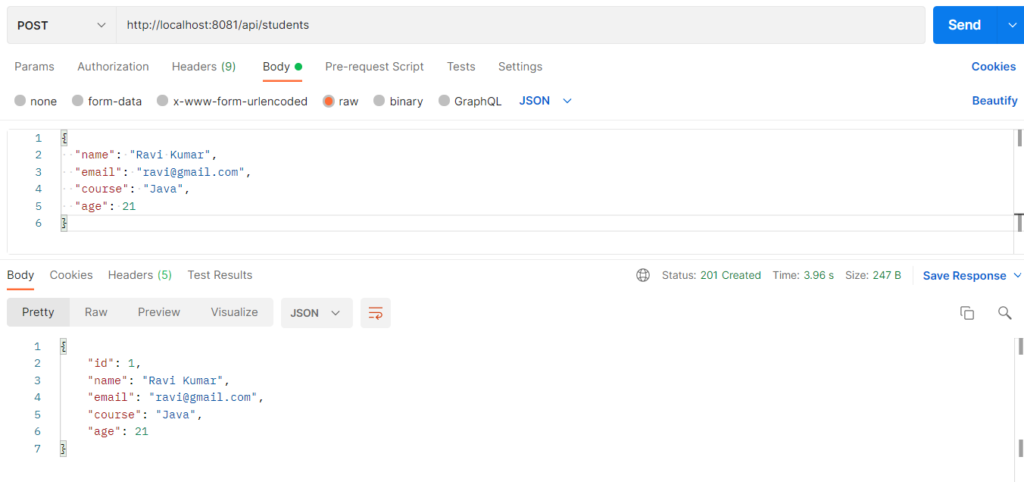
YAML (application.yml) is a human-readable file for storing Spring Boot application settings in a hierarchical, indentation-based structure. Related settings such as server, database, and JPA are grouped under one parent key, so you don’t repeat prefixes. It supports maps, lists, and nested objects, and can hold separate settings for dev, test, and prod. The Student application uses it to configure the port, database, and custom business rules without changing Java code.
Why it’s used
- Less repetition and better readability for nested settings.
- Native support for lists and nested objects (for example
allowed-courses). - Easy environment separation (dev, prod) using profiles.
- Values can be injected into Java classes, so behaviour changes without recompiling.
- Environment variables and placeholders (
${DB_PASSWORD:root}) keep secrets out of code.
Rules to remember: indent with spaces (never tabs), use key: value with a space after the colon, and use - item for lists.
Ways to read YAML values in Java
@Value("${key}")for single values@ConfigurationProperties(prefix = "...")to bind a whole group into an object (best practice)Environmentbean for programmatic access
Hands-on Experiment: Creating a Student Application with YAML Configuration
The following steps are involved in developing this hands-on experiment.
Step 1: Generate the Project
Step 2: Project Structure
Step 3: pom.xml
Step 4: application.yml
Step 5: Create Configuration Class
Step 6: Create Entity Class
Step 7: Create Repository Interface
Step 8: Create Service Class
Step 9: Create Controller Class
Step 10: Main Application Class
Step 11: Run the Main Application Class
Step 1: Configure the Project on Spring Initializr
Go to start.spring.io and set:
- Project: Maven
- Language: Java
- Spring Boot version: 3.2.x
- Group: com.example
- Artifact: student
- Name: student
- Package name: com.example.student
- Packaging: Jar
- Java: 17
- Dependencies: Spring Web, Spring Data JPA, MySQL Driver
Click Generate to download the ZIP, then extract and import it into your IDE as a Maven project.
Step 2: Generated Project Structure
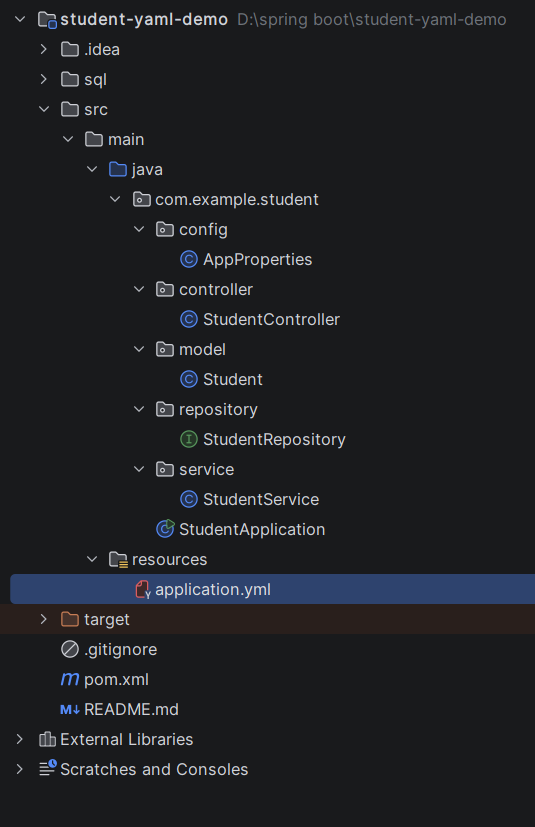
Step 3: Explore pom.xml
<?xml version="1.0" encoding="UTF-8"?>
<project xmlns="http://maven.apache.org/POM/4.0.0"
         xmlns:xsi="http://www.w3.org/2001/XMLSchema-instance"
         xsi:schemaLocation="http://maven.apache.org/POM/4.0.0 https://maven.apache.org/xsd/maven-4.0.0.xsd">
    <modelVersion>4.0.0</modelVersion>

    <parent>
        <groupId>org.springframework.boot</groupId>
        <artifactId>spring-boot-starter-parent</artifactId>
        <version>3.3.4</version>
        <relativePath/>
    </parent>

    <groupId>com.example</groupId>
    <artifactId>student-yaml-demo</artifactId>
    <version>1.0.0</version>
    <name>student-yaml-demo</name>
    <description>Student application configured with application.yml and MySQL</description>

    <properties>
        <java.version>17</java.version>
    </properties>

    <dependencies>
        <dependency>
            <groupId>org.springframework.boot</groupId>
            <artifactId>spring-boot-starter-web</artifactId>
        </dependency>
        <dependency>
            <groupId>org.springframework.boot</groupId>
            <artifactId>spring-boot-starter-data-jpa</artifactId>
        </dependency>
        <dependency>
            <groupId>com.mysql</groupId>
            <artifactId>mysql-connector-j</artifactId>
            <scope>runtime</scope>
        </dependency>
    </dependencies>

    <build>
        <plugins>
            <plugin>
                <groupId>org.springframework.boot</groupId>
                <artifactId>spring-boot-maven-plugin</artifactId>
            </plugin>
        </plugins>
    </build>
</project>
Step 4: application.yml
spring:
application:
name: student-service
datasource:
url: jdbc:mysql://localhost:3306/studentdb_dev?createDatabaseIfNotExist=true&useSSL=false&allowPublicKeyRetrieval=true&serverTimezone=UTC
driver-class-name: com.mysql.cj.jdbc.Driver
username: ${DB_USERNAME:root}
password: ${DB_PASSWORD:password}
jpa:
open-in-view: false
show-sql: true
hibernate:
ddl-auto: update
server:
port: 8081
servlet:
context-path: /api
# Custom, hierarchical business settings
student:
app:
name: Student Management System
version: 1.0.0
max-students: 5
allowed-courses:
- Java
- Python
- React
admin:
email: admin@school.com
phone: "9999999999"Step 5: Configuration file
package com.example.student.config;

import java.util.ArrayList;
import java.util.List;
import org.springframework.boot.context.properties.ConfigurationProperties;
import org.springframework.stereotype.Component;

@Component
@ConfigurationProperties(prefix = "student.app")
public class AppProperties {

    private String name;
    private String version;
    private int maxStudents;
    private List<String> allowedCourses = new ArrayList<>();
    private Admin admin = new Admin();

    public static class Admin {
        private String email;
        private String phone;

        public String getEmail() { return email; }
        public void setEmail(String email) { this.email = email; }
        public String getPhone() { return phone; }
        public void setPhone(String phone) { this.phone = phone; }
    }

    public String getName() { return name; }
    public void setName(String name) { this.name = name; }
    public String getVersion() { return version; }
    public void setVersion(String version) { this.version = version; }
    public int getMaxStudents() { return maxStudents; }
    public void setMaxStudents(int maxStudents) { this.maxStudents = maxStudents; }
    public List<String> getAllowedCourses() { return allowedCourses; }
    public void setAllowedCourses(List<String> allowedCourses) { this.allowedCourses = allowedCourses; }
    public Admin getAdmin() { return admin; }
    public void setAdmin(Admin admin) { this.admin = admin; }
}
Step 6: Create Entity Class
package com.example.student.model;

import jakarta.persistence.Entity;
import jakarta.persistence.GeneratedValue;
import jakarta.persistence.GenerationType;
import jakarta.persistence.Id;
import jakarta.persistence.Table;

@Entity
@Table(name = "students")
public class Student {

    @Id
    @GeneratedValue(strategy = GenerationType.IDENTITY)
    private Long id;
    private String name;
    private String email;
    private String course;
    private int age;

    public Long getId() { return id; }
    public void setId(Long id) { this.id = id; }
    public String getName() { return name; }
    public void setName(String name) { this.name = name; }
    public String getEmail() { return email; }
    public void setEmail(String email) { this.email = email; }
    public String getCourse() { return course; }
    public void setCourse(String course) { this.course = course; }
    public int getAge() { return age; }
    public void setAge(int age) { this.age = age; }
}
Step 7: Create Repository Interface
package com.example.student.repository;

import com.example.student.model.Student;
import org.springframework.data.jpa.repository.JpaRepository;

public interface StudentRepository extends JpaRepository<Student, Long> {
}
Step 8: Create Service class
package com.example.student.service;

import com.example.student.config.AppProperties;
import com.example.student.model.Student;
import com.example.student.repository.StudentRepository;
import java.util.List;
import org.springframework.http.HttpStatus;
import org.springframework.stereotype.Service;
import org.springframework.web.server.ResponseStatusException;

@Service
public class StudentService {

    private final StudentRepository repository;
    private final AppProperties props;

    public StudentService(StudentRepository repository, AppProperties props) {
        this.repository = repository;
        this.props = props;
    }

    public Student create(Student s) {
        if (repository.count() >= props.getMaxStudents()) {
            throw new ResponseStatusException(HttpStatus.BAD_REQUEST,
                    "Maximum students limit reached: " + props.getMaxStudents());
        }
        if (!props.getAllowedCourses().contains(s.getCourse())) {
            throw new ResponseStatusException(HttpStatus.BAD_REQUEST,
                    "Course not allowed. Allowed: " + props.getAllowedCourses());
        }
        s.setId(null);
        return repository.save(s);
    }

    public List<Student> getAll() {
        return repository.findAll();
    }

    public Student getById(Long id) {
        return repository.findById(id).orElseThrow(() ->
                new ResponseStatusException(HttpStatus.NOT_FOUND, "Student not found: " + id));
    }

    public Student update(Long id, Student s) {
        if (!props.getAllowedCourses().contains(s.getCourse())) {
            throw new ResponseStatusException(HttpStatus.BAD_REQUEST,
                    "Course not allowed. Allowed: " + props.getAllowedCourses());
        }
        Student existing = getById(id);
        existing.setName(s.getName());
        existing.setEmail(s.getEmail());
        existing.setCourse(s.getCourse());
        existing.setAge(s.getAge());
        return repository.save(existing);
    }

    public void delete(Long id) {
        repository.delete(getById(id));
    }
}
Step 9: Create Controller class
package com.example.student.controller;

import com.example.student.config.AppProperties;
import com.example.student.model.Student;
import com.example.student.service.StudentService;
import java.util.List;
import org.springframework.beans.factory.annotation.Value;
import org.springframework.http.HttpStatus;
import org.springframework.web.bind.annotation.DeleteMapping;
import org.springframework.web.bind.annotation.GetMapping;
import org.springframework.web.bind.annotation.PathVariable;
import org.springframework.web.bind.annotation.PostMapping;
import org.springframework.web.bind.annotation.PutMapping;
import org.springframework.web.bind.annotation.RequestBody;
import org.springframework.web.bind.annotation.ResponseStatus;
import org.springframework.web.bind.annotation.RestController;

@RestController
public class StudentController {

    private final StudentService service;
    private final AppProperties props;

    // @Value reads a single YAML value
    @Value("${spring.application.name}")
    private String serviceName;

    public StudentController(StudentService service, AppProperties props) {
        this.service = service;
        this.props = props;
    }

    @GetMapping("/config")
    public AppProperties config() {
        return props;
    }

    @GetMapping("/service-name")
    public String serviceName() {
        return serviceName;
    }

    @PostMapping("/students")
    @ResponseStatus(HttpStatus.CREATED)
    public Student create(@RequestBody Student s) {
        return service.create(s);
    }

    @GetMapping("/students")
    public List<Student> all() {
        return service.getAll();
    }

    @GetMapping("/students/{id}")
    public Student one(@PathVariable Long id) {
        return service.getById(id);
    }

    @PutMapping("/students/{id}")
    public Student update(@PathVariable Long id, @RequestBody Student s) {
        return service.update(id, s);
    }

    @DeleteMapping("/students/{id}")
    @ResponseStatus(HttpStatus.NO_CONTENT)
    public void delete(@PathVariable Long id) {
        service.delete(id);
    }
}
Step 10: Main Application
package com.example.student;

import org.springframework.boot.SpringApplication;
import org.springframework.boot.autoconfigure.SpringBootApplication;

@SpringBootApplication
public class StudentApplication {
    public static void main(String[] args) {
        SpringApplication.run(StudentApplication.class, args);
    }
}
Step 11: Run the StudentApplication