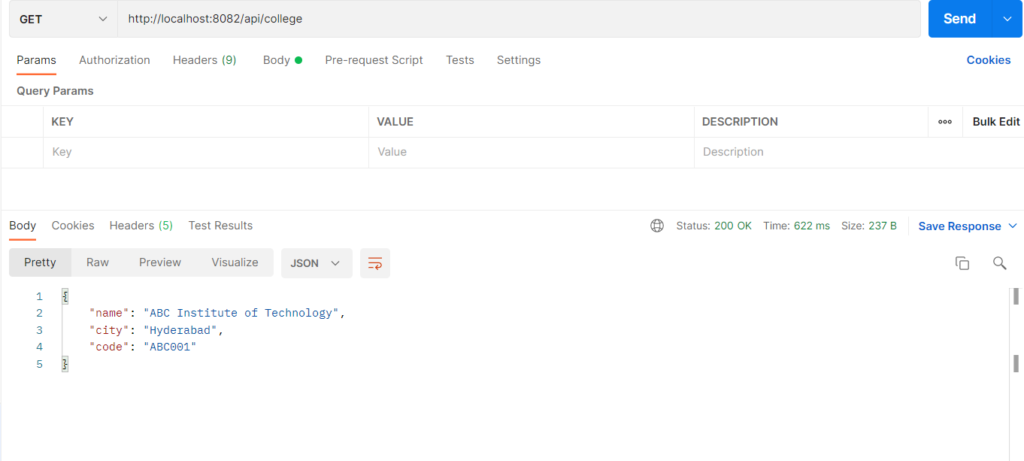
Java-based configuration means you register objects as beans yourself, inside a class marked @Configuration, using methods marked @Bean. Spring runs each @Bean method once, stores the returned object in the container, and injects it wherever it is needed. It is used for classes you cannot annotate (third-party or plain model classes) and when you want full control over how an object is built. The bean name defaults to the method name, so a method called college() creates a bean named college.
Types
- Basic
@Bean: a method that returns the object, with the default bean name. - Named bean:
@Bean("myName")or@Bean(name = {"a", "b"}). - Bean with dependencies: parameters in the
@Beanmethod are injected by Spring. - Scoped bean:
@Scope("prototype")for a new object per request (the default issingleton). - Lifecycle hooks:
@Bean(initMethod = "...", destroyMethod = "..."). - Selection helpers:
@Primaryand@Qualifierwhen there are several beans of one type.
Hands-on Experiment: Creating a spring boot application along with Java-based Bean Configuration
The following steps are involved in developing this hands-on experiment.
Step 1: Generate the Project
Step 2: Project Structure
Step 3: pom.xml
Step 4: application.properties
Step 5: Create Entity Class
Step 6: Create Repository Interface
Step 7: Create Service Class
Step 8: Create Controller Class
Step 9: Main Application Class
Step 10: Run the Main Application Class
Step 1: Configure the Project on Spring Initializr
Go to start.spring.io and set:
- Project: Maven
- Language: Java
- Spring Boot version: 3.2.x
- Group: com.example
- Artifact: javaconfig
- Name: javaconfig
- Package name: com.example.javaconfig
- Packaging: Jar
- Java: 17
- Dependencies: Spring Web, Spring Data JPA, MySQL Driver
Click Generate to download the ZIP, then extract and import it into your IDE as a Maven project.
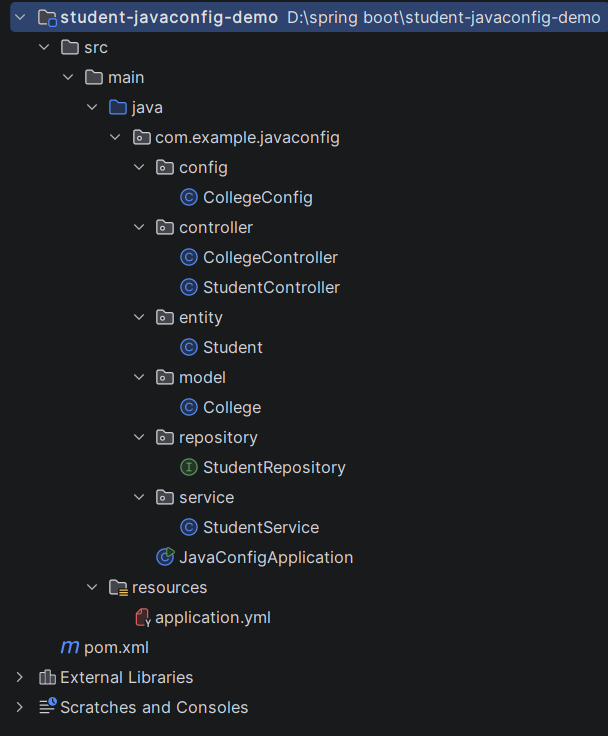
Step 2: Generated Project Structure
Step 3: Explore pom.xml
<?xml version="1.0" encoding="UTF-8"?>
<project xmlns="http://maven.apache.org/POM/4.0.0"
         xmlns:xsi="http://www.w3.org/2001/XMLSchema-instance"
         xsi:schemaLocation="http://maven.apache.org/POM/4.0.0 https://maven.apache.org/xsd/maven-4.0.0.xsd">
    <modelVersion>4.0.0</modelVersion>

    <parent>
        <groupId>org.springframework.boot</groupId>
        <artifactId>spring-boot-starter-parent</artifactId>
        <version>3.3.5</version>
        <relativePath/>
    </parent>

    <groupId>com.example</groupId>
    <artifactId>student-javaconfig-demo</artifactId>
    <version>1.0.0</version>

    <properties>
        <java.version>17</java.version>
    </properties>

    <dependencies>
        <dependency>
            <groupId>org.springframework.boot</groupId>
            <artifactId>spring-boot-starter-web</artifactId>
        </dependency>
        <dependency>
            <groupId>org.springframework.boot</groupId>
            <artifactId>spring-boot-starter-data-jpa</artifactId>
        </dependency>
        <dependency>
            <groupId>com.mysql</groupId>
            <artifactId>mysql-connector-j</artifactId>
            <scope>runtime</scope>
        </dependency>
    </dependencies>

    <build>
        <plugins>
            <plugin>
                <groupId>org.springframework.boot</groupId>
                <artifactId>spring-boot-maven-plugin</artifactId>
            </plugin>
        </plugins>
    </build>
</project>
Step 4: application.yml
spring:
datasource:
url: jdbc:mysql://localhost:3306/student_javaconfig_db?createDatabaseIfNotExist=true&useSSL=false&allowPublicKeyRetrieval=true&serverTimezone=UTC
username: root
password: password
jpa:
hibernate:
ddl-auto: update
show-sql: true
server:
port:8082Code language: JavaScript (javascript)Step 5: Create Entity class
package com.example.javaconfig.entity;

import jakarta.persistence.*;

@Entity
public class Student {

    @Id
    @GeneratedValue(strategy = GenerationType.IDENTITY)
    private Long id;
    private String name;
    private String course;

    public Long getId() { return id; }
    public void setId(Long id) { this.id = id; }
    public String getName() { return name; }
    public void setName(String name) { this.name = name; }
    public String getCourse() { return course; }
    public void setCourse(String course) { this.course = course; }
}
package com.example.javaconfig.model;

// A plain Java class: NO @Component, NO @Service. Spring only knows it
// because CollegeConfig registers it with @Bean.
public class College {

    private final String name;
    private final String city;
    private final String code;

    public College(String name, String city, String code) {
        this.name = name;
        this.city = city;
        this.code = code;
        System.out.println(">>> College bean created: " + name);
    }

    public String getName() { return name; }
    public String getCity() { return city; }
    public String getCode() { return code; }
}
Step 6: Create Repository Interface
package com.example.javaconfig.repository;

import com.example.javaconfig.entity.Student;
import org.springframework.data.jpa.repository.JpaRepository;

public interface StudentRepository extends JpaRepository<Student, Long> {
}
Step 7: Create Service class
package com.example.javaconfig.service;

import com.example.javaconfig.entity.Student;
import com.example.javaconfig.model.College;
import com.example.javaconfig.repository.StudentRepository;
import org.springframework.stereotype.Service;

import java.util.List;

@Service
public class StudentService {

    private final StudentRepository repository;
    private final College college;   // the @Bean from CollegeConfig

    // Constructor injection: Spring passes the College bean defined in CollegeConfig
    public StudentService(StudentRepository repository, College college) {
        this.repository = repository;
        this.college = college;
    }

    public Student save(Student student) {
        return repository.save(student);
    }

    public List<Student> findAll() {
        return repository.findAll();
    }

    public Student findById(Long id) {
        return repository.findById(id).orElseThrow(() -> new RuntimeException("Student not found: " + id));
    }

    // Uses the injected College bean
    public String idCard(Long id) {
        Student s = findById(id);
        return s.getName() + " | " + s.getCourse() + " | " + college.getName()
                + ", " + college.getCity() + " (" + college.getCode() + ")";
    }
}
Step 8: Create below Controller classes
package com.example.javaconfig.controller;

import com.example.javaconfig.entity.Student;
import com.example.javaconfig.service.StudentService;
import org.springframework.web.bind.annotation.*;

import java.util.List;

@RestController
@RequestMapping("/api/students")
public class StudentController {

    private final StudentService service;

    public StudentController(StudentService service) {
        this.service = service;
    }

    @PostMapping
    public Student create(@RequestBody Student student) {
        return service.save(student);
    }

    @GetMapping
    public List<Student> getAll() {
        return service.findAll();
    }

    @GetMapping("/{id}")
    public Student getById(@PathVariable Long id) {
        return service.findById(id);
    }

    @GetMapping("/{id}/id-card")
    public String idCard(@PathVariable Long id) {
        return service.idCard(id);
    }
}
package com.example.javaconfig.controller;

import com.example.javaconfig.model.College;
import org.springframework.web.bind.annotation.GetMapping;
import org.springframework.web.bind.annotation.RequestMapping;
import org.springframework.web.bind.annotation.RestController;

@RestController
@RequestMapping("/api/college")
public class CollegeController {

    private final College college;   // same single College bean (singleton)

    public CollegeController(College college) {
        this.college = college;
    }

    @GetMapping
    public College getCollege() {
        return college;
    }
}
package com.example.javaconfig.config;

import com.example.javaconfig.model.College;
import org.springframework.context.annotation.Bean;
import org.springframework.context.annotation.Configuration;

// @Configuration -> this class holds bean definitions
@Configuration
public class CollegeConfig {

    // @Bean -> the returned object is registered in the Spring container.
    // Bean name = method name ("college"). Change it with @Bean("myName").
    @Bean
    public College college() {
        return new College("ABC Institute of Technology", "Hyderabad", "ABC001");
    }
}
Step 9: Main Application
package com.example.javaconfig;

import org.springframework.boot.SpringApplication;
import org.springframework.boot.autoconfigure.SpringBootApplication;

@SpringBootApplication
public class JavaConfigApplication {
    public static void main(String[] args) {
        SpringApplication.run(JavaConfigApplication.class, args);
    }
}
Step 10: Run the JavaConfigApplication