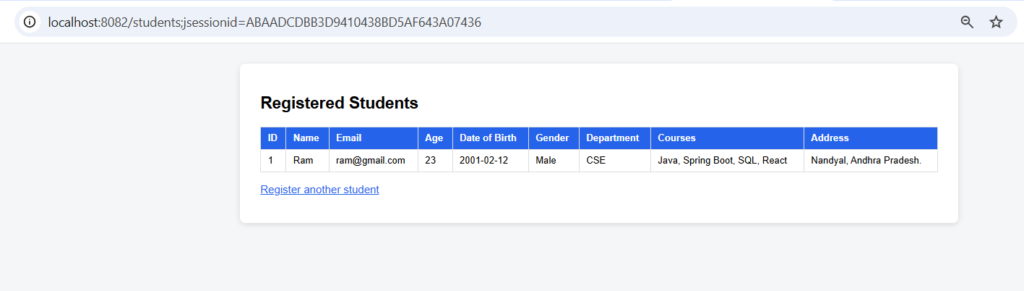
Form data binding automatically copies the values typed into an HTML form into the fields of a Java object.It is used so you don’t read each field by hand with request.getParameter(). Spring creates the object, fills it, and converts text to numbers and dates.In Spring MVC it works through @ModelAttribute on the controller and th:object / th:field in the Thymeleaf page.The form field name must match the Java property name (name, age, dateOfBirth). Spring matches them and calls the setters.
Features
- One object receives the whole form (
@ModelAttribute Student student). - Text is converted to the right Java type automatically (
"20"becomesInteger,"2004-05-12"becomesLocalDate). - Several values with the same name become a
List(checkboxes). th:fieldkeeps the form and the object in sync, so values are pre-filled and remembered.@InitBindercan block fields from being bound (hereid, so a form can’t set the database id).- The bound object can be saved straight to MySQL.
Form Data Binding Types
| Type | How it works | Example in this project |
|---|---|---|
Object binding (@ModelAttribute) |
The whole form fills one Java object. | register(@ModelAttribute Student student) |
Single-field binding (@RequestParam) |
Each field is read into its own parameter. | /students/quick-register |
| Single-value controls | Text, radio buttons and drop-downs each bind to one String. |
name, gender, department |
| Multi-value binding | Checkboxes with the same name bind to a List<String>. |
courses |
| Type-converted binding | Text is converted to numbers and dates. | age (Integer), dateOfBirth (LocalDate) |
Hands-on Experiment: Creating a spring boot application with HTML form fields are mapped to Java objects in Spring applications.
The following steps are involved in developing this hands-on experiment.
Step 1: Generate the Project
Step 2: Project Structure
Step 3: pom.xml
Step 4: application.properties
Step 5: Create Entity Class
Step 6: Create Repository Interface
Step 7: Create Service Class
Step 8: Create Controller Class
Step 9: Main Application Class
Step 10: Run the Main Application Class
Step 1: Configure the Project on Spring Initializr
Go to start.spring.io and set:
- Project: Maven
- Language: Java
- Spring Boot version: 3.2.x
- Group: com.example
- Artifact: formbinding
- Name: formbinding
- Package name: com.example.formbinding
- Packaging: Jar
- Java: 17
- Dependencies: Spring Web, Spring Data JPA, Thymeleaf, MySQL Driver
Click Generate to download the ZIP, then extract and import it into your IDE as a Maven project.
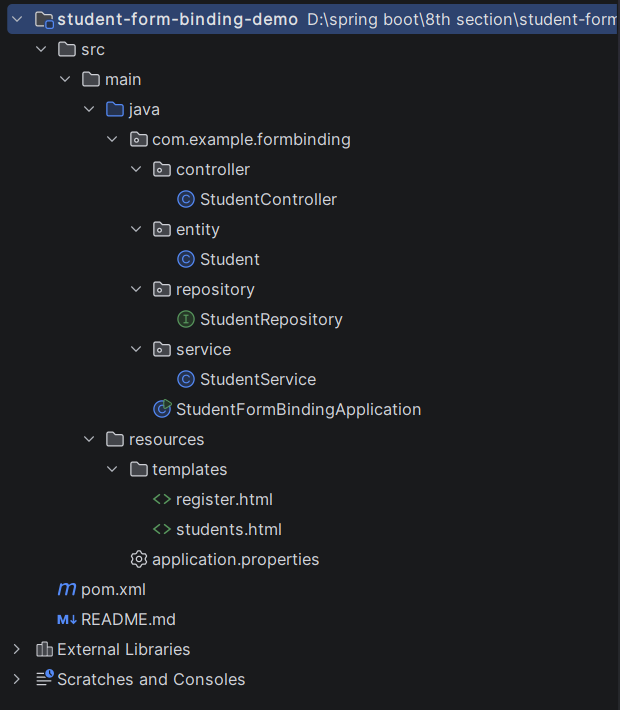
Step 2: Generated Project Structure
Step 3: Explore pom.xml
<?xml version="1.0" encoding="UTF-8"?>
<project xmlns="http://maven.apache.org/POM/4.0.0"
         xmlns:xsi="http://www.w3.org/2001/XMLSchema-instance"
         xsi:schemaLocation="http://maven.apache.org/POM/4.0.0 https://maven.apache.org/xsd/maven-4.0.0.xsd">
    <modelVersion>4.0.0</modelVersion>

    <parent>
        <groupId>org.springframework.boot</groupId>
        <artifactId>spring-boot-starter-parent</artifactId>
        <version>3.2.5</version>
        <relativePath/>
    </parent>

    <groupId>com.example</groupId>
    <artifactId>student-form-binding-demo</artifactId>
    <version>1.0.0</version>
    <name>student-form-binding-demo</name>

    <properties>
        <java.version>17</java.version>
    </properties>

    <dependencies>
        <dependency>
            <groupId>org.springframework.boot</groupId>
            <artifactId>spring-boot-starter-web</artifactId>
        </dependency>
        <dependency>
            <groupId>org.springframework.boot</groupId>
            <artifactId>spring-boot-starter-thymeleaf</artifactId>
        </dependency>
        <dependency>
            <groupId>org.springframework.boot</groupId>
            <artifactId>spring-boot-starter-data-jpa</artifactId>
        </dependency>
        <dependency>
            <groupId>com.mysql</groupId>
            <artifactId>mysql-connector-j</artifactId>
            <scope>runtime</scope>
        </dependency>
    </dependencies>

    <build>
        <plugins>
            <plugin>
                <groupId>org.springframework.boot</groupId>
                <artifactId>spring-boot-maven-plugin</artifactId>
            </plugin>
        </plugins>
    </build>
</project>
Step 4: application.properties
spring.application.name=student-form-binding-demo
server.port=8082
spring.datasource.url=jdbc:mysql://localhost:3306/student_form_db?createDatabaseIfNotExist=true&useSSL=false&serverTimezone=UTC&allowPublicKeyRetrieval=true
spring.datasource.username=root
spring.datasource.password=password
spring.datasource.driver-class-name=com.mysql.cj.jdbc.Driver
spring.jpa.hibernate.ddl-auto=update
spring.jpa.show-sql=true
spring.jpa.database-platform=org.hibernate.dialect.MySQLDialect
spring.thymeleaf.cache=falseCode language: JavaScript (javascript)Step 5: Create Entity Class
package com.example.formbinding.entity;

import jakarta.persistence.CollectionTable;
import jakarta.persistence.Column;
import jakarta.persistence.ElementCollection;
import jakarta.persistence.Entity;
import jakarta.persistence.FetchType;
import jakarta.persistence.GeneratedValue;
import jakarta.persistence.GenerationType;
import jakarta.persistence.Id;
import jakarta.persistence.JoinColumn;
import jakarta.persistence.Table;
import org.springframework.format.annotation.DateTimeFormat;

import java.time.LocalDate;
import java.util.ArrayList;
import java.util.List;

// This single class is the Java model the form is bound to (and the database table).
@Entity
@Table(name = "students")
public class Student {

    @Id
    @GeneratedValue(strategy = GenerationType.IDENTITY)
    private Long id;

    @Column(nullable = false)
    private String name;                 // text input      -> String

    private String email;                // email input     -> String

    private Integer age;                 // number input    -> Integer (type conversion)

    @DateTimeFormat(iso = DateTimeFormat.ISO.DATE)
    @Column(name = "date_of_birth")
    private LocalDate dateOfBirth;       // date input      -> LocalDate (format conversion)

    private String gender;               // radio buttons   -> String (one value)

    private String department;           // drop-down list  -> String (one value)

    @ElementCollection(fetch = FetchType.EAGER)
    @CollectionTable(name = "student_courses", joinColumns = @JoinColumn(name = "student_id"))
    @Column(name = "course")
    private List<String> courses = new ArrayList<>();   // checkboxes -> List<String> (many values)

    @Column(length = 500)
    private String address;              // textarea        -> String

    public Student() {
    }

    public Long getId() { return id; }
    public void setId(Long id) { this.id = id; }

    public String getName() { return name; }
    public void setName(String name) { this.name = name; }

    public String getEmail() { return email; }
    public void setEmail(String email) { this.email = email; }

    public Integer getAge() { return age; }
    public void setAge(Integer age) { this.age = age; }

    public LocalDate getDateOfBirth() { return dateOfBirth; }
    public void setDateOfBirth(LocalDate dateOfBirth) { this.dateOfBirth = dateOfBirth; }

    public String getGender() { return gender; }
    public void setGender(String gender) { this.gender = gender; }

    public String getDepartment() { return department; }
    public void setDepartment(String department) { this.department = department; }

    public List<String> getCourses() { return courses; }
    public void setCourses(List<String> courses) { this.courses = courses; }

    public String getAddress() { return address; }
    public void setAddress(String address) { this.address = address; }
}
Step 6: Create below Repository Interface
package com.example.formbinding.repository;

import com.example.formbinding.entity.Student;
import org.springframework.data.jpa.repository.JpaRepository;
import org.springframework.stereotype.Repository;

@Repository
public interface StudentRepository extends JpaRepository<Student, Long> {
}
Step 7: Create below Service class
package com.example.formbinding.service;

import com.example.formbinding.entity.Student;
import com.example.formbinding.repository.StudentRepository;
import org.springframework.stereotype.Service;

import java.util.List;

@Service
public class StudentService {

    private final StudentRepository studentRepository;

    public StudentService(StudentRepository studentRepository) {
        this.studentRepository = studentRepository;
    }

    public Student register(Student student) {
        return studentRepository.save(student);
    }

    public List<Student> getAll() {
        return studentRepository.findAll();
    }
}
Step 8: Create Controller class
package com.example.formbinding.controller;

import com.example.formbinding.entity.Student;
import com.example.formbinding.service.StudentService;
import org.springframework.stereotype.Controller;
import org.springframework.ui.Model;
import org.springframework.web.bind.WebDataBinder;
import org.springframework.web.bind.annotation.GetMapping;
import org.springframework.web.bind.annotation.InitBinder;
import org.springframework.web.bind.annotation.ModelAttribute;
import org.springframework.web.bind.annotation.PostMapping;
import org.springframework.web.bind.annotation.RequestMapping;
import org.springframework.web.bind.annotation.RequestParam;
import org.springframework.web.bind.annotation.ResponseBody;
import org.springframework.web.servlet.mvc.support.RedirectAttributes;

import java.util.List;

@Controller
@RequestMapping("/students")
public class StudentController {

    private static final List<String> GENDERS = List.of("Male", "Female", "Other");
    private static final List<String> DEPARTMENTS = List.of("CSE", "ECE", "MECH", "CIVIL");
    private static final List<String> COURSES = List.of("Java", "Spring Boot", "SQL", "React", "Python");

    private final StudentService studentService;

    public StudentController(StudentService studentService) {
        this.studentService = studentService;
    }

    // Never let a form submit set the database id
    @InitBinder
    public void initBinder(WebDataBinder binder) {
        binder.setDisallowedFields("id");
    }

    // GET /students/register -> shows the empty form (an empty Student is bound to it)
    @GetMapping("/register")
    public String showForm(Model model) {
        model.addAttribute("student", new Student());
        model.addAttribute("genders", GENDERS);
        model.addAttribute("departments", DEPARTMENTS);
        model.addAttribute("courseOptions", COURSES);
        return "register";
    }

    // POST /students/register -> Spring fills the Student object from the submitted fields
    @PostMapping("/register")
    public String register(@ModelAttribute("student") Student student, RedirectAttributes redirectAttributes) {
        Student saved = studentService.register(student);
        redirectAttributes.addFlashAttribute("message",
                "Student '" + saved.getName() + "' registered successfully with id " + saved.getId());
        return "redirect:/students";
    }

    // POST /students/quick-register -> binding single fields with @RequestParam
    @PostMapping("/quick-register")
    @ResponseBody
    public Student quickRegister(@RequestParam String name,
                                 @RequestParam String email,
                                 @RequestParam(defaultValue = "CSE") String department) {
        Student student = new Student();
        student.setName(name);
        student.setEmail(email);
        student.setDepartment(department);
        return studentService.register(student);
    }

    // GET /students -> HTML table of registered students
    @GetMapping
    public String list(Model model) {
        model.addAttribute("students", studentService.getAll());
        return "students";
    }

    // GET /students/json -> same data as JSON (to verify binding in Postman / browser)
    @GetMapping("/json")
    @ResponseBody
    public List<Student> listJson() {
        return studentService.getAll();
    }
}
<!DOCTYPE html>
<html xmlns:th="http://www.thymeleaf.org">
<head>
    <meta charset="UTF-8">
    <title>Student Registration</title>
    <style>
        body { font-family: Arial, sans-serif; background: #f4f6f8; margin: 0; padding: 30px; }
        .card { max-width: 560px; margin: auto; background: #fff; padding: 25px 30px; border-radius: 8px;
                box-shadow: 0 2px 8px rgba(0,0,0,.12); }
        h2 { margin-top: 0; }
        label.title { display: block; margin: 14px 0 5px; font-weight: bold; }
        input[type=text], input[type=email], input[type=number], input[type=date], select, textarea {
            width: 100%; padding: 8px; box-sizing: border-box; border: 1px solid #bbb; border-radius: 4px; }
        .inline label { margin-right: 15px; font-weight: normal; }
        button { margin-top: 20px; padding: 10px 22px; background: #2563eb; color: #fff; border: 0;
                 border-radius: 4px; cursor: pointer; font-size: 15px; }
        a { color: #2563eb; }
    </style>
</head>
<body>
<div class="card">
    <h2>Student Registration</h2>

    <!-- th:object binds the whole form to the 'student' model object -->
    <form th:action="@{/students/register}" th:object="${student}" method="post">

        <label class="title">Full Name</label>
        <input type="text" th:field="*{name}" placeholder="Enter name" required>

        <label class="title">Email</label>
        <input type="email" th:field="*{email}" placeholder="Enter email">

        <label class="title">Age</label>
        <input type="number" th:field="*{age}" min="1" max="100">

        <label class="title">Date of Birth</label>
        <input type="date" th:field="*{dateOfBirth}">

        <label class="title">Gender</label>
        <div class="inline">
            <label th:each="g : ${genders}">
                <input type="radio" th:field="*{gender}" th:value="${g}"> <span th:text="${g}"></span>
            </label>
        </div>

        <label class="title">Department</label>
        <select th:field="*{department}">
            <option value="">-- Select Department --</option>
            <option th:each="d : ${departments}" th:value="${d}" th:text="${d}"></option>
        </select>

        <label class="title">Courses</label>
        <div class="inline">
            <label th:each="c : ${courseOptions}">
                <input type="checkbox" th:field="*{courses}" th:value="${c}"> <span th:text="${c}"></span>
            </label>
        </div>

        <label class="title">Address</label>
        <textarea th:field="*{address}" rows="3" placeholder="Enter address"></textarea>

        <button type="submit">Register</button>
    </form>

    <p><a th:href="@{/students}">View registered students</a></p>
</div>
</body>
</html>
<!DOCTYPE html>
<html xmlns:th="http://www.thymeleaf.org">
<head>
    <meta charset="UTF-8">
    <title>Registered Students</title>
    <style>
        body { font-family: Arial, sans-serif; background: #f4f6f8; margin: 0; padding: 30px; }
        .card { max-width: 1000px; margin: auto; background: #fff; padding: 25px 30px; border-radius: 8px;
                box-shadow: 0 2px 8px rgba(0,0,0,.12); }
        table { width: 100%; border-collapse: collapse; margin-top: 15px; }
        th, td { border: 1px solid #ddd; padding: 8px 10px; text-align: left; font-size: 14px; }
        th { background: #2563eb; color: #fff; }
        .msg { background: #dcfce7; color: #166534; padding: 10px 14px; border-radius: 4px; }
        a { color: #2563eb; }
    </style>
</head>
<body>
<div class="card">
    <h2>Registered Students</h2>

    <div class="msg" th:if="${message}" th:text="${message}"></div>

    <table>
        <thead>
        <tr>
            <th>ID</th><th>Name</th><th>Email</th><th>Age</th><th>Date of Birth</th>
            <th>Gender</th><th>Department</th><th>Courses</th><th>Address</th>
        </tr>
        </thead>
        <tbody>
        <tr th:each="s : ${students}">
            <td th:text="${s.id}"></td>
            <td th:text="${s.name}"></td>
            <td th:text="${s.email}"></td>
            <td th:text="${s.age}"></td>
            <td th:text="${s.dateOfBirth}"></td>
            <td th:text="${s.gender}"></td>
            <td th:text="${s.department}"></td>
            <td th:text="${#strings.listJoin(s.courses, ', ')}"></td>
            <td th:text="${s.address}"></td>
        </tr>
        <tr th:if="${#lists.isEmpty(students)}">
            <td colspan="9">No students registered yet.</td>
        </tr>
        </tbody>
    </table>

    <p><a th:href="@{/students/register}">Register another student</a></p>
</div>
</body>
</html>
Step 9: Main Application
package com.example.formbinding;

import org.springframework.boot.SpringApplication;
import org.springframework.boot.autoconfigure.SpringBootApplication;

@SpringBootApplication
public class StudentFormBindingApplication {

    public static void main(String[] args) {
        SpringApplication.run(StudentFormBindingApplication.class, args);
    }
}
Step 10: Run the StudentFormBindingApplication