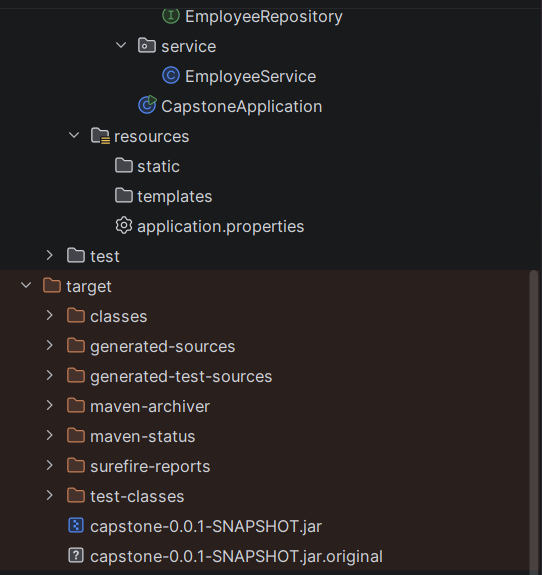
Learn how to build, package, configure, and run a complete Spring Boot application as a standalone application. This capstone project combines the concepts learned in the previous sections, including Spring Boot Starters, Auto Configuration, Embedded Server, REST APIs, JPA, database connectivity, application properties, and Maven build commands.
The project demonstrates how a Spring Boot application moves from development to a runnable packaged application.
What is Building and Running a Spring Boot Application?
Building converts source code into runnable artifacts. With Maven this means compile, test, and package into an executable (fat) JAR that contains your classes, dependencies, and the embedded server.
Why is it used?
It produces a single deployable file and gives a repeatable way to run the same app in every environment.
Features – One command builds and tests: mvn clean package – Executable JAR runs anywhere with Java – Multiple run modes: IDE, Maven plugin, JAR – Externalized configuration at run time
Hands-on Experiment: Build with Maven, create an executable JAR, run from the command line
The following steps are involved in developing this hands-on experiment.
Step 1: Generate the Project
Step 2: Project Structure
Step 3: pom.xml
Step 4: application.properties
Step 5: Create Entity Class
Step 6: Create Repository Interface
Step 7: Create Service Class
Step 8: Create Controller Class
Step 9: Main Application Class
Step 10: Run the Main Application Class
Step 1: Configure the Project on Spring Initializr
Go to start.spring.io and set:
- Project: Maven
- Language: Java
- Spring Boot version: 3.2.x
- Group: net.codejava
- Artifact: capstone
- Name: capstone
- Package name: net.codejava.capstone
- Packaging: Jar
- Java: 17
- Dependencies: Spring Web, Spring Data JPA, MySQL Driver
Click Generate to download the ZIP, then extract and import it into your IDE as a Maven project.
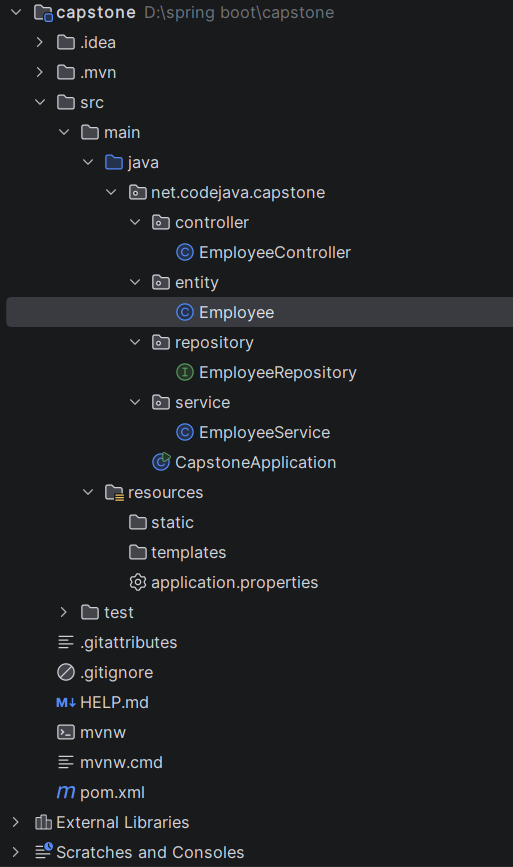
Step 2: Generated Project Structure
Step 3: Explore pom.xml
<?xml version="1.0" encoding="UTF-8"?>
<project xmlns="http://maven.apache.org/POM/4.0.0" xmlns:xsi="http://www.w3.org/2001/XMLSchema-instance"
	xsi:schemaLocation="http://maven.apache.org/POM/4.0.0 https://maven.apache.org/xsd/maven-4.0.0.xsd">
	<modelVersion>4.0.0</modelVersion>
	<parent>
		<groupId>org.springframework.boot</groupId>
		<artifactId>spring-boot-starter-parent</artifactId>
		<version>4.1.1</version>
		<relativePath/> <!-- lookup parent from repository -->
	</parent>
	<groupId>net.codejava</groupId>
	<artifactId>capstone</artifactId>
	<version>0.0.1-SNAPSHOT</version>
	<name/>
	<description/>
	<url/>
	<licenses>
		<license/>
	</licenses>
	<developers>
		<developer/>
	</developers>
	<scm>
		<connection/>
		<developerConnection/>
		<tag/>
		<url/>
	</scm>
	<properties>
		<java.version>17</java.version>
	</properties>
	<dependencies>
		<dependency>
			<groupId>org.springframework.boot</groupId>
			<artifactId>spring-boot-starter-data-jpa</artifactId>
		</dependency>
		<dependency>
			<groupId>org.springframework.boot</groupId>
			<artifactId>spring-boot-starter-webmvc</artifactId>
		</dependency>

		<dependency>
			<groupId>com.mysql</groupId>
			<artifactId>mysql-connector-j</artifactId>
			<scope>runtime</scope>
		</dependency>
		<dependency>
			<groupId>org.springframework.boot</groupId>
			<artifactId>spring-boot-starter-data-jpa-test</artifactId>
			<scope>test</scope>
		</dependency>
		<dependency>
			<groupId>org.springframework.boot</groupId>
			<artifactId>spring-boot-starter-webmvc-test</artifactId>
			<scope>test</scope>
		</dependency>
	</dependencies>

	<build>
		<plugins>
			<plugin>
				<groupId>org.springframework.boot</groupId>
				<artifactId>spring-boot-maven-plugin</artifactId>
			</plugin>
		</plugins>
	</build>

</project>
Step 4: application.properties
spring.application.name=embedded-server
# DataSource Configuration
spring.datasource.url=jdbc:mysql://localhost:3306/sys
spring.datasource.username=root
spring.datasource.password=password
# JPA / Hibernate Configuration
spring.jpa.hibernate.ddl-auto=update
spring.jpa.show-sql=true
# Server Configuration
server.port=8081Code language: PHP (php)Step 5: Create Entity Class
package net.codejava.capstone.entity;

import jakarta.persistence.*;
import java.time.LocalDate;

@Entity
@Table(name = "employees")
public class Employee {
    @Id
    @GeneratedValue(strategy = GenerationType.IDENTITY)
    private Long id;
    private String name;
    private String email;
    private String department;
    private Integer age;
    private Double salary;
    private LocalDate joiningDate;

    public Employee() {}

    public Long getId() { return id; }
    public void setId(Long id) { this.id = id; }
    public String getName() { return name; }
    public void setName(String name) { this.name = name; }
    public String getEmail() { return email; }
    public void setEmail(String email) { this.email = email; }
    public String getDepartment() { return department; }
    public void setDepartment(String department) { this.department = department; }
    public Integer getAge() { return age; }
    public void setAge(Integer age) { this.age = age; }
    public Double getSalary() { return salary; }
    public void setSalary(Double salary) { this.salary = salary; }
    public LocalDate getJoiningDate() { return joiningDate; }
    public void setJoiningDate(LocalDate joiningDate) { this.joiningDate = joiningDate; }
}
Step 6: Create Repository Interface
package net.codejava.capstone.repository;

import net.codejava.capstone.entity.Employee;
import org.springframework.data.jpa.repository.JpaRepository;

public interface EmployeeRepository extends JpaRepository<Employee, Long> {}
Step 7: Create Service class
package net.codejava.capstone.service;

import net.codejava.capstone.entity.Employee;
import net.codejava.capstone.repository.EmployeeRepository;
import org.springframework.stereotype.Service;
import java.util.List;

@Service
public class EmployeeService {
    private final EmployeeRepository repository;

    public EmployeeService(EmployeeRepository repository) { this.repository = repository; }

    public Employee save(Employee e) { return repository.save(e); }
    public List<Employee> findAll() { return repository.findAll(); }
    public Employee findById(Long id) { return repository.findById(id).orElse(null); }
    public void delete(Long id) { repository.deleteById(id); }
}
Step 8: Create Controller class
package net.codejava.capstone.controller;

import net.codejava.capstone.entity.Employee;
import net.codejava.capstone.service.EmployeeService;
import org.springframework.http.ResponseEntity;
import org.springframework.web.bind.annotation.*;
import java.util.List;

@RestController
@RequestMapping("/employees")
public class EmployeeController {
    private final EmployeeService service;

    public EmployeeController(EmployeeService service) { this.service = service; }

    @PostMapping
    public Employee create(@RequestBody Employee e) { return service.save(e); }

    @GetMapping
    public List<Employee> getAll() { return service.findAll(); }

    @GetMapping("/{id}")
    public ResponseEntity<Employee> getById(@PathVariable Long id) {
        Employee e = service.findById(id);
        return e != null ? ResponseEntity.ok(e) : ResponseEntity.notFound().build();
    }

    @PutMapping("/{id}")
    public Employee update(@PathVariable Long id, @RequestBody Employee e) {
        e.setId(id);
        return service.save(e);
    }

    @DeleteMapping("/{id}")
    public void delete(@PathVariable Long id) { service.delete(id); }
}
Step 9: Main Application
package net.codejava.capstone;

import org.springframework.boot.SpringApplication;
import org.springframework.boot.autoconfigure.SpringBootApplication;

@SpringBootApplication
public class CapstoneApplication {

	public static void main(String[] args) {
		SpringApplication.run(CapstoneApplication.class, args);
	}

}
Step 10: Run the CapstoneApplication