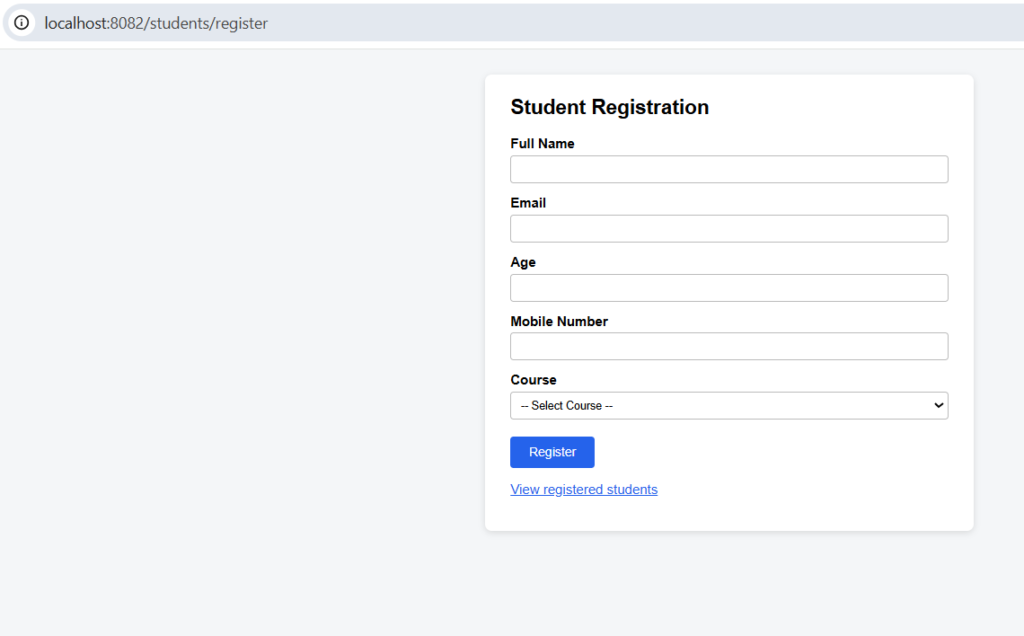
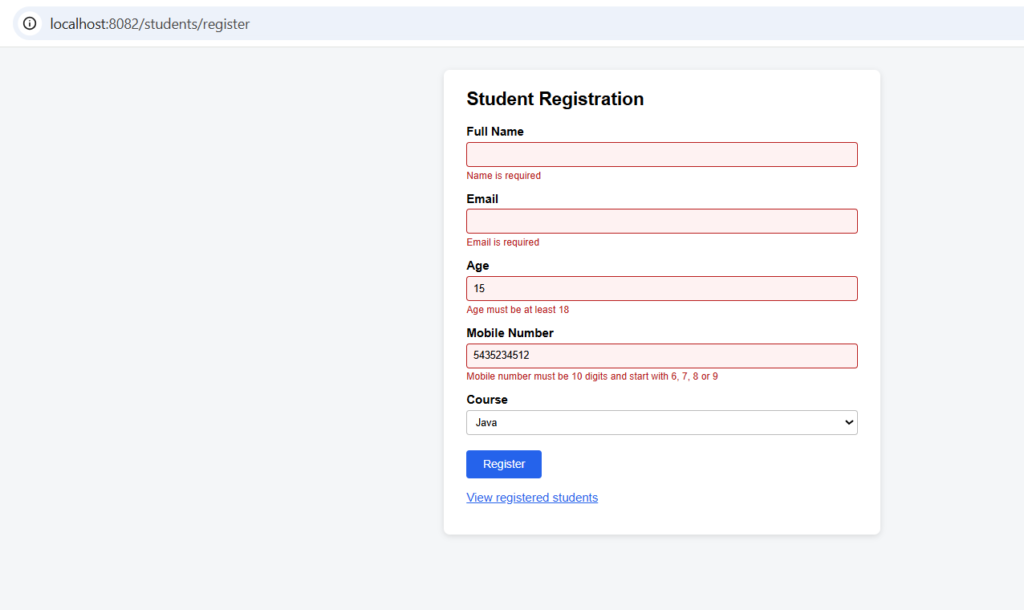
Bean Validation checks user input against rules written as annotations on the Java fields, such as @NotBlank, @Email and @Min.It is used so bad data (empty names, wrong emails, invalid mobile numbers) is rejected before it reaches your logic or the database.You put the rules on the model, add @Valid on the controller parameter, and Spring runs the checks automatically on every request.If a rule fails, the request is rejected with a message you wrote. In a form the error shows beside the field, and in a JSON API it comes back as a 400 response.
Features
- Rules sit on the fields, in one place, instead of
ifchecks scattered in the code. - Each rule has its own custom message.
- The same rules work for the HTML form (
BindingResult) and the JSON API (@RequestBody). - All errors are reported at once, not one at a time.
- Invalid data is never saved to MySQL.
- Needs the
spring-boot-starter-validationdependency.
Hands-on Experiment: Creating a spring boot application with Validations
The following steps are involved in developing this hands-on experiment.
Step 1: Generate the Project
Step 2: Project Structure
Step 3: pom.xml
Step 4: application.properties
Step 5: Create Entity Class
Step 6: Create Repository Interface
Step 7: Create Service Class
Step 8: Create Controller Class
Step 9: Main Application Class
Step 10: Run the Main Application Class
Step 1: Configure the Project on Spring Initializr
Go to start.spring.io and set:
- Project: Maven
- Language: Java
- Spring Boot version: 3.2.x
- Group: com.example
- Artifact: validation
- Name: validation
- Package name: com.example.validation
- Packaging: Jar
- Java: 17
- Dependencies: Spring Web, Spring Data JPA, MySQL Driver, Thymeleaf, Validation I/O.
Click Generate to download the ZIP, then extract and import it into your IDE as a Maven project.
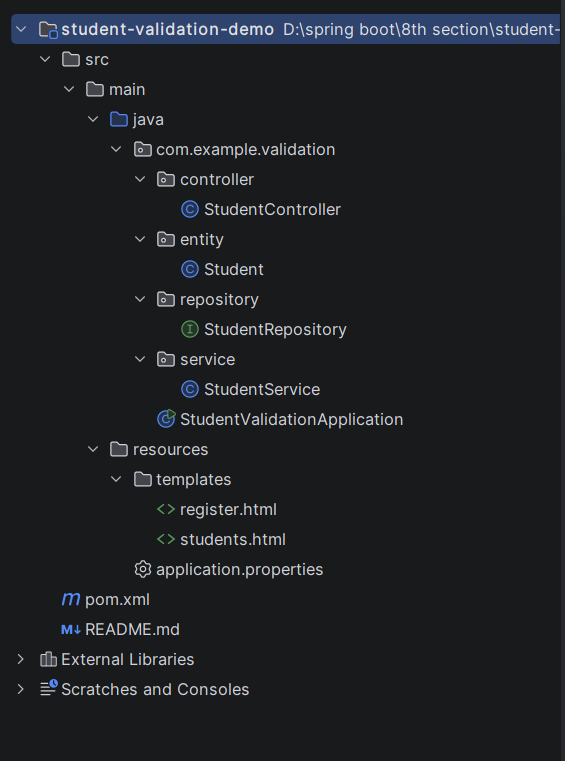
Step 2: Generated Project Structure
Step 3: Explore pom.xml
<?xml version="1.0" encoding="UTF-8"?>
<project xmlns="http://maven.apache.org/POM/4.0.0"
         xmlns:xsi="http://www.w3.org/2001/XMLSchema-instance"
         xsi:schemaLocation="http://maven.apache.org/POM/4.0.0 https://maven.apache.org/xsd/maven-4.0.0.xsd">
    <modelVersion>4.0.0</modelVersion>

    <parent>
        <groupId>org.springframework.boot</groupId>
        <artifactId>spring-boot-starter-parent</artifactId>
        <version>3.2.5</version>
        <relativePath/>
    </parent>

    <groupId>com.example</groupId>
    <artifactId>student-validation-demo</artifactId>
    <version>1.0.0</version>
    <name>student-validation-demo</name>

    <properties>
        <java.version>17</java.version>
    </properties>

    <dependencies>
        <dependency>
            <groupId>org.springframework.boot</groupId>
            <artifactId>spring-boot-starter-web</artifactId>
        </dependency>
        <dependency>
            <groupId>org.springframework.boot</groupId>
            <artifactId>spring-boot-starter-thymeleaf</artifactId>
        </dependency>
        <dependency>
            <groupId>org.springframework.boot</groupId>
            <artifactId>spring-boot-starter-validation</artifactId>
        </dependency>
        <dependency>
            <groupId>org.springframework.boot</groupId>
            <artifactId>spring-boot-starter-data-jpa</artifactId>
        </dependency>
        <dependency>
            <groupId>com.mysql</groupId>
            <artifactId>mysql-connector-j</artifactId>
            <scope>runtime</scope>
        </dependency>
    </dependencies>

    <build>
        <plugins>
            <plugin>
                <groupId>org.springframework.boot</groupId>
                <artifactId>spring-boot-maven-plugin</artifactId>
            </plugin>
        </plugins>
    </build>
</project>
Step 4: application.properties
spring.application.name=student-validation-demo
server.port=8082
spring.datasource.url=jdbc:mysql://localhost:3306/student_validation_db?createDatabaseIfNotExist=true&useSSL=false&serverTimezone=UTC&allowPublicKeyRetrieval=true
spring.datasource.username=root
spring.datasource.password=password
spring.datasource.driver-class-name=com.mysql.cj.jdbc.Driver
spring.jpa.hibernate.ddl-auto=update
spring.jpa.show-sql=true
spring.jpa.database-platform=org.hibernate.dialect.MySQLDialect
spring.thymeleaf.cache=falseCode language: JavaScript (javascript)Step 5: Create Entity Class
package com.example.validation.entity;

import jakarta.persistence.Column;
import jakarta.persistence.Entity;
import jakarta.persistence.GeneratedValue;
import jakarta.persistence.GenerationType;
import jakarta.persistence.Id;
import jakarta.persistence.Table;
import jakarta.validation.constraints.Email;
import jakarta.validation.constraints.Max;
import jakarta.validation.constraints.Min;
import jakarta.validation.constraints.NotBlank;
import jakarta.validation.constraints.NotNull;
import jakarta.validation.constraints.Pattern;
import jakarta.validation.constraints.Size;

@Entity
@Table(name = "students")
public class Student {

    @Id
    @GeneratedValue(strategy = GenerationType.IDENTITY)
    private Long id;

    // Required, and 3 to 50 characters long
    @NotBlank(message = "Name is required")
    @Size(min = 3, max = 50, message = "Name must be between 3 and 50 characters")
    private String name;

    // Required, and must look like an email address
    @NotBlank(message = "Email is required")
    @Email(message = "Enter a valid email address")
    private String email;

    // Required, and between 18 and 60
    @NotNull(message = "Age is required")
    @Min(value = 18, message = "Age must be at least 18")
    @Max(value = 60, message = "Age must not be more than 60")
    private Integer age;

    // Required, and exactly 10 digits starting with 6, 7, 8 or 9
    @NotBlank(message = "Mobile number is required")
    @Pattern(regexp = "^[6-9][0-9]{9}$",
            message = "Mobile number must be 10 digits and start with 6, 7, 8 or 9")
    @Column(length = 10)
    private String mobile;

    // Required, and must be one of the offered courses
    @NotBlank(message = "Course is required")
    @Pattern(regexp = "Java|Spring Boot|SQL|React|Python",
            message = "Course must be one of: Java, Spring Boot, SQL, React, Python")
    private String course;

    public Student() {
    }

    public Long getId() { return id; }
    public void setId(Long id) { this.id = id; }

    public String getName() { return name; }
    public void setName(String name) { this.name = name; }

    public String getEmail() { return email; }
    public void setEmail(String email) { this.email = email; }

    public Integer getAge() { return age; }
    public void setAge(Integer age) { this.age = age; }

    public String getMobile() { return mobile; }
    public void setMobile(String mobile) { this.mobile = mobile; }

    public String getCourse() { return course; }
    public void setCourse(String course) { this.course = course; }
}
Step 6: Create below Repository Interface
package com.example.validation.repository;

import com.example.validation.entity.Student;
import org.springframework.data.jpa.repository.JpaRepository;
import org.springframework.stereotype.Repository;

@Repository
public interface StudentRepository extends JpaRepository<Student, Long> {
}
Step 7: Create below Service class
package com.example.validation.service;

import com.example.validation.entity.Student;
import com.example.validation.repository.StudentRepository;
import org.springframework.stereotype.Service;

import java.util.List;

@Service
public class StudentService {

    private final StudentRepository studentRepository;

    public StudentService(StudentRepository studentRepository) {
        this.studentRepository = studentRepository;
    }

    public Student register(Student student) {
        student.setId(null);   // a client must never choose the database id
        return studentRepository.save(student);
    }

    public List<Student> getAll() {
        return studentRepository.findAll();
    }
}
Step 8: Create Controller class
package com.example.validation.controller;

import com.example.validation.entity.Student;
import com.example.validation.service.StudentService;
import jakarta.validation.Valid;
import org.springframework.beans.propertyeditors.StringTrimmerEditor;
import org.springframework.http.HttpStatus;
import org.springframework.http.ResponseEntity;
import org.springframework.stereotype.Controller;
import org.springframework.ui.Model;
import org.springframework.validation.BindingResult;
import org.springframework.web.bind.MethodArgumentNotValidException;
import org.springframework.web.bind.WebDataBinder;
import org.springframework.web.bind.annotation.ExceptionHandler;
import org.springframework.web.bind.annotation.GetMapping;
import org.springframework.web.bind.annotation.InitBinder;
import org.springframework.web.bind.annotation.ModelAttribute;
import org.springframework.web.bind.annotation.PostMapping;
import org.springframework.web.bind.annotation.RequestBody;
import org.springframework.web.bind.annotation.RequestMapping;
import org.springframework.web.bind.annotation.ResponseBody;
import org.springframework.web.servlet.mvc.support.RedirectAttributes;

import java.util.LinkedHashMap;
import java.util.List;
import java.util.Map;

@Controller
@RequestMapping("/students")
public class StudentController {

    private static final List<String> COURSES = List.of("Java", "Spring Boot", "SQL", "React", "Python");

    private final StudentService studentService;

    public StudentController(StudentService studentService) {
        this.studentService = studentService;
    }

    // Trim spaces and turn empty form text into null, so "required" messages show once
    @InitBinder
    public void initBinder(WebDataBinder binder) {
        binder.setDisallowedFields("id");
        binder.registerCustomEditor(String.class, new StringTrimmerEditor(true));
    }

    // ---------- HTML form ----------

    // GET /students/register
    @GetMapping("/register")
    public String showForm(Model model) {
        model.addAttribute("student", new Student());
        model.addAttribute("courseOptions", COURSES);
        return "register";
    }

    // POST /students/register  (@Valid runs the rules; errors land in BindingResult)
    @PostMapping("/register")
    public String register(@Valid @ModelAttribute("student") Student student,
                           BindingResult result,
                           Model model,
                           RedirectAttributes redirectAttributes) {
        if (result.hasErrors()) {
            model.addAttribute("courseOptions", COURSES);
            return "register";   // show the form again with the error messages
        }
        Student saved = studentService.register(student);
        redirectAttributes.addFlashAttribute("message",
                "Student '" + saved.getName() + "' registered successfully with id " + saved.getId());
        return "redirect:/students";
    }

    // GET /students
    @GetMapping
    public String list(Model model) {
        model.addAttribute("students", studentService.getAll());
        return "students";
    }

    // ---------- JSON API (for Postman) ----------

    // POST /students/api  (@Valid on @RequestBody; failures throw MethodArgumentNotValidException)
    @PostMapping("/api")
    @ResponseBody
    public ResponseEntity<Student> createJson(@Valid @RequestBody Student student) {
        return ResponseEntity.status(HttpStatus.CREATED).body(studentService.register(student));
    }

    // GET /students/json
    @GetMapping("/json")
    @ResponseBody
    public List<Student> listJson() {
        return studentService.getAll();
    }

    // Turns validation failures of the JSON API into a clean 400 response: { field: message }
    @ExceptionHandler(MethodArgumentNotValidException.class)
    public ResponseEntity<Map<String, String>> handleValidation(MethodArgumentNotValidException ex) {
        Map<String, String> errors = new LinkedHashMap<>();
        ex.getBindingResult().getFieldErrors()
                .forEach(error -> errors.merge(error.getField(), error.getDefaultMessage(),
                        (first, second) -> first + "; " + second));
        return ResponseEntity.badRequest().body(errors);
    }
}
Step 9: Main Application
package com.example.validation;

import org.springframework.boot.SpringApplication;
import org.springframework.boot.autoconfigure.SpringBootApplication;

@SpringBootApplication
public class StudentValidationApplication {

    public static void main(String[] args) {
        SpringApplication.run(StudentValidationApplication.class, args);
    }
}
Step 10: Run the StudentVAlidationApplication