Request mapping tells Spring which controller method should handle which request, based on the URL and the HTTP method. @RequestMapping on a class sets the base URL, and @GetMapping, @PostMapping, @PutMapping, @DeleteMapping on methods narrow it down. It is used so one URL like /api/students can do different things (read, create, update, delete) depending on the HTTP method. If no mapping matches, Spring returns 404 (no URL), 405 (wrong method), or 415 (wrong content type).
Types
- Class-level:
@RequestMapping("/api/students")sets the common prefix. - HTTP method shortcuts:
@GetMapping,@PostMapping,@PutMapping,@PatchMapping,@DeleteMapping. - Long form:
@RequestMapping(value = "...", method = RequestMethod.GET). - Path variables:
/{id}with@PathVariable. - Conditions:
params = "course"(query parameter present),consumes(request Content-Type),produces(response type),headers.
Hands-on Experiment: Creating a spring boot application with Request Mapping
The following steps are involved in developing this hands-on experiment.
Step 1: Generate the Project
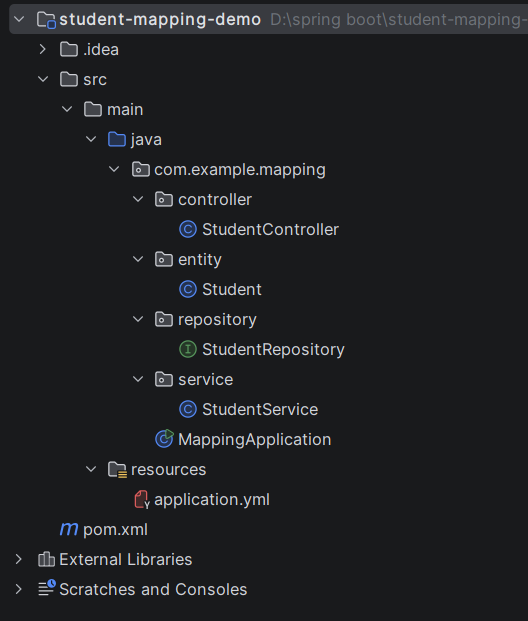
Step 2: Project Structure
Step 3: pom.xml
Step 4: application.properties
Step 5: Create Entity Class
Step 6: Create Repository Interface
Step 7: Create Service Class
Step 8: Create Controller Class
Step 9: Main Application Class
Step 10: Run the Main Application Class
Step 1: Configure the Project on Spring Initializr
Go to start.spring.io and set:
- Project: Maven
- Language: Java
- Spring Boot version: 3.2.x
- Group: com.example
- Artifact: mapping
- Name: mapping
- Package name: com.example.mapping
- Packaging: Jar
- Java: 17
- Dependencies: Spring Web, Spring Data JPA, MySQL Driver
Click Generate to download the ZIP, then extract and import it into your IDE as a Maven project.
Step 2: Generated Project Structure
Step 3: Explore pom.xml
<?xml version="1.0" encoding="UTF-8"?>
<project xmlns="http://maven.apache.org/POM/4.0.0"
         xmlns:xsi="http://www.w3.org/2001/XMLSchema-instance"
         xsi:schemaLocation="http://maven.apache.org/POM/4.0.0 https://maven.apache.org/xsd/maven-4.0.0.xsd">
    <modelVersion>4.0.0</modelVersion>

    <parent>
        <groupId>org.springframework.boot</groupId>
        <artifactId>spring-boot-starter-parent</artifactId>
        <version>3.3.5</version>
        <relativePath/>
    </parent>

    <groupId>com.example</groupId>
    <artifactId>student-mapping-demo</artifactId>
    <version>1.0.0</version>

    <properties>
        <java.version>17</java.version>
    </properties>

    <dependencies>
        <dependency>
            <groupId>org.springframework.boot</groupId>
            <artifactId>spring-boot-starter-web</artifactId>
        </dependency>
        <dependency>
            <groupId>org.springframework.boot</groupId>
            <artifactId>spring-boot-starter-data-jpa</artifactId>
        </dependency>
        <dependency>
            <groupId>com.mysql</groupId>
            <artifactId>mysql-connector-j</artifactId>
            <scope>runtime</scope>
        </dependency>
    </dependencies>

    <build>
        <plugins>
            <plugin>
                <groupId>org.springframework.boot</groupId>
                <artifactId>spring-boot-maven-plugin</artifactId>
            </plugin>
        </plugins>
    </build>
</project>
Step 4: application.yml
spring:
datasource:
url: jdbc:mysql://localhost:3306/student_mapping_db?createDatabaseIfNotExist=true&useSSL=false&allowPublicKeyRetrieval=true&serverTimezone=UTC
username: root
password: password
jpa:
hibernate:
ddl-auto: update
show-sql: true
server:
port: 8082Code language: JavaScript (javascript)Step 5: Create Entity class
package com.example.mapping.entity;

import jakarta.persistence.*;

@Entity
public class Student {

    @Id
    @GeneratedValue(strategy = GenerationType.IDENTITY)
    private Long id;
    private String name;
    private String email;
    private String course;

    public Long getId() { return id; }
    public void setId(Long id) { this.id = id; }
    public String getName() { return name; }
    public void setName(String name) { this.name = name; }
    public String getEmail() { return email; }
    public void setEmail(String email) { this.email = email; }
    public String getCourse() { return course; }
    public void setCourse(String course) { this.course = course; }
}
Step 6: Create Repository Interface
package com.example.mapping.repository;

import com.example.mapping.entity.Student;
import org.springframework.data.jpa.repository.JpaRepository;

import java.util.List;

public interface StudentRepository extends JpaRepository<Student, Long> {
    List<Student> findByCourse(String course);
}
Step 7: Create Service class
package com.example.mapping.service;

import com.example.mapping.entity.Student;
import com.example.mapping.repository.StudentRepository;
import org.springframework.stereotype.Service;

import java.util.List;
import java.util.Optional;

@Service
public class StudentService {

    private final StudentRepository repository;

    public StudentService(StudentRepository repository) {
        this.repository = repository;
    }

    public Student save(Student student) {
        return repository.save(student);
    }

    public List<Student> findAll() {
        return repository.findAll();
    }

    public List<Student> findByCourse(String course) {
        return repository.findByCourse(course);
    }

    public long count() {
        return repository.count();
    }

    public Optional<Student> findById(Long id) {
        return repository.findById(id);
    }

    public Optional<Student> update(Long id, Student updated) {
        return repository.findById(id).map(existing -> {
            existing.setName(updated.getName());
            existing.setEmail(updated.getEmail());
            existing.setCourse(updated.getCourse());
            return repository.save(existing);
        });
    }

    public boolean delete(Long id) {
        if (!repository.existsById(id)) return false;
        repository.deleteById(id);
        return true;
    }
}
Step 8: Create Controller class
package com.example.mapping.controller;

import com.example.mapping.entity.Student;
import com.example.mapping.service.StudentService;
import org.springframework.http.HttpStatus;
import org.springframework.http.MediaType;
import org.springframework.http.ResponseEntity;
import org.springframework.web.bind.annotation.*;

import java.util.List;

// Class-level mapping: the base URL for every method below
@RestController
@RequestMapping("/api/students")
public class StudentController {

    private final StudentService service;

    public StudentController(StudentService service) {
        this.service = service;
    }

    // POST /api/students
    // consumes -> only accepts JSON bodies (other Content-Types get 415)
    @PostMapping(consumes = MediaType.APPLICATION_JSON_VALUE)
    public ResponseEntity<Student> create(@RequestBody Student student) {
        return ResponseEntity.status(HttpStatus.CREATED).body(service.save(student));
    }

    // GET /api/students
    @GetMapping
    public List<Student> getAll() {
        return service.findAll();
    }

    // GET /api/students?course=Java
    // params -> chosen ONLY when the "course" query parameter is present
    @GetMapping(params = "course")
    public List<Student> getByCourse(@RequestParam String course) {
        return service.findByCourse(course);
    }

    // GET /api/students/count
    // The long form: @RequestMapping(value, method). Same as @GetMapping("/count").
    // A literal path like /count wins over the pattern /{id}.
    @RequestMapping(value = "/count", method = RequestMethod.GET)
    public long count() {
        return service.count();
    }

    // GET /api/students/1   ({id} is a path variable)
    @GetMapping("/{id}")
    public ResponseEntity<Student> getById(@PathVariable Long id) {
        return service.findById(id)
                .map(ResponseEntity::ok)
                .orElse(ResponseEntity.notFound().build());
    }

    // PUT /api/students/1
    @PutMapping(value = "/{id}", consumes = MediaType.APPLICATION_JSON_VALUE)
    public ResponseEntity<Student> update(@PathVariable Long id, @RequestBody Student student) {
        return service.update(id, student)
                .map(ResponseEntity::ok)
                .orElse(ResponseEntity.notFound().build());
    }

    // DELETE /api/students/1
    @DeleteMapping("/{id}")
    public ResponseEntity<Void> delete(@PathVariable Long id) {
        return service.delete(id) ? ResponseEntity.noContent().build()
                                  : ResponseEntity.notFound().build();
    }
}
Step 9: Main Application
package com.example.mapping;

import org.springframework.boot.SpringApplication;
import org.springframework.boot.autoconfigure.SpringBootApplication;

@SpringBootApplication
public class MappingApplication {
    public static void main(String[] args) {
        SpringApplication.run(MappingApplication.class, args);
    }
}
Step 10: Run the MappingApplication
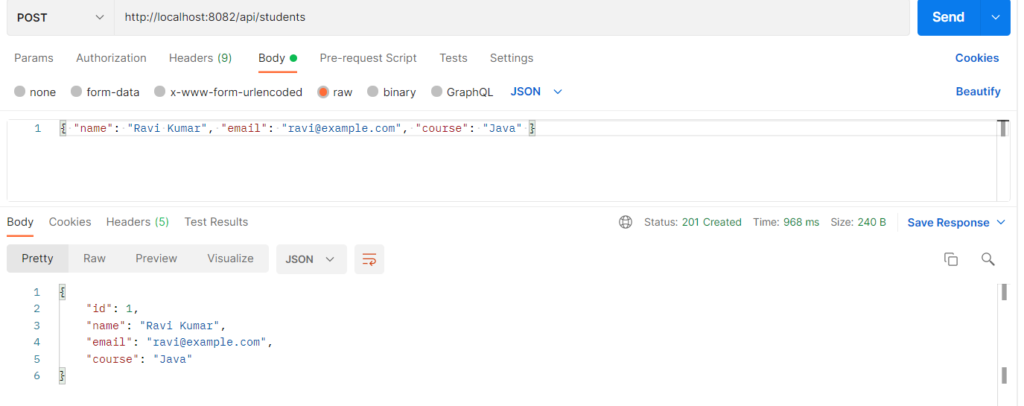
i. Creating a student using post method
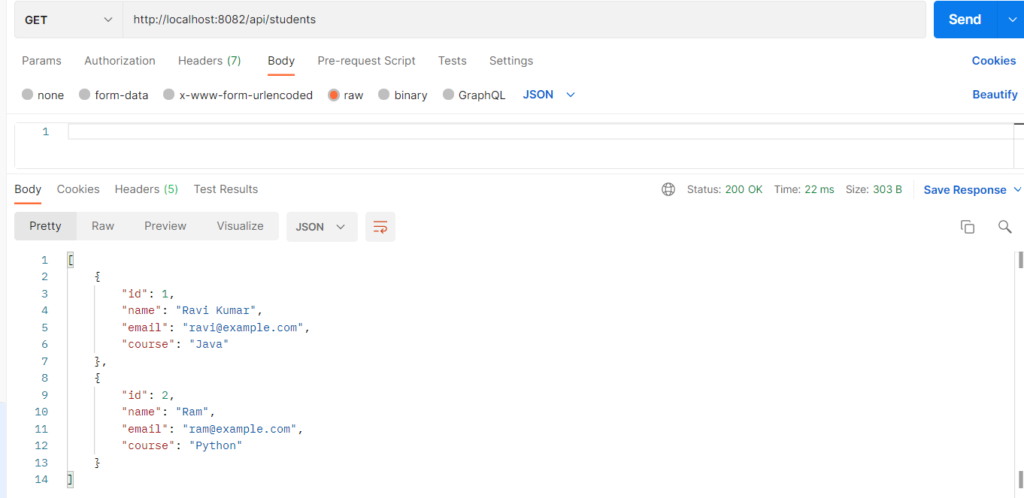
ii. Getting all Students
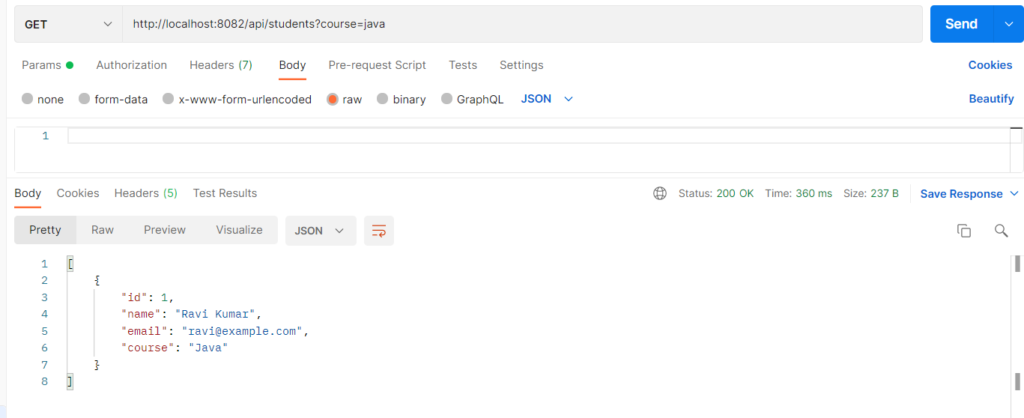
iii. Getting a Student data with specific course
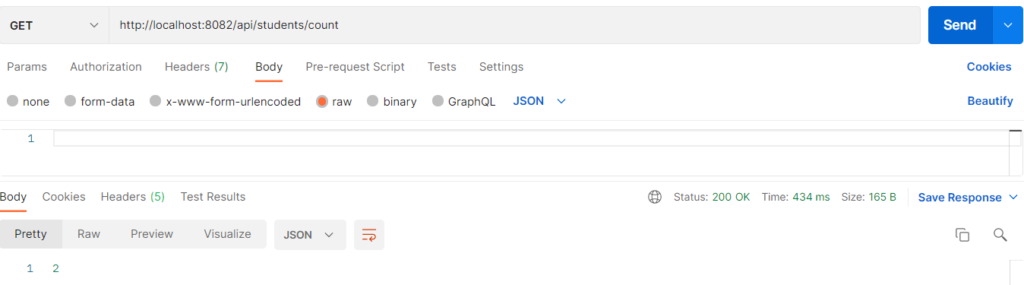
iv. Counting the no. of students
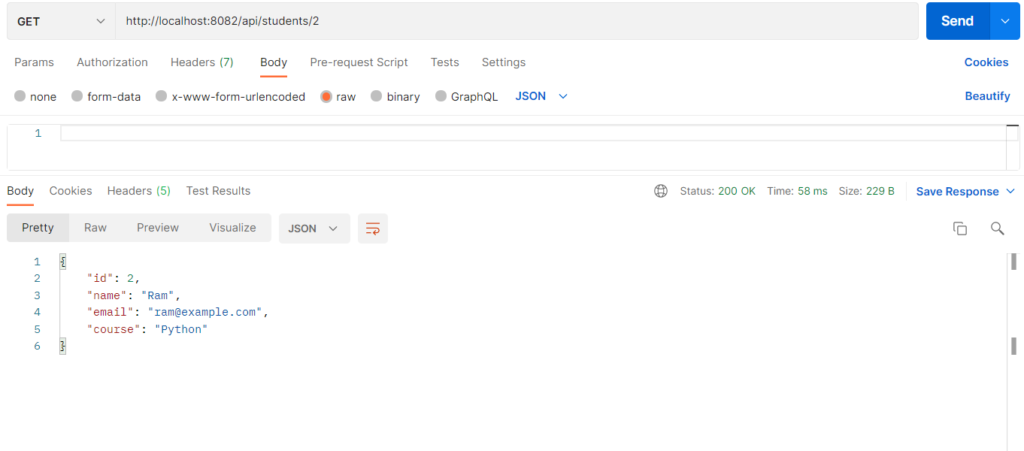
v. Getting the Student data by using their id
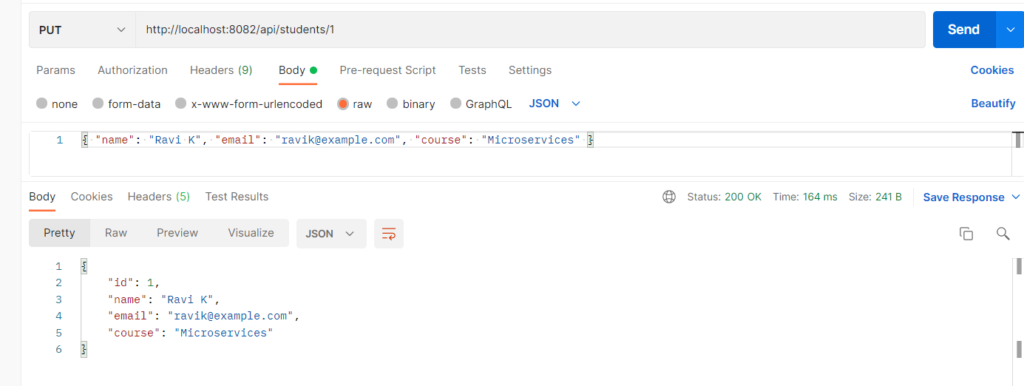
vi. Updating the Student data by using their id
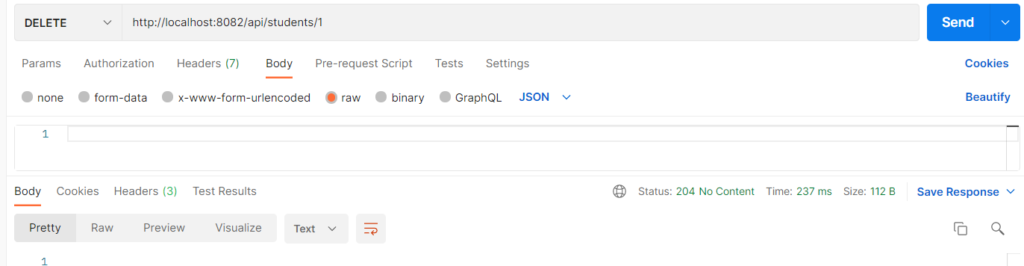
vii. Deleting a student with id