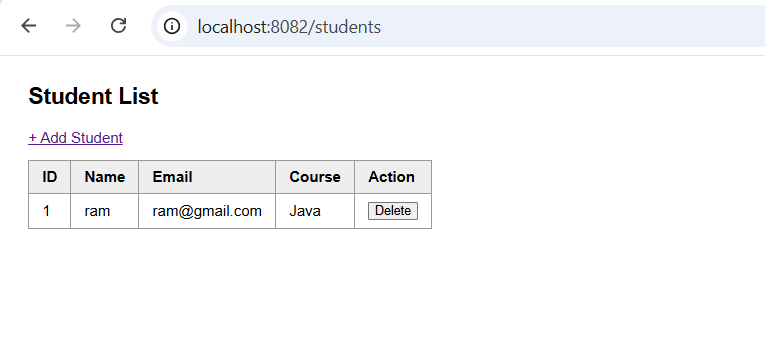
Spring MVC is the web framework in Spring Boot that follows the Model-View-Controller pattern: the Controller handles requests, the Model carries data, and the View renders the page. Every request first reaches the DispatcherServlet, which finds the right controller method, runs it, and then picks a view to render. It is used to build web applications with clear separation: controllers for web handling, services for business logic, repositories for data, and templates for HTML. The flow is: Browser → DispatcherServlet → Controller → Service → Repository → Model → View (Thymeleaf) → Browser.
Types
- Controllers:
@Controllerreturns view names for HTML pages, and@RestControllerreturns JSON directly. - Request mapping:
@GetMapping,@PostMapping,@PutMapping,@DeleteMapping, or the general@RequestMapping. - Data binding:
@PathVariable,@RequestParam,@ModelAttribute(form data),@RequestBody(JSON). - Passing data to views:
Model,ModelAndView,RedirectAttributes. - View technologies: Thymeleaf (used here), JSP, FreeMarker, Mustache.
Hands-on Experiment: Creating a spring boot web application
The following steps are involved in developing this hands-on experiment.
Step 1: Generate the Project
Step 2: Project Structure
Step 3: pom.xml
Step 4: application.properties
Step 5: Create Entity Class
Step 6: Create Repository Interface
Step 7: Create Service Class
Step 8: Create Controller Class
Step 9: Main Application Class
Step 10: Run the Main Application Class
Step 1: Configure the Project on Spring Initializr
Go to start.spring.io and set:
- Project: Maven
- Language: Java
- Spring Boot version: 3.2.x
- Group: com.example
- Artifact: mvc
- Name: mvc
- Package name: com.example.mvc
- Packaging: Jar
- Java: 17
- Dependencies: Spring Web, Spring Data JPA, MySQL Driver, Thymeleaf.
Click Generate to download the ZIP, then extract and import it into your IDE as a Maven project.
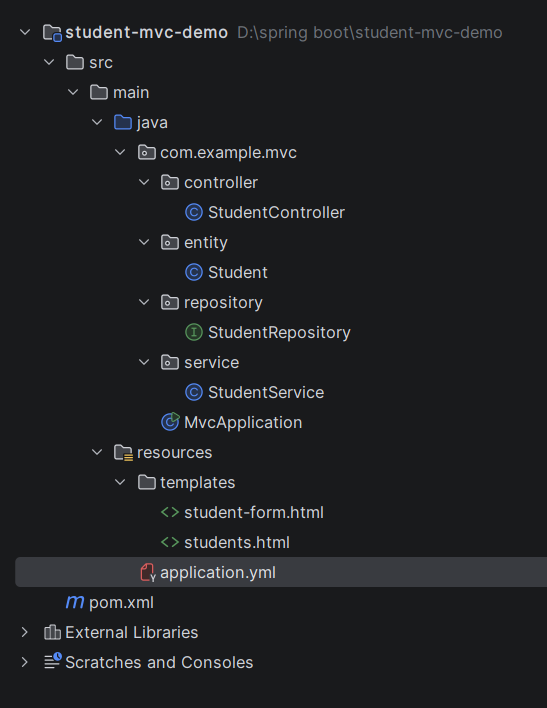
Step 2: Generated Project Structure
Step 3: Explore pom.xml
<?xml version="1.0" encoding="UTF-8"?>
<project xmlns="http://maven.apache.org/POM/4.0.0"
         xmlns:xsi="http://www.w3.org/2001/XMLSchema-instance"
         xsi:schemaLocation="http://maven.apache.org/POM/4.0.0 https://maven.apache.org/xsd/maven-4.0.0.xsd">
    <modelVersion>4.0.0</modelVersion>

    <parent>
        <groupId>org.springframework.boot</groupId>
        <artifactId>spring-boot-starter-parent</artifactId>
        <version>3.3.5</version>
        <relativePath/>
    </parent>

    <groupId>com.example</groupId>
    <artifactId>student-mvc-demo</artifactId>
    <version>1.0.0</version>

    <properties>
        <java.version>17</java.version>
    </properties>

    <dependencies>
        <dependency>
            <groupId>org.springframework.boot</groupId>
            <artifactId>spring-boot-starter-web</artifactId>
        </dependency>
        <dependency>
            <groupId>org.springframework.boot</groupId>
            <artifactId>spring-boot-starter-thymeleaf</artifactId>
        </dependency>
        <dependency>
            <groupId>org.springframework.boot</groupId>
            <artifactId>spring-boot-starter-data-jpa</artifactId>
        </dependency>
        <dependency>
            <groupId>com.mysql</groupId>
            <artifactId>mysql-connector-j</artifactId>
            <scope>runtime</scope>
        </dependency>
    </dependencies>

    <build>
        <plugins>
            <plugin>
                <groupId>org.springframework.boot</groupId>
                <artifactId>spring-boot-maven-plugin</artifactId>
            </plugin>
        </plugins>
    </build>
</project>
Step 4: application.yml
spring:
datasource:
url: jdbc:mysql://localhost:3306/student_mvc_db?createDatabaseIfNotExist=true&useSSL=false&allowPublicKeyRetrieval=true&serverTimezone=UTC
username: root
password: password
jpa:
hibernate:
ddl-auto: update
show-sql: true
server:
port: 8082Code language: JavaScript (javascript)Step 5: Create Entity class
package com.example.mvc.entity;

import jakarta.persistence.*;

@Entity
public class Student {

    @Id
    @GeneratedValue(strategy = GenerationType.IDENTITY)
    private Long id;
    private String name;
    private String email;
    private String course;

    public Long getId() { return id; }
    public void setId(Long id) { this.id = id; }
    public String getName() { return name; }
    public void setName(String name) { this.name = name; }
    public String getEmail() { return email; }
    public void setEmail(String email) { this.email = email; }
    public String getCourse() { return course; }
    public void setCourse(String course) { this.course = course; }
}
Step 6: Create Repository Interface
package com.example.mvc.repository;

import com.example.mvc.entity.Student;
import org.springframework.data.jpa.repository.JpaRepository;

public interface StudentRepository extends JpaRepository<Student, Long> {
}
Step 7: Create Service class
package com.example.mvc.service;

import com.example.mvc.entity.Student;
import com.example.mvc.repository.StudentRepository;
import org.springframework.stereotype.Service;

import java.util.List;

@Service
public class StudentService {

    private final StudentRepository repository;

    public StudentService(StudentRepository repository) {
        this.repository = repository;
    }

    public List<Student> findAll() {
        return repository.findAll();
    }

    public Student save(Student student) {
        return repository.save(student);
    }

    public void delete(Long id) {
        repository.deleteById(id);
    }
}
Step 8: Create Controller class
package com.example.mvc.controller;

import com.example.mvc.entity.Student;
import com.example.mvc.service.StudentService;
import org.springframework.stereotype.Controller;
import org.springframework.ui.Model;
import org.springframework.web.bind.annotation.*;

// @Controller (not @RestController): methods return VIEW NAMES, not JSON
@Controller
public class StudentController {

    private final StudentService service;

    public StudentController(StudentService service) {
        this.service = service;
    }

    // GET / -> redirect to the list page
    @GetMapping("/")
    public String home() {
        return "redirect:/students";
    }

    // GET /students -> put data in the Model, return view name "students" (templates/students.html)
    @GetMapping("/students")
    public String list(Model model) {
        model.addAttribute("students", service.findAll());
        return "students";
    }

    // GET /students/new -> show an empty form (templates/student-form.html)
    @GetMapping("/students/new")
    public String showForm(Model model) {
        model.addAttribute("student", new Student());
        return "student-form";
    }

    // POST /students -> form fields are bound to the Student object automatically
    @PostMapping("/students")
    public String create(@ModelAttribute Student student) {
        service.save(student);
        return "redirect:/students";   // Post-Redirect-Get: avoids duplicate submit on refresh
    }

    // POST /students/{id}/delete
    @PostMapping("/students/{id}/delete")
    public String delete(@PathVariable Long id) {
        service.delete(id);
        return "redirect:/students";
    }
}
Create below html files
<!DOCTYPE html>
<html xmlns:th="http://www.thymeleaf.org">
<head>
    <meta charset="UTF-8">
    <title>Students</title>
    <style>
        body { font-family: Arial, sans-serif; margin: 30px; }
        table { border-collapse: collapse; margin-top: 15px; }
        th, td { border: 1px solid #999; padding: 8px 14px; text-align: left; }
        th { background: #eee; }
    </style>
</head>
<body>
    <h2>Student List</h2>
    <a th:href="@{/students/new}">+ Add Student</a>

    <table>
        <tr>
            <th>ID</th><th>Name</th><th>Email</th><th>Course</th><th>Action</th>
        </tr>
        <tr th:each="s : ${students}">
            <td th:text="${s.id}"></td>
            <td th:text="${s.name}"></td>
            <td th:text="${s.email}"></td>
            <td th:text="${s.course}"></td>
            <td>
                <form th:action="@{/students/{id}/delete(id=${s.id})}" method="post">
                    <button type="submit">Delete</button>
                </form>
            </td>
        </tr>
    </table>

    <p th:if="${#lists.isEmpty(students)}">No students yet.</p>
</body>
</html>
<!DOCTYPE html>
<html xmlns:th="http://www.thymeleaf.org">
<head>
    <meta charset="UTF-8">
    <title>Add Student</title>
    <style>
        body { font-family: Arial, sans-serif; margin: 30px; }
        label { display: block; margin-top: 12px; }
        input { padding: 6px; width: 260px; }
        button { margin-top: 16px; padding: 7px 18px; }
    </style>
</head>
<body>
    <h2>Add Student</h2>

    <form th:action="@{/students}" th:object="${student}" method="post">
        <label>Name</label>
        <input type="text" th:field="*{name}" required>

        <label>Email</label>
        <input type="email" th:field="*{email}" required>

        <label>Course</label>
        <input type="text" th:field="*{course}" required>

        <br>
        <button type="submit">Save</button>
        <a th:href="@{/students}">Cancel</a>
    </form>
</body>
</html>
Step 9: Main Application
package com.example.mvc;

import org.springframework.boot.SpringApplication;
import org.springframework.boot.autoconfigure.SpringBootApplication;

@SpringBootApplication
public class MvcApplication {
    public static void main(String[] args) {
        SpringApplication.run(MvcApplication.class, args);
    }
}
Step 10: Run the MvcApplication