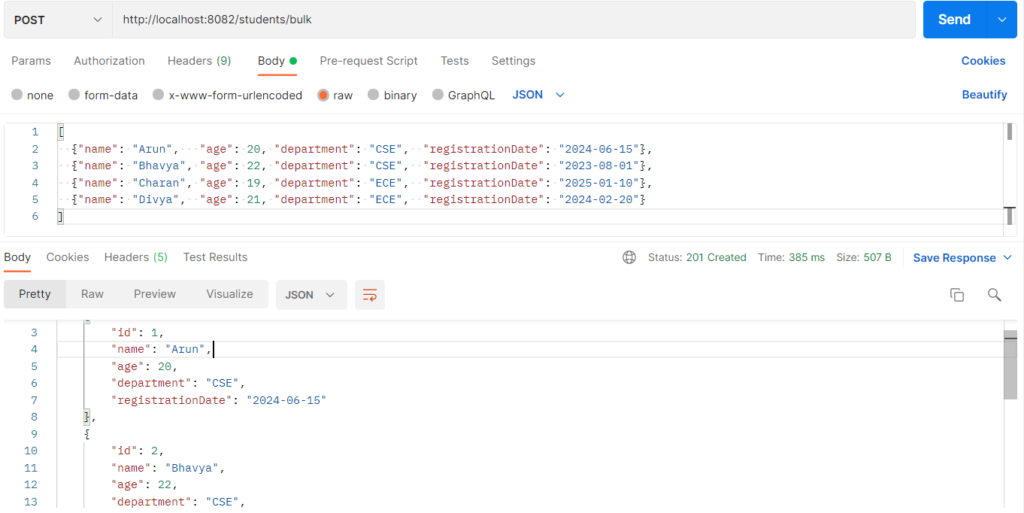
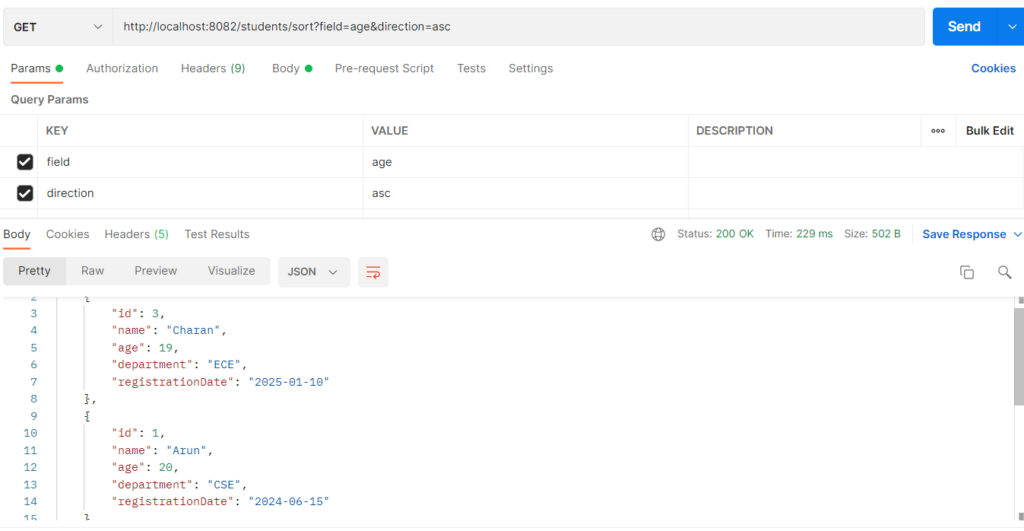
Sorting orders database results by one or more fields, such as name, age or registration date, in ascending or descending order.It is used so users can see data in a meaningful order (A–Z, newest first, youngest first) without sorting it in Java code.Spring Data provides it through the Sort class, and a Sort can also travel inside a Pageable. The ordering becomes a SQL ORDER BY clause.The client chooses the field and direction through URL parameters, and the repository applies them to the query.
Features
- Sort by a single field or by several fields in priority order.
- Each field gets its own direction (
departmentascending, thenagedescending). - Works with
findAll(Sort), derived queries, and paging together. - Sorting can be fixed in the method name or chosen by the client at runtime.
- The sort happens in the database, so it stays efficient with large tables.
Sorting Types
| Type | How it works | Example in this project |
|---|---|---|
| Static sorting | Order is written into the method name and never changes. | findAllByOrderByNameAsc() |
| Dynamic single-field sorting | Sort.by(direction, field) is built from request parameters. |
/students/sort?field=age&direction=desc |
| Multi-field sorting | Several Sort.Order objects combined, each with its own direction. |
/students/sort/multiple?orders=department:asc,age:desc |
| Sorting with filtering | A Sort parameter added to a derived query. |
findByDepartment(dept, Sort) |
| Sorting with pagination | The Sort is carried inside Pageable. |
/students/older?age=19&sort=age,desc |
Hands-on Experiment: Creating a spring boot application by Sorting all data
The following steps are involved in developing this hands-on experiment.
Step 1: Generate the Project
Step 2: Project Structure
Step 3: pom.xml
Step 4: application.properties
Step 5: Create Entity Class
Step 6: Create Repository Interface
Step 7: Create Service Class
Step 8: Create Controller Class
Step 9: Main Application Class
Step 10: Run the Main Application Class
Step 1: Configure the Project on Spring Initializr
Go to start.spring.io and set:
- Project: Maven
- Language: Java
- Spring Boot version: 3.2.x
- Group: com.example
- Artifact: sorting
- Name: sorting
- Package name: com.example.sorting
- Packaging: Jar
- Java: 17
- Dependencies: Spring Web, Spring Data JPA, MySQL Driver
Click Generate to download the ZIP, then extract and import it into your IDE as a Maven project.
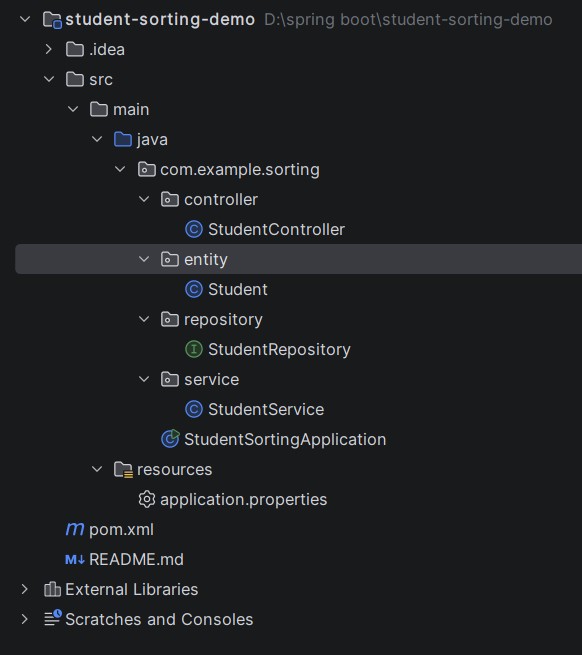
Step 2: Generated Project Structure
Step 3: Explore pom.xml
<?xml version="1.0" encoding="UTF-8"?>
<project xmlns="http://maven.apache.org/POM/4.0.0"
         xmlns:xsi="http://www.w3.org/2001/XMLSchema-instance"
         xsi:schemaLocation="http://maven.apache.org/POM/4.0.0 https://maven.apache.org/xsd/maven-4.0.0.xsd">
    <modelVersion>4.0.0</modelVersion>

    <parent>
        <groupId>org.springframework.boot</groupId>
        <artifactId>spring-boot-starter-parent</artifactId>
        <version>3.2.5</version>
        <relativePath/>
    </parent>

    <groupId>com.example</groupId>
    <artifactId>student-sorting-demo</artifactId>
    <version>1.0.0</version>
    <name>student-sorting-demo</name>

    <properties>
        <java.version>17</java.version>
    </properties>

    <dependencies>
        <dependency>
            <groupId>org.springframework.boot</groupId>
            <artifactId>spring-boot-starter-web</artifactId>
        </dependency>
        <dependency>
            <groupId>org.springframework.boot</groupId>
            <artifactId>spring-boot-starter-data-jpa</artifactId>
        </dependency>
        <dependency>
            <groupId>com.mysql</groupId>
            <artifactId>mysql-connector-j</artifactId>
            <scope>runtime</scope>
        </dependency>
    </dependencies>

    <build>
        <plugins>
            <plugin>
                <groupId>org.springframework.boot</groupId>
                <artifactId>spring-boot-maven-plugin</artifactId>
            </plugin>
        </plugins>
    </build>
</project>
Step 4: application.properties
spring.application.name=student-sorting-demo
server.port=8082
spring.datasource.url=jdbc:mysql://localhost:3306/student_sort_db?createDatabaseIfNotExist=true&useSSL=false&serverTimezone=UTC&allowPublicKeyRetrieval=true
spring.datasource.username=root
spring.datasource.password=password
spring.datasource.driver-class-name=com.mysql.cj.jdbc.Driver
spring.jpa.hibernate.ddl-auto=update
spring.jpa.show-sql=true
spring.jpa.database-platform=org.hibernate.dialect.MySQLDialectCode language: JavaScript (javascript)Step 5: Create Entity Class
package com.example.sorting.entity;

import jakarta.persistence.Column;
import jakarta.persistence.Entity;
import jakarta.persistence.GeneratedValue;
import jakarta.persistence.GenerationType;
import jakarta.persistence.Id;
import jakarta.persistence.PrePersist;
import jakarta.persistence.Table;

import java.time.LocalDate;

@Entity
@Table(name = "students")
public class Student {

    @Id
    @GeneratedValue(strategy = GenerationType.IDENTITY)
    private Long id;

    @Column(nullable = false)
    private String name;

    private Integer age;

    private String department;

    @Column(name = "registration_date")
    private LocalDate registrationDate;

    public Student() {
    }

    public Student(String name, Integer age, String department, LocalDate registrationDate) {
        this.name = name;
        this.age = age;
        this.department = department;
        this.registrationDate = registrationDate;
    }

    @PrePersist
    public void setDefaultRegistrationDate() {
        if (registrationDate == null) {
            registrationDate = LocalDate.now();
        }
    }

    public Long getId() { return id; }
    public void setId(Long id) { this.id = id; }

    public String getName() { return name; }
    public void setName(String name) { this.name = name; }

    public Integer getAge() { return age; }
    public void setAge(Integer age) { this.age = age; }

    public String getDepartment() { return department; }
    public void setDepartment(String department) { this.department = department; }

    public LocalDate getRegistrationDate() { return registrationDate; }
    public void setRegistrationDate(LocalDate registrationDate) { this.registrationDate = registrationDate; }
}
Step 6: Create below Repository Interface
package com.example.sorting.repository;

import com.example.sorting.entity.Student;
import org.springframework.data.domain.Page;
import org.springframework.data.domain.Pageable;
import org.springframework.data.domain.Sort;
import org.springframework.data.jpa.repository.JpaRepository;
import org.springframework.stereotype.Repository;

import java.util.List;

@Repository
public interface StudentRepository extends JpaRepository<Student, Long> {

    // Fixed sorting written into the method name
    List<Student> findAllByOrderByNameAsc();

    // Dynamic sorting: Sort passed as a parameter (inherited findAll(Sort) works too)
    List<Student> findByDepartment(String department, Sort sort);

    // Sorting together with pagination: the Sort travels inside Pageable
    Page<Student> findByAgeGreaterThan(Integer age, Pageable pageable);
}
Step 7: Create below Service class
package com.example.sorting.service;

import com.example.sorting.entity.Student;
import com.example.sorting.repository.StudentRepository;
import org.springframework.data.domain.Page;
import org.springframework.data.domain.Pageable;
import org.springframework.data.domain.Sort;
import org.springframework.stereotype.Service;

import java.util.ArrayList;
import java.util.List;
import java.util.Set;

@Service
public class StudentService {

    // Only these fields may be sorted on (prevents errors and unexpected column access)
    private static final Set<String> ALLOWED_FIELDS =
            Set.of("id", "name", "age", "department", "registrationDate");

    private final StudentRepository studentRepository;

    public StudentService(StudentRepository studentRepository) {
        this.studentRepository = studentRepository;
    }

    public Student save(Student student) {
        return studentRepository.save(student);
    }

    public List<Student> saveAll(List<Student> students) {
        return studentRepository.saveAll(students);
    }

    // 1. Fixed sorting from the method name
    public List<Student> getAllSortedByNameAsc() {
        return studentRepository.findAllByOrderByNameAsc();
    }

    // 2. Single field, dynamic direction
    public List<Student> getAllSorted(String field, String direction) {
        validate(field);
        Sort sort = Sort.by(parseDirection(direction), field);
        return studentRepository.findAll(sort);
    }

    // 3. Multiple fields, each with its own direction: "department:asc,age:desc"
    public List<Student> getAllSortedByOrders(String orders) {
        List<Sort.Order> orderList = new ArrayList<>();
        for (String item : orders.split(",")) {
            String[] parts = item.trim().split(":");
            String field = parts[0].trim();
            validate(field);
            String direction = parts.length > 1 ? parts[1] : "asc";
            orderList.add(new Sort.Order(parseDirection(direction), field));
        }
        return studentRepository.findAll(Sort.by(orderList));
    }

    // 4. Sorting inside a derived query
    public List<Student> getByDepartmentSorted(String department, String field, String direction) {
        validate(field);
        return studentRepository.findByDepartment(department, Sort.by(parseDirection(direction), field));
    }

    // 5. Sorting combined with pagination
    public Page<Student> getOlderThan(Integer age, Pageable pageable) {
        pageable.getSort().forEach(order -> validate(order.getProperty()));
        return studentRepository.findByAgeGreaterThan(age, pageable);
    }

    private void validate(String field) {
        if (!ALLOWED_FIELDS.contains(field)) {
            throw new IllegalArgumentException(
                    "Cannot sort by '" + field + "'. Allowed fields: " + ALLOWED_FIELDS);
        }
    }

    private Sort.Direction parseDirection(String direction) {
        return Sort.Direction.fromOptionalString(direction).orElse(Sort.Direction.ASC);
    }
}
Step 8: Create Controller class
package com.example.sorting.controller;

import com.example.sorting.entity.Student;
import com.example.sorting.service.StudentService;
import org.springframework.data.domain.Page;
import org.springframework.data.domain.Pageable;
import org.springframework.data.web.PageableDefault;
import org.springframework.http.HttpStatus;
import org.springframework.http.ResponseEntity;
import org.springframework.web.bind.annotation.ExceptionHandler;
import org.springframework.web.bind.annotation.GetMapping;
import org.springframework.web.bind.annotation.PathVariable;
import org.springframework.web.bind.annotation.PostMapping;
import org.springframework.web.bind.annotation.RequestBody;
import org.springframework.web.bind.annotation.RequestMapping;
import org.springframework.web.bind.annotation.RequestParam;
import org.springframework.web.bind.annotation.RestController;

import java.util.List;
import java.util.Map;

@RestController
@RequestMapping("/students")
public class StudentController {

    private final StudentService studentService;

    public StudentController(StudentService studentService) {
        this.studentService = studentService;
    }

    // POST /students
    @PostMapping
    public ResponseEntity<Student> create(@RequestBody Student student) {
        return ResponseEntity.status(HttpStatus.CREATED).body(studentService.save(student));
    }

    // POST /students/bulk
    @PostMapping("/bulk")
    public ResponseEntity<List<Student>> createBulk(@RequestBody List<Student> students) {
        return ResponseEntity.status(HttpStatus.CREATED).body(studentService.saveAll(students));
    }

    // GET /students/sorted/name  (fixed: name ascending)
    @GetMapping("/sorted/name")
    public List<Student> sortedByName() {
        return studentService.getAllSortedByNameAsc();
    }

    // GET /students/sort?field=age&direction=desc  (single field)
    @GetMapping("/sort")
    public List<Student> sort(@RequestParam(defaultValue = "name") String field,
                              @RequestParam(defaultValue = "asc") String direction) {
        return studentService.getAllSorted(field, direction);
    }

    // GET /students/sort/multiple?orders=department:asc,age:desc  (multiple fields)
    @GetMapping("/sort/multiple")
    public List<Student> sortMultiple(@RequestParam String orders) {
        return studentService.getAllSortedByOrders(orders);
    }

    // GET /students/department/CSE/sort?field=registrationDate&direction=desc
    @GetMapping("/department/{department}/sort")
    public List<Student> byDepartmentSorted(@PathVariable String department,
                                            @RequestParam(defaultValue = "name") String field,
                                            @RequestParam(defaultValue = "asc") String direction) {
        return studentService.getByDepartmentSorted(department, field, direction);
    }

    // GET /students/older?age=19&page=0&size=4&sort=age,desc&sort=name,asc  (sorting + paging)
    @GetMapping("/older")
    public Page<Student> older(@RequestParam Integer age,
                               @PageableDefault(size = 5, sort = "name") Pageable pageable) {
        return studentService.getOlderThan(age, pageable);
    }

    @ExceptionHandler(IllegalArgumentException.class)
    public ResponseEntity<Map<String, String>> handleBadRequest(IllegalArgumentException ex) {
        return ResponseEntity.badRequest().body(Map.of("error", ex.getMessage()));
    }
}
Step 9: Main Application
package com.example.sorting;

import org.springframework.boot.SpringApplication;
import org.springframework.boot.autoconfigure.SpringBootApplication;

@SpringBootApplication
public class StudentSortingApplication {

    public static void main(String[] args) {
        SpringApplication.run(StudentSortingApplication.class, args);
    }
}
Step 10: Run the StudentSortingApplication