A native query is a plain SQL query, written with @Query(value = "...", nativeQuery = true), that Spring Data sends to the database exactly as written. It uses real table and column names (students, marks), unlike JPQL, which uses entity and field names (Student, s.marks). It is used when JPQL is not suitable, such as for window functions (RANK() OVER), database functions (LEAST), LIMIT, or hand-tuned SQL. The price is portability: a native query written for MySQL may not run on another database.
Features
- Full access to everything your database’s SQL supports.
- Parameters work as in JPQL, named (
:departmentwith@Param) or positional (?1). - Results can be entities, report rows (projections), a single value, or an update count.
- Report columns are matched to getters of an interface by their
ASalias. - Native queries are not checked at startup. A mistake only appears when the query runs.
Hands-on Experiment: Creating a spring boot application with Native Queries
The following steps are involved in developing this hands-on experiment.
Step 1: Generate the Project
Step 2: Project Structure
Step 3: pom.xml
Step 4: application.yml
Step 5: Create Entity Class
Step 6: Create Repository Interface
Step 7: Create Service Class
Step 8: Create Controller Class
Step 9: Main Application Class
Step 10: Run the Main Application Class
Step 1: Configure the Project on Spring Initializr
Go to start.spring.io and set:
- Project: Maven
- Language: Java
- Spring Boot version: 3.2.x
- Group: com.example
- Artifact: nativequery
- Name: nativequery
- Package name: com.example.nativequery
- Packaging: Jar
- Java: 17
- Dependencies: Spring Web, Spring Data JPA, MySQL Driver
Click Generate to download the ZIP, then extract and import it into your IDE as a Maven project.
Step 2: Generated Project Structure
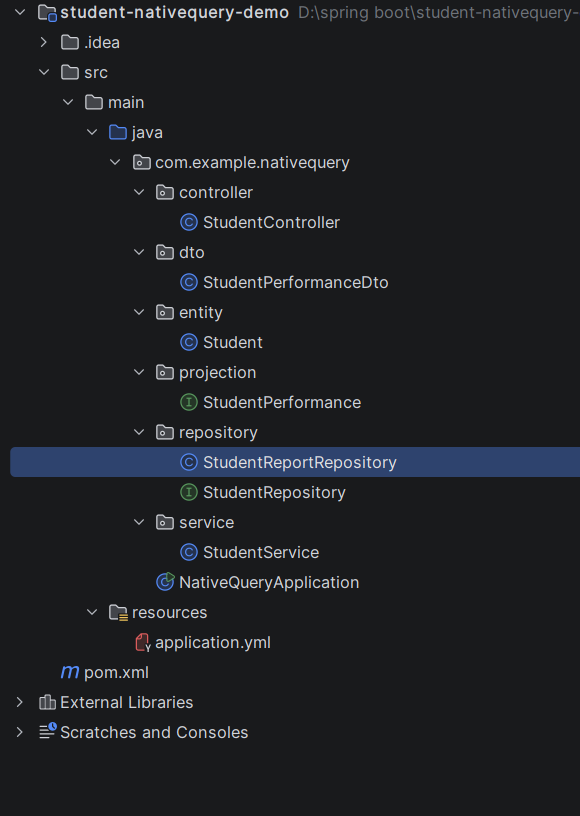
Step 3: Explore pom.xml
<?xml version="1.0" encoding="UTF-8"?>
<project xmlns="http://maven.apache.org/POM/4.0.0"
         xmlns:xsi="http://www.w3.org/2001/XMLSchema-instance"
         xsi:schemaLocation="http://maven.apache.org/POM/4.0.0 https://maven.apache.org/xsd/maven-4.0.0.xsd">
    <modelVersion>4.0.0</modelVersion>

    <parent>
        <groupId>org.springframework.boot</groupId>
        <artifactId>spring-boot-starter-parent</artifactId>
        <version>3.3.5</version>
        <relativePath/>
    </parent>

    <groupId>com.example</groupId>
    <artifactId>student-nativequery-demo</artifactId>
    <version>1.0.0</version>

    <properties>
        <java.version>17</java.version>
    </properties>

    <dependencies>
        <dependency>
            <groupId>org.springframework.boot</groupId>
            <artifactId>spring-boot-starter-web</artifactId>
        </dependency>
        <dependency>
            <groupId>org.springframework.boot</groupId>
            <artifactId>spring-boot-starter-data-jpa</artifactId>
        </dependency>
        <dependency>
            <groupId>com.mysql</groupId>
            <artifactId>mysql-connector-j</artifactId>
            <scope>runtime</scope>
        </dependency>
    </dependencies>

    <build>
        <plugins>
            <plugin>
                <groupId>org.springframework.boot</groupId>
                <artifactId>spring-boot-maven-plugin</artifactId>
            </plugin>
        </plugins>
    </build>
</project>
Step 4: application.yml
spring:
datasource:
url: jdbc:mysql://localhost:3306/student_native_db?createDatabaseIfNotExist=true&useSSL=false&allowPublicKeyRetrieval=true&serverTimezone=UTC
username: root
password: password
driver-class-name: com.mysql.cj.jdbc.Driver
jpa:
hibernate:
ddl-auto: update
show-sql: true
server:
port: 8082Step 5: Create Entity Class
package com.example.nativequery.entity;

import jakarta.persistence.*;

@Entity
@Table(name = "students")
public class Student {

    @Id
    @GeneratedValue(strategy = GenerationType.IDENTITY)
    private Long id;

    private String name;

    @Column(unique = true)
    private String email;

    private String department;
    private int marks;      // out of 100

    public Student() {}

    public Student(String name, String email, String department, int marks) {
        this.name = name;
        this.email = email;
        this.department = department;
        this.marks = marks;
    }

    public Long getId() { return id; }
    public void setId(Long id) { this.id = id; }
    public String getName() { return name; }
    public void setName(String name) { this.name = name; }
    public String getEmail() { return email; }
    public void setEmail(String email) { this.email = email; }
    public String getDepartment() { return department; }
    public void setDepartment(String department) { this.department = department; }
    public int getMarks() { return marks; }
    public void setMarks(int marks) { this.marks = marks; }
}
package com.example.nativequery.dto;
import java.math.BigDecimal;
// A normal Java class holding one row of the performance report.
public class StudentPerformanceDto {
private final Long id;
private final String name;
private final String department;
private final int marks;
private final String grade;
private final long departmentRank;
private final BigDecimal differenceFromAverage;
public StudentPerformanceDto(Long id, String name, String department, int marks,
String grade, long departmentRank, BigDecimal differenceFromAverage) {
this.id = id;
this.name = name;
this.department = department;
this.marks = marks;
this.grade = grade;
this.departmentRank = departmentRank;
this.differenceFromAverage = differenceFromAverage;
}
public Long getId() { return id; }
public String getName() { return name; }
public String getDepartment() { return department; }
public int getMarks() { return marks; }
public String getGrade() { return grade; }
public long getDepartmentRank() { return departmentRank; }
public BigDecimal getDifferenceFromAverage() { return differenceFromAverage; }
}
package com.example.nativequery.repository;

import com.example.nativequery.dto.StudentPerformanceDto;
import jakarta.persistence.EntityManager;
import org.springframework.stereotype.Repository;

import java.math.BigDecimal;
import java.util.ArrayList;
import java.util.List;

// A plain class (not an interface). We run the native SQL ourselves with EntityManager
// and convert every row into a StudentPerformanceDto object.
@Repository
public class StudentReportRepository {

    private static final String PERFORMANCE_SQL = """
            SELECT id, name, department, marks,
                   CASE WHEN marks >= 90 THEN 'A'
                        WHEN marks >= 75 THEN 'B'
                        WHEN marks >= 60 THEN 'C'
                        ELSE 'D' END AS grade,
                   RANK() OVER (PARTITION BY department ORDER BY marks DESC) AS departmentRank,
                   ROUND(marks - AVG(marks) OVER (PARTITION BY department), 1) AS differenceFromAverage
            FROM students
            ORDER BY department, departmentRank
            """;

    private final EntityManager entityManager;

    public StudentReportRepository(EntityManager entityManager) {
        this.entityManager = entityManager;
    }

    @SuppressWarnings("unchecked")
    public List<StudentPerformanceDto> findPerformanceReport() {
        // Each row comes back as an Object[] in the same order as the SELECT columns
        List<Object[]> rows = entityManager.createNativeQuery(PERFORMANCE_SQL).getResultList();

        List<StudentPerformanceDto> report = new ArrayList<>();
        for (Object[] row : rows) {
            report.add(new StudentPerformanceDto(
                    ((Number) row[0]).longValue(),        // id
                    (String) row[1],                      // name
                    (String) row[2],                      // department
                    ((Number) row[3]).intValue(),         // marks
                    (String) row[4],                      // grade
                    ((Number) row[5]).longValue(),        // departmentRank
                    new BigDecimal(row[6].toString())));  // differenceFromAverage
        }
        return report;
    }
}
Step 6: Create below Repository Interface
package com.example.nativequery.projection;

import java.math.BigDecimal;

public interface StudentPerformance {

    Long getId();
    String getName();
    String getDepartment();
    Integer getMarks();
    String getGrade();                      // alias: grade
    Long getDepartmentRank();               // alias: departmentRank
    BigDecimal getDifferenceFromAverage();  // alias: differenceFromAverage
}
package com.example.nativequery.repository;

import com.example.nativequery.entity.Student;
import com.example.nativequery.projection.StudentPerformance;
import org.springframework.data.jpa.repository.JpaRepository;
import org.springframework.data.jpa.repository.Modifying;
import org.springframework.data.jpa.repository.Query;
import org.springframework.data.repository.query.Param;
import org.springframework.transaction.annotation.Transactional;

import java.util.List;

// With nativeQuery = true the text is sent to MySQL AS WRITTEN:
// use TABLE names (students) and COLUMN names (marks), not entity and field names.
public interface StudentRepository extends JpaRepository<Student, Long> {

    boolean existsByEmail(String email);

    // ===== TYPE 1: Native query returning entities =====
    @Query(value = "SELECT * FROM students WHERE department = :department AND marks >= :minMarks ORDER BY marks DESC",
           nativeQuery = true)
    List<Student> findTopStudents(@Param("department") String department, @Param("minMarks") int minMarks);

    // MySQL's LIMIT keyword (JPQL has no LIMIT)
    @Query(value = "SELECT * FROM students ORDER BY marks DESC, name LIMIT :limit", nativeQuery = true)
    List<Student> findTopN(@Param("limit") int limit);

    // ===== TYPE 2: Native query with a projection (the performance report) =====
    // CASE gives a grade; RANK() and AVG() ... OVER (...) are window functions (MySQL 8+),
    // which JPQL cannot express. Each "AS name" alias is matched to a getter in StudentPerformance.
    @Query(value = """
            SELECT id, name, department, marks,
                   CASE WHEN marks >= 90 THEN 'A'
                        WHEN marks >= 75 THEN 'B'
                        WHEN marks >= 60 THEN 'C'
                        ELSE 'D' END AS grade,
                   RANK() OVER (PARTITION BY department ORDER BY marks DESC) AS departmentRank,
                   ROUND(marks - AVG(marks) OVER (PARTITION BY department), 1) AS differenceFromAverage
            FROM students
            ORDER BY department, departmentRank
            """, nativeQuery = true)
    List<StudentPerformance> performanceReport();

    // Same report for ONE department
    @Query(value = """
            SELECT id, name, department, marks,
                   CASE WHEN marks >= 90 THEN 'A'
                        WHEN marks >= 75 THEN 'B'
                        WHEN marks >= 60 THEN 'C'
                        ELSE 'D' END AS grade,
                   RANK() OVER (PARTITION BY department ORDER BY marks DESC) AS departmentRank,
                   ROUND(marks - AVG(marks) OVER (PARTITION BY department), 1) AS differenceFromAverage
            FROM students
            WHERE department = :department
            ORDER BY departmentRank
            """, nativeQuery = true)
    List<StudentPerformance> performanceReportByDepartment(@Param("department") String department);

    // ===== TYPE 3: Native query returning a single value =====
    // Percentage of students whose marks are at least :passMarks
    @Query(value = "SELECT ROUND(100.0 * SUM(CASE WHEN marks >= :passMarks THEN 1 ELSE 0 END) / COUNT(*), 1) FROM students",
           nativeQuery = true)
    Double passPercentage(@Param("passMarks") int passMarks);

    // ===== TYPE 4: Native modifying query (UPDATE / DELETE) =====
    // LEAST() is a MySQL function: marks never go above 100
    @Modifying(clearAutomatically = true)
    @Transactional
    @Query(value = "UPDATE students SET marks = LEAST(marks + :bonus, 100) WHERE department = :department",
           nativeQuery = true)
    int addBonus(@Param("department") String department, @Param("bonus") int bonus);
}
Step 7: Create below Service class
package com.example.nativequery.service;

import com.example.nativequery.dto.StudentPerformanceDto;
import com.example.nativequery.entity.Student;
import com.example.nativequery.projection.StudentPerformance;
import com.example.nativequery.repository.StudentReportRepository;
import com.example.nativequery.repository.StudentRepository;
import org.springframework.stereotype.Service;

import java.util.List;
import java.util.Optional;

// Business logic lives here. The controller handles HTTP, the repository handles SQL.
@Service
public class StudentService {

    private final StudentRepository repository;
    private final StudentReportRepository reportRepository;   // class-based repository

    public StudentService(StudentRepository repository, StudentReportRepository reportRepository) {
        this.repository = repository;
        this.reportRepository = reportRepository;
    }

    // Business rule: an email can be registered only once
    public Optional<Student> create(Student student) {
        if (repository.existsByEmail(student.getEmail())) {
            return Optional.empty();
        }
        student.setId(null);
        return Optional.of(repository.save(student));
    }

    public List<Student> findAll() {
        return repository.findAll();
    }

    // TYPE 1: native query returning entities
    public List<Student> findTopStudents(String department, int minMarks) {
        return repository.findTopStudents(department, minMarks);
    }

    public List<Student> findTopN(int limit) {
        return repository.findTopN(limit);
    }

    // TYPE 2: native query with projection (the performance report)
    public List<StudentPerformance> performanceReport() {
        return repository.performanceReport();
    }

    public List<StudentPerformance> performanceReport(String department) {
        return repository.performanceReportByDepartment(department);
    }

    // Same report, built with classes: StudentReportRepository + StudentPerformanceDto
    public List<StudentPerformanceDto> performanceReportWithClasses() {
        return reportRepository.findPerformanceReport();
    }

    // TYPE 3: single value. SQL returns NULL when the table is empty, so we turn that into 0.0
    public double passPercentage(int passMarks) {
        Double percentage = repository.passPercentage(passMarks);
        return percentage == null ? 0.0 : percentage;
    }

    // TYPE 4: native update
    public int addBonus(String department, int bonus) {
        return repository.addBonus(department, bonus);
    }
}
Step 8: Create Controller class
package com.example.nativequery.controller;

import com.example.nativequery.dto.StudentPerformanceDto;
import com.example.nativequery.entity.Student;
import com.example.nativequery.projection.StudentPerformance;
import com.example.nativequery.service.StudentService;
import org.springframework.http.HttpStatus;
import org.springframework.http.ResponseEntity;
import org.springframework.web.bind.annotation.*;

import java.util.List;
import java.util.Map;

@RestController
@RequestMapping("/students")
public class StudentController {

    private final StudentService service;

    public StudentController(StudentService service) {
        this.service = service;
    }

    @PostMapping
    public ResponseEntity<Object> create(@RequestBody Student student) {
        return service.create(student)
                .<ResponseEntity<Object>>map(saved -> ResponseEntity.status(HttpStatus.CREATED).body(saved))
                .orElseGet(() -> ResponseEntity.status(HttpStatus.CONFLICT)
                        .body(Map.of("error", "Email already exists")));
    }

    @GetMapping
    public List<Student> getAll() {
        return service.findAll();
    }

    // TYPE 1: native query returning entities
    @GetMapping("/top")
    public List<Student> top(@RequestParam String department, @RequestParam int minMarks) {
        return service.findTopStudents(department, minMarks);
    }

    @GetMapping("/top-n")
    public List<Student> topN(@RequestParam int limit) {
        return service.findTopN(limit);
    }

    // TYPE 2: THE EXPERIMENT - performance report
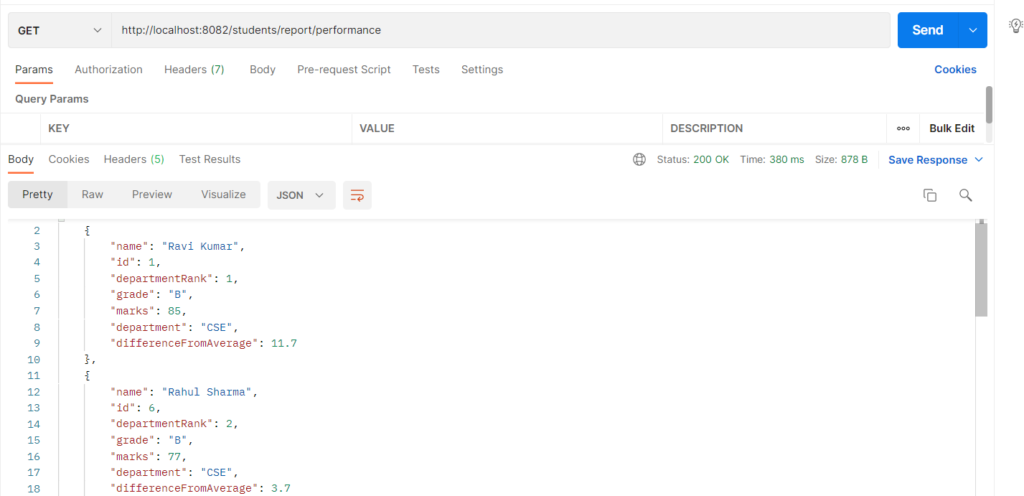
    @GetMapping("/report/performance")
    public List<StudentPerformance> performance() {
        return service.performanceReport();
    }

    @GetMapping("/report/performance/{department}")
    public List<StudentPerformance> performanceByDepartment(@PathVariable String department) {
        return service.performanceReport(department);
    }

    // Same report using classes (DTO class + class-based repository)
    @GetMapping("/report/performance-class")
    public List<StudentPerformanceDto> performanceWithClasses() {
        return service.performanceReportWithClasses();
    }

    // TYPE 3: single value
    @GetMapping("/report/pass-percentage")
    public Map<String, Double> passPercentage(@RequestParam int passMarks) {
        return Map.of("passPercentage", service.passPercentage(passMarks));
    }

    // TYPE 4: native update
    @PutMapping("/department/{department}/bonus")
    public Map<String, Integer> addBonus(@PathVariable String department, @RequestParam int marks) {
        return Map.of("updatedRows", service.addBonus(department, marks));
    }
}
Step 9: Main Application
package com.example.nativequery;

import com.example.nativequery.entity.Student;
import com.example.nativequery.repository.StudentRepository;
import org.springframework.boot.CommandLineRunner;
import org.springframework.boot.SpringApplication;
import org.springframework.boot.autoconfigure.SpringBootApplication;
import org.springframework.context.annotation.Bean;

import java.util.List;

@SpringBootApplication
public class NativeQueryApplication {

    public static void main(String[] args) {
        SpringApplication.run(NativeQueryApplication.class, args);
    }

    // Adds sample students once (only when the table is empty)
    @Bean
    CommandLineRunner seedData(StudentRepository repository) {
        return args -> {
            if (repository.count() == 0) {
                repository.saveAll(List.of(
                        new Student("Ravi Kumar",   "ravi@example.com",  "CSE", 85),
                        new Student("Ravi Teja",    "teja@example.com",  "ECE", 72),
                        new Student("Sneha Reddy",  "sneha@example.com", "ECE", 91),
                        new Student("Anil Verma",   "anil@example.com",  "CSE", 58),
                        new Student("Priya Nair",   "priya@example.com", "IT",  91),
                        new Student("Rahul Sharma", "rahul@example.com", "CSE", 77)));
            }
        };
    }
}
Step 10: Run the NativeQueryApplication