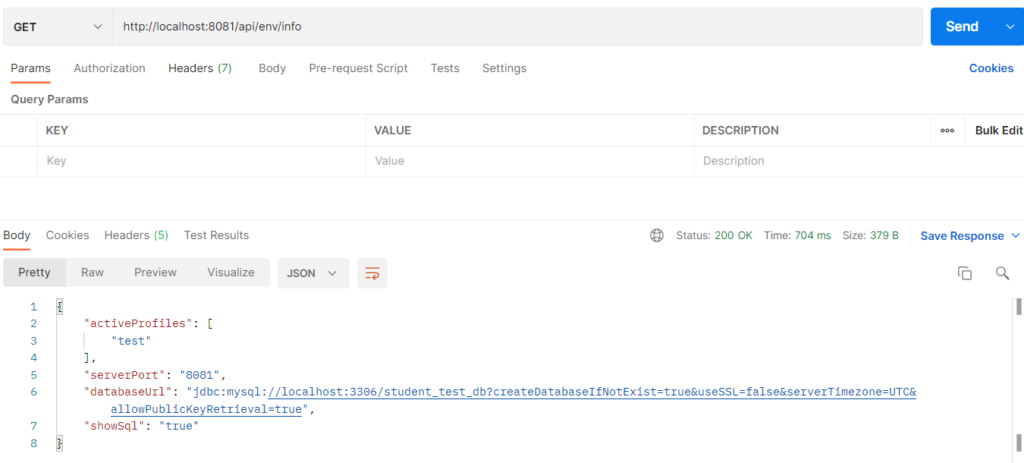
Environment profiles let one application keep separate configurations for development, testing and production. Each profile has its own file, such as application-dev.properties and application-prod.properties. A property named spring.profiles.active decides which profile is loaded at startup. Settings that appear in both the common file and the profile file are overridden by the profile file. The same code and the same jar can run in any environment without changes.
Why it is used
- Dev, test and prod need different databases, ports and logging levels
- Prevents accidentally pointing development work at the production database
- No editing of the properties file when moving between environments
- Production can be quiet (no SQL logging) while development stays detailed
Hands-on Experiment: Creating a Spring Boot application using different environment profiles
The following steps are involved in developing this hands-on experiment.
Step 1: Generate the Project
Step 2: Project Structure
Step 3: pom.xml
Step 4: application.properties
Step 5: Create Entity Class
Step 6: Create Repository Interface
Step 7: Create Service Class
Step 8: Create Controller Class
Step 9: Main Application Class
Step 10: Run the Main Application Class
Step 1: Configure the Project on Spring Initializr
Go to start.spring.io and set:
- Project: Maven
- Language: Java
- Spring Boot version: 3.2.x
- Group: com.example
- Artifact: studentprofiles
- Name: studentprofiles
- Package name: com.example.studentprofiles
- Packaging: Jar
- Java: 17
- Dependencies: Spring Web, Spring Data JPA, MySQL Driver
Click Generate to download the ZIP, then extract and import it into your IDE as a Maven project.
Step 2: Generated Project Structure
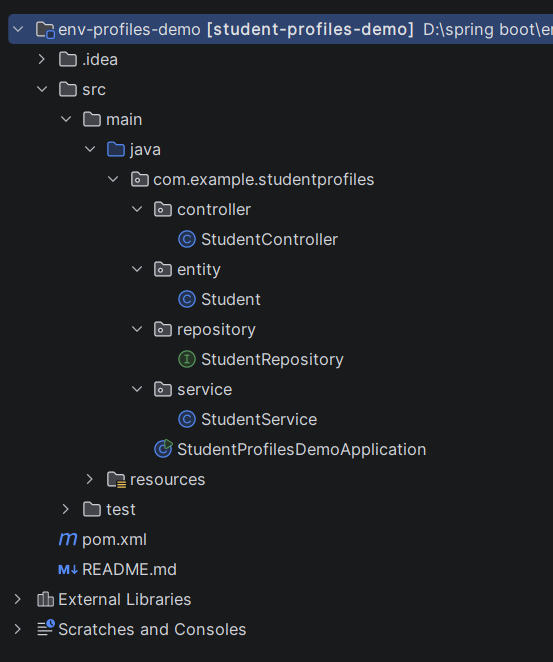
Step 3: Explore pom.xml
<?xml version="1.0" encoding="UTF-8"?>
<project xmlns="http://maven.apache.org/POM/4.0.0"
         xmlns:xsi="http://www.w3.org/2001/XMLSchema-instance"
         xsi:schemaLocation="http://maven.apache.org/POM/4.0.0 https://maven.apache.org/xsd/maven-4.0.0.xsd">
    <modelVersion>4.0.0</modelVersion>

    <parent>
        <groupId>org.springframework.boot</groupId>
        <artifactId>spring-boot-starter-parent</artifactId>
        <version>3.2.5</version>
        <relativePath/>
    </parent>

    <groupId>com.example</groupId>
    <artifactId>student-profiles-demo</artifactId>
    <version>0.0.1-SNAPSHOT</version>
    <name>student-profiles-demo</name>
    <description>Environment Profiles demo with Spring Boot and MySQL</description>

    <properties>
        <java.version>17</java.version>
    </properties>

    <dependencies>
        <dependency>
            <groupId>org.springframework.boot</groupId>
            <artifactId>spring-boot-starter-web</artifactId>
        </dependency>
        <dependency>
            <groupId>org.springframework.boot</groupId>
            <artifactId>spring-boot-starter-data-jpa</artifactId>
        </dependency>
        <dependency>
            <groupId>com.mysql</groupId>
            <artifactId>mysql-connector-j</artifactId>
            <scope>runtime</scope>
        </dependency>
        <dependency>
            <groupId>org.springframework.boot</groupId>
            <artifactId>spring-boot-starter-test</artifactId>
            <scope>test</scope>
        </dependency>
    </dependencies>

    <build>
        <plugins>
            <plugin>
                <groupId>org.springframework.boot</groupId>
                <artifactId>spring-boot-maven-plugin</artifactId>
            </plugin>
        </plugins>
    </build>
</project>
Step 4: application.properties
spring.application.name=student-profiles-demo
# Active profile: dev | test | prod
# (can be overridden at run time, see README)
spring.profiles.active=dev
# ---------- Common settings (shared by all profiles) ----------
spring.datasource.username=root
spring.datasource.password=root
spring.jpa.hibernate.ddl-auto=updateCode language: PHP (php)application-dev.properties
# ---------- DEVELOPMENT ----------
server.port=8080
spring.datasource.url=jdbc:mysql://localhost:3306/student_dev_db?createDatabaseIfNotExist=true&useSSL=false&serverTimezone=UTC&allowPublicKeyRetrieval=true
spring.jpa.show-sql=true
logging.level.root=DEBUG
logging.level.org.hibernate=INFO
logging.level.org.springframework=INFOCode language: PHP (php)
application-prod.properties
# ---------- PRODUCTION ----------
server.port=9090
spring.datasource.url=jdbc:mysql://localhost:3306/student_prod_db?createDatabaseIfNotExist=true&useSSL=false&serverTimezone=UTC&allowPublicKeyRetrieval=true
spring.jpa.show-sql=false
logging.level.root=WARNCode language: PHP (php)
application-test.properties
# ---------- TESTING ----------
server.port=8081
spring.datasource.url=jdbc:mysql://localhost:3306/student_test_db?createDatabaseIfNotExist=true&useSSL=false&serverTimezone=UTC&allowPublicKeyRetrieval=true
spring.jpa.show-sql=true
logging.level.root=INFOCode language: PHP (php)
Step 5: Create Entity Class
package com.example.studentprofiles.entity;

import jakarta.persistence.*;

@Entity
@Table(name = "students")
public class Student {

    @Id
    @GeneratedValue(strategy = GenerationType.IDENTITY)
    private Long id;

    @Column(nullable = false)
    private String name;

    @Column(nullable = false, unique = true)
    private String email;

    private String course;

    public Student() {}

    public Long getId() { return id; }
    public void setId(Long id) { this.id = id; }
    public String getName() { return name; }
    public void setName(String name) { this.name = name; }
    public String getEmail() { return email; }
    public void setEmail(String email) { this.email = email; }
    public String getCourse() { return course; }
    public void setCourse(String course) { this.course = course; }
}
Step 6: Create Repository Interface
package com.example.studentprofiles.repository;

import com.example.studentprofiles.entity.Student;
import org.springframework.data.jpa.repository.JpaRepository;
import org.springframework.stereotype.Repository;

@Repository
public interface StudentRepository extends JpaRepository<Student, Long> {
}
Step 7: Create Service class
package com.example.studentprofiles.service;

import com.example.studentprofiles.entity.Student;
import com.example.studentprofiles.repository.StudentRepository;
import org.springframework.beans.factory.annotation.Value;
import org.springframework.core.env.Environment;
import org.springframework.stereotype.Service;

import java.util.Arrays;
import java.util.LinkedHashMap;
import java.util.List;
import java.util.Map;

@Service
public class StudentService {

    private final StudentRepository repository;
    private final Environment environment;

    @Value("${server.port}")
    private String serverPort;

    @Value("${spring.datasource.url}")
    private String datasourceUrl;

    @Value("${spring.jpa.show-sql}")
    private String showSql;

    public StudentService(StudentRepository repository, Environment environment) {
        this.repository = repository;
        this.environment = environment;
    }

    // Shows which profile is active and which settings it loaded
    public Map<String, Object> getEnvironmentInfo() {
        Map<String, Object> info = new LinkedHashMap<>();
        info.put("activeProfiles", Arrays.asList(environment.getActiveProfiles()));
        info.put("serverPort", serverPort);
        info.put("databaseUrl", datasourceUrl);
        info.put("showSql", showSql);
        return info;
    }

    public Student addStudent(Student student) {
        return repository.save(student);
    }

    public List<Student> getAllStudents() {
        return repository.findAll();
    }
}
Step 8: Create Controller class
package com.example.studentprofiles.controller;

import com.example.studentprofiles.entity.Student;
import com.example.studentprofiles.service.StudentService;
import org.springframework.http.HttpStatus;
import org.springframework.http.ResponseEntity;
import org.springframework.web.bind.annotation.*;

import java.util.List;
import java.util.Map;

@RestController
@RequestMapping("/api")
public class StudentController {

    private final StudentService service;

    public StudentController(StudentService service) {
        this.service = service;
    }

    @GetMapping("/env/info")
    public Map<String, Object> getEnvironmentInfo() {
        return service.getEnvironmentInfo();
    }

    @PostMapping("/students")
    public ResponseEntity<Student> addStudent(@RequestBody Student student) {
        return ResponseEntity.status(HttpStatus.CREATED).body(service.addStudent(student));
    }

    @GetMapping("/students")
    public List<Student> getAllStudents() {
        return service.getAllStudents();
    }
}
Step 9: Main Application
package com.example.studentprofiles;

import org.springframework.boot.SpringApplication;
import org.springframework.boot.autoconfigure.SpringBootApplication;

@SpringBootApplication
public class StudentProfilesDemoApplication {

    public static void main(String[] args) {
        SpringApplication.run(StudentProfilesDemoApplication.class, args);
    }
}
Step 10: Run the EmbeddedServerApplication
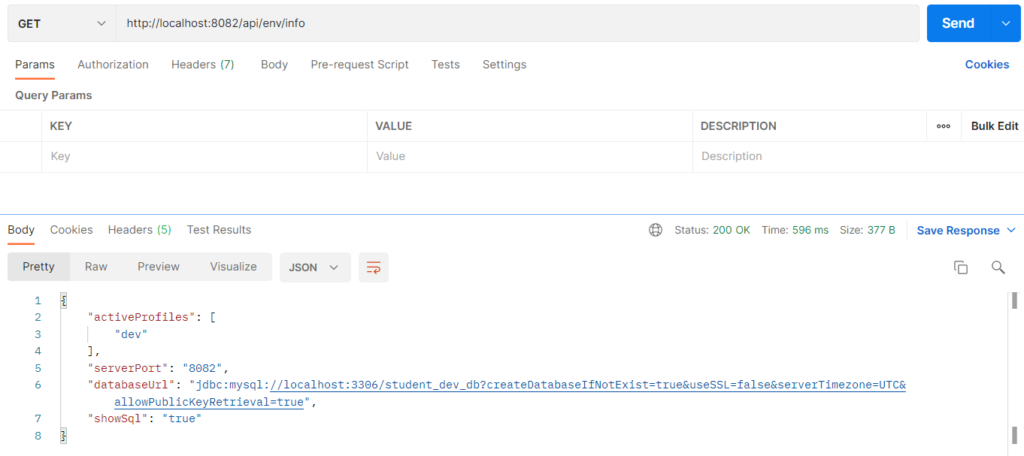
Change spring.profiles.active=dev to spring.profiles.active=prod in application.properties
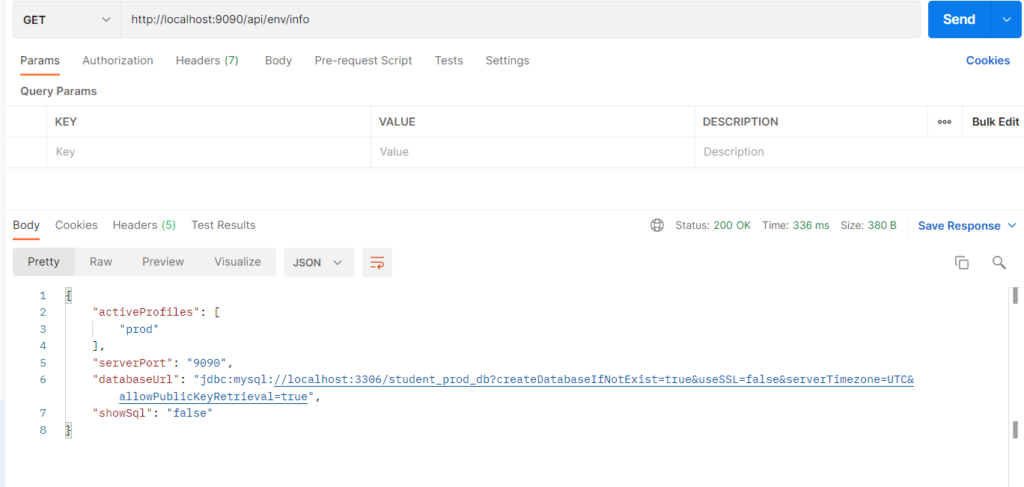
Change spring.profiles.active=prod to spring.profiles.active=test in application.properties